SPDK: user-space storage drivers, build setup and licensing
Storage Performance Development Kit
At a glance
- What is it?
- A C storage toolkit that moves device drivers into user space and polls instead of using interrupts, with a calendar-versioned release every few months. The root licence identifies BSD-3-Clause for the main repository and lists exceptions, the unit test script is documented as printing errors on purpose, the virtual machine setup is still tested on a 2016 distribution, and there is a Windows build path the readme never mentions.
- Who is it for?
- SPDK is worth studying if you are writing storage software and want to know what a polled, user-space driver model costs and buys you, because the whole design is one decision taken seriously, and the repository is a reference implementation of it with a target stack, a fabric target and a set of accelerators. Three things to know before you build.
- Can I use it commercially?
- Check first. The repository uses a licence we do not classify automatically, so read its LICENSE file before any commercial use.
- Is it still maintained?
- Yes. The repository last received commits 3 days ago.
- What is it written in?
- Mainly C, according to GitHub's language statistics.
Answers come from the project's GitHub data, last synced on November 15, 2026, and from our analysis. They are not legal advice.
Star history
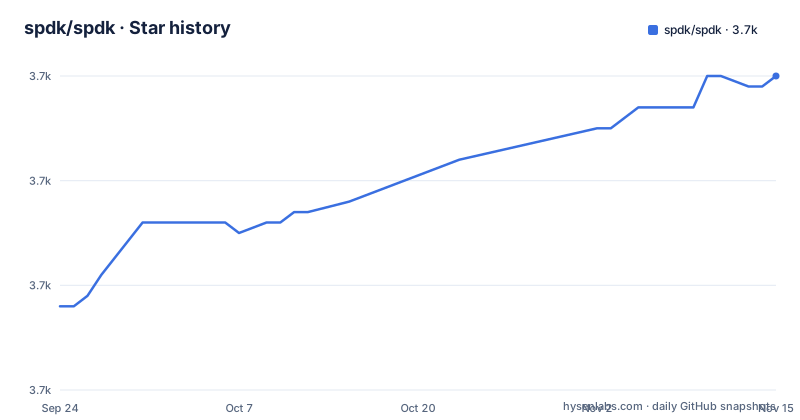
- spdk/spdk3,700 ★ · +22
| Repository | 2026-09-24 | 2026-11-15 |
|---|---|---|
| spdk/spdk | 3.7k | 3.7k |
22 Stars in the last 52 days, measured from the daily GitHub snapshot. Compare with other projects
Editorial analysis
The root licence identifies the main terms and exceptions
The root LICENSE identifies BSD-3-Clause as the main repository licence, lists specific exceptions, and directs readers to check the licences of individual submodules. Read those files and relevant source headers when assessing the parts you use.
The test suite is documented as printing errors
The unit test section is four sentences and one of them is a warning rather than an instruction. You run a shell script, and the readme then tells you that you will see several error messages while it runs, that those messages are part of the test suite, and that the final message at the end of the script is what tells you whether it passed. This is the single most useful sentence in the build documentation, because it is the difference between a first-time user spending an hour convinced the build is broken and a first-time user reading one line and knowing to look at the last line. It also says something about the shape of the suite: these are unit tests that exercise failure paths on purpose, and they report in the language of the paths rather than in the language of the assertions.
One option can be set in three places, in a documented order
The advanced build section is unusually thorough and its mechanism is worth reading as a pattern rather than as documentation. There is a configuration file at the root holding base settings, a configuration script that reads it and generates a second file with the final settings, and a make command line. The example is a feature toggle declared with a make assignment that gives it a default, so the script can flip it to generate the file, a script flag can do the same, and the make command line overrides both. The readme then says explicitly that the command line wins, and why you would want that: you generate a file once and then toggle a debug build repeatedly without regenerating it. Three layers for one boolean is one layer more than most projects need and it is justified here, because the alternative is a full reconfigure for every change.
Setup means huge pages, unbound devices and a library path
Before any of this runs, the readme tells you two things that are not optional. Some amount of huge page memory must be allocated, and any NVMe or accelerator devices must be unbound from their native kernel drivers, with a script included to automate the process. If you have not done both, the software starts and then does nothing useful, which is a rough first experience and one the documentation at least warns about. The shared-library route adds a third step after the build: tell the loader where the new libraries are, either by running the cache command on the directory or by setting the library path variable, and if the underlying data plane libraries are shared as well then those need adding too. The example shows both the build flag, the cache command and the path variable in one block, which is the fastest way to get it running and the least forgiving way to get it wrong:
./configure --with-shared
make
ldconfig -v -n ./build/lib
LD_LIBRARY_PATH=./build/lib/:./dpdk/build/lib/ ./build/bin/spdk_tgt
The virtual machine and cloud instructions are pinned to a 2018 distribution
Two setup paths are documented for people without hardware. The virtual machine one says it has been tested on a Mac, on Ubuntu 16.04 long-term support and on Ubuntu 18.04 long-term support, with two different providers, and it requires an extension pack for one of them or a plugin for the other in order to get the accelerated controller the point of the exercise depends on. The cloud one says the setup is known to work on one image, names Ubuntu 18.04, and adds a preparatory step to load a kernel module before running the setup script with an override variable. Both are seven and ten years old respectively, both are written as if current, and the readme has been pushed to as recently as the start of October. That combination means these instructions are the most likely thing in the file to have rotted silently, so verify each step against your own environment rather than trusting the version numbers.
There is a Windows build path the readme never mentions
The build file branches on the operating system variable and, on Windows, adds a directory for a data plane library built against the platform's driver kit. Nothing in the visible readme mentions Windows: the build instructions cover Linux and FreeBSD, the virtual machine guidance covers two providers on a Mac and Ubuntu, and the cloud guidance covers one image. So the repository contains a Windows code path that the documentation does not advertise, which is either work in progress, work for an internal use case, or work waiting for documentation. The same is true of several other directories in the tree: a networking protocol module, a caching framework, a userspace device interface library and a separately versioned NVMe toolkit, each with its own build directory and its own configuration toggle. The readme lists six components; the build file knows about a dozen.
The mailing list moved and old subscribers were not migrated
The very first block of the readme is a note that the mailing list has moved to a different host, with a subscription link, and it adds one sentence that is easy to skim past: subscribers from the old location will not be migrated automatically. So a project where community discussion has always happened by mailing list has a list where every existing subscriber has silently stopped receiving mail, and the only thing standing between a contributor and a silent month is that parenthetical. The rest of the header is badge housekeeping: documentation links for a Go remote-procedure interface subpackage, its security score, and a package index badge that appears twice in the same row.
The build file carries a workaround for a different build system
Two details from the build file that explain a lot about the project without appearing in its documentation. The first is an exported make variable holding the parent process identifier, with a comment naming it a workaround for one build tool and pointing at another directory's makefile. It is there so a nested build invoked by that tool can find the right root, and it lives in the top-level makefile because that is where the nesting is visible. The second is the directory list itself: entries are added conditionally on configuration flags, so the same source tree builds a minimal library, a library plus targets, a library plus applications, a library plus examples, and any combination of accelerators, crypto and transports, with the data plane library itself built as a submodule unless a package-configuration option says otherwise.
Editorial conclusion
SPDK is worth studying if you are writing storage software and want to know what a polled, user-space driver model costs and buys you, because the whole design is one decision taken seriously, and the repository is a reference implementation of it with a target stack, a fabric target and a set of accelerators. Three things to know before you build. Read the root licence and the licences of any submodules you use; the root file also lists exceptions. Setup is not casual: you allocate huge pages, unbind devices from their kernel drivers, and configure at one of three different override levels that are easy to apply in the wrong order. And the virtual machine setup and the cloud instructions are both pinned to a 2018 distribution, so plan your own environment rather than following them literally.
Frequently asked questions
What does SPDK stand for?
Storage Performance Development Kit. It is a set of tools and libraries for writing high performance, scalable, user-mode storage applications, and it includes an NVMe driver, an accelerator DMA driver, and targets for fabrics, iSCSI and vhost.
What is SPDK and DPDK?
The readme does not explain the relationship. It shows that the data plane library is included as a submodule and can be rebuilt in place or overridden to point at an installed copy, and that shared libraries from it may need to be on the library path at run time.
Why does the SPDK unit test run print errors?
The readme says so directly: you will see several error messages while the tests run, they are part of the suite, and the final message at the end of the script is what indicates success or failure.
What does SPDK need before an application will do anything?
Huge page memory must be allocated and any NVMe or accelerator devices unbound from their native kernel drivers. The repository includes a script to automate that, and the readme covers it before the build instructions.
How do I turn on an optional SPDK component?
Three ways, in increasing precedence: edit the boolean in the root configuration file, pass the matching flag to the configure script, or override it on the make command line. The readme states that the command line takes precedence over the generated settings file.
Official sources
Add this badge to your README
If you maintain this project, the badge below links readers to this analysis and shows its maintenance status from the daily GitHub snapshot. Paste the markdown into your README; add ?metric=license or ?metric=stars to the image URL for a different field.

[](https://hysenlabs.com/projects/spdk-spdk)Star history chart for your README
[](https://hysenlabs.com/projects/spdk-spdk)Was this useful?