Camunda Modeler is a desktop shell around bpmn-js, dmn-js and form-js
A modeling solution for BPMN, DMN, and Forms based on bpmn.io. As a companion tool to your favorite IDE it supports you in implementing solutions with Camunda.
At a glance
- What is it?
- Camunda Modeler packages bpmn.io libraries into an Electron desktop application for editing BPMN, DMN and Forms, with a Node build pipeline and a nightly channel. Its editing engine is bpmn.io, and its own code is the application around it.
- Who is it for?
- Camunda Modeler is the right choice if your team authors Camunda BPMN, DMN or Forms files and wants validation and element palettes without an IDE plugin, and the bpmn.io licence covers your use since the editor core comes from there. It is the wrong tool if you need to run a process or if you want a cloud-hosted modeller.
- Can I use it commercially?
- Yes. MIT is a permissive licence: you can use, modify and sell software built on it, as long as you keep its copyright and licence notices.
- Is it still maintained?
- Yes. The repository received new commits within the last day.
- What is it written in?
- Mainly JavaScript, according to GitHub's language statistics.
Answers come from the project's GitHub data, last synced on October 23, 2026, and from our analysis. They are not legal advice.
Star history
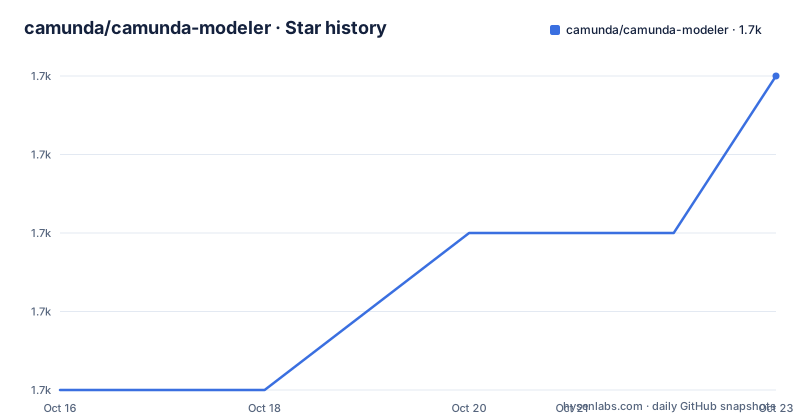
- camunda/camunda-modeler1,730 ★ · +4
| Repository | 2026-10-16 | 2026-10-23 |
|---|---|---|
| camunda/camunda-modeler | 1.7k | 1.7k |
4 Stars in the last 7 days, measured from the daily GitHub snapshot. Compare with other projects
Editorial analysis
The editing engine comes from bpmn.io, not from this repository
Camunda Modeler is a desktop application for modeling BPMN diagrams, DMN decisions and Forms, and the README is explicit that it is powered by bpmn.io. The three libraries doing the actual editing are bpmn-js, dmn-js and form-js, all from the bpmn.io organisation.
That division has a direct licensing consequence, and it is stated in the README's License section. The application itself is MIT. The libraries it uses are licensed under the bpmn.io license, a separate document at http://bpmn.io/license. If you are evaluating this for commercial use or for redistribution, those are two different licences and the more restrictive one is on the components doing the core work.
What this repository contributes is the application layer: the Electron shell, the menus, the file handling, the deployment connection to Camunda, the plugin system, the build pipeline and the release process. The README describes the tool as a companion to your favorite IDE rather than a replacement for it, which is the honest framing. You author a diagram here and you write the code that implements it in an IDE.
The stated purpose is implementing solutions with Camunda, and the homepage is https://camunda.com/products/modeler.
Two branches and a nightly channel, with releases cut from develop
The repository is not archived, and its recent push is an active development signal.
The default branch is `develop`, and the build instructions tell you to check out `main` when you want to work from a stable state. The default branch is develop, while the build example checks out main.
Release tags are conventional semantic versions: v5.52.0 on 2026-10-06, v5.51.1 on 2026-09-14, v5.51.0 on 2026-08-28. A minor and two patch releases in roughly six weeks is a steady cadence for a tool that follows a platform.
There are two download channels. Stable builds come from https://camunda.com/download/modeler/, and nightly builds come from https://downloads.camunda.cloud/release/camunda-modeler/nightly/. The nightly channel is where a platform change or a bpmn.io update shows up first, which is useful when you need to be on a specific version of an underlying library rather than the latest app.
Building requires a C++ addon toolchain even though the app is JavaScript
The build instructions open with a warning that is easy to skim past: build the app in a Posix environment, which on Windows means Git Bash or WSL. You also need the tools required to install and compile Node.js C++ addons, and the README links to the node-gyp installation notes for that.
The sequence is short. Check out the branch, install, then build:
# checkout a tag
git checkout main

# install dependencies
npm install

# execute all checks (lint, test and build)
npm run all

# build the application to ./dist
npm run build
Note the comment inconsistency in the block itself: the comment says checkout a tag and the command checks out the branch named `main`. Worth knowing before you copy it.
For development there is a single command:
npm run devThe package name is `camunda-modeler-builder` and it is marked `private` with version `0.0.0`, so this is a build repository rather than something you consume from npm. The distributable lands in `./dist`.
package.json splits the code into an app half and a client half
The script names in `package.json` describe the architecture better than any prose would.
There is an `app` side and a `client` side, and the client half is an npm workspace. Scripts like `client:build`, `client:dev` and `client:test` all delegate with `--workspace=client`, which is the mechanism the split uses. A `bpmn-io-modelers:test` script exists as well, scoped to the client workspace, which suggests the bpmn.io libraries are vendored or wrapped inside that workspace rather than pulled straight from npm at the top level.
The preload script is built separately with `preload:build`, which runs webpack against `webpack.config.js`. In Electron terms that is the bridge between the renderer and the main process, and building it as its own step tells you the main process and the renderer are kept apart.
Two other webpack configs exist: `webpack.config.license.js` and the corresponding `app:collect-licenses` script. That script generates the third-party notices file, and the release pipeline runs it automatically:
"prerelease": "run-s update-license-book",
"update-license-book": "node tasks/license-book.js -o THIRD_PARTY_NOTICES -c",
"release": "bio-release --force-release"
So the licence book is regenerated before every release. That is how the repository keeps accurate attribution for a dependency tree this size, and it is worth knowing if you are auditing what ships.
Testing is mocha and nyc for the app, eslint for linting
The app test script gives you the actual test stack:
"app:test": "nyc --reporter lcov --exclude \"app/test/**\" --exclude \"app/**/__tests__\" mocha --require ./app/test/expect.js \"app/**/*-spec.js\""Mocha as the runner, nyc for coverage with an lcov reporter, and a required setup file at `app/test/expect.js`. Test files match `*-spec.js` under `app/`. The two exclude patterns are worth noting: `app/test/**` is the harness itself, and `app/**/__tests__` is excluded from coverage, which suggests some tests live in a `__tests__` directory under a different convention.
Lint is ESLint with a flat config, `eslint.config.mjs`, which is the modern config format. Formatting is partly delegated to ESLint itself through `lint -- --fix`, and markdown is handled separately by remark:
"format": "run-s format:markdown 'lint -- --fix'",
"format:markdown": "remark . -qo --ignore-pattern dist",
"lint": "eslint ."
Watch mode is available for both halves at once through `auto-test`, which runs `run-p *:auto-test`, so the app and client suites watch in parallel.
A `.codecov.yml` at the root configures coverage reporting, and coverage is excluded from the build output for the license webpack run, so instrumentation does not leak into a distribution.
Renovate, Snyk and the agent files tell you how maintenance is done
Several root files describe the maintenance posture more precisely than the README does.
`renovate.json` means dependency updates are automated rather than done by hand. `.snyk` means the project is scanned with Snyk, which is a security posture signal for a desktop app that downloads engine code from the internet. `SECURITY.md` exists, so there is a documented reporting channel rather than only the issue tracker.
Then there are `AGENTS.md` and `CLAUDE.md`. These are instructions for coding agents working in the repository, which tells you something specific: a substantial part of contributions to this project may be machine-generated, and the repository has chosen to document that openly rather than leave contributors to guess the conventions. `CLAUDE.md` in particular is a file for a specific assistant tool, so its presence is a deliberate choice about which tools the project supports.
`.editorconfig`, `.gitattributes` and `eslint.config.mjs` at the root, plus `docs/` and `tasks/` directories, complete the picture of a well-instrumented build repository. The `tasks/` directory holds Node scripts for the release steps, since `build:distro` runs `node tasks/distro.js`.
Where Camunda Modeler stops and Camunda itself begins
The boundary is worth stating because the naming invites confusion. This repository contains no process engine, no runtime and no execution environment. It produces files.
A BPMN diagram edited here describes a process.
The same applies to DMN and Forms. A DMN decision authored in the Modeler is a decision table that some engine evaluates. A Form authored here is a form definition that a task or an app renders. The Modeler gives you validation, palettes and a coherent editing experience for all three, and the README's other links are to the changelog, downloads, a forum category for BPMN modeling, and the issue tracker.
What the Modeler does not do is reduce the modelling problem. It makes authoring faster. If the difficulty you face is deciding how to structure a process rather than drawing it, no editor feature in this repository addresses that.
Editorial conclusion
Camunda Modeler is the right choice if your team authors Camunda BPMN, DMN or Forms files and wants validation and element palettes without an IDE plugin, and the bpmn.io licence covers your use since the editor core comes from there. It is the wrong tool if you need to run a process or if you want a cloud-hosted modeller. Before adopting, read the bpmn.io license linked in the README, because the project is MIT while bpmn-js, dmn-js and form-js are licensed separately, and check `npm run all` passes on your platform since the build requires Node.js C++ addon toolchain.
Frequently asked questions
How do I build Camunda Modeler from source?
Check out the branch you want, run npm install, then npm run all to execute lint, test and build, or npm run build to produce the application in ./dist. You need a Posix environment, meaning Git Bash or WSL on Windows, plus the Node.js C++ addon toolchain.
Which branch should I check out for Camunda Modeler?
The default branch is develop, which is where development happens. The build instructions tell you to check out main for a stable state, and releases such as v5.52.0 are tagged separately from that.
What licence applies to Camunda Modeler?
The application code is MIT. It uses bpmn-js, dmn-js and form-js, which are licensed separately under the bpmn.io license, so both terms apply to what you ship.
Where can I get nightly builds of Camunda Modeler?
Nightly builds are published at https://downloads.camunda.cloud/release/camunda-modeler/nightly/, while stable downloads come from https://camunda.com/download/modeler/.
Does Camunda Modeler run the workflows I author?
No. It is a modeling tool for BPMN diagrams, DMN decisions, and Forms.
Official sources
Add this badge to your README
If you maintain this project, the badge below links readers to this analysis and shows its maintenance status from the daily GitHub snapshot. Paste the markdown into your README; add ?metric=license or ?metric=stars to the image URL for a different field.

[](https://hysenlabs.com/projects/camunda-camunda-modeler)Star history chart for your README
[](https://hysenlabs.com/projects/camunda-camunda-modeler)Was this useful?