NASA Worldview: Local Setup and OpenLayers Imagery Access
Interactive interface for browsing global, full-resolution satellite imagery
At a glance
- What is it?
- NASA Worldview is a JavaScript interface for browsing global satellite imagery from NASA GIBS. It suits Earth observation users who want an interactive public application, a configurable local deployment, or a reference client for full-resolution imagery.
- Who is it for?
- Adopt NASA Worldview when you need an interactive GIBS imagery client or a configurable reference application. Do not choose it as a lightweight GIS library if you only need direct map tiles.
- Can I use it commercially?
- Check first. The repository uses a licence we do not classify automatically, so read its LICENSE file before any commercial use.
- Is it still maintained?
- Yes. The repository received new commits within the last day.
- What is it written in?
- Mainly JavaScript, according to GitHub's language statistics.
Answers come from the project's GitHub data, last synced on October 23, 2026, and from our analysis. They are not legal advice.
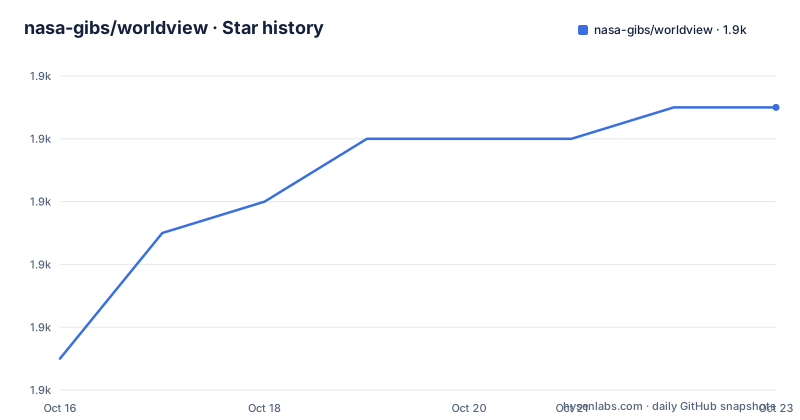
Star history
- nasa-gibs/worldview1,947 ★ · +8
| Repository | 2026-10-16 | 2026-10-23 |
|---|---|---|
| nasa-gibs/worldview | 1.9k | 1.9k |
8 Stars in the last 7 days, measured from the daily GitHub snapshot. Compare with other projects
Editorial analysis
What NASA Worldview Solves
NASA Worldview addresses the problem of finding and comparing satellite imagery without downloading entire scenes before inspecting them. The README describes access to more than 1,000 global, full-resolution imagery layers through an interface that works on desktop and mobile devices. The intended users are not limited to cartographers. The project identifies wildfire management, air quality measurement, and flood monitoring as time-sensitive applications, while its topics also place it within NASA Earthdata, GIS, and Earth science work.
The catalog combines observation windows that serve different purposes. Many layers are updated daily and are described as being available within three hours of observation. Some layers cover nearly 30 years, which makes the interface relevant when a user needs to place a recent event in a longer temporal context. The README also identifies underlying imagery as downloadable and notes Arctic and Antarctic views for selected layers. Geostationary full-disk imagery is available in ten-minute increments for the last 90 days.
Worldview is therefore a complete browser interface rather than merely a tile-rendering component. It is aimed at people who want map navigation, temporal browsing, layer selection, and configuration support in one application. Developers who only need imagery can instead use GIBS with Leaflet, Cesium, Google Maps, or custom GDAL scripts. That distinction matters because adopting the full client introduces a Node.js build, configuration files, and its NASA-1.3 license.
OpenLayers, GIBS, and the Worldview Data Flow
The documented rendering path has two principal components. Worldview uses OpenLayers to display imagery obtained from NASA Global Imagery Browse Services, or GIBS. OpenLayers handles the interactive map presentation, while GIBS supplies the imagery services. Developers who do not need the Worldview application can connect to those services from other mapping libraries or GDAL scripts.
The repository layout indicates that Worldview is a webpack-based JavaScript application. The `build` script in `package.json` runs `clean`, `getcapabilities`, `build:config`, and `build:dev` in sequence. The configuration stage calls `tasks/buildOptions.sh` and `node ./tasks/util/config.js`, after which webpack compiles the development application. This separates generated application configuration from the browser bundle. It also means a local checkout does more than install JavaScript dependencies: configuration selection and service capabilities participate in producing the application.
The repository contains `config/`, `schemas/`, `tasks/`, `tools/`, `web/`, and documentation for development, branding, optional features, URL parameters, Docker, embedding, and data downloads. Those entries point to a configurable application with several deployment concerns. They do not make it a minimal reusable mapping package. Its value for an engineer lies partly in seeing how NASA packages GIBS capabilities, temporal imagery, map controls, and application configuration into a browser client.
Installing Worldview and Opening the Local Application
The README requires Node.js, and `package.json` narrows the supported engine to Node.js 24.21.0 or newer. Clone the repository and install the exact dependency set recorded in `package-lock.json` with `npm ci`. Windows users also need Git Bash, according to the installation notes.
git clone https://github.com/nasa-gibs/worldview.git
cd worldview
npm ci
This installs from `package-lock.json` rather than resolving a new dependency graph. After installation, build the development application and start it:
npm run build
npm start
The README directs the user to `http://localhost:3000`. A successful local launch should expose the Worldview interface there, with the available imagery and map controls determined by the selected configuration. Press Control+C in the terminal to stop the process.
The official configuration is not automatically equivalent to every custom deployment. The README points contributors to `doc/config/configuration.md` for installing the official NASA Worldview configuration or adding a custom one. That file should be reviewed before treating a local build as an operational replica of the public site. The README does not document individual configuration keys, so this tutorial does not invent them.
Configuration, Docker, and Custom Branding Boundaries
Worldview has a broader configuration surface than a static map viewer. The documentation links cover configuration, custom branding, optional features, URL parameters, uploading, Docker, embedding, and Smart Handoffs data downloads. This suggests several supported deployment paths, but their feature sets should not be assumed to be identical.
The included `Dockerfile` is based on `mcr.microsoft.com/playwright:noble`, installs Node.js 24.21.0 through nvm, and installs `@playwright/test` plus `playwright-firefox`. It exposes port 80 and ends with `CMD tail -f /dev/null`. The Dockerfile does not itself show a production startup command, so it is evidence of a Playwright-oriented container environment rather than a complete production deployment recipe. The repository's `doc/docker.md` is the appropriate source for any documented container workflow.
Configuration also affects how the application knows which capabilities and options to expose. The build scripts explicitly retrieve capabilities and build configuration before webpack compilation. A developer adding a private or custom layer should therefore expect to work through the configuration system rather than hard-code a service into the frontend. The repository does not state the schema for custom layers, rollback procedures, or which optional features are enabled by default.
Where Worldview Is the Wrong Choice
The clearest wrong-tool case is an application that only needs GIBS tiles inside an existing map. The README specifically points developers to Leaflet, Cesium, Google Maps, and custom GDAL scripts. Those approaches avoid adopting Worldview's complete interface and configuration-oriented build process. GDAL is the documented option for command-oriented processing rather than interactive visual inspection.
Worldview is also not a documented replacement for downloading and systematically processing source imagery. Although the README says underlying data is available for download, it presents Worldview as an interactive browsing tool. It does not claim to provide bulk-processing workflows, analytical models, or a complete scientific processing pipeline. The repository's GDAL link points users toward scripting services separately.
Near-real-time viewing also needs careful interpretation. The documentation states that many layers are updated daily and can be within three hours of observation, while geostationary imagery is provided in ten-minute increments for the last 90 days. Those statements do not make every layer equally current. Operational adoption should depend on the update schedule and coverage of the specific GIBS layer, not on a single general statement about the application.
Custom branding is documented, but customization does not mean the project has a permissive general-purpose software license. The package metadata identifies `NASA-1.3`, and the README directs users to `LICENSE.md`. Review that file for the actual permissions, attribution, and restrictions relevant to the intended distribution.
Updates, Compatibility, and Maintenance Signals
The README documents updates by pulling a branch or tag from GitHub and states that `git pull` updates a local `main` checkout to the latest stable version. It follows Semantic Versioning. The README specifically warns that a major version increment in `package.json` indicates a breaking change and should be approached with caution. The current package metadata identifies version 5.7.0 and requires Node.js 24.21.0 or newer.
The repository is not archived. Version 5.6.0 was released on 2026-09-29, followed by version 5.5.0 on 2026-09-14. These are concrete signs of recent project change, but they do not remove the migration work implied by major releases.
The license field is classified as `NASA-1.3`, which GitHub does not treat as one of its standard permissive license identifiers. The README identifies the same license and points to `LICENSE.md`. Teams planning to modify branding, redistribute builds, or operate a public service need to inspect that file directly. This review identifies the applicable license text and does not offer legal advice.
Direct GIBS Access Versus the Full Worldview Client
The strongest documented alternative is direct use of GIBS rather than the Worldview client. GIBS supplies the imagery, and Worldview provides an OpenLayers interface around it. If an engineer is adding imagery to an existing Leaflet or Cesium map, Worldview duplicates application concerns that the existing map already handles.
Direct GIBS access offers a smaller architectural choice for simple display. The README links separate usage guidance for Leaflet, Cesium, Google Maps, and GDAL scripts. Worldview becomes more relevant when the requirement is the complete browsing experience, deployment of NASA's configured client, custom branding, or use of documented Worldview features such as URL parameters and Smart Handoffs.
Custom GDAL scripts serve a third use case. They suit users who want to retrieve or process imagery through a script rather than inspect it in the browser. The boundary is therefore determined by the interface required: Worldview for interactive application use, direct GIBS integration for mapping inside another application, and GDAL for scripted access.
Editorial conclusion
Adopt NASA Worldview when you need an interactive GIBS imagery client or a configurable reference application. Do not choose it as a lightweight GIS library if you only need direct map tiles. Before adoption, verify the NASA-1.3 licensing terms, review `doc/config/configuration.md` for deployment requirements, and confirm that the required GIBS layers and update frequencies fit your operational use.
Frequently asked questions
What Node.js version does NASA Worldview require?
The `package.json` file requires Node.js 24.21.0 or newer. The README also notes that Windows developers need Git Bash.
How do I build and open NASA Worldview locally?
After cloning the repository and running `npm ci`, use `npm run build` followed by `npm start`. Open `http://localhost:3000` in a browser.
Can NASA Worldview be used without GIBS?
The documented rendering architecture uses OpenLayers to display imagery from GIBS. A separate mapping setup without GIBS is not documented for Worldview, although developers can build their own clients around other data sources.
Official sources
Add this badge to your README
If you maintain this project, the badge below links readers to this analysis and shows its maintenance status from the daily GitHub snapshot. Paste the markdown into your README; add ?metric=license or ?metric=stars to the image URL for a different field.

[](https://hysenlabs.com/projects/nasa-gibs-worldview)Star history chart for your README
[](https://hysenlabs.com/projects/nasa-gibs-worldview)Was this useful?