oh-my-pi: A Terminal Coding Agent That Wires in LSP, DAP, and Hash-Anchored Edits
AI Coding agent for the terminal, hash-anchored edits, optimized tool harness, LSP, Python, browser, subagents, and more.
At a glance
- What is it?
- oh-my-pi is a TypeScript and Rust coding agent for the terminal, forked from Pi, that adds hash-anchored edits, LSP-aware writes, a real debugger, and subagents. It targets engineers who want IDE-level behavior without leaving the command line.
- Who is it for?
- Adopt oh-my-pi if you live in the terminal, need LSP-aware renames and real debugger sessions from an agent, and want a harness that is tuned for specific models rather than a generic wrapper. Skip it if you prefer a stable, conservative toolchain or cannot tolerate the churn of v18.x releases that land multiple times a week.
- Can I use it commercially?
- Yes. MIT is a permissive licence: you can use, modify and sell software built on it, as long as you keep its copyright and licence notices.
- Is it still maintained?
- Yes. The repository last received commits 1 day ago.
- What is it written in?
- Mainly TypeScript, according to GitHub's language statistics.
Answers come from the project's GitHub data, last synced on November 13, 2026, and from our analysis. They are not legal advice.
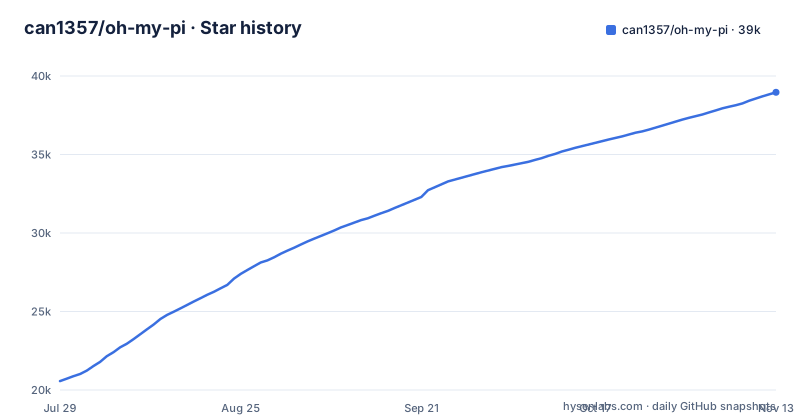
Star history
- can1357/oh-my-pi38,960 ★ · +18,393
| Repository | 2026-07-29 | 2026-11-13 |
|---|---|---|
| can1357/oh-my-pi | 20.6k | 39k |
18,393 Stars in the last 107 days, measured from the daily GitHub snapshot. Compare with other projects
Editorial analysis
What oh-my-pi Actually Fixes
The README describes oh-my-pi as a fork of Pi by Mario Zechner, with the tagline 'A coding agent with the IDE wired in.' The problem it solves is the gap between terminal-based AI agents and full IDEs. Most agents give you a Python sandbox and a text editor; oh-my-pi claims to give you the parts of an IDE that matter: language server protocol operations, a real debugger, and file edits that do not corrupt the codebase. The target user is an engineer who works in a terminal but misses the refactoring and debugging safety of an IDE. The project ships a Rust core of roughly 80k lines, 31 built-in tools, 14 LSP operations, and 28 DAP operations. That is a specific claim about scope, not a marketing number. The README also mentions 60+ providers, which suggests the agent can talk to many model backends.
Hash-Anchored Edits and the Tool Harness
The core mechanism for safe edits is hash-anchored edits. The README's benchmark table shows dramatic improvements when the edit format is fixed: Grok Code Fast 1 goes from 6.7% to 68.3% pass rate, and MiniMax doubles its pass rate. These numbers come from the project's own blog post, not from independent testing. The point is that the harness, not the model, is the bottleneck. The README claims that reads summarize files instead of dumping them, and that grep is 'fastest in the west.' That is a boast, not a verified fact. What is verifiable is that the harness is tuned per model, with prompts adjusted relentlessly for each one. That is a real design choice: instead of a universal prompt, oh-my-pi adapts to the model's weaknesses.
LSP and DAP: The IDE Wired In
The most concrete feature is LSP integration on every write. The README gives an example: a rename goes through workspace/willRenameFiles, so re-exports, barrel files, and aliased imports update before the file moves. That is a specific mechanism, not a vague promise. It means the agent does not just edit text; it asks the language server what depends on the file being moved. For debugger support, the README describes attaching lldb to a C binary, dlv to a Go service, and debugpy to a Python process. That is a broad claim, but the DAP operations count of 28 suggests a real implementation. The README links to a video capture, but the text alone does not prove the debugger works in all cases. The limitation is obvious: these features depend on the language server and debugger being installed and configured. If your project uses a language without LSP support, or if you are on Windows with a misconfigured PATH, these features will not work out of the box.
Installation and Configuration
The README lists several installation methods. The first one listed is a curl script for macOS and Linux: curl -fsSL https://omp.sh/install | sh. There is a Homebrew tap: brew install can1357/tap/omp. Bun users can install globally with bun install -g @oh-my-pi/pi-coding-agent. Nix users can run without installing via nix run github:can1357/oh-my-pi, or install into a profile. The Nix flake exposes packages.<system>.omp, overlays.default, nixosModules.default, and homeManagerModules.default. A Home Manager config example shows programs.omp.enable = true and settings.startup.quiet = true. Windows users can use irm https://omp.sh/install.ps1 | iex. The README notes that Alpine/musl users must install libstdc++ and libgcc first. There is also a mise integration: mise use -g github:can1357/oh-my-pi. Shell completions are generated from live command metadata, so they do not drift.
Subagents, Advisor Model, and Stream Rules
oh-my-pi includes first-class subagents. The README describes a task that fans out into isolated worktrees, each worker runs its own tool surface, and the final yield is a schema-validated object. That is a different approach from agents that return prose. The parent reads a typed result, not a paragraph. The Agent Hub, opened with Alt+A, shows the roster, live transcripts, and lets you steer or kill a worker without aborting the parent. Stream rules are time-traveling: a regex match aborts the stream mid-token, injects a system reminder, and retries from the same point. The README claims injections survive compaction. The trade-off is complexity: separate mechanisms (subagents, stream rules) that each add a layer of state and configuration.
Limitations and Failure Modes
Several limitations are visible from the repository. First, the project is a fork of Pi, and the fork adds a large surface: Rust core, Bun worker, Python kernel, LSP, DAP. That is a lot of moving parts. If any one fails, the agent may not work at all. Second, the Alpine note is a concrete failure mode: on stock Alpine, the prebuilt binary will not run until you install libstdc++ and libgcc. That is a real edge case. Third, the release cadence is aggressive: v18.14.2, v18.15.0, and v18.16.0 were published within three days (2026-10-31 to 2026-11-02). That means frequent updates, potential breaking changes, and a moving target for configuration. Fourth, the README mentions that PRs were previously gated by a vouch system, and that requirement is temporarily lifted. That suggests the maintainer is cautious about contributions, which could slow community fixes.
The Alternative: Pi and Other Terminal Agents
The direct alternative is the original Pi project, which oh-my-pi forked. Pi is a terminal coding agent by Mario Zechner. The difference is that oh-my-pi adds the LSP, DAP, subagents, and hash-anchored edits on top of Pi's base. Another alternative is a generic agent like Claude Code or Codex. The key difference in approach is that oh-my-pi is not a generic harness. It is tuned per model, with prompts adjusted for each model's weaknesses. That is a different philosophy from a one-size-fits-all prompt. If you want IDE-like behavior in the terminal, oh-my-pi is the one that attempts it. The trade-off is that oh-my-pi's complexity may be overkill for simple scripting tasks.
Maintenance and Licensing
The project is licensed under MIT, which is permissive and allows commercial use without copyleft obligations. That is a concrete fact from the repository metadata. The maintenance cost is visible in the release history: three releases in three days. That is a high cadence, which means you will need to track changes frequently. The README points to a CHANGELOG.md in the coding-agent package, so there is a record of changes. The project is not archived, and the last push is recent, so it is actively maintained. The Rust core is a significant dependency; if you need to build from source, you will need a Rust toolchain and a Bun runtime. The Nix flake and Home Manager module suggest a declarative setup, which can reduce drift, but only if you use Nix. For non-Nix users, the curl installer is the fastest path, but it also means you run a remote script; the README says the install scripts check the SHA-256 of the prebuilt binary before installing it.
Editorial conclusion
Adopt oh-my-pi if you live in the terminal, need LSP-aware renames and real debugger sessions from an agent, and want a harness that is tuned for specific models rather than a generic wrapper. Skip it if you prefer a stable, conservative toolchain or cannot tolerate the churn of v18.x releases that land multiple times a week. Before adopting, verify that your editor workflow does not depend on the IDE-only features that this agent approximates, and check the current state of the vouch system for PRs if you plan to contribute. The project is open under MIT, but the core is Rust and the surface is large, so budget time for upgrades and config drift.
Frequently asked questions
what is oh my pi
It is a terminal coding agent, MIT licensed, built as a fork of an earlier project by a named author and maintained by a company. The README describes it as a coding agent with the IDE wired in, with more than sixty providers, thirty-one built-in tools, fourteen language server operations, twenty-eight debug adapter operations and about eighty thousand lines of Rust core.
how to install oh-my-pi
On macOS and Linux the one-line script downloads an installer from the project's domain and pipes it to a shell. The alternatives are a Homebrew tap, a global install through the Bun package manager which the README recommends, two Nix routes, a PowerShell one-liner on Windows, and a version manager route that pins a release. On Alpine or musl you must first install two C++ runtime libraries the prebuilt binary needs.
What is the difference between pi and oh my pi?
The README says the project was originally built on the upstream project and adds what is missing, listing persistent code execution with tool calling, the language server wired into every write, a real debugger integration, time-traveling stream rules and first-class subagents. It also states plainly that it is a fork, with the upstream credited by name in the header.
Why use oh my pi?
The README argues for the harness rather than the model: it claims the edit format is what decides whether a model's edits land, and gives figures for several models changing sharply when the format changes, including one where output tokens fall by sixty-one percent once a retry loop on bad diffs is removed. It also says any model can be picked, that reads summarise files instead of dumping them, and that shell completions are generated from live command metadata so they cannot drift.
Is oh my pi any good?
The project claims to be continuously tuned by real-world use and publishes benchmark figures per model in a table, and it carries a note saying pull requests are temporarily open to anyone as a trial because the previous vouch requirement is being evaluated. The releases are frequent, with three tagged versions between 2026-10-31 and 2026-11-02.
Official sources
Where developers are discussing it
Posts on Hacker News, dev.to and Lobsters that link to this repository, found by our scan of those communities. 1 in the last 30 days; newest first.
- OMP disables Google Antigravity subs due to Google disabling accountsHacker News · Nov 9, 2026 · 4 points · 0 comments
Add this badge to your README
If you maintain this project, the badge below links readers to this analysis and shows its maintenance status from the daily GitHub snapshot. Paste the markdown into your README; add ?metric=license or ?metric=stars to the image URL for a different field.

[](https://hysenlabs.com/projects/can1357-oh-my-pi)Star history chart for your README
[](https://hysenlabs.com/projects/can1357-oh-my-pi)Was this useful?