OpenKnowledge and the ok CLI: an agent harness bolted onto your markdown folder
Beautiful, AI-native markdown IDE and LLM wiki. To get more complex, you can use the starter packs to create LLM Wikis, second brains, or more structured knowledge bases.
At a glance
- What is it?
- OpenKnowledge is a WYSIWYG markdown editor that points coding agents at the folder you already have, wiring MCP and skills into Claude Code, Codex and OpenCode. It suits engineers who keep specs and notes in git and want an agent editing the same files; it is wrong for anyone who wants their vault hosted for them.
- Who is it for?
- Adopt OpenKnowledge if your notes and specs already live in a git-tracked folder and your agents run locally through MCP, because ok init wires the harness for you in one command and you keep plain markdown files with git history. Skip it if you want your notes hosted for you, if you are on an Intel Mac without Node 24 to spare, or if your legal review objects to copyleft terms in your desktop tooling.
- Can I use it commercially?
- Yes, with conditions. GPL-3.0 is a copyleft licence: if you distribute software that includes it, you must release that software's source code under the same licence. Running it internally without distributing it does not trigger that obligation.
- Is it still maintained?
- Yes. The repository received new commits within the last day.
- What is it written in?
- Mainly TypeScript, according to GitHub's language statistics.
Answers come from the project's GitHub data, last synced on November 14, 2026, and from our analysis. They are not legal advice.
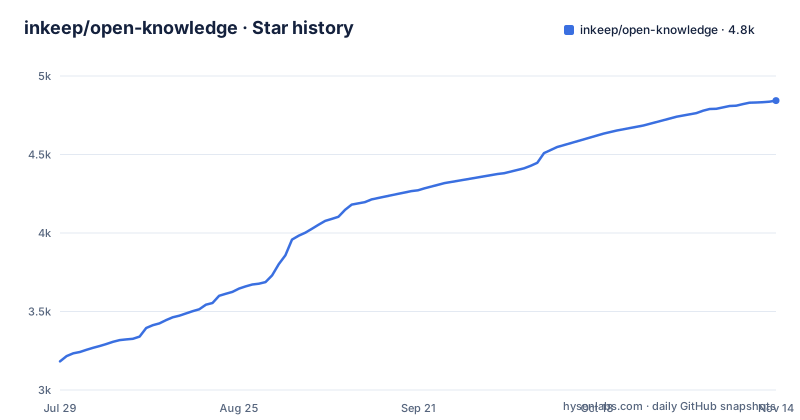
Star history
- inkeep/open-knowledge4,843 ★ · +1,661
| Repository | 2026-07-29 | 2026-11-14 |
|---|---|---|
| inkeep/open-knowledge | 3.2k | 4.8k |
1,661 Stars in the last 108 days, measured from the daily GitHub snapshot. Compare with other projects
Editorial analysis
Pointing an agent at the folder you already have
OpenKnowledge starts from a directory, not from a workspace file. Open any existing folder holding markdown or mdx files and the editor treats it as the knowledge base, which is why an Obsidian vault or a repository with a docs directory works without an import step. The README calls the result "Notion meets VS Code": rich text editing on one side, a file navigator, tabs and search on the other.
The interesting part is what happens after that. The editor scans the machine for agent harnesses it recognises, among them Claude Code, Claude Desktop, Cursor, Codex, OpenCode and OpenClaw, and offers to install the MCP server and skills for each one it finds. There is no plugin marketplace step and no config file to hand-edit. You open a folder, accept the install, and your coding agent gains a search and authoring path into the same notes.
That inversion is the reason to care. Most agent tooling assumes the agent owns the files. Here the editor owns the files and lends them out. It is a smaller claim than an AI-native IDE, and a more concrete one.
What ok init writes into your agent harness
The scaffold step is where the coupling becomes visible. Running ok init in a project directory creates the project scaffolding and wires up the editors, so the MCP configuration lands in the places Claude Code, Codex, Cursor and the others already read. Nothing about a separate server address or a hosted account is involved.
Skills ship alongside the MCP server. The README positions both as what lets an agent search the knowledge base and author documents in it, with agentic search and a graph wiki link viewer sitting on the editor side. Two surfaces, one folder.
There is a catch worth naming. The install is keyed on detection, not on declaration. If your harness is not one of the listed tools, the editor has no reason to touch it, and the fallback the README gives is a generic one: any harness or agent can be used over MCP or CLI. That fallback means you are back to writing configuration by hand.
Running the editor as a local web app with the ok CLI
Two install paths exist and they cost different things. The desktop app ships as a DMG for Apple Silicon, a per-user Setup installer for Windows 10+ on x64 and Arm64, and deb or rpm packages for Linux. Those are installers with no toolchain requirement, and the Windows build is explicitly per-user, so no admin prompt stands in the way.
The CLI path runs the same editor as a local web app on any platform, including Intel Macs and servers. It needs Node.js 24 and git. The repository enforces that floor twice: the root package.json declares engines node >=24.2.0 and devEngines pins 24.21.0 with onFail set to download.
Installing the CLI globally and starting the editor in an existing project takes four lines:
npm install -g @inkeep/open-knowledge
cd your-project
ok init          # scaffold the project + wire up your AI editors (Claude Code, Claude Desktop, Cursor, Codex, OpenCode, OpenClaw)
ok start --open  # serve the web editor and open it in your browser
Note the two commands do different jobs. ok init writes the scaffold and the harness wiring into the directory you are standing in, so run it in the folder you intend to keep as a knowledge base rather than in your home directory. ok start --open then serves the same editor locally and opens a browser at it.
One configuration detail catches people: VITE_PORT=9999 in .env.example customises the Vite dev server, which defaults to 5173, and the file states in plain terms that the CLI has its own port resolution and is not affected. A custom Vite port will not move ok start.
Git and GitHub underneath the sharing features
No-code team sharing and auto-sync are described as powered by git and GitHub under the hood, and both are optional. There is no hosted workspace to sign up for; the collaboration story is the version control already running in your repository.
That is a deliberate trade. You keep plain markdown files in a repository, so history, branching and review work the way they do for code, and the editor adds a formatted view on top. Nothing in the README describes how it behaves when two people edit the same paragraph at the same time. Git will tell you about the conflict, the way it always does.
Embeddable HTML and rich components for specs sit on the same foundation, which suits engineers writing engineering specs and visualized reports rather than a plain reading experience.
What the pnpm workspace root reveals about the build
Licensing is GPL-3.0-or-later, and it reaches further than a permissive licence if you redistribute, so read the LICENSE file before assuming the terms carry over to your own tooling. This is not legal advice, only a pointer to the file that governs it.
The repository root shows the shape of the codebase. It is a pnpm workspace with packageManager [email protected], turbo.json driving the task graph, biome.jsonc and oxlint.config.ts as the linters, knip.config.ts for dead code, and a lint-plugins/ directory that ships custom rules. Two unusual entries stand out: no-comments.config.jsonc at the root, and check:drift:guards in the scripts, a chain of checks for the schema snapshot, third-party notices and i18n drift. Pinned versions are deliberate, since devEngines sets onFail to download.
The last push was on 2026-11-02, and the three most recent releases are v0.89.3-beta.0 (2026-11-03), v0.89.2 (2026-11-02) and v0.89.1-beta.3 (2026-10-30), a fast cadence that mixes beta tags with regular releases.
Where OpenKnowledge is the wrong tool
Three concrete limits. First, an Intel Mac cannot take the desktop path. The DMG is Apple Silicon only, so the web app or a different editor becomes the option.
Second, the root package.json declares engines node >=24.2.0, so working from a clone of the repository needs Node 24.2.0 or newer.
Third, and most consequential, everything is local and every variable is optional. The .env.example states plainly that all variables are optional and that a fresh clone runs end to end with no .env file. OpenTelemetry is off by default on both the server and the Vite frontend, and the OTLP endpoint defaults to http://localhost:4318. If your notes are the record of decisions your team relies on, the protection against accidental deletion is your git habits, not the application.
OpenKnowledge against Obsidian and against a plain editor
Obsidian stores notes in a local folder of markdown and links them with wiki syntax. That is the same storage model, and for reading and linking alone it already works. The difference in approach is the agent layer: OpenKnowledge installs an MCP server and skills so a coding agent can search and author inside the vault, and offers side-by-side AI editing with Claude, Codex, OpenCode and Pi in the same window. Obsidian reaches an agent through a plugin and a community ecosystem; here the integration ships with the editor and is set up by a detection pass.
The other comparison is a plain WYSIWYG editor with a plugin system. There you choose an agent plugin, configure it, and keep it updated as the plugin ecosystem moves. Here the choice is the other way round: you take the harnesses the installer recognises and skip the rest. That is a narrower set of choices with less assembly, paid for in flexibility on the edges.
Nobody needs to replace Obsidian to use this. The question is whether you want your notes to be agent-addressable, and if so, whether you would rather have that wired once by a command than assembled by hand.
Editorial conclusion
Adopt OpenKnowledge if your notes and specs already live in a git-tracked folder and your agents run locally through MCP, because ok init wires the harness for you in one command and you keep plain markdown files with git history. Skip it if you want your notes hosted for you, if you are on an Intel Mac without Node 24 to spare, or if your legal review objects to copyleft terms in your desktop tooling. Before anything else, run ok init inside a throwaway folder and confirm that the MCP server the editor installs actually reaches your agent harness, since the wiring is driven by harness detection and falls back to manual configuration for anything unrecognised.
Frequently asked questions
How is OpenKnowledge different from Obsidian for markdown notes?
Both open an existing local folder of markdown files, so neither requires an import step. OpenKnowledge adds an MCP server, skills and side-by-side editing with Claude, Codex, OpenCode and Pi that it installs for detected harnesses, whereas Obsidian reaches agents through community plugins the user configures.
How do I install OpenKnowledge and run it for the first time?
Install the desktop build from openknowledge.ai/download or the latest release, or install the CLI globally with npm and run ok init in a project directory followed by ok start --open. The CLI path requires Node.js 24 and git.
Does OpenKnowledge need an account or any environment variables to work?
No. The .env.example states that all variables are optional and that a fresh clone runs end to end with no .env file. OpenTelemetry is off by default, server-side and on the Vite frontend, and the OTLP endpoint defaults to http://localhost:4318.
Which agent harnesses can OpenKnowledge connect to?
The install wires up Claude Code, Claude Desktop, Cursor, Codex, OpenCode and OpenClaw. For harnesses outside that set, the README states any agent can be used via MCP or CLI, which leaves the configuration to the user.
What are the repository's build and test commands?
The root package.json is a private pnpm workspace pinned to [email protected] with turbo.json driving the task graph. It exposes scripts including build, check:types and check:drift, which chains drift checks for the schema snapshot, third-party notices and i18n.
Official sources
Add this badge to your README
If you maintain this project, the badge below links readers to this analysis and shows its maintenance status from the daily GitHub snapshot. Paste the markdown into your README; add ?metric=license or ?metric=stars to the image URL for a different field.

[](https://hysenlabs.com/projects/inkeep-open-knowledge)Star history chart for your README
[](https://hysenlabs.com/projects/inkeep-open-knowledge)Was this useful?