candleLight_fw: one gs_usb firmware for many STM32 USB-CAN adapters
gs_usb compatible firmware for candleLight, cantact and canable
At a glance
- What is it?
- candleLight_fw is open firmware for STM32F042 and STM32F072 USB-CAN adapters that speaks the mainline Linux gs_usb interface, so one build replaces vendor drivers across a long list of boards. It also ships with real hardware exclusions and an echo timing caveat worth reading first.
- Who is it for?
- candleLight_fw fits engineers who own one of the listed STM32F042x or STM32F072xB boards and want a single open firmware tree with SocketCAN support on Linux. It does not fit anyone with an STM32G0B1 or STM32G431 adapter, and it does not fit anyone who needs transmission timestamps to reflect actual bus success.
- Can I use it commercially?
- Check first. The repository uses a licence we do not classify automatically, so read its LICENSE file before any commercial use.
- Is it still maintained?
- Yes. The repository last received commits 37 days ago.
- What is it written in?
- Mainly C, according to GitHub's language statistics.
Answers come from the project's GitHub data, last synced on November 7, 2026, and from our analysis. They are not legal advice.
Star history
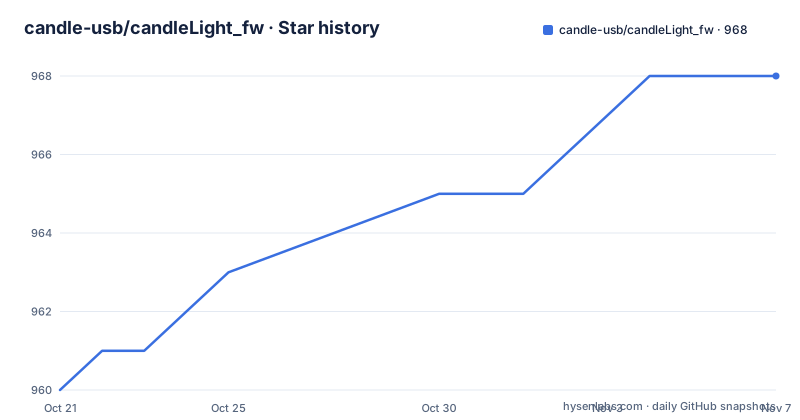
- candle-usb/candleLight_fw968 ★ · +8
| Repository | 2026-10-21 | 2026-11-07 |
|---|---|---|
| candle-usb/candleLight_fw | 960 | 968 |
8 Stars in the last 17 days, measured from the daily GitHub snapshot. Compare with other projects
Editorial analysis
Why a generic gs_usb firmware changes what you can buy
Most low cost USB-CAN adapters ship with a vendor specific utility that talks to the device over a proprietary USB protocol. candleLight_fw takes the opposite route: it implements the interface of the mainline Linux gs_usb kernel module, so the adapter appears to the operating system as an ordinary SocketCAN interface. On distributions that package that module, the README names Ubuntu as an example, the hardware works out of the box with no extra driver and no vendor application.
That matters because the firmware is tied to the MCU family rather than to a brand. The board list covers candleLight, candleLight FD, cantact, canable, USB2CAN, CANAlyze, VulCAN Gen1, Entreé, CANable-MKS 1.0, ConvertDevice-xCAN, ConvertDevice-xCANFD, DSD TECH SH-C30A, FYSETC UCAN and FalCAN Probe, with the STM32F072xB and STM32F042C6 parts called out per device. An engineer can replace the firmware on a cantact and on a canable and keep one build system, one flashing procedure and one driver path for both.
The target user is someone doing vehicle, robotics or industrial bus work on Linux who is tired of per vendor software. The target user is not someone who needs a Windows driver stack, though the firmware does implement WCID USB descriptors and can therefore be used on recent Windows versions without installing a driver.
One source tree, many board targets, and one unsupported family
The build system is CMake based, with one CMake target per board, and the top level of the repository carries the expected embedded pieces: src/, include/, ldscripts/, libs/, cmake/, plus openocd.cfg and gdb_oocd.cmds for debugging.
Because every board is a separate target, you can compile the whole set at once or pick a single one. The README gives the shape of the flow: configure with the bundled arm-none-eabi-gcc toolchain file, then run make for everything, or make with a specific target name such as cantact_fw to build only that board. A make help target lists what is available, and the same naming convention drives flashing later, since each target also has a flash counterpart.
That per board structure is also where the coverage limits become visible. The README states plainly that STM32G0B1 based devices are not yet supported by the mainline firmware, which affects boards such as candleLight FD and ConvertDevice-xCANFD, even though those adapters appear in the supported hardware list. Support for those devices is discussed in two open pull requests, 139 and 176. STM32G431 based devices, with the CANable-MKS 2.0 given as an example, are not supported by the project yet. Buying a newer board therefore does not mean the project covers it.
The F103 and the small F042 packages cannot carry USB and CAN
Two hardware exclusions are worth understanding before anything is ordered or flashed. The first is the very common STM32F103, which the README singles out by name. Its hardware cannot use USB and CAN simultaneously, so it will not work with this firmware no matter how the build is configured. The second concerns smaller packages in the F042 series, where a USB signal and CAN_TX are mapped onto the same pin, which makes those parts unusable for this design.
This is a physical constraint rather than a software gap, and it is the reason the repository keeps a board list at all. The value of the project is that it maps an open firmware onto a known set of adapters, and that mapping is only valid for the specific MCU and package combinations listed. If your adapter has an STM32F103 or a cramped F042 package, the correct conclusion is that you need different hardware, not a different build target.
Echo frames come back before the bus does
The most important behavioural caveat sits in the Limitations section, and it is subtle enough to bite during data logging. The firmware sends an echo frame back to the host when the frame is written to the CAN peripheral, and not when the frame is actually sent successfully on the bus.
In practice that means the acknowledgement your software receives reflects a hand off to the controller, not a completed transmission. The README calls out the consequences directly: timestamps, one-shot mode and other edge cases are affected. A logger that trusts echo timing will record a time that does not correspond to the moment the bit went out on the wire, and one-shot transmit setups will report success earlier than the bus confirms it. If your work depends on precise timing or on confirmed delivery, this limitation matters more than the size of the supported board list.
Building on Debian when the toolchain switched to picolibc
Building requires a newlib based arm-none-eabi-gcc toolchain, and this is the part of the setup most likely to trip you up on a current Debian release. Debian forky's arm-none-eabi-gcc toolchain switched to picolibc, while the candlelight firmware still requires newlib. On Debian trixie and older, the standard package is the answer.
sudo apt-get install gcc-arm-none-eabiOn Debian forky and newer, a helper script downloads and installs the latest newlib based toolchain and extracts it into the current directory. You then move that directory to /opt, and cmake will pick it up automatically.
./cmake/install-debian-gcc-arm-none-eabi
sudo mv arm-none-eabi_14.2.rel1-1 /opt
With a toolchain in place, the build is a standard out of source CMake run.
mkdir build
cd build
cmake .. -DCMAKE_TOOLCHAIN_FILE=../cmake/arm-none-eabi-gcc.cmake
After configuring, make builds all targets, and make with a board specific name builds just one. The README also notes that the cmake-gui route works, with the reminder to specify the toolchain file before configuring, and that make help lists the possible targets. Use the toolchain file at configure time, not after, or you will compile with the host compiler and see errors that look like firmware bugs.
Flashing with dfu-util and the BOOT pin fallback
Flashing a candleLight on Linux needs dfu-util, which on Ubuntu comes from a standard package.
sudo apt install dfu-utilIf you compiled with cmake, the simple method is a make target that invokes dfu-util for you, for example make flash-canable_fw. If you prefer to download a binary instead of compiling, the README points at prebuilt binaries in the CI workflow artifacts, and names one release file, gsusb_cantact_8b2b2b4.bin, as an alternative to compiling.
When several boards are connected at once, dfu-util cannot always pick the right one. List the devices, take the serial number of the target, and adapt the command.
dfu-util -D CORRECT_FIRMWARE.bin -S "serial_number_here", -a 0 -s 0x08000000:leaveThe:leave suffix is a convenient way to reboot the board back into the normal firmware, and the README warns that older dfu-util builds may not support it. If dfu-util fails because of permission problems, you need extra udev rules, and the repository ships 70-candle-usb.rules for that purpose. There is also a fail-safe route for a blank device: disconnect USB, short the BOOT pins, reconnect so the board enumerates as "STM32 BOOTLOADER", then run the manual command.
sudo dfu-util --dfuse-address -d 0483:df11 -c 1 -i 0 -a 0 -s 0x08000000 -D CORRECT_FIRMWARE.binAfterwards, disconnect USB, remove the BOOT short and reconnect.
Persistent interface names for boards plugged in side by side
Bench setups often have several adapters attached at once, and the interface names the kernel assigns are not stable. With udev on Linux, you can bind a predictable name to a particular serial number, and the README points at the udev manpages and systemd.link for the mechanism. The serial number is readable with the lsusb utility.
$ cat /etc/systemd/network/60-persistent-candev.link
[Match]
Property=ID_MODEL=cannette_gs_usb ID_SERIAL_SHORT="003800254250431420363230"

[Link]
# from systemd.link manpage:
# Note that specifying a name that the kernel might use for another interface (for example "eth0") is dangerous because the name assignment done by udev will race with the assignment done by the kernel, and only one
#   interface may use the name. Depending on the order of operations, either udev or the kernel will win, making the naming unpredictable. It is best to use some different prefix

Name=cannette99
The Match section ties the rule to the model and the short serial, and the Link section assigns the name. The quoted warning from the systemd.link manpage explains the one rule that matters here: pick a name with your own prefix, because a collision with a name the kernel might use creates a race in which either side can win and the result becomes unpredictable. After reloading systemd units and resetting the board, ip a shows the renamed interface.
The alternative is a patched kernel module, and only for old kernels
There is a known issue worth naming: a bug in the gs_usb module in Linux versions below 4.5 can crash the kernel when the device is removed. The README offers a fixed version of that module, hosted separately as socketcan_gs_usb, that should also work on older kernels.
The two approaches differ in where the fix lives. A kernel module patch changes the host side of the interface, so it applies to any adapter already running a compatible firmware, while the firmware approach changes the device side and needs the board to be reflashed. For a workstation running a modern kernel neither is necessary. For an embedded target still on an old kernel, the separate module is the only route the project points to, and it adds a dependency outside this repository.
On maintenance, the repository is not archived and the last push was on 2026-10-02, so the tree is still receiving work. The release history is thinner than that date suggests: the only listed release is v2.0 from 2022-04-19, which means day to day fixes arrive through the master branch and the CI artifacts rather than through tagged versions. The licence is a custom one that GitHub cannot classify, stored in the LICENSE.md file at the root, so anyone shipping this firmware in a product needs to read that file rather than assume a familiar permissive licence.
Editorial conclusion
candleLight_fw fits engineers who own one of the listed STM32F042x or STM32F072xB boards and want a single open firmware tree with SocketCAN support on Linux. It does not fit anyone with an STM32G0B1 or STM32G431 adapter, and it does not fit anyone who needs transmission timestamps to reflect actual bus success. Before committing, check the board's MCU part number against the supported list, confirm the release binaries in the CI artifacts match your board target, and read the echo frame note if you plan one-shot or time-triggered transmission.
Frequently asked questions
Which hardware does candleLight_fw support?
It targets STM32F042x and STM32F072xB based USB-CAN adapters, including candleLight, cantact, canable, USB2CAN, CANAlyze, FalCAN Probe, CANable-MKS 1.0, ConvertDevice-xCAN, DSD TECH SH-C30A and FYSETC UCAN. STM32G0B1 and STM32G431 based devices are not supported yet.
How do I flash candleLight_fw to a canable?
Install dfu-util, then run the cmake flash target for your board, for example make flash-canable_fw, or use dfu-util directly with the serial number of the device. The README also describes a fail-safe path that involves shorting the BOOT pins so the board enumerates as "STM32 BOOTLOADER".
Does candleLight_fw need a driver on Windows?
No. The firmware implements WCID USB descriptors, so it can be used on recent Windows versions without installing a driver.
Why do the echo timestamps from candleLight_fw not match the CAN bus?
The firmware sends the echo frame back when the frame is written to the CAN peripheral, not when it is actually sent successfully on the bus. The README lists timestamps, one-shot mode and other edge cases as the affected areas.
Can I build candleLight_fw on Debian forky?
Not with the standard arm-none-eabi-gcc package, because the Debian forky toolchain switched to picolibc while the firmware still requires newlib. The repository ships a script, cmake/install-debian-gcc-arm-none-eabi, that downloads the newlib based toolchain for extraction into the current directory.
Official sources
Add this badge to your README
If you maintain this project, the badge below links readers to this analysis and shows its maintenance status from the daily GitHub snapshot. Paste the markdown into your README; add ?metric=license or ?metric=stars to the image URL for a different field.

[](https://hysenlabs.com/projects/candle-usb-candlelight-fw)Star history chart for your README
[](https://hysenlabs.com/projects/candle-usb-candlelight-fw)Was this useful?