FSearch's indexed search on Linux, and the two things its index cannot tell you
A fast file search utility for Unix-like systems based on GTK3
At a glance
- What is it?
- FSearch is a GTK3 file finder written in C that keeps an index and matches names as you type. It is fast for the name lookup it was built for, and it gives up in specific, documented places: sorting by type and trashing a file.
- Who is it for?
- Adopt FSearch if you are on Linux or a BSD, you search by filename fragment often, and you accept a graphical indexer with no documented command line. Skip it if you live in a terminal, if you need search inside file contents, or if sorting a result list by file type is part of your workflow.
- Can I use it commercially?
- Yes, with conditions. GPL-2.0 is a copyleft licence: if you distribute software that includes it, you must release that software's source code under the same licence. Running it internally without distributing it does not trigger that obligation.
- Is it still maintained?
- Yes. The repository received new commits within the last day.
- What is it written in?
- Mainly C, according to GitHub's language statistics.
Answers come from the project's GitHub data, last synced on November 14, 2026, and from our analysis. They are not legal advice.
Star history
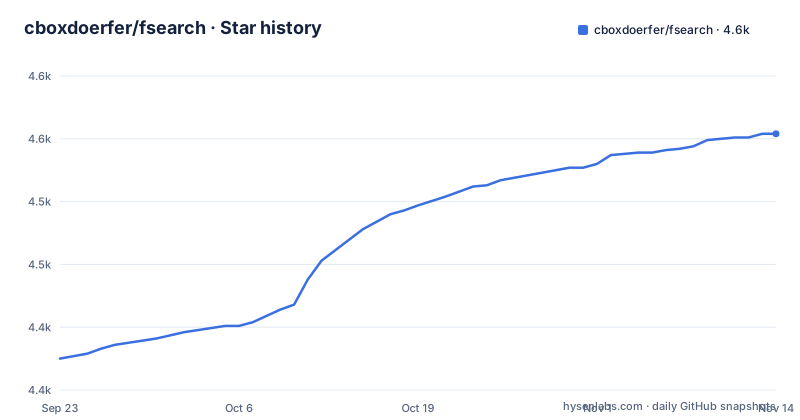
- cboxdoerfer/fsearch4,554 ★ · +179
| Repository | 2026-09-23 | 2026-11-14 |
|---|---|---|
| cboxdoerfer/fsearch | 4.4k | 4.6k |
179 Stars in the last 52 days, measured from the daily GitHub snapshot. Compare with other projects
Editorial analysis
An instant filename finder, built to not live inside a file manager
FSearch answers one narrow question quickly: given a fragment of a name, show every matching file on this machine before I finish typing it. The design constraints the author sets for his own tool read like an adoption checklist. A standalone application rather than a feature bolted onto a file manager. Written in a language with C like performance. No dependency on a specific desktop environment. GTK3 or Qt5. Small memory usage, on hard drive and in RAM. The stated target audience is advanced users.
Those constraints exist because the alternatives were surveyed first. The list of tools examined includes MATE Search Tool, Recoll, Krusader's locate based search, SpaceFM File Search, Nautilus, ANGRYsearch and Catfish, and none of them delivered the combination.
So FSearch is narrow on purpose. It searches names, not contents, and it does it from a window of its own.
Instant results over a folder index, with wildcard, regex and filter layers
Matching happens as you type, against an index built from the folders you chose to include. Four matching styles sit on top of that index. Plain substring typing is the default path. Wildcards work inside a name. Regular expressions go through PCRE2, which the requirements pin at version 10.21. Filters narrow the search to files, to folders, or to everything.
Indexing is where the choices get opinionated. Specific folders can be included and excluded, and beyond that, wildcard expressions can keep particular files and folders out of the index entirely, which is how you would exclude build output without enumerating it. Results sort by filename, path, size or modification time.
One detail in the interface section is easy to skim past. The window can switch between a traditional layout with a menubar and a client-side decoration layout. That kind of choice only makes sense if the author is not settled on the GTK3 form being the final one, and the README's 'Why GTK3 and not Qt5?' section states the long term plan is a console interface, a GTK3 interface and a Qt5 interface, or at least a codebase other people can build those from. Today you get the GTK3 one.
The dependency floor is stated, the build steps are not
The requirements are given as exact versions: GTK 3.24, GLib 2.60, PCRE2 10.21 and ICU 4.4. The C standard library is the interesting entry, because the line carries its own caveat. It names glibc 2.19 or musl 1.1.15, then adds that other C standard libraries might work too, and that those are just the ones verified. That is an honest statement of what was tested and an admission that the rest is untested.
The repository layout fits a Meson build, with `meson.build` and `meson_options.txt` at the top level, a `debian/` directory for Debian packaging and a `snap/` directory alongside `copr/` and `po/` for translations. The actual steps live off in the wiki, under the Build instructions page. The README's Build Instructions section is only that link.
That arrangement has a consequence for anyone evaluating the project. The dependency floor is public and checkable against your distribution's package versions. The recipe that turns the source tree into a binary is one wiki page away, and it can change independently of what the packages ship.
Stable packages, nightly packages and a Flatpak with fewer features
Installation is distribution by distribution rather than a single script, and the project asks you to stay on the stable channel unless you have a reason not to. Ubuntu gets a stable PPA, with a daily PPA behind it. Arch users have `fsearch` in the official repository and `fsearch-git` in the AUR for the development build. Fedora, RHEL and CentOS have a stable COPR and a nightly COPR. Debian and openSUSE builds come out of the same OpenBuildService project.
Then there is the Flatpak on Flathub, and the table links its label to a wiki page on version limitations. That link is the honest part of the entry: the sandboxed build runs with fewer features than the native packages, and the page, not this page, is where you find out which ones. Two rows carry a footnote that says they are not maintained by the author, the Solus repository and FreshPorts for FreeBSD. A footnote there is not a disqualification, but it does tell you whose bug tracker to file against.
The project is distributed under GPL-2.0, and the last push to the repository was on 2026-10-26.
Sorting by type is slow, and it silently drops your sort order
Sorting a large result list by type can be very slow. The reason given is mechanical: working out each entry's type is expensive and the type data is not indexed.
The second half of that limitation is the one that changes how you use the window. When the view is sorted by type, searching resets the sort order back to Name. You can sort by type, look at where the executables cluster, and then type one more character, and the view drops the type grouping under you. The behaviour is documented rather than hidden, which is more than many tools manage, but it means the type sort is a browsing mode rather than a working mode.
If your workflow is repeatedly narrowing results to one class of file, this is the place where FSearch's narrow design shows through. An indexer that stored type at walk time would answer the question for free, at the cost of a larger index.
Move to Trash changes the filesystem but not the database
Using Move to Trash does not update the database index. A file you send to the trash stays in the result list as though nothing had happened, and it keeps coming back on the next search until the index is rebuilt.
This is listed under Current Limitations. On a machine with a large trash and a rarely rebuilt index, the gap between what you see and what exists on disk can widen for a long time.
Two other boundaries are worth stating plainly, because the documentation is quiet on them. The index covers folders you include, so anything outside that set is invisible to the search. For an advanced user, that is the cost of a design that keeps the indexer simple.
What FSearch says to use instead, and when that is the right answer
For terminal work the author's own recommendation is `fzf`, or the obvious tools find and (m)locate. That recommendation is the clearest statement of scope in the project: the intended interface is a window, and anyone who wants a pipe gets something else. It reads a stream of candidates and does the matching as you type without holding a database, so it pays nothing for indexing and knows nothing about the filesystem you did not feed it.
Maintenance of the interface is community work in a specific sense: translations run through Weblate, and the request is to submit them there rather than opening pull requests on GitHub. The author also notes that English is not his first language, so the English strings in the interface are open to correction through the same route.
Editorial conclusion
Adopt FSearch if you are on Linux or a BSD, you search by filename fragment often, and you accept a graphical indexer with no documented command line. Skip it if you live in a terminal, if you need search inside file contents, or if sorting a result list by file type is part of your workflow. Check first that the packaging route listed for your distribution still builds against GTK 3.24, GLib 2.60 and PCRE2 10.21, since the build instructions live in a wiki and the Flatpak is labelled as limited in features.
Frequently asked questions
How do I install fsearch?
The project ships packages rather than an install command. Ubuntu uses a stable PPA, Fedora, RHEL and CentOS use a COPR, Debian and openSUSE use OpenBuildService, Arch has a package in its official repository, and a Flatpak is on Flathub with limited features.
How do I install fsearch on Ubuntu?
There is a stable PPA maintained by the author for Ubuntu, plus a separate daily PPA for testing. The README asks you to stay on the stable one unless you have a reason to do otherwise.
How do I search for a specific file with fsearch?
Type part of the name and results update as you type. You can narrow the search with wildcards, PCRE2 regular expressions, or a filter that restricts results to files, folders or everything.
How do I search for files in Linux?
FSearch builds an index from the folders you include and exclude, then matches names against it. You can keep particular files out of the index with wildcard expressions.
What is a good alternative to Everything Search Engine on Linux?
The author points to fzf for the command line, and to find and (m)locate as the obvious alternatives. FSearch itself is the graphical answer, written in C on GTK3, and it searches names rather than file contents.
What are the FSearch alternatives on Linux?
Tools examined and set aside include MATE Search Tool, Recoll, Krusader's locate based search, SpaceFM File Search, Nautilus, ANGRYsearch and Catfish.
Official sources
Add this badge to your README
If you maintain this project, the badge below links readers to this analysis and shows its maintenance status from the daily GitHub snapshot. Paste the markdown into your README; add ?metric=license or ?metric=stars to the image URL for a different field.

[](https://hysenlabs.com/projects/cboxdoerfer-fsearch)Star history chart for your README
[](https://hysenlabs.com/projects/cboxdoerfer-fsearch)Was this useful?