vkQuake: QuakeSpasm with a Vulkan renderer, and the GPU features that depend on ray tracing
Vulkan Quake port based on QuakeSpasm
At a glance
- What is it?
- vkQuake replaces QuakeSpasm's OpenGL renderer with Vulkan, keeps mod compatibility, and adds model, texture and lighting features. This review covers what needs special hardware, where game files must live, how the builds differ per platform, and what the README leaves unsaid.
- Who is it for?
- vkQuake suits Quake players on Windows, Linux or the BSDs who already run QuakeSpasm mods and have a Vulkan GPU, and who want threaded rendering and frame rates above 72Hz. It does not suit big-endian machines, which fail at startup by design, and the dynamic shadow and light features are closed to GPUs without ray tracing.
- Can I use it commercially?
- Yes, with conditions. GPL-2.0 is a copyleft licence: if you distribute software that includes it, you must release that software's source code under the same licence. Running it internally without distributing it does not trigger that obligation.
- Is it still maintained?
- Yes. The repository received new commits within the last day.
- What is it written in?
- Mainly C, according to GitHub's language statistics.
Answers come from the project's GitHub data, last synced on November 26, 2026, and from our analysis. They are not legal advice.
Star history
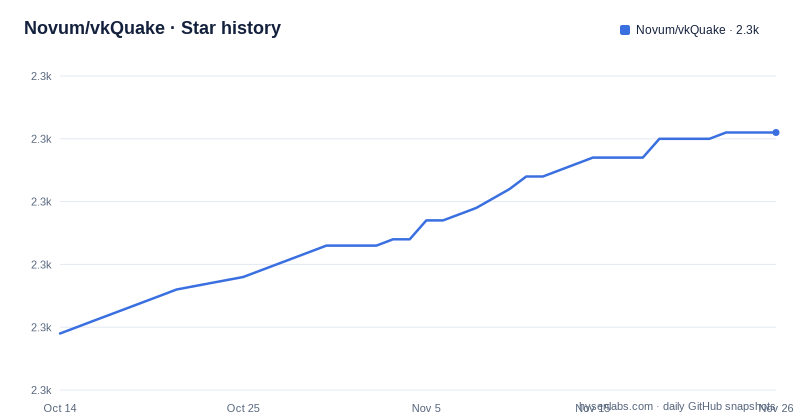
- Novum/vkQuake2,331 ★ · +32
| Repository | 2026-10-14 | 2026-11-26 |
|---|---|---|
| Novum/vkQuake | 2.3k | 2.3k |
32 Stars in the last 43 days, measured from the daily GitHub snapshot. Compare with other projects
Editorial analysis
Vulkan instead of OpenGL, built on QuakeSpasm and QuakeSpasm-Spiked
vkQuake is a port of id Software's Quake that draws with Vulkan where earlier ports use OpenGL. It descends from QuakeSpasm and from QuakeSpasm-Spiked, the latter abbreviated QSS in the feature list. Several features in that list carry a note that they come from QSS: the more modern network protocol meant to avoid certain movement issues, custom mod HUDs, scriptable particles and fullbright support on true color skins.
Compatibility with the mod scene is the main claim. The README states that vkQuake runs all mods compatible with QuakeSpasm and names Arcane Dimensions as an example. A player with an existing QuakeSpasm mod folder is therefore the intended reader, and a Mods menu is included for loading them without command-line arguments.
The repository layout matches a classic engine port. Source lives under Quake/, shader code under Shaders/, Windows project files under Windows/, and Packaging/ and Misc/ hold distribution material. The build system comes in several forms, from a Visual Studio solution to Makefile.w64 and a meson.build file at the top level.
Higher frame rates than 72Hz without breaking physics
Original Quake ties game logic to a 72Hz tick, and engines that simply render faster tend to make movement behave oddly. The README lists the fix as an improvement over QuakeSpasm: the game can run at higher frame rates than 72Hz without breaking physics. It does not describe how, so there is no switch or console variable to point at, and you should treat the behaviour as something to test with your own mods.
Performance is the other headline. The README promises much better performance with multithreaded rendering and loading, with no figures attached. The repository carries a helgrind.supp file, a suppression list for the Helgrind thread-error detector, which fits an engine that runs work across threads. The README gives no benchmark numbers, so how much faster it is than QuakeSpasm on your machine is something you would measure yourself.
Vulkan is also the project's teaching angle. A short section says vkQuake shows basic usage of the API, with render passes and sub passes, pipeline barriers and synchronization, compute shaders, push and specialization constants, CPU and GPU parallelism, and memory pooling.
Dynamic shadows and dynamic lights are closed to GPUs without ray tracing
Two features carry a hardware condition. Dynamic shadows require a GPU with ray tracing support. Dynamic lights, which use the 2021 re-release dynamiclight entities, require the same ray tracing support and also need the Dynamic Shadows setting at medium or higher. A card that runs Vulkan fine but lacks ray tracing gets neither, and the other improvements still apply.
The rest of the rendering list is not gated that way. It includes a software Quake like underwater effect, better color precision to reduce banding in dark areas, native anti aliasing and anisotropic filtering, 8-bit color emulation, and scaling for a pixelated look. Those last two are the choice for players who want the original palette feel, while the true color options go the other direction.
On textures, level textures and static models accept .png, .tga and .jpg files. External WAD files are supported, and WAD3 support allows per-texture palettes for more colorful levels. Both have a linked pull request, number 753, as their documentation, since the README itself gives only the one-line description.
Classic and Enhanced models share one menu switch
The engine handles two model families. Classic means the original Quake models. Enhanced means MD5 models, as used in the 2021 re-release, or MD3 models, as used in Quake 3. When both versions of a model exist, the Models menu option chooses which one is displayed.
Skins for the enhanced formats can be true color in .png, .tga or .jpg, and fullbrights are supported, a feature credited to QSS. The practical effect is that a mod pack shipping MD3 or MD5 replacements does not overwrite the original models. The player toggles between them, and a player who dislikes the replacements can switch back without deleting files.
The README says nothing about model limits, animation features or what happens with a malformed MD5 file, so that behaviour is undocumented. If a particular mod depends on enhanced models, load it once and flip the Models option before settling in for a full campaign.
The re-release gets a separate note: vkQuake supports playing the 2021 re-release content, and installation is the same as for the classic game except that files go into the rerelease folder.
Where the game files go and why GOG copies can fail on Linux
vkQuake is an engine, not a game. It needs Quake's data, and the README speaks about the Quake base directory throughout. It does not say where to buy the data or how to extract it from a disc, so that step is yours.
On Windows the recommended route is the installer. It creates start menu entries for the classic and remastered versions, finds Steam, GOG and Epic Games Store installs automatically, and otherwise asks for the game folder once and remembers it. Save data and config files then go to the user folder, %APPDATA%\vkQuake, and not to the Quake data folder. The manual route copies the contents of vkquake-<version>_windows_x64.zip for Intel or vkquake-<version>_windows_arm64.zip for Arm64 into the Quake base directory, overwrites existing files, and runs vkQuake.exe.
On Linux, the README says to copy all files inside the `vkquake-<version>-linux_x64` folder in the tar archive to the Quake base directory, overwrite any existing files, and run `vkquake.AppImage`.
The README adds a warning about case. Data files must be lowercase, for instance id1 and not ID1, and pak0.pak and not PAK0.PAK. Some distributions of the game have upper case names, GOG.com being the example given. On a case-sensitive Linux filesystem, a straight copy of such an install will not be found by the engine.
Packages exist for OpenBSD and FreeBSD, and the Mac builds live on another site
OpenBSD has vkQuake in its standard package repositories since version 6.6, and the install is:
$ pkg_add vkquakeFreeBSD has it since version 11.3, with a package install through pkg install vkquake as root, or a build from the ports collection by changing into /usr/ports/games/vkquake and running make install. These are distribution packages, so their version follows the BSD release schedule and not the vkQuake releases page.
Windows and Linux binaries are on the GitHub Releases page. The most recent three listed there are 1.36.0 on 2026-08-29, 1.35.0 on 2026-07-08 and 1.34.1 on 2026-04-02, and the last push was on 2026-09-27. macOS is different: both Apple Silicon and 64-bit Intel binaries are hosted at Mac Source Ports, a separate site, so Mac users do not get a download from the project's own releases and cannot assume the Mac build tracks the same version number.
Build status badges at the top of the README cover Windows, MinGW, MSYS2 on ARM64 clang, Linux, macOS and a clang-format check, which shows which of those paths are exercised by continuous integration.
Little-endian only: vkQuake refuses to start on big-endian systems
The README is blunt about byte order. vkQuake supports only little-endian systems. The stated reason is that all known Vulkan-capable systems in the wild are little-endian, so the big-endian support inherited from QuakeSpasm has been effectively removed. On a big-endian machine the program does not limp along. It would not even start, and it prints a fatal error.
That matters to a small group, such as someone with an older PowerPC board who wants a modern Quake port. They should use QuakeSpasm, the upstream the README names, since vkQuake gives them nothing.
Build requirements carry the next set of limits. On Windows, building needs Vulkan SDK 1.4.321.1 or newer. On Linux the minimum is Vulkan SDK 1.2.162, and the README notes that the SDK your distribution provides is not always that recent, so you may need the latest LunarG SDK. On Windows, the README also asks you to log out and back in after installing the SDK so that environment variables are set.
As for build tools, Windows offers Windows\VisualStudio\vkquake.sln, MinGW with make -f Makefile.w64 or Makefile.w64a, and Meson. Meson works with a command pair:
cd vkQuake
meson setup build && ninja -C build
For MSVC with Meson, the README says to run meson setup --vsenv build instead. Linux users cross-compiling for Windows are pointed at the build_cross_win??.sh scripts.
What the README never compares: ironwail, DarkPlaces and numbers
The README makes one comparison, against QuakeSpasm, and gives a feature list for it. It does not mention Ironwail or DarkPlaces, two other Quake engines, so any claim about how vkQuake ranks against them has no support in the repository. What can be said from the project's own text: vkQuake keeps QuakeSpasm's mod compatibility, replaces the renderer, and adds features from QSS. DarkPlaces and Ironwail users should read their own project's documentation for a fair comparison.
The README has no benchmark table and no minimum hardware list. It says Vulkan-capable GPU with drivers, and for Linux asks you to check that both GPU and driver support Vulkan. Anything more specific, such as how old a card can be, is not documented.
Maintenance is easy to judge, though. Three releases between April and August 2026 and a push on 2026-09-27 make this an engine with current activity, and a file named error_reporting_howto.md sits at the top level for bug reports.
One more practical gap concerns settings. The README does not list console commands or cvar names for the Vulkan-specific options, so the Dynamic Shadows setting and the Models option are reached through the in-game menus. Players who want to script a configuration have to find the variable names inside the game itself, since the repository text names none of them. The Packaging/ directory is where the installer and AppImage material would be looked for, but the README does not describe its contents.
Editorial conclusion
vkQuake suits Quake players on Windows, Linux or the BSDs who already run QuakeSpasm mods and have a Vulkan GPU, and who want threaded rendering and frame rates above 72Hz. It does not suit big-endian machines, which fail at startup by design, and the dynamic shadow and light features are closed to GPUs without ray tracing. Before switching, check that your Quake data files are lowercase on Linux and decide whether you want the installer or a manual copy on Windows.
Frequently asked questions
How do I install vkQuake?
On Windows, use the installer from the Releases page, which finds Steam, GOG and Epic installs. On Linux, copy all files inside the vkquake-<version>-linux_x64 folder in the tar archive to the Quake base directory, overwrite any existing files, and run vkquake.AppImage.
How do I use vkQuake?
Install it next to your Quake game files, then run vkQuake.exe on Windows or the AppImage on Linux. Mods compatible with QuakeSpasm can be loaded from the Mods menu.
How does vkQuake compare with DarkPlaces?
The README makes no comparison with DarkPlaces. It states that vkQuake is a Vulkan port based on QuakeSpasm and QuakeSpasm-Spiked and runs mods compatible with QuakeSpasm.
Official sources
Add this badge to your README
If you maintain this project, the badge below links readers to this analysis and shows its maintenance status from the daily GitHub snapshot. Paste the markdown into your README; add ?metric=license or ?metric=stars to the image URL for a different field.

[](https://hysenlabs.com/projects/novum-vkquake)Star history chart for your README
[](https://hysenlabs.com/projects/novum-vkquake)Was this useful?