vue-plugin-hiprint is a jQuery tool library with a print client dependency, not a Vue component library
hiprint for Vue2/Vue3 ⚡打印、打印设计、可视化设计器、报表设计、元素编辑、可视化打印编辑
At a glance
- What is it?
- vue-plugin-hiprint wraps hiprint 2.5.4 for Vue 2 and Vue 3 projects and adds a drag-and-drop template designer. The README is blunt about what it is not, and equally blunt about the separate desktop print client your deployment depends on.
- Who is it for?
- Adopt vue-plugin-hiprint if your Vue application needs a visual print template designer and you can accept a jQuery dependency, a Node 16 build environment and a separate local print client on the client machine. Do not adopt it expecting a Vue component library or a server-side PDF pipeline: it ships no UI, and silent printing depends on that external client.
- Can I use it commercially?
- Yes. MIT is a permissive licence: you can use, modify and sell software built on it, as long as you keep its copyright and licence notices.
- Is it still maintained?
- Yes. The repository last received commits 31 days ago.
- What is it written in?
- Mainly JavaScript, according to GitHub's language statistics.
Answers come from the project's GitHub data, last synced on November 7, 2026, and from our analysis. They are not legal advice.
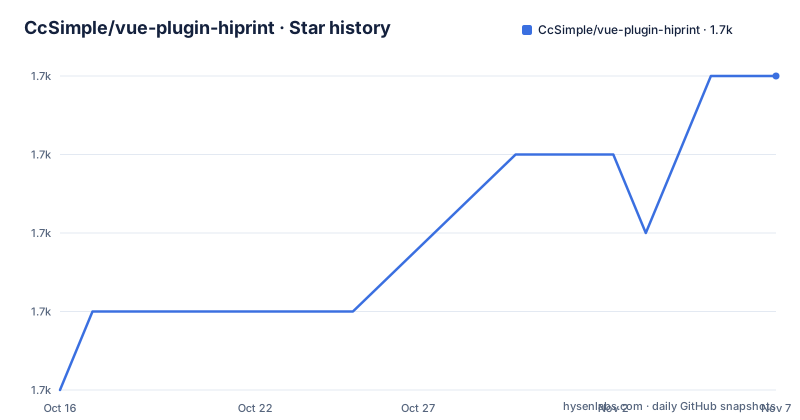
Star history
- CcSimple/vue-plugin-hiprint1,742 ★ · +4
| Repository | 2026-10-16 | 2026-11-07 |
|---|---|---|
| CcSimple/vue-plugin-hiprint | 1.7k | 1.7k |
4 Stars in the last 22 days, measured from the daily GitHub snapshot. Compare with other projects
Editorial analysis
It says outright that this is a tool library, not components
The most useful paragraph in the README is the disclaimer. vue-plugin-hiprint is built on hiprint 2.5.4, and the author states in red text that they are not the original hiprint author and that the plugin name came from wanting to use hiprint inside their own Vue projects.
Then the key distinction: this is only a JavaScript tool library, not a Vue component library, so by default it does not include the component pages shown in the demo. The demo code can be copied and used, but nothing arrives prebuilt. If you want a ready-made UI, the README points at a separate component library, sv-print.
That single sentence determines the adoption decision. Teams looking for a drop-in `<hiprint-design>` component will not find one here. Teams willing to own the surrounding UI, which for a designer with panels, toolbars and option containers is most of the work, are the actual audience.
There is also a provenance detail worth knowing. The README says the official hiprint site was last updated in 2019 and that hiprint 2.5.4 is LGPL, and that many optimizations and adjustments were made afterwards in response to user feedback. So this is a maintained fork of a dormant upstream, not a thin wrapper around a live product.
The print stylesheet is a mandatory step people skip
Installation is one command, but the README marks a second step as required by putting it in bold inside the HTML snippet. Print styles must be added to `index.html`, and the file name has to stay exactly `print-lock.css`.
<link
  rel="stylesheet"
  type="text/css"
  media="print"
  href="https://npmmirror.com/package/vue-plugin-hiprint/files/dist/print-lock.css"
/>
<!-- OR -->
<link
  rel="stylesheet"
  type="text/css"
  media="print"
  href="https://cdn.jsdelivr.net/npm/vue-plugin-hiprint@latest/dist/print-lock.css"
/>
<!-- 可以调整成 相对链接/自有链接, 【重要】名称需要一致 【print-lock.css】-->
<link rel="stylesheet" type="text/css" media="print" href="/print-lock.css" />
Two CDNs are offered, npmmirror and jsdelivr, and the README notes the CDN may be unstable. The third option is a self-hosted relative path, with the constraint that the file name must remain `print-lock.css`. That name-matching requirement is the kind of detail that costs an afternoon if you rename the file for tidiness, which is why it is called out.
Without this stylesheet the print layout is wrong in ways that are hard to trace back to a missing stylesheet, so treat it as part of the install rather than as an optimisation.
Building the drag-and-drop designer
The recommended path is the drag-and-drop designer, and the init sequence shows how the pieces connect. You import `hiprint` and `defaultElementTypeProvider`, initialise the draggable element types, then build the palette items from your own markup:
import { hiprint, defaultElementTypeProvider } from "vue-plugin-hiprint";
// 初始化可拖拽的元素
hiprint.init({
  providers: [new defaultElementTypeProvider()],
});
// $('.ep-draggable-item') 包含 tid, 与上边的 provider 中的 tid 对应 才能正常拖拽生成元素
hiprint.PrintElementTypeManager.buildByHtml($(".ep-draggable-item"));
hiprintTemplate = new hiprint.PrintTemplate({
  template: {}, // 模板json
  settingContainer: "#PrintElementOptionSetting", // 元素参数容器
  paginationContainer: ".hiprint-printPagination", // 多面板的容器
});
The coupling to watch is the `tid`. Elements in your `.ep-draggable-item` markup carry a `tid` that has to match one in the provider list, or drag-and-drop generation fails. That is a string contract between your markup and the configuration, enforced at runtime only.
The `PrintTemplate` constructor takes CSS selectors rather than component references, so `settingContainer: "#PrintElementOptionSetting"` is a DOM lookup. The pagination container is how you get multi-page output, and the README notes it needs an extra `<div class="hiprint-printPagination"/>` added to the page.
Optional configuration covers a lot of ground. There is an `onImageChooseClick` hook where you call `target.refresh(url, options, callback)` to resize a chosen image, a `fontList` of your own font choices, `dataMode` where 1 gives `getJson` and other values give `getJsonTid`, `history: true` for undo and redo, an `onDataChanged` callback reporting add, move, delete, parameter change, resize and rotate, and `onUpdateError` for failures.
The print client is a separate program you do not control
This is the deployment reality the README is most insistent about. It says to use the print client associated with the project, or modify the print client's source yourself to adapt it to your templates. The npm package description says the same thing more compactly: silent printing and MAC address retrieval are done with the help of a client.
So there is a local native process on the end user's machine, outside the browser. That has three consequences.
First, deployment is not only `npm install`. There is a client to distribute, install and keep in step with your template format. Second, the cross-origin problem is real: the README warns that the direct client works fine in local development but fails to connect when deployed, and points at a note about upgrading to HTTPS for that online cross-origin issue. A browser on a plain HTTP deployment cannot reach a local client, which effectively means HTTPS is a requirement rather than a recommendation. Third, silent printing, where output happens with no dialog, only works where that client is running.
Whether the model fits depends on your environment. A LAN with managed client software on every workstation can absorb it. A public web app with no ability to install software on user machines cannot, and for that case you need server-side rendering of the template instead.
jQuery underneath, and the Node version the build expects
The README states the library is built on jQuery and that in theory other frameworks could use it, with a react demo branch linked. In practice the code is jQuery-shaped: the init snippet calls `$(".ep-draggable-item")`, the image hook shows `el.designTarget.css('width', width + "pt")` and `.children('.resize-panel').trigger($.Event('click'))`, and the pagination comment describes adding a div with a class.
So the honest description is that you are calling a jQuery plugin from a Vue component. That works because the designer's DOM is outside Vue's reactivity, but it means the designer state is not reactive and you cannot drive it from Vue state cleanly.
The build environment is equally specific. `package.json` sets `engines.node` to `>=16`, and the README's warning block says NodeJs needs version 16.x, developed against 16.18.1. The build script is `cross-env NODE_ENV=production webpack --progress`, with `webpack.config.js`, `babel.config.js` and `vue.config.js` at the root, so the demo is served by vue-cli-service while the library itself is bundled by webpack directly. Publishing runs the build then pushes to the npmjs registry, with a separate `pub-beta` script that tags as beta.
Dependencies show the scope honestly: `jquery`, `lodash`, `jspdf`, `canvg`, `jsbarcode`, `bwip-js`, `@claviska/jquery-minicolors` and `nzh`, which is a Chinese number formatting library. The barcode, PDF and canvas packages explain what kinds of template the designer can produce.
Versioning, mirrors and where to report problems
The package version in `package.json` is 0.0.62, a versioning scheme that signals a pre-1.0 library where breaking changes are still expected. There are no GitHub releases, so the npm version is the only version reference. The CHANGELOG is a page in the README linked for updates, with Ctrl+F search available, which is where you look instead of a tag history.
The project is mirrored to Gitee, and the README explains the workflow: pull requests go to GitHub, and after merging the npm package is published automatically and the code synced to Gitee. That is worth knowing because it explains why some search results point at Gitee and some at GitHub.
Licence is MIT at the package level. The README separately notes that hiprint 2.5.4, the underlying library, is LGPL, which is the detail to check with your own legal reading if your organisation has a policy on copyleft dependencies in a front-end bundle. That is a description of the licences as stated, not legal advice.
On maintenance, the repository is not archived and the last push was on 2026-10-08, so work is landing. What the README does not document is a compatibility matrix for Vue versions beyond the 2.x and 3.x claim, or a supported list of print client versions, and the absence of GitHub releases means there is no changelog with version-level detail to point at.
Editorial conclusion
Adopt vue-plugin-hiprint if your Vue application needs a visual print template designer and you can accept a jQuery dependency, a Node 16 build environment and a separate local print client on the client machine. Do not adopt it expecting a Vue component library or a server-side PDF pipeline: it ships no UI, and silent printing depends on that external client. Before integrating, read the two warnings in the README rather than the demo: the package differs substantially from the hiprint.io original and the two should not be mixed, and the template format only matches the print client the project ships, so you either use that client or modify its source yourself.
Frequently asked questions
How do I install vue-plugin-hiprint in a Vue project?
The README gives `npm install vue-plugin-hiprint`, then requires adding a print stylesheet link to index.html with media="print". The file name must remain print-lock.css whether you load it from npmmirror, from jsdelivr, or from a self-hosted path, and the README notes the CDN may be unstable.
Is vue-plugin-hiprint a Vue component library?
No. The README states explicitly that it is only a JavaScript tool library rather than a Vue component library, so it does not include the demo's UI pages by default. It is built on jQuery and works with Vue 2.x and Vue 3.x.
Why does printing fail after I deploy to production?
The README warns that using the direct print client works locally but causes cross-origin connection failures once deployed, and links a note that the fix is to serve the application over HTTPS. It also says to use the project's associated print client, or modify the client source to match your templates.
What Node version does vue-plugin-hiprint need?
The package.json declares engines.node as ">=16", and the README's warning block says NodeJs needs the 16.x series, with 16.18.1 used for development. The build itself runs webpack through cross-env in production mode.
Official sources
Add this badge to your README
If you maintain this project, the badge below links readers to this analysis and shows its maintenance status from the daily GitHub snapshot. Paste the markdown into your README; add ?metric=license or ?metric=stars to the image URL for a different field.

[](https://hysenlabs.com/projects/ccsimple-vue-plugin-hiprint)Star history chart for your README
[](https://hysenlabs.com/projects/ccsimple-vue-plugin-hiprint)Was this useful?