FastFlix: a GUI that turns FFmpeg encoder flags into a form
FastFlix is a free GUI for H.264, HEVC and AV1 hardware and software encoding!
At a glance
- What is it?
- FastFlix is a Python and PySide6 desktop interface that builds the FFmpeg command line for H.264, HEVC and AV1 encodes, including hardware encoders from Nvidia, Intel and AMD. It is a front end, not an encoder, so your FFmpeg build and your GPU decide what actually works.
- Who is it for?
- FastFlix fits a person who knows roughly what an encode should look like and does not want to memorise encoder flags, and it earns its place most clearly on a machine with a supported GPU where a software encode of the same file would take hours. It does not fit someone who wants an automatic quality target, an unattended batch queue, or a service running on a server.
- Can I use it commercially?
- Yes. MIT is a permissive licence: you can use, modify and sell software built on it, as long as you keep its copyright and licence notices.
- Is it still maintained?
- Yes. The repository last received commits 1 day ago.
- What is it written in?
- Mainly Python, according to GitHub's language statistics.
Answers come from the project's GitHub data, last synced on October 23, 2026, and from our analysis. They are not legal advice.
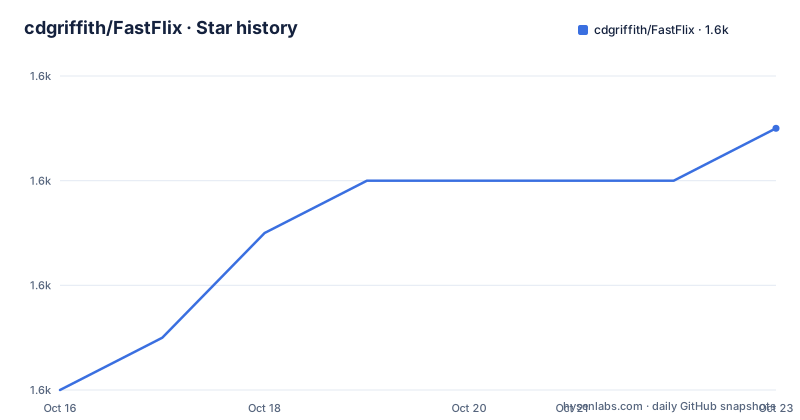
Star history
- cdgriffith/FastFlix1,587 ★ · +5
| Repository | 2026-10-16 | 2026-10-23 |
|---|---|---|
| cdgriffith/FastFlix | 1.6k | 1.6k |
5 Stars in the last 7 days, measured from the daily GitHub snapshot. Compare with other projects
Editorial analysis
FastFlix does the command line, FFmpeg does the encoding
The first thing to be clear about is that FastFlix is not an encoder. It is described as a handy GUI for encoding videos, and the documentation says up front that it needs FFmpeg under the hood for the heavy lifting, with version 4.3 or greater required and 5.0 or newer recommended.
That division of labour is the entire architecture. FastFlix takes the settings you choose in a window, works out the right encoder and the right flags for those settings, and hands the job to FFmpeg. The GUI does not contain a codec, and there is no path where it produces a file FFmpeg could not. The practical upshot is that the ceiling on what you can encode is set by your FFmpeg build and your hardware, not by the application.
The dependency list in the project manifest confirms the shape of the thing. It is a Python application built on pyside6, pinned to a specific version, with pydantic for data validation, colorama and coloredlogs for terminal output, platformdirs for per platform directories, and psutil for process information. There is a ffmpeg-normalize dependency for the normalisation path, pytesseract and opencv-python for the subtitle and image work, pgsrip and pysrt for subtitle handling, and requests for network access. Python 3.13 or newer is required.
There is a console entry point declared in the manifest, which means the application can also be launched as a command:
[project.scripts]
fastflix = "fastflix.__main__:start_fastflix"
For most people though, the relevant download is the release build. The documentation points to the latest release on the project GitHub, and the repository carries several Windows packaging specifications, including an NSIS installer script and separate one-file builds, so a plain install is available for the platform the author develops on.
The encoder table is really a table of what your FFmpeg can do
The documentation presents the encoder support as a set of tables, and the tables are worth reading carefully because their meaning is unusual.
The software encoder table covers x265, x264, rav1e, AOM AV1, SVT AV1, VP9 and VVC, with rows for HDR10, HDR10+, audio, subtitles, covers and bt.2020. The critical note under it is that if one of those software encoders is not listed for a given capability, it is because your version of FFmpeg does not have that encoder compiled in. The table is therefore a statement about your local FFmpeg build as much as about FastFlix.
The hardware tables are narrower and more specific. NVEncC for Nvidia, QSVEncC for Intel, and VCEEncC for AMD, and the documentation notes that most of these come from rigaya's hardware encoder projects, which must be downloaded separately, extracted to a directory of your choice, and then linked to in the FastFlix settings panel. That last step is manual, and it is the part most likely to catch someone out.
The AV1 section has a hard requirement stated in prose: AV1 is only supported on the latest generation of graphics cards, specifically the Intel Arc, the Nvidia 4000 series and the AMD 7000 series. Anything older and the row in the table simply is not available to you.
The HEVC and H.264 tables show the same pattern with a different emphasis. NVENC HEVC through plain FFmpeg has no HDR10 or HDR10+ row filled, while the rigaya based NVEncC, VCEEncC and QSVEncC columns do, and covers are listed only for the plain FFmpeg NVENC HEVC column. The Apple VideoToolbox table for macOS lists only H.264 and HEVC, with audio and subtitles supported and no HDR rows. Read those tables as a per encoder capability list, because the differences between neighbouring columns are the actual operational content.
Running from source is a Python packaging exercise
The project is packaged with setuptools and setuptools_scm, which means the version number is derived from the git tags rather than written into the source. The manifest points the dynamic version attribute at a version module inside the package:
[tool.setuptools.dynamic]
version = { attr = "fastflix.version.__version__" }
The build backend is declared as setuptools.build_meta with wheel and setuptools_scm as requirements, and the package discovery is limited to the fastflix directory. There is a separate package data entry that ships the interface assets alongside the code, which is worth noting because it means a source install carries the icons, stylesheets and yaml configuration with it:
[tool.setuptools.package-data]
"*" = ['*.yaml', '*.ico', '*.svg', '*.png', '*.qss']
The development tooling is modern and mostly declarative. The dev dependency group lists pytest, ruff for linting, pre-commit, pyinstaller for building the one file executables, and type stubs for requests and setuptools. A uv.lock file is present at the top level, so a uv based workflow is at least supported, and there is a pre-commit configuration and an isort configuration alongside a .pre-commit-config.yaml.
The repository layout is consistent with a desktop application rather than a library. There is a fastflix package directory, a tests directory, a scripts directory, a docs directory holding the preview image, and a CHANGES file that acts as the changelog. The Windows packaging is spelled out in a separate WINDOWS_BUILD.md document and in the spec files, which is where you would look for the exact build recipe rather than in the general documentation.
The real limitation is what your FFmpeg was compiled with
FastFlix will happily present an encoder in its interface that your installed FFmpeg cannot execute, and the failure will surface as an FFmpeg error rather than as a disabled option. The documentation handles this by pushing the responsibility outward with the note about compiled in encoders, and that is a real constraint for anyone who installs FFmpeg from a minimal package or a homebrew bottle built without some codecs.
The second constraint is the separate rigaya download. NVEncC, QSVEncC and VCEEncC are not bundled. You fetch them, extract them somewhere, and point the settings panel at the directory. The payoff is HDR10 and HDR10+ support and cover handling in the HEVC columns that plain FFmpeg does not fill, and audio handling in the AVC column where the hardware encoders otherwise leave it blank. The cost is a manual setup step that a user doing a one-off encode may not want.
Third, there is a platform asymmetry. The Windows path is the most complete, with an installer script, one-file specifications and a dedicated build document. The macOS path relies on the built in VideoToolbox encoders, which the tables show covering H.264 and HEVC with audio and subtitles but no HDR rows, so a Mac user with a colour grading workflow is limited to software encoding for HDR. The Linux path exists through VAAPI, which the documentation lists alongside the three vendor encoders as requiring compatible hardware.
None of this makes FastFlix a bad tool, but it does mean the application is a convenience layer over a toolchain you already have to assemble, and that the quality of the outcome is bounded by the parts you assembled.
Compared with writing the FFmpeg command by hand
The honest comparison is not against another GUI. It is against typing the command yourself, because that is the alternative most people actually have.
Writing the command by hand gives you complete control over every flag, in an order you choose, and it has no learning curve if you already know FFmpeg. It also has no memory: the flag that sets the bitrate, the flag that sets the preset, the flag that maps the tone curve, the flag that moves the subtitles, and the difference between the two muxers all have to be remembered or looked up. People who encode regularly keep a notes file for exactly this reason.
FastFlix turns those flags into form fields. The documentation shows a preview image of the interface and a linked wiki for details, so the specific layout is something to check, but the design intent is stated plainly in the description: a free GUI for H.264, HEVC and AV1 hardware and software encoding, and a tool that works with a variety of encoders. The value is in removing the flag recall, not in adding capability.
The comparison with a service based encoder is less favourable, and worth naming. There is no cloud submission, no queue, no per file web interface, and no schedule. This is a local application that drives a local FFmpeg. If your need is an automated transcode pipeline triggered by a webhook or a nightly job, the right shape of tool is a script wrapping FFmpeg directly, and FastFlix will not fit it. There is also no automatic target quality mode described, so the workflow stays hands on: you set the parameters and watch the progress.
MIT licence, current releases, and an active but dated development record
The licence is MIT, which is the permissive end of the scale and removes any question about embedding FastFlix in a commercial workflow or redistributing a modified build.
The release record shows a project in the middle of its 6.x line. Version 6.2.0 and 6.2.1 both landed on 2026-03-21, and 6.1.1 came a month earlier on 2026-02-22. The last push to the repository was on 2026-10-22, and the repository is not archived. So the code is being worked on and the releases are recent relative to a normal desktop application, but the development record is a few months old rather than continuous.
That matters more than usual here, because FFmpeg moves. A build of FastFlix that was current a year ago may be paired with an FFmpeg that has since added or changed an encoder, and the mismatch shows up as a failed command rather than as a warning. The prudent approach is to take the current release rather than an old installer, and to keep the FFmpeg version near the recommended one.
The repository also carries a CLAUDE.md file, a.claude directory, an AUTHORS file, a CNAME file for a custom domain, and a _config.yml, which suggests a GitHub Pages site for the documentation. The CHANGES file is the changelog to read before upgrading, and the project GitHub wiki is where the documentation says to look for help and further detail. Bug reports go to the issue tracker.
Editorial conclusion
FastFlix fits a person who knows roughly what an encode should look like and does not want to memorise encoder flags, and it earns its place most clearly on a machine with a supported GPU where a software encode of the same file would take hours. It does not fit someone who wants an automatic quality target, an unattended batch queue, or a service running on a server. Before adopting it, confirm that your FFmpeg build actually contains the encoders you need, because the documentation is explicit that a missing encoder in the table means your FFmpeg lacks it rather than that FastFlix omits it, and check that the separate rigaya hardware encoder downloads are acceptable in your environment, since they must be fetched and linked by hand in the settings panel.
Frequently asked questions
What does FastFlix do and what does it need?
FastFlix is a desktop GUI that builds FFmpeg commands for H.264, HEVC and AV1 encoding, software or hardware. It requires FFmpeg under the hood, version 4.3 or greater, with 5.0 or newer recommended.
Does FastFlix support hardware encoding?
Yes. It supports NVEnc for Nvidia, QSVEnc for Intel, VCEEnc for AMD, VAAPI on Linux and Apple VideoToolbox on macOS. Most of the Nvidia, Intel and AMD encoders come from rigaya's projects and must be downloaded separately and linked in the FastFlix settings panel.
Which cards can do AV1 encoding in FastFlix?
The documentation states that AV1 is only supported on the latest generation of graphics cards, specifically the Intel Arc, the Nvidia 4000 series and the AMD 7000 series.
How do I install FastFlix?
The simplest route is the latest release from the project GitHub, which includes Windows installer and one-file builds. From source the project is a Python package requiring Python 3.13 or newer, with a console entry point named fastflix and a dev workflow built on pytest, ruff and pre-commit.
What licence does FastFlix use?
FastFlix is released under the MIT licence, with copyright held by the project author Chris Griffith, and the repository contains a LICENSE file alongside an AUTHORS file.
Official sources
Add this badge to your README
If you maintain this project, the badge below links readers to this analysis and shows its maintenance status from the daily GitHub snapshot. Paste the markdown into your README; add ?metric=license or ?metric=stars to the image URL for a different field.

[](https://hysenlabs.com/projects/cdgriffith-fastflix)Star history chart for your README
[](https://hysenlabs.com/projects/cdgriffith-fastflix)Was this useful?