clipmenu watches X11 selections and hands them to dmenu
Clipboard management using dmenu
At a glance
- What is it?
- clipmenu is a small C clipboard manager for X11 that stores copied text and serves it through dmenu, rofi, fzf or any other dmenu-compliant launcher. It suits a suckless style X11 desktop that wants a clipboard history without a heavyweight desktop daemon, and it is a X11 tool with no Wayland support.
- Who is it for?
- Adopt clipmenu if you run an X11 session with dmenu or a compatible launcher and want a clipboard history that stores text on disk without a full desktop clipboard service, and if you are comfortable editing clipmenu.conf and reading man pages. Do not adopt it as a Wayland clipboard manager or as a way to store images and rich content, since the mechanism is built around X11 selections and text.
- Can I use it commercially?
- Yes. MIT is a permissive licence: you can use, modify and sell software built on it, as long as you keep its copyright and licence notices.
- Is it still maintained?
- Activity is slowing. The repository last received commits 7 months ago.
- What is it written in?
- Mainly C, according to GitHub's language statistics.
Answers come from the project's GitHub data, last synced on November 7, 2026, and from our analysis. They are not legal advice.
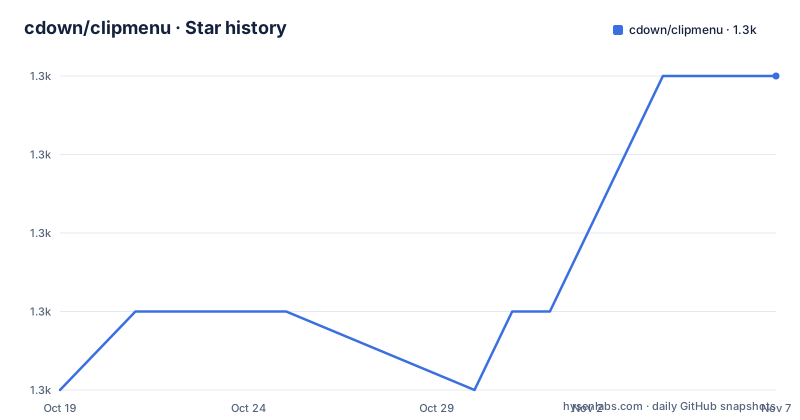
Star history
- cdown/clipmenu1,257 ★ · +4
| Repository | 2026-10-19 | 2026-11-07 |
|---|---|---|
| cdown/clipmenu | 1.3k | 1.3k |
4 Stars in the last 19 days, measured from the daily GitHub snapshot. Compare with other projects
Editorial analysis
The daemon watches XFixes, the client hands clips to a launcher
clipmenu is a clipboard manager using dmenu, rofi or something similar, written in C, and it is split into a daemon and a client that are each useful on their own.
The README describes the mechanism in two short lists. The daemon, clipmenud, passively monitors X11 clipboard selections, specifically PRIMARY, CLIPBOARD and SECONDARY, for changes using XFixes, with the note that there is no polling. When it detects a change it writes the contents out to storage and indexes them using a hash as the filename.
The client, clipmenu, reads the index to find all available clips, executes the configured launcher so the user can pick one, and after the selection puts the clip onto the PRIMARY and CLIPBOARD X selections.
That split is what makes the tool feel cheap. The expensive part, watching the clipboard, happens once in a long-lived daemon. The part you invoke on a keyboard shortcut is a read of the index plus a launcher, and the launcher does the drawing. Nothing in the design requires a compositor extension, a D-Bus service, or a settings application.
The three selections are worth knowing about individually. X11 has several clipboard buffers, and clipmenu watches all three, so a middle-click primary selection is captured the same way a Ctrl-C copy is, and both end up in the same history.
Six binaries ship in one package, including clipctl and clipserve
The README mentions clipmenud, clipmenu, clipdel, clipdelmenu and clipctl, and the Makefile shows the full set of installed binaries: clipctl, clipmenud, clipdel, clipdelmenu, clipserve and clipmenu.
The extras are what separate this from a two-file script. clipdel deletes clips and clipdelmenu does the same interactively through a launcher. clipctl enables or disables clipboard monitoring on the fly, so you can stop collecting when you are about to copy a secret and start again afterwards. clipserve appears in the Makefile's binary list and in its man page list, though the README does not describe what it does.
The configuration surface is wide. The README says the behaviour of clipmenud can be customised through a config file, and it lists examples: customising the maximum number of clips stored, which defaults to 1000; disabling clip collection temporarily with clipctl disable and reenabling with clipctl enable; deduplicating repeated clips so only the newest remains; not storing clipboard changes from certain applications, like password managers; and taking direct ownership of the clipboard.
That last set of options is the interesting part. Excluding password managers by application is a coarse but real mitigation for the fact that a clipboard history on disk is a liability, and taking direct ownership of the clipboard is the option that changes how the tool interacts with the X server rather than just what it stores. The full list of configuration variables and their environment variable equivalents is in man clipmenu.conf.
Every argument to clipmenu is passed straight through to dmenu
The launcher integration is deliberately transparent. The README states that all args passed to clipmenu are transparently dispatched to dmenu, so if you usually call dmenu with arguments to set colours and other properties, you can invoke clipmenu in exactly the same way. The example given is:
clipmenu -i -fn Terminus:size=8 -nb '#002b36' -nf '#839496' -sb '#073642' -sf '#93a1a1'One default can get in the way. By default, clipmenu also adds dmenu-compatible defaults such as -p and -l, and if that conflicts with a custom launcher you set launcher_pass_dmenu_args to 0 in clipmenu.conf.
The launcher is not limited to dmenu. The README says any dmenu-compliant application will work, and it lists the CM_LAUNCHER configurations that are known to work: dmenu, which is the default, fzf, and rofi. Using fzf or rofi means the selection UI is a fuzzy finder rather than a dmenu, and since arguments are forwarded, the same colour flags would apply to whichever program ends up reading them.
For the X11 session setup there is a specific gotcha. If you start X via startx or xinit and use the systemd user service, you need $DISPLAY set so clipmenud knows which X server to use. Most distributions include scripts in /etc/X11/xinit/xinitrc.d/ for this, so if they are present you can usually just source them in your ~/.xinitrc, or run systemctl --user import-environment DISPLAY before launching the service.
Building from source needs X11 and XFixes headers and a strict warning set
Several distributions, including Arch and Nix, package clipmenu officially under the name clipmenu. If your distribution does not, the README suggests manual installation with make install, and adds a parenthetical that suggests creating a package for your distribution instead.
The Makefile is a plain, readable one, which suits a project this size. Compilation flags are strict:
CFLAGS := -std=gnu11 -O2 -Wall -Wextra -Wshadow -Wpointer-arith \
	  -Wcast-align -Wmissing-prototypes -Wstrict-overflow -Wformat=2 \
	  -Wwrite-strings -Warray-bounds -Wstrict-prototypes \
	  -Wno-maybe-uninitialized \
	  -Werror $(CFLAGS)
CPPFLAGS += -I/usr/X11R6/include -L/usr/X11R6/lib
LDLIBS += -lX11 -lXfixes
PREFIX ?= /usr/local
The -Werror flag means the build fails on any warning, which is why the CFLAGS variable is written to include itself at the end, letting you append your own flags from the environment without losing the defaults. The two libraries that matter are X11 and Xfixes, and the include and library paths default to /usr/X11R6, so a distribution with the headers under /usr/include/X11 needs CPPFLAGS adjusted.
There is a debug target that swaps in a different flag set: -D_FORTIFY_SOURCE=2, the leak, address and undefined behaviour sanitizers, -Og, -ggdb, -fno-omit-frame-pointer and -fstack-protector-strong. The make install target installs the man pages, the six binaries into $(PREFIX)/bin, and generates a systemd user service from init/clipmenud.service.in, substituting the bindir path into it. The default PREFIX is /usr/local, and DESTDIR is honoured for packaging.
No GitHub releases, and the last push was on 2026-04-03
clipmenu has no GitHub releases. The README describes it as a simple clipboard manager, and the topics attached to the repository list suckless alongside clipboard management, dmenu and simple. The default branch is develop rather than master, which is the convention that lets a project keep stable releases on one branch and development on another.
The licence is MIT, with the LICENSE file at the repository root as the authoritative text. That is a permissive licence with no copyleft obligations, and this is a licensing statement rather than legal advice.
On maintenance, the facts are limited. The last push to the repository was on 2026-04-03, and the project publishes no tagged releases through GitHub, so the version you get is whatever your distribution packaged or whatever the tip of the branch contains. There is no changelog to consult, and no compatibility statement to read.
That does not make the project unsuitable. A clipboard manager that talks XFixes and dmenu is a small, stable surface, and the design has not changed in a way that would need documenting. But it does mean you should read the source and the man pages rather than assume a version matrix, and if you are packaging it yourself, the make install target and the systemd user service template are the pieces you will be maintaining.
The repository also has a tests/ directory alongside src/, man/, init/ and a .clang-format file, which tells you the code is formatted with clang-format and that there is some form of test harness in the tree.
The comparison is with a desktop clipboard service, not with another dmenu script
The realistic alternative to clipmenu is not another dmenu script. It is the clipboard service that ships with the desktop environment you already run, which keeps a history and presents it in a panel without you writing a config file.
The difference in approach is where each one wins. A desktop-provided clipboard manager runs inside the session's own service stack, so it already knows which application holds the selection, and it can draw the history with the same widget toolkit as the rest of the desktop. clipmenu is a standalone pair of binaries that treat the clipboard as text, store it on disk, and hand the decision back to a launcher you already run.
That design buys a specific advantage: no dependency on a desktop environment, and no dependency on a Wayland clipboard protocol, at the price of a text-only history and a Unix tool configuration model. The README documents the tool as working with dmenu, rofi or fzf, and the man pages carry the configuration. If your workflow is a keyboard-driven X11 session, that model fits. If you want images, rich text, or a history that spans applications with different clipboard semantics, a desktop service handles those better.
One more comparison matters, because it is a security property rather than a feature. Storing a clipboard history on disk means that whatever you copy, including a password you did not think of, persists in a file. clipmenu gives you the two mitigations it can give: the maximum number of clips, default 1000, which bounds growth, and the option to exclude clipboard changes from specific applications such as password managers. Neither is encryption, and the README does not describe any encryption of the stored clips.
Editorial conclusion
Adopt clipmenu if you run an X11 session with dmenu or a compatible launcher and want a clipboard history that stores text on disk without a full desktop clipboard service, and if you are comfortable editing clipmenu.conf and reading man pages. Do not adopt it as a Wayland clipboard manager or as a way to store images and rich content, since the mechanism is built around X11 selections and text. Before you build it, confirm you have the X11 and XFixes development headers on the include and library path the Makefile expects, decide which launcher to bind, and set launcher_pass_dmenu_args to 0 if the default dmenu arguments get in the way of your own colours.
Frequently asked questions
How do I install clipmenu and start the clipboard daemon?
Arch and Nix package clipmenu officially. Otherwise run make install from the source, which installs the binaries, the man pages and a systemd user service. Then start clipmenud and run clipmenu to pick a clip for the clipboard.
Can I use rofi or fzf instead of dmenu with clipmenu?
Yes. The README says any dmenu-compliant application works, and the known CM_LAUNCHER configurations are dmenu as the default, fzf, and rofi. All arguments passed to clipmenu are transparently dispatched to the launcher.
Why does clipmenud not find my X display when I use startx?
When X is started via startx or xinit, $DISPLAY has to be set so clipmenud knows which X server to use. You can source the scripts in /etc/X11/xinit/xinitrc.d/ from your ~/.xinitrc, or run systemctl --user import-environment DISPLAY before launching the service.
How do I stop clipmenu from collecting the clipboard temporarily?
Use clipctl disable to turn collection off and clipctl enable to turn it back on. The daemon can also be told not to store changes from certain applications such as password managers, and the maximum number of stored clips defaults to 1000.
Where is the list of clipmenu configuration options?
The README points to man clipmenu.conf for the full list of configuration variables and what they do, including their environment variable equivalents. The config file itself is clipmenu.conf, where options such as launcher_pass_dmenu_args are set.
Official sources
Add this badge to your README
If you maintain this project, the badge below links readers to this analysis and shows its maintenance status from the daily GitHub snapshot. Paste the markdown into your README; add ?metric=license or ?metric=stars to the image URL for a different field.

[](https://hysenlabs.com/projects/cdown-clipmenu)Star history chart for your README
[](https://hysenlabs.com/projects/cdown-clipmenu)Was this useful?