catimg: Terminal Image Rendering in C
🦦 Insanely fast image printing in your terminal
At a glance
- What is it?
- catimg renders JPEG, PNG, and GIF images in a color-capable terminal without dependencies. The C implementation favors rendering speed, while the earlier ImageMagick-based script is documented as more accurate for color but considerably slower.
- Who is it for?
- catimg suits developers and terminal users who want quick image display without installing ImageMagick. It is less suitable for color-critical inspection, image editing, or terminals that do not support the required text output.
- Can I use it commercially?
- Yes. MIT is a permissive licence: you can use, modify and sell software built on it, as long as you keep its copyright and licence notices.
- Is it still maintained?
- Yes. The repository last received commits 20 days ago.
- What is it written in?
- Mainly C, according to GitHub's language statistics.
Answers come from the project's GitHub data, last synced on November 7, 2026, and from our analysis. They are not legal advice.
Star history
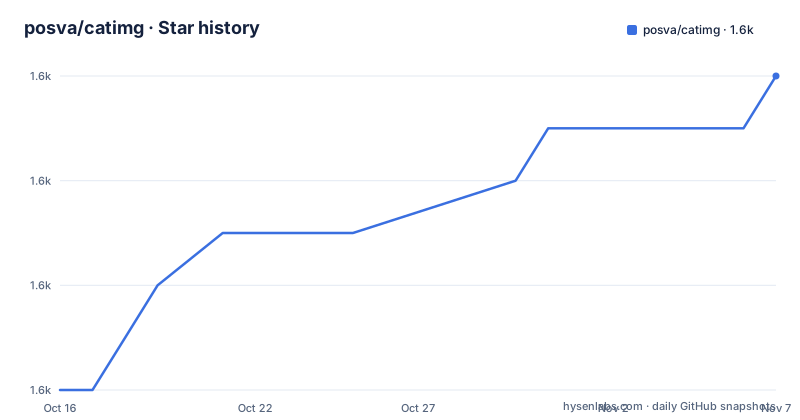
- posva/catimg1,588 ★ · +6
| Repository | 2026-10-16 | 2026-11-07 |
|---|---|---|
| posva/catimg | 1.6k | 1.6k |
6 Stars in the last 22 days, measured from the daily GitHub snapshot. Compare with other projects
Editorial analysis
Why catimg Exists for Shell Users
catimg addresses a specific problem: viewing a raster image while working inside a terminal. It is for users who want to inspect a picture during a shell session without leaving the command line for a graphical viewer. The README identifies JPEG, PNG, and GIF as the supported formats. That is a deliberately bounded format list, not a claim that every image type or every image-processing operation is covered.
The repository description presents catimg as an image-printing utility for the terminal. Its current implementation is written in C and is documented as having no dependencies. This sets it apart from the project's original shell script, which used ImageMagick's `convert`. The native program is aimed at users who prioritize quick output and a small runtime dependency footprint.
Catimg does not occupy the same role as an image editor or asset-management application. The README does not describe cropping, resizing exports, color correction, metadata inspection, or conversion pipelines. Its likely working unit is the terminal display itself. For remote shells, minimal containers, and command-line environments, removing the ImageMagick dependency can matter, although the program still depends on terminal capabilities such as Unicode character support and 256-color output for the documented rendering mode.
How catimg Turns Images into Terminal Cells
Catimg's rendering approach is based on text rather than a graphical window. The README states that the program uses Unicode characters to attempt a higher-resolution appearance. It also documents the `-r` option for forcing the resolution. These details indicate that output quality is tied to terminal cell geometry and glyph density rather than to actual terminal pixels alone.
A terminal divides its drawing area into character cells. Catimg can use different characters and colors within those cells to approximate the source image. A denser selection of block-like Unicode characters can represent smaller spatial detail than a sparse character grid, but the exact result depends on the terminal font, cell dimensions, color handling, and glyph coverage. The same invocation can therefore look different across terminal emulators.
The README does not expose the decoder pipeline, internal image scaling algorithm, color quantization method, or handling of transparency and animation. Repository entries including `src/`, `CMakeLists.txt`, and `test-images/` show that the project has source code, a build definition, and test assets, but their presence alone does not establish support for particular edge cases.
The documented format scope remains the dependable boundary. JPEG, PNG, and GIF are named directly. Readers should not infer TIFF, WebP, BMP, HEIF, SVG, or additional animation controls from the repository topic list. Likewise, the README does not state whether a GIF animation is played, paused, or reduced to a frame. Those behaviors need confirmation from the bundled man pages or source before depending on them.
Installing catimg with Package Managers or CMake
The README offers installation commands for Homebrew, Arch Linux, Fedora 25 and later, and source builds. On macOS systems using Homebrew, the documented package command is:
brew install catimgAfter Homebrew completes the installation, the `catimg` executable should be available to the shell. The README does not document an initial rendering command using a named file, so it should not be reconstructed with an invented flag. The repository's `man/` directory is the appropriate documented source for invocation details in the installed version.
For Arch Linux, the README specifically names `yaourt`:
yaourt -S catimgThis command is presented as the project's documented Arch Linux installation path. The README does not provide installation commands for current Arch Linux packages, pacman repositories, or alternative AUR helpers.
For Fedora 25 and later, the documented command is:
dnf -y install catimgA successful package installation should place `catimg` on the user's executable path, subject to the system package configuration. The README does not give a Fedora verification command or expected first image output.
Users who prefer a source build can follow the two commands documented under Building:
cmake .
make install
The first command configures the build in the current source directory. The second installs the resulting program, although the README does not name the destination directory, required privileges, generated binary path, or installation configuration flags. Because installation location and file completion details are absent, users doing a manual build should inspect the `CMakeLists.txt` file rather than assume defaults that the project has not documented.
Resolution Control and the Limits of Terminal Accuracy
The main rendering control identified in the README is `-r`, which forces terminal resolution. This is relevant when automatic Unicode-based rendering does not suit a particular terminal or when a user wants a predictable character-grid density. The README includes visual examples for high-resolution and low-resolution output, but it does not state the accepted values, units, valid ranges, default setting, or whether higher numeric values mean smaller character cells.
That missing command detail is important. The option name alone confirms that resolution can be forced, but it does not establish an exact invocation that can safely be copied into a tutorial. The repository includes a `man/` directory and a `completion/` directory. Those entries suggest dedicated command documentation and shell-completion resources, but the README does not describe their contents enough to quote flags or completion behavior as confirmed facts.
Catimg also makes a clear trade-off between speed and color accuracy. The README says the original script is much more accurate for color, but it is considerably slower. It describes the C version as very fast in the repository description. The design therefore favors responsiveness and native execution over the more accurate color behavior attributed to the script.
This trade-off limits where catimg should be used. It is suitable when the goal is to see an approximate picture promptly in a shell. It is not suitable when every color transition must be judged precisely. Terminal rendering also depends on font design and emulator behavior, so source-image pixels cannot be assumed to map one-to-one to displayed pixels. The README does not provide a calibration model, objective color-difference metric, or compatibility matrix for terminal emulators.
Script, Native Renderer, and the ImageMagick Boundary
The original catimg script offers a genuinely different approach from the current C implementation. According to the README, that script uses ImageMagick and lists a specific dependency version: ImageMagick 6.6.0-4 2012-08-17 Q16. The documentation says earlier versions were not tested. It also requires a shell with 256-color support.
The README's script dependency section shows an example Bash shebang and says it can be changed to match the user's shell:
#!/usr/bin/env bashFor OS X, the documentation says the Bash version may need to be updated using Homebrew or another method. This is a script setup issue rather than a documented requirement imposed on the C binary. Conflating the two implementations would produce the wrong adoption decision: a user choosing the native program should not assume the ImageMagick and shell setup documented for the historical script.
The practical difference is straightforward. The script delegates image handling to ImageMagick `convert`, and the README describes it as slower but more accurate for color. The C implementation is described as having no dependencies and as extremely fast. A user who already has the required ImageMagick environment and needs closer color reproduction may prefer the script. A user who wants a native renderer without ImageMagick is the clearer audience for the C program.
The README does not say that both implementations are shipped as equivalent front ends in the current repository, nor does it describe feature parity beyond the color-accuracy and performance comparison. Users selecting the script should therefore verify its current location and compatibility in the repository rather than assume that package-manager commands for `catimg` install the script.
Maintenance, License, and Upgrade Boundaries
The repository is not archived. Its last push was on 2026-04-07. The recorded release list includes `v2.8.0` dated 2025-11-26, `2.7.0` dated 2020-09-08, and `2.6.0` dated 2019-06-30. These dates establish recent repository and release activity, but they do not amount to a published support policy or a promise that every platform receives simultaneous updates.
The release gaps also limit conclusions about upgrade cadence. The listed versions do not form a regular sequence across the available dates, and the README does not define a long-term support branch, compatibility guarantee, or migration guide. Upgrade planning must therefore account for the gap between `2.7.0` and `v2.8.0` rather than assuming a fixed release interval.
Catimg is distributed under the MIT License. The README links to the MIT License and identifies Eduardo San Martin Morote as the copyright holder. The repository's `LICENSE` file is the authoritative text for its notice, permission, and disclaimer terms. Code reuse, redistribution, and packaging should be checked against that file. This review does not provide legal advice.
Catimg is a sensible fit for quick terminal viewing when approximate color and geometry are acceptable. It is the wrong choice for precision color inspection, advanced editing, or environments lacking 256-color or Unicode support. The immediate adoption check should remain specific: use the documented package command for the target system or run `cmake .` and `make install`, then inspect `man/` for the installed command syntax and test a known JPEG, PNG, or GIF file in the intended terminal.
Editorial conclusion
catimg suits developers and terminal users who want quick image display without installing ImageMagick. It is less suitable for color-critical inspection, image editing, or terminals that do not support the required text output. Before adopting it, verify installation through the listed package manager or CMake build, consult the bundled `man/` documentation for the installed version's invocation syntax, and render a known image in the target terminal. Under the stated MIT license, distributions must also preserve the applicable license notice and disclaimer.
Frequently asked questions
Which image formats does catimg support?
The README states that catimg supports JPEG, PNG, and GIF. It does not document additional image formats.
Does the catimg C program require ImageMagick?
No. The README describes the C implementation as having no dependencies. ImageMagick 6.6.0-4 2012-08-17 Q16 is listed as a dependency for the earlier script version.
How do I install and build catimg?
The README lists package-manager commands for Homebrew, Arch Linux through `yaourt`, and Fedora 25 and later. Its source build uses `cmake .` followed by `make install`.
Official sources
Add this badge to your README
If you maintain this project, the badge below links readers to this analysis and shows its maintenance status from the daily GitHub snapshot. Paste the markdown into your README; add ?metric=license or ?metric=stars to the image URL for a different field.

[](https://hysenlabs.com/projects/posva-catimg)Star history chart for your README
[](https://hysenlabs.com/projects/posva-catimg)Was this useful?