Chaos Toolkit: running chaos engineering experiments across platforms through an extension model
Chaos Engineering Toolkit & Orchestration for Developers
At a glance
- What is it?
- Chaos Toolkit is an Apache-2.0 Python CLI that reads experiment documents in JSON format and executes them against any target platform you connect through extensions. It works across cloud environments, datacenters and CI/CD pipelines, but every platform-specific action depends on extensions you install separately.
- Who is it for?
- Chaos Toolkit suits SRE and DevOps teams who want to define experiments as versioned documents, run them across cloud environments, datacenters and CI/CD, and share an extension ecosystem with other users. Skip it when you need a graphical interface, automated failure injection without writing experiment files, or a single-vendor SaaS that manages the chaos platform for you.
- Can I use it commercially?
- Yes. Apache-2.0 is a permissive licence: you can use, modify and sell software built on it, as long as you keep its copyright and licence notices.
- Is it still maintained?
- Yes. The repository last received commits 18 days ago.
- What is it written in?
- Mainly Python, according to GitHub's language statistics.
Answers come from the project's GitHub data, last synced on October 23, 2026, and from our analysis. They are not legal advice.
Star history
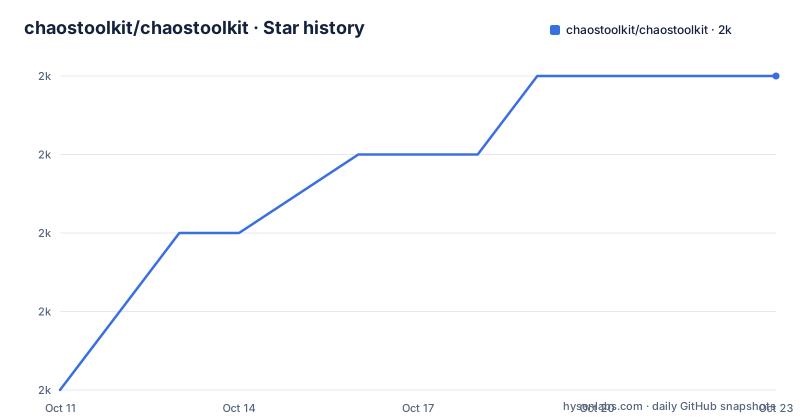
- chaostoolkit/chaostoolkit2,033 ★ · +4
| Repository | 2026-10-11 | 2026-10-23 |
|---|---|---|
| chaostoolkit/chaostoolkit | 2k | 2k |
4 Stars in the last 12 days, measured from the daily GitHub snapshot. Compare with other projects
Editorial analysis
Experiment documents as the unit of work, extensions as the only path to platforms
Chaos Toolkit, referred to as ctk in its own documentation, is a CLI-driven tool that reads chaos engineering experiments from JSON files and executes them. Each experiment tells the toolkit what steady-state to verify, what disruption to apply, and what to check afterward. The toolkit processes that document, calls into the extensions that cover each action, and produces a record of what happened.
The project's README describes three environment types where it fits when other chaos tools do not: cloud environments, datacenters and CI/CD pipelines. That positioning is about portability: the core toolkit carries no platform-specific logic at all. Every action against real infrastructure goes through an extension, and the index of existing extensions lives at chaostoolkit.org/drivers/overview/.
The CLI entry point is the chaos command, which is the only interface the project ships: no graphical interface, web dashboard or scheduler comes with the core toolkit. The documentation hub, tutorials and concept reference are at chaostoolkit.org, with the API reference at chaostoolkit.org/reference/concepts/ and the extensions directory at chaostoolkit.org/drivers/overview/.
Installing on Python 3.12 with uv or pip, then running chaos run experiment.json
The pyproject.toml sets requires-python at >=3.12 and classifies the project as Production/Stable. The README marks uv as the recommended install path:
$ uv tool install chaostoolkitFor environments where uv is not present, pip works:
$ pip install -U chaostoolkitThe package pulls in click>=8.0, click-plugins>=1.1, chaostoolkit-lib>=1.45.1, importlib-metadata>=6.0 and pyyaml>=6.0.1 as its direct dependencies. After installation, the chaos command is available and chaos --help prints the full option list for the version installed.
Running an experiment takes one command:
$ chaos run experiment.jsonBefore running, chaos validate experiment.json checks the document against the schema without executing anything. Validation is the step to add to CI on commit, so a malformed experiment does not make it to a run in a production environment.
A container option exists as well. The Dockerfile in the repository builds from python:3.14-alpine3.23 and copies uv 0.9.13 from ghcr.io/astral-sh/uv. It installs a pinned chaostoolkit version via pip install chaostoolkit==${ctkversion}, sets WORKDIR to /home/svc, and uses chaos as its ENTRYPOINT with --help as the default CMD.
Per-experiment Python environments through runtime.python declarations
A significant feature in recent versions is the ability for an experiment document to declare its own Python version and dependencies. The README shows the YAML form inside an experiment file:
runtime:
  python:
    version: "3.14"
    dependencies:
      - chaostoolkit-kubernetes>=0.38
When chaos run or chaos validate encounters this block, it calls uv to prepare a Python environment with those exact packages, then runs the experiment in that environment. The current Chaos Toolkit installation and its environment are left untouched.
Two keys govern isolation behavior. Setting isolated to true creates a fully isolated run environment; that key defaults to false. Setting version selects the Python version and automatically enables isolation, so a version declaration implies isolation whether or not isolated appears explicitly.
This feature requires the uv executable on PATH, and without a runtime.python.dependencies declaration, the toolkit falls back to its earlier behavior and expects extensions to be installed in the same environment the toolkit itself runs in. Teams migrating from that model need to decide per experiment whether to declare dependencies explicitly or keep relying on the global install.
Extensions cover each platform; no platform support ships in the core
Everything ctk does against real infrastructure depends on an extension. The runtime.python example in the README uses chaostoolkit-kubernetes>=0.38 to cover Kubernetes. Any other target, AWS, GCP, an internal service, or a specific database, requires its own extension. The core toolkit is small by design: click, click-plugins, chaostoolkit-lib, importlib-metadata and pyyaml are its only runtime dependencies.
That keeps the core stable but shifts quality responsibility to each extension. An extension that lags behind a cloud API update or a Kubernetes API version breaks experiments that depend on it, and the core toolkit has no fallback. Checking chaostoolkit.org/drivers/overview/ before adopting ctk for a specific platform is the only way to confirm that an extension exists and is actively developed.
The classifiers in pyproject.toml list Python 3.12, 3.13 and 3.14 as supported versions. An experiment that pins its runtime to a version outside that range may encounter behavior not covered by the project's own test matrix, which runs against those three versions.
Remote experiment documents and the two-fetch constraint
Experiments can live at a remote URL rather than a local file path. For remote sources, any controls needed to fetch or load the experiment must already be installed in the base Chaos Toolkit environment before the runtime is prepared. That requirement exists because of how remote experiments work: the toolkit fetches the document once to discover its runtime.python dependencies, prepares the environment, and then fetches the document again inside that runtime to execute it.
That two-fetch pattern has a concrete implication. If the document at the remote URL changes between the first and second fetch, the dependencies discovered in the first pass may not match what the second pass runs. The README states plainly that remote experiment documents should be immutable or versioned for this reason.
A mutable URL, such as an S3 path that always serves a latest version or a short URL that redirects, creates a race condition between the two fetches. Pinning to a specific object version or content hash before each run is the way to close that gap.
No dashboard or GUI, and the extension maintenance gap as a dependency risk
The toolkit is a CLI and a document format. No metrics collection, no result visualization, no alert integration and no graphical interface ships with it. Terminal output during a run is what you get. Teams who want to track experiment results over time or feed them into an observability platform build that integration themselves, separate from the toolkit.
The extension model creates a dependency risk that direct-scripting approaches do not have. With a shell script that kills a process or drops network traffic, the only dependencies are the shell and the system tools it calls. With Chaos Toolkit, you manage the toolkit version, each extension version and the target platform's API version as three separate tracks that must stay compatible.
For teams who run chaos experiments rarely or against a single well-understood service, plain scripts or one-off failure injection through platform CLI tools is a real alternative. That approach produces no reusable document, no shared format for recording what steady state was verified, and no extension ecosystem to draw from, but it also carries no framework overhead and no Python environment to manage.
Version 1.21.4 from 2026-10-05, Apache-2.0 license and Developer Certificate of Origin for contributors
Three releases landed on 2026-10-05: 1.21.4, 1.21.3 and 1.21.2. CHANGELOG.md at the repository root tracks the history. The release pace in that single day shows an active project, and the last push to master was on 2026-10-05. The pyproject.toml's Development Status classifier reads 5 - Production/Stable.
The license is Apache-2.0, stated in both the pyproject.toml license field and the repository metadata. Contributing to the project requires signing a Developer Certificate of Origin on each commit intended for the master branch. The README links to github.com/probot/dco#how-it-works for the mechanism.
The development environment uses PDM. Contributors run pdm install to set it up, then pdm run test, pdm run format and pdm run lint to work through quality checks. Formatting and linting use ruff. Each code change needs an entry in CHANGELOG.md and unit tests that cover the proposed changes. Community discussion happens in the Slack workspace linked from the README, with GitHub issues and email to [email protected] as additional channels.
Editorial conclusion
Chaos Toolkit suits SRE and DevOps teams who want to define experiments as versioned documents, run them across cloud environments, datacenters and CI/CD, and share an extension ecosystem with other users. Skip it when you need a graphical interface, automated failure injection without writing experiment files, or a single-vendor SaaS that manages the chaos platform for you. Before adopting, check chaostoolkit.org/drivers/overview/ to confirm extensions exist for every platform you intend to target, and verify that uv is available in your CI environment if you plan to use the runtime.python feature for per-experiment dependencies.
Frequently asked questions
What is Chaos Toolkit used for?
Chaos Toolkit is a CLI that reads chaos engineering experiments from JSON documents and executes them against target platforms through extensions. It is used to verify that systems recover from failures in cloud environments, datacenters and CI/CD pipelines.
How do I install Chaos Toolkit?
The README recommends uv tool install chaostoolkit on Python 3.12 or newer. pip install -U chaostoolkit also works. Platform support requires separate extension packages installed alongside the core.
Does Chaos Toolkit support Kubernetes?
Kubernetes support requires the chaostoolkit-kubernetes extension. The README shows it declared as chaostoolkit-kubernetes>=0.38 in a runtime.python dependencies block. The extensions directory at chaostoolkit.org/drivers/overview/ lists the available platform extensions.
What Python version does Chaos Toolkit require?
The pyproject.toml sets requires-python at >=3.12. The classifier list covers Python 3.12, 3.13 and 3.14.
Is Chaos Toolkit open source?
Yes. The license is Apache-2.0, stated in the pyproject.toml and the repository metadata. Contributors are required to sign a Developer Certificate of Origin on each commit they submit for merge.
Official sources
Add this badge to your README
If you maintain this project, the badge below links readers to this analysis and shows its maintenance status from the daily GitHub snapshot. Paste the markdown into your README; add ?metric=license or ?metric=stars to the image URL for a different field.

[](https://hysenlabs.com/projects/chaostoolkit-chaostoolkit)Star history chart for your README
[](https://hysenlabs.com/projects/chaostoolkit-chaostoolkit)Was this useful?