Conductor OSS: A Local-First Control Surface for AI Coding Agents
Local-first control surface for AI coding agents, workspaces, worktrees, terminals, diffs, previews, and paired-device access.
At a glance
- What is it?
- Conductor OSS is a Rust-based dashboard and launcher that runs Claude Code, Codex, and other coding CLIs in isolated git worktrees on your own machine, with an optional bridge for remote access. It is not a cloud IDE or a sandbox, and it depends on Node.js for installation.
- Who is it for?
- Adopt Conductor OSS if you want a vendor-neutral, local-first dashboard that keeps your repos and agent sessions on your own machine, and you are comfortable with Node.js and Rust backends. Do not adopt it if you expect OS-level sandboxing or a fully hosted cloud IDE.
- Can I use it commercially?
- Yes. Apache-2.0 is a permissive licence: you can use, modify and sell software built on it, as long as you keep its copyright and licence notices.
- Is it still maintained?
- Yes. The repository last received commits 3 days ago.
- What is it written in?
- Mainly Rust, according to GitHub's language statistics.
Answers come from the project's GitHub data, last synced on October 22, 2026, and from our analysis. They are not legal advice.
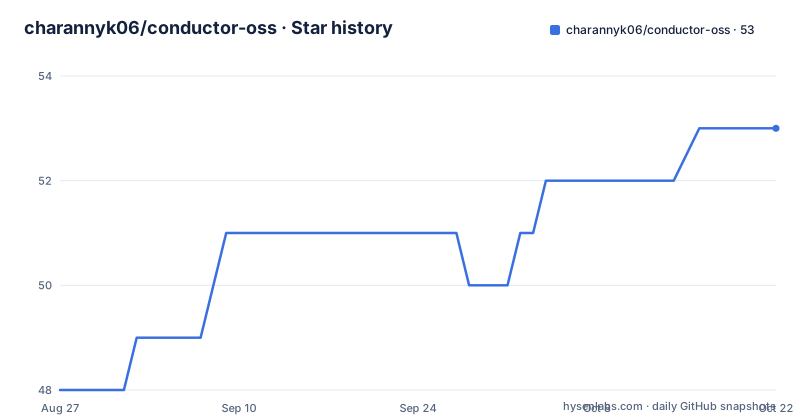
Star history
- charannyk06/conductor-oss53 ★ · +5
| Repository | 2026-08-27 | 2026-10-22 |
|---|---|---|
| charannyk06/conductor-oss | 48 | 53 |
5 Stars in the last 56 days, measured from the daily GitHub snapshot. Compare with other projects
Editorial analysis
What Conductor OSS Solves and Who It Is For
Conductor OSS addresses a specific pain: running AI coding agents like Claude Code, Codex, and Gemini in a way that is observable and controlled. Without a tool like this, you might launch an agent in a plain terminal, lose track of which git branch it is modifying, or struggle to review its diffs outside a chat interface. Conductor gives you a dashboard that links workspaces, launches agents in isolated git worktrees, and shows live terminal output, diffs, previews, and reviewer feedback in one place. It is for developers who already use these coding CLIs and want a local-first layer that does not send their code to a cloud service. The README is explicit that it is not a replacement model provider, not a hosted cloud IDE, and not a fake browser chat wrapper. The target user is someone who values keeping repos and terminals on their own machine but wants a richer control surface than a raw shell.
The Architecture: PTYs, Worktrees, and SQLite
The core mechanism is a Rust backend that manages sessions, backed by SQLite for local state. Conductor sits between your repos and the coding CLIs. It uses real first-party PTYs, meaning the terminal you see in the dashboard is the actual terminal session, not a simulated output. This matters for reconnects, resize events, and mobile terminal behavior, which the documentation says act like a real terminal session. Git worktrees are used to separate concurrent sessions so that two agents do not stomp on each other's changes. The state layer is stored in normal local files: `conductor.yaml`, `CONDUCTOR.md`, and `.conductor/conductor.db`. This design keeps everything on your machine, with the optional paired-device bridge as the only remote component. The bridge allows a hosted dashboard to reach your local runtime, but the actual work still runs on your machine. This is a key architectural choice: the dashboard is a frontend, the backend is local, and the bridge is a relay, not a cloud execution environment.
Getting It Running: Commands and Config
The quickest start is via npx, which requires Node.js 20.9.0 or newer. From inside a repo, you run `npx --yes --registry=https://registry.npmjs.org conductor-oss@latest init` to scaffold `conductor.yaml` and `CONDUCTOR.md`, then `npx --yes --registry=https://registry.npmjs.org conductor-oss@latest start --workspace . --open` to launch the dashboard. Alternatively, you can install globally with `npm install -g conductor-oss` and then use the `co` alias, for example `co start --open`. A guided setup is available via `co setup`. If you do not pass a workspace, the launcher defaults to `~/.openclaw/workspace`. For remote access, the README shows a curl installer for the paired-device bridge: `curl -fsSL https://app.conductross.com/bridge/install.sh | sh -s -- --connect --dashboard-url https://app.conductross.com --relay-url https://relay.conductross.com/`. Windows PowerShell is also supported. The CLI commands are straightforward, but note the explicit npm registry URL, which may be a workaround for a package name conflict or registry issue.
The Workflow: From Workspace to Session Review
The user flow starts with adding a workspace, either a GitHub repo you have access to or a local folder. Conductor links the workspace and scaffolds state. Then you start or resume agent sessions. The session detail page has four surfaces: Terminal, Overview, Preview, and Diff. Terminal is the live PTY, Overview shows normalized state and recovery actions, Preview shows dev server URLs when available, and Diff shows file changes. You can send feedback, retry, restore, or clean up from the dashboard. The README also describes a Markdown board in `CONDUCTOR.md` with a task lifecycle: Inbox, Ready to Dispatch, Dispatching, In Progress, Review, Done. This board is optional; you can skip it and launch sessions directly with the CLI using `co spawn`. This workflow is concrete and seems designed for iterative agent use, where you watch the terminal, review diffs, and provide feedback without leaving the dashboard.
Limitations and Failure Modes
The README is honest about what Conductor is not. It is not an operating-system sandbox. Worktrees separate Git changes, but agents run with the permissions of your local account. This is a real limitation: if an agent goes rogue, it can modify files outside the worktree. The optional automatic permission mode is described as an explicit trust decision, which means you must consciously accept broad local execution. Another failure mode is remote access. The README warns that if you only forward a local dashboard port from a remote VM, Conductor will treat that as remote access and block it unless you add an identity layer. You must either pair the machine with the hosted dashboard or put your self-hosted dashboard behind Clerk or Cloudflare Access. This is a deliberate security boundary, but it adds friction for users who want simple port forwarding. Also, the launcher requires Node.js, which may be a hurdle in minimal environments, and native backends are only provided for macOS, Linux x64, and Windows x64; other platforms require a source build.
Alternatives and How They Differ
The obvious alternative is to run coding agents directly in your own terminal without any dashboard. That approach gives you full control but no worktree management, no centralized diff review, and no remote access. Tools like tmux or screen can multiplex terminals, but they do not provide a web dashboard or a git worktree manager. Another alternative is a hosted cloud IDE that integrates with agents, but that contradicts the local-first principle. The key difference with Conductor is the paired-device bridge: it allows a hosted dashboard to reach your local machine without storing code in the cloud. This is a unique approach compared to pure local tools or pure cloud IDEs. If you need a simple, no-dependency way to watch an agent, a plain terminal is lighter. If you need a full cloud environment, a hosted IDE is different. Conductor sits in between, and its value depends on whether you need the worktree isolation and the bridge.
Maintenance and License Considerations
The project is licensed under Apache-2.0, which is permissive and allows commercial use, modification, and distribution, provided you preserve license notices. The repository is active, with recent releases like v0.62.8 in August 2026, suggesting ongoing maintenance. However, the README does not document an upgrade path or migration process. Since state is stored in local files like `conductor.yaml` and `.conductor/conductor.db`, upgrades may involve schema changes, but there is no explicit note about this. The bridge install script and the hosted dashboard introduce a dependency on external services, which could change or disappear. You should verify that the relay service is reliable before depending on it for remote access. The npm package name `conductor-oss` is the official distribution channel, so you should trust that registry source. Overall, the license is favorable, but the maintenance cost depends on how quickly the project evolves and whether the hosted services remain stable.
Editorial conclusion
Adopt Conductor OSS if you want a vendor-neutral, local-first dashboard that keeps your repos and agent sessions on your own machine, and you are comfortable with Node.js and Rust backends. Do not adopt it if you expect OS-level sandboxing or a fully hosted cloud IDE. Before relying on it, verify that your agent's permission model matches your trust level, and test the paired-device bridge on your network to confirm the relay works as documented.
Frequently asked questions
What is Conductor oss?
A local-first control surface for coding agents, with a Rust backend and a web dashboard. It links a repository or local folder as a workspace, launches Claude Code, Codex or Gemini inside isolated git worktrees, shows their real terminals, and keeps state in a local database alongside a conductor.yaml and a CONDUCTOR.md file.
Can I use Claude Code with Conductor?
Yes. Claude Code, Codex and Gemini are the named supported CLIs, and each runs as itself in a real terminal rather than through a chat wrapper. Conductor uses a native PTY pipeline, so reconnects, resize events and restore behave like an ordinary terminal session.
What is Conductor UI?
A dashboard that starts with a workspace-first flow, where you link repositories before managing sessions. Each session page has four surfaces: the live terminal, an overview with normalised state and recovery actions, a preview showing project dev server URLs where available, and a diff view for file changes.
Official sources
Add this badge to your README
If you maintain this project, the badge below links readers to this analysis and shows its maintenance status from the daily GitHub snapshot. Paste the markdown into your README; add ?metric=license or ?metric=stars to the image URL for a different field.

[](https://hysenlabs.com/projects/charannyk06-conductor-oss)Star history chart for your README
[](https://hysenlabs.com/projects/charannyk06-conductor-oss)