PM Skills Marketplace counts 69 skills and 42 workflows across 9 plugins
PM Skills Marketplace: 100+ agentic skills, commands, and plugins — from discovery to strategy, execution, launch, and growth.
At a glance
- What is it?
- PM Skills Marketplace is a plugin bundle for Claude Code and Cowork that turns product management frameworks into slash commands and auto-loaded skills. Skills fire on their own when a conversation touches their subject, commands chain several of them in a fixed order, and the same marketplace file installs into the Codex CLI, where the commands do not come across and the conversion path is a model writing new skills for you.
- Who is it for?
- PM Skills Marketplace fits a product manager who wants a framework applied step by step rather than a paragraph of general advice, and a team willing to install whole plugins and follow the suggested next command instead of cherry-picking. It does not fit a reader who wants to choose a single method from a shelf, since the value is in the chains, and it does not fit an assistant without a plugin system, where you copy skill folders by hand and lose the commands entirely.
- Can I use it commercially?
- Yes. MIT is a permissive licence: you can use, modify and sell software built on it, as long as you keep its copyright and licence notices.
- Is it still maintained?
- Yes. The repository last received commits 5 days ago.
- What is it written in?
- GitHub does not report a main language for this repository.
Answers come from the project's GitHub data, last synced on November 13, 2026, and from our analysis. They are not legal advice.
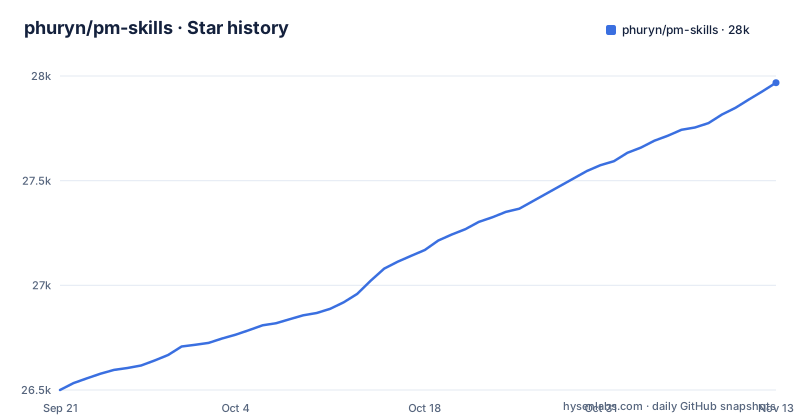
Star history
- phuryn/pm-skills27,968 ★ · +1,468
| Repository | 2026-09-21 | 2026-11-13 |
|---|---|---|
| phuryn/pm-skills | 26.5k | 28k |
1,468 Stars in the last 53 days, measured from the daily GitHub snapshot. Compare with other projects
Editorial analysis
Two different counts describe the same bundle, and they add up to the 100+ figure
The project description advertises 100+ agentic skills, commands and plugins. The README counts the same bundle more carefully: 69 PM skills and 42 chained workflows across 9 plugins. Sixty-nine plus forty-two is one hundred and eleven, which is where the headline number comes from, and the split matters more than the total. A skill is one framework or one reference, pulled into context on its own. A command is a sequence of those chained into a process, and the sequence is what a newcomer actually experiences. So the number of guided processes is closer to 42 than to 111, and nine is the number of installable units. The plugin list in the tree matches that nine: pm-toolkit, pm-product-strategy, pm-product-discovery, pm-market-research, pm-data-analytics, pm-marketing-growth, pm-go-to-market, pm-execution and pm-ai-shipping. Anyone quoting the 100+ figure as a count of distinct methods is counting workflows and skills as one thing.
Skills load themselves, so the framework can arrive without being asked for
The loading model is the first surprise. Skills are loaded automatically when relevant to the conversation, with no explicit invocation needed. When you want to force loading, for example to prioritise skills over general knowledge, the forms are `/plugin-name:skill-name` or `/skill-name`, and Claude adds the prefix itself. `prioritization-frameworks` and `opportunity-solution-tree` are described as standalone references the assistant draws on whenever relevant, with no command needed. A reference that fires on its own is exactly what you want in a review and exactly what you do not want if the question is which framework was applied. If provenance matters to you, ask for the named invocation rather than trusting the automatic path.
/discover is four skills in a fixed order, and each command suggests the next
Commands are the part a newcomer touches, and they are deliberately thin. A command is a user-triggered workflow invoked with `/command-name`, and its job is to chain one or more skills into an end-to-end process. `/discover` is the clearest example, chaining four skills in a fixed order: brainstorm-ideas, then identify-assumptions, then prioritize-assumptions, then brainstorm-experiments. Read as a method, that is a loop rather than a document generator, and the fixed order is the point. The commands are also designed to flow into each other to match the PM workflow, and after any command completes it suggests relevant next commands for you to follow. The consequence for a reader is that the order of operations is the product. Skip assumption identification and go straight to experiments and you are no longer using `/discover`, and nothing in the tooling will stop you from doing it.
Codex installs the skills but not the commands, and the workaround is model-written
Codex reads the same plugin marketplace file as Claude Code, so the skills install natively with no conversion or file-copying:
# Step 1: Add the marketplace
codex plugin marketplace add phuryn/pm-skills

# Step 2: Install the plugins you want
codex plugin add pm-toolkit@pm-skills
codex plugin add pm-product-strategy@pm-skills
codex plugin add pm-product-discovery@pm-skills
codex plugin add pm-market-research@pm-skills
codex plugin add pm-data-analytics@pm-skills
codex plugin add pm-marketing-growth@pm-skills
codex plugin add pm-go-to-market@pm-skills
codex plugin add pm-execution@pm-skills
What differs is stated just as plainly. The slash commands install but do not run as Codex slash commands, because Codex plugins do not expose commands, so a workflow has to be described in plain language instead. The optional workaround is to ask Codex to read the command files inside a plugin and create equivalent Codex skills. That is called a best-effort, model-driven conversion, and some Claude-specific command syntax will not translate. You are therefore not porting a workflow, you are asking a model to write a new one, and the result is only as faithful as the reading.
Cowork installs all nine plugins in four steps while the CLI installs them one at a time
Two paths serve the same marketplace and they cost different amounts of effort. Claude Cowork, which the README recommends for non-developers, is an interface path: open Customize in the bottom-left, go to Browse plugins, then Personal, then the + button, then Add marketplace from GitHub, then enter `phuryn/pm-skills`. All 9 plugins install automatically and you get both commands and skills. Claude Code reaches the same content through nine separate commands, first `claude plugin marketplace add phuryn/pm-skills` and then eight `claude plugin install` lines, the AI Shipping Kit having moved to `ai-shipping@product-engineering`. The CLI path is the finer-grained of the two, and that is the trade. The interface installs everything and lets you find out what you did not know existed, while the CLI makes you decide up front. The project also advises installing whole plugins rather than cherry-picking individual skills, on the grounds that a workflow usually relies on several skills that ship together.
Without a plugin system you copy folders by hand, and the chains never arrive
The last route has no tooling at all. The `skills/*/SKILL.md` files follow the universal skill format and work with any tool that reads it, while the commands are Claude-specific. Gemini CLI, OpenCode, Cursor and Kiro are each handled by copying skill folders into a directory, and all four are marked as skills only:
# Example: copy all skills for OpenCode (project-level)
for plugin in pm-*/; do
  mkdir -p .opencode/skills/
  cp -r "$plugin/skills/"* .opencode/skills/ 2>/dev/null
done

# Example: copy all skills for Gemini CLI (global)
for plugin in pm-*/; do
  cp -r "$plugin/skills/"* ~/.gemini/skills/ 2>/dev/null
done
The scripts are glob loops over the plugin directories, and a copy failure is silenced with `2>/dev/null`, so a missing folder leaves you with a partly populated skills directory and no message. That is a real hazard when moving nine plugins worth of skills by hand. The loss is not only the commands either. Since a command is the chain, a skills-only install hands you the frameworks as references and none of the orderings that make them a method.
The skill names carry their own framework, and one Python script guards the tree
The naming is not decorative. Inside pm-product-discovery, which carries 13 skills and 5 commands, the entries are `brainstorm-ideas-existing`, `brainstorm-ideas-new`, `brainstorm-experiments-existing`, `brainstorm-experiments-new` and `identify-assumptions-existing`, each labelled with what it is for, and `brainstorm-experiments-new` is attributed in the listing to Alberto Savoia and lean startup pretotypes. The repository layout is plain and inspectable: nine plugin directories at the top level, a `.claude-plugin/` directory holding the marketplace definition, a `tests/` directory, and a single `validate_plugins.py` at the root. Recent releases are v2.0.0, v2.1.0 and v2.2.0 (2026-10-10), the last recorded push is 2026-10-29, and the licence is MIT.
Editorial conclusion
PM Skills Marketplace fits a product manager who wants a framework applied step by step rather than a paragraph of general advice, and a team willing to install whole plugins and follow the suggested next command instead of cherry-picking. It does not fit a reader who wants to choose a single method from a shelf, since the value is in the chains, and it does not fit an assistant without a plugin system, where you copy skill folders by hand and lose the commands entirely. Before you install, count what you are actually getting, because the 100+ in the project description is 69 skills plus 42 workflows, and check whether your assistant can run commands at all.
Frequently asked questions
What is pm-skills in this repository?
PM Skills Marketplace is a bundle of product management skills, commands and plugins packaged as a marketplace for Claude Code and Cowork. The README counts 69 PM skills and 42 chained workflows across 9 plugins, and the individual `skills/*/SKILL.md` files follow a universal format that other AI assistants can also read.
How do I install pm-skills in Claude Code?
Add the marketplace with `claude plugin marketplace add phuryn/pm-skills`, then install the plugins you want with `claude plugin install pm-toolkit@pm-skills` and the equivalent line for each of the other seven plugins listed; the AI Shipping Kit has moved to `ai-shipping@product-engineering`. In Claude Cowork you add `phuryn/pm-skills` as a marketplace from GitHub and all 9 plugins install at once.
What are some PM skills in pm-skills?
The pm-product-discovery plugin carries 13 skills and 5 commands, among them brainstorm-ideas-existing, brainstorm-ideas-new, brainstorm-experiments-existing, brainstorm-experiments-new and identify-assumptions-existing. Standalone reference skills such as prioritization-frameworks and opportunity-solution-tree are also available with no command needed.
Does pm-skills work outside Claude Code?
The skills follow the universal skill format, so Gemini CLI, OpenCode, Cursor and Kiro can load them by copying the skill folders into `.gemini/skills/`, `.opencode/skills/`, `.cursor/skills/` and `.kiro/skills/`. Commands are Claude-specific, so those four assistants get skills only, and Codex installs the skills but does not expose the slash commands.
Official sources
Add this badge to your README
If you maintain this project, the badge below links readers to this analysis and shows its maintenance status from the daily GitHub snapshot. Paste the markdown into your README; add ?metric=license or ?metric=stars to the image URL for a different field.

[](https://hysenlabs.com/projects/phuryn-pm-skills)Star history chart for your README
[](https://hysenlabs.com/projects/phuryn-pm-skills)Was this useful?