checkmake reads your Makefile and complains about the targets that lie
Linter/analyzer for Makefiles
At a glance
- What is it?
- checkmake is a Go linter for Makefiles that applies configurable rules, most visibly to phony targets, and reports findings with a file name and a line number. It fits teams whose build files are reviewed and maintained by hand, and it offers both a pre-commit hook and a container image for CI, with the caveat that its rule set is small and its installation paths disagree about the Go version they need.
- Who is it for?
- checkmake is worth adding to a repository whose Makefile is a shared artefact that other people break, because the phony target checks are cheap to run and catch a mistake that make itself will only report as a stale binary. It is not a substitute for understanding a Makefile, its rule set is narrow, and it will not tell you that a recipe is wrong.
- Can I use it commercially?
- Yes. MIT is a permissive licence: you can use, modify and sell software built on it, as long as you keep its copyright and licence notices.
- Is it still maintained?
- Yes. The repository last received commits 13 days ago.
- What is it written in?
- Mainly Go, according to GitHub's language statistics.
Answers come from the project's GitHub data, last synced on November 7, 2026, and from our analysis. They are not legal advice.
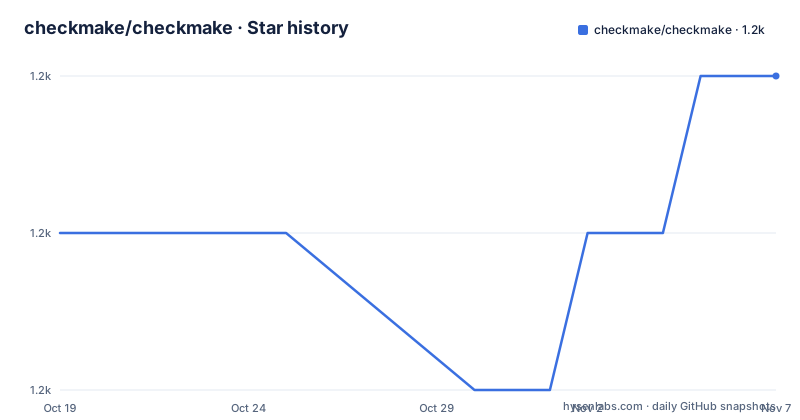
Star history
- checkmake/checkmake1,221 ★ · +1
| Repository | 2026-10-19 | 2026-11-07 |
|---|---|---|
| checkmake/checkmake | 1.2k | 1.2k |
1 Stars in the last 19 days, measured from the daily GitHub snapshot. Compare with other projects
Editorial analysis
Makefiles fail at the wrong time, which is the problem
A compiler tells you that your code does not compile. A Makefile tells you nothing, and then produces a stale artefact. The classic case is a target that is not declared phony, so make sees a file with the target's name on disk, decides it is up to date, and skips the recipe entirely. Nothing is printed, the exit status is zero, and the failure surfaces much later as a mysterious test result. Another is a phony target that is missing altogether, so a dependency declared on it silently does nothing. checkmake exists to move that class of failure forward, to the moment the file is edited. It scans Makefiles for potential issues based on configurable rules, and it is a linter in the ordinary sense: a Go program, a set of rules, findings with a line number, and a non-zero outcome when something is wrong. The audience is any team where a Makefile is a shared artefact that more than one person edits.
The sample output shows two phony rules and where they point
The example output in the documentation is worth reading closely, because it shows the shape of a finding and the two rules that dominate the default set. Running the linter on a fixture produces a table with the rule name, a description, the file name and the line number:
% checkmake fixtures/missing_phony.make
      RULE                 DESCRIPTION                      FILE NAME            LINE NUMBER
  minphony        Missing required phony target    fixtures/missing_phony.make   21
                   "all"
  minphony        Missing required phony target    fixtures/missing_phony.make   21
                   "test"
  phonydeclared   Target "all" should be           fixtures/missing_phony.make   16
                   declared PHONY.
minphony reports a required phony target that is missing, and it names the target in the description, here all and test. phonydeclared reports the opposite problem, a target that should be declared PHONY but is not, here all at line 16. The two rules together cover the phony story in both directions, which tells you something about the scope of the project. This is a rule set for the mistakes that are specific to Makefiles and that the tooling otherwise cannot see, not a general Makefile critic.
Installing with go install, go run or a distribution package
The primary installation path is the Go toolchain:
go install github.com/checkmake/checkmake/cmd/checkmake@latest
checkmake Makefile
The documentation also shows running it without installing anything:
go run github.com/checkmake/checkmake/cmd/checkmake@latest Makefileand it states that checkmake is available in many Linux distributions and package managers, with a link to Repology. One version detail to notice: the README asks for Go 1.16 or higher, while the go.mod in the repository declares go 1.27, and the dependency set has moved on since the README was written, with cobra, tablewriter, go-ini and testify as the direct requirements. The command itself takes one or more Makefiles:
% checkmake Makefile
% checkmake Makefile foo.mk bar.mk baz.mk
The tool is built on cobra, so it has subcommands, and two of them are visible in the help output: list-rules, which lists the registered rules, and completion, which generates the autocompletion script for your shell.
Rules come from checkmake.ini, and the flags control the report
Configuration is a file called checkmake.ini, read by default from the working directory, and the flag that points at it is --config. The presence of the go-ini dependency in go.mod confirms the format. The flag set is small and each flag does one thing: --config string to read the configuration file, --debug to enable debug mode, --format string for a custom Go template for text output, -o or --output to choose text or json, and -v for the version. The output flag and the format flag are documented as mutually exclusive, and the format template is ignored in JSON mode, which is the usual arrangement for a tool that offers both machine and human renderings of the same findings. The text output is a table with the rule, a description, the file and the line, and the JSON mode is what you want in CI, where a table is awkward to parse. The most useful diagnostic command for a new user is list-rules, because it tells you what the tool can actually check before you decide what to configure.
Two pre-commit hooks, one of which compiles Go in a sandbox
The repository ships pre-commit configuration, and the README explains the two hooks, which differ in an important operational way. The recommended hook is checkmake, and pre-commit sets up a Go environment from scratch to compile and run the tool, which the documentation links to the pre-commit golang plugin docs for. The alternative is checkmake-system, which looks for checkmake on your PATH and therefore requires every contributor to install it separately, for example with a package manager or a prebuilt binary release. The documentation recommends the system variant only if it is permissible to require all repository users to install checkmake manually. The configuration block is:
repos:
-   repo: https://github.com/checkmake/checkmake.git
    # Or another commit hash or version
    rev: 0.2.2
    hooks:
    # Use this hook to let pre-commit build checkmake in its sandbox
    -   id: checkmake
    # OR Use this hook to use a pre-installed checkmake executable
    #   -   id: checkmake-system
Note the rev value, 0.2.2, which is behind the current 0.3.2 release. That is the sort of detail worth fixing in your own copy. The repository also documents running the hook as a GitHub Actions workflow, with a path filter that triggers only on the pre-commit configuration files and on Makefile, makefile, GNUmakefile, and the .mk and .make patterns, so the check does not run on unrelated commits.
A container image on quay.io for pipelines without Go
The container route exists for pipelines that have no Go toolchain, and the build is a Containerfile at the repository root rather than a Dockerfile. You can build the image with docker or podman, passing your name and email as build arguments:
docker build --build-arg BUILDER_NAME='Your Name' --build-arg [email protected] . -t checkerThe same build is available as a make target, image-build, with the builder details passed as variables. The image tag is composed from three variables, IMAGE_REGISTRY, which defaults to quay.io, REGISTRY_NAMESPACE, which defaults to the name of the project, and IMAGE_VERSION_TAG, which defaults to latest. The container command is auto-detected with a preference for podman, and can be overridden with the CONTAINER_CMD variable. Running it means mounting the Makefile into the container:
docker run --workdir / -v "$PWD"/Makefile:/Makefile quay.io/checkmake/checkmake:latestand to use a configuration file as well, mount checkmake.ini next to it, since the default configuration file name in the working directory is picked up automatically. The published images live on quay.io at the checkmake/checkmake repository, and there is a packagecloud badge in the README for distribution packages.
A narrow rule set, and a project that still moves
Two things to weigh before you adopt this. The first is scope. The rules visible in the documentation are about phony targets, and while list-rules will show you the full registered set, a linter with a handful of rules is a long way from understanding a Makefile. It will not notice that your recipe depends on a file that is generated, and it cannot tell you that a target is rebuilt every time because it depends on a directory. The alternative approaches are honest about that. One is to write the check yourself as a make target, which you then own and which runs in the same environment as the build, at the cost of maintaining it. The other is to rely on make's own diagnostics and on code review, which catch the problem at build time rather than at edit time. checkmake's difference is that it runs on every commit, before the build, and reports a line number. On maintenance, the project is active: v0.3.0, v0.3.1 and v0.3.2 were published in January 2026, and the last push was on 2026-10-13. The licence is MIT, the repository carries a CHANGELOG.md, a man/ directory for manual pages, docs/, fixtures/ for test files, and a config/ and rules/ directory that hold the rule implementations, so the rule set is meant to be extended.
Editorial conclusion
checkmake is worth adding to a repository whose Makefile is a shared artefact that other people break, because the phony target checks are cheap to run and catch a mistake that make itself will only report as a stale binary. It is not a substitute for understanding a Makefile, its rule set is narrow, and it will not tell you that a recipe is wrong. Before adopting it, run checkmake list-rules to see exactly what the current rules cover, decide between the two pre-commit hooks based on whether every contributor may install a Go toolchain, and pin the Go version you use, since the README asks for 1.16 or higher while the module declares Go 1.27.
Frequently asked questions
How do I install checkmake?
With Go 1.16 or higher, run go install github.com/checkmake/checkmake/cmd/checkmake@latest, or use go run github.com/checkmake/checkmake/cmd/checkmake@latest Makefile to run it without installing. The README also points to distribution packages through Repology.
What does checkmake check in a Makefile?
It scans Makefiles for potential issues based on configurable rules. The documented example output shows the minphony rule, which reports a missing required phony target such as all or test, and the phonydeclared rule, which reports a target that should be declared PHONY.
How do I configure checkmake?
Through a configuration file named checkmake.ini, which is read from the working directory by default, or from the path given with the --config flag. The list-rules subcommand prints the registered rules, and the --output flag switches the report between text and json.
Which pre-commit hook should I use for checkmake?
The recommended hook id checkmake lets pre-commit build checkmake in its Go sandbox. The alternative id checkmake-system uses a checkmake executable already on your PATH, and the documentation recommends it only if every repository user may install checkmake manually.
Official sources
Add this badge to your README
If you maintain this project, the badge below links readers to this analysis and shows its maintenance status from the daily GitHub snapshot. Paste the markdown into your README; add ?metric=license or ?metric=stars to the image URL for a different field.

[](https://hysenlabs.com/projects/checkmake-checkmake)Star history chart for your README
[](https://hysenlabs.com/projects/checkmake-checkmake)Was this useful?