charmbracelet/vhs: Writing Terminal GIFs as Tape Files
Your CLI home video recorder 📼
At a glance
- What is it?
- VHS turns a small text script into a reproducible terminal recording, so CLI demos and integration tests stop depending on someone hitting record at the right moment. It is a Go binary that drives a virtual terminal through ttyd and ffmpeg, and the tape file is the artifact you keep.
- Who is it for?
- Adopt VHS if your CLI demos or docs need recordings that can be regenerated from a checked-in .tape file, and if you can put ttyd and ffmpeg on the machine that renders them. Do not adopt it if you need a one-shot screen capture with audio, or if you cannot install those two dependencies.
- Can I use it commercially?
- Yes. MIT is a permissive licence: you can use, modify and sell software built on it, as long as you keep its copyright and licence notices.
- Is it still maintained?
- Yes. The repository last received commits 8 days ago.
- What is it written in?
- Mainly Go, according to GitHub's language statistics.
Answers come from the project's GitHub data, last synced on November 14, 2026, and from our analysis. They are not legal advice.
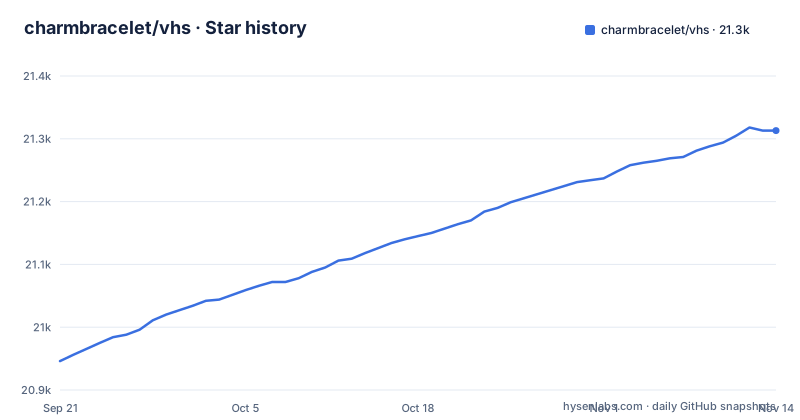
Star history
- charmbracelet/vhs21,313 ★ · +367
| Repository | 2026-09-21 | 2026-11-14 |
|---|---|---|
| charmbracelet/vhs | 20.9k | 21.3k |
367 Stars in the last 54 days, measured from the daily GitHub snapshot. Compare with other projects
Editorial analysis
The problem VHS solves for CLI authors
A terminal demo is normally a screen recording. Someone opens a terminal, types a command, waits, and stops the capture. That file is now the source of truth for how the tool looks, and it cannot be re-rendered when the interface changes. The recording also depends on the typist: a missed keystroke means starting over.
VHS inverts that. The README describes the project as a way to "Write terminal GIFs as code for integration testing and demoing your CLI tools." The recording becomes a .tape file, a sequence of commands that instruct VHS what to perform on its virtual terminal. You keep the tape in the repository next to the code it demonstrates. When the CLI output changes, you edit the tape or rerun it, and the GIF is produced again from the same script.
The audience is narrow and specific. It is people who ship command-line tools and need a demo asset that survives refactoring, plus people who want a rendered terminal state in a test or a documentation build. VHS is not a general screen recorder, and it does not capture a window you already have open. It builds the terminal session itself.
How a tape file drives a virtual terminal
The repository layout shows the pipeline. The lexer/ and parser/ directories read the tape syntax, command.go and evaluator.go execute the resulting instructions, and tty.go, tty_unix.go and tty_windows.go handle the terminal side. Rendering goes through ffmpeg.go and video.go. The go.mod file lists github.com/creack/pty, github.com/charmbracelet/x/conpty and github.com/go-rod/rod, which is consistent with a process that spawns a pseudo-terminal and drives a browser-based terminal front end rather than capturing your existing shell.
The README states plainly that VHS requires ttyd and ffmpeg to be installed and available on your PATH. ttyd is the terminal-over-HTTP server that gives VHS a terminal to type into; ffmpeg is what turns the resulting frames into a GIF, MP4, WebM or PNG. That is the whole mechanism: a tape is parsed into commands, the commands are sent to a virtual terminal, frames are captured, and ffmpeg encodes them.
Commands map to terminal actions. Output sets the destination path, Set adjusts recording settings such as FontSize, Width and Height, Type emulates typing a string, Enter and the arrow keys send special keys, Sleep pauses, and Wait blocks until a regex matches. Hide and Show control which commands appear in the output, which matters when a setup step should not be visible in the final GIF. Source pulls commands from another tape, so shared preamble can live in one file.
Installing VHS and rendering a first tape
The README gives several installation routes. On macOS or Linux, Homebrew is the shortest. On Windows, scoop or winget. There is also a Docker image that bundles the dependencies, which avoids the ttyd and ffmpeg requirement on the host.
brew install vhsIf you prefer Go, the module path is the installation target. Note that this installs the VHS binary only; ttyd and ffmpeg still have to be on PATH.
go install github.com/charmbracelet/vhs@latestTo start a tape, the README uses the new subcommand to scaffold one. It writes a demo.tape file in the current directory that you then open in your editor.
vhs new demo.tapeThe README's example tape has this structure: an Output line naming the GIF, a few Set lines for font size and terminal dimensions, a Type line, a Sleep, an Enter, and a closing Sleep. Once saved, you feed the tape back to VHS and it renders the file named in Output.
vhs demo.tapeIf you would rather not install ttyd and ffmpeg locally, the Docker route mounts the working directory at /vhs, which is also the image's WORKDIR, and passes the tape as the argument.
docker run --rm -v $PWD:/vhs ghcr.io/charmbracelet/vhs <cassette>.tapeThe image sets VHS_PORT to 1976 and VHS_HOST to 0.0.0.0, and it installs ffmpeg, chromium and bash. That chromium dependency is worth noting if you are auditing image size.
Recording a tape instead of writing one
Not every tape has to be authored by hand. The README documents a record subcommand that generates a tape from the actions you perform in a terminal session. You run it with output redirected to a file, work normally, and exit the session to stop recording.
vhs record > cassette.tapeThe README then suggests editing the generated tape to add settings or adjust actions before rendering it with vhs cassette.tape. This is the pragmatic path when you already know what the demo should look like and do not want to hand-write every keystroke. The trade-off is that a recorded tape reflects whatever you actually typed, including timing and mistakes, so it usually needs cleanup before it belongs in a repository.
There is also a publish subcommand that uploads a GIF to vhs.charm.sh and returns links for browser, HTML and Markdown embedding. That is a hosted service, not a local feature. Treat publication as a separate decision from rendering.
The SSH server mode and what it changes
VHS includes an SSH server. Running vhs serve starts it, and the README's example pipes a tape in over SSH and receives the GIF on stdout. The stated advantage is that the server has access to commands and applications on the host, so the machine sending the tape does not need them installed.
vhs servessh vhs.example.com < demo.tape > demo.gifThe README lists the configuration through environment variables: VHS_PORT defaults to 1976, VHS_HOST to localhost, VHS_GID and VHS_UID to the current user's IDs, VHS_KEY_PATH to .ssh/vhs_ed25519, and VHS_AUTHORIZED_KEYS_PATH to empty with public accessibility. The Dockerfile overrides several of these, setting VHS_HOST to 0.0.0.0 and VHS_AUTHORIZED_KEYS_PATH to an empty string, and adds VHS_NO_SANDBOX set to true.
That combination deserves attention. An empty authorized keys path described as publicly accessible, together with a host binding of 0.0.0.0, means the container is reachable from outside and the README does not describe an authentication requirement in that configuration. If you run the server mode, decide deliberately who can reach the port and what the process is allowed to execute, because the tape is arbitrary input that becomes commands on the host.
Where VHS is the wrong tool
The dependency chain is the first real constraint. ttyd and ffmpeg must be on PATH. On a locked-down build machine, that is two extra packages to install and keep current, on top of the fonts the tape expects. Font availability is not a soft concern: if the rendering host lacks the fonts your tape expects, the output will not match what you saw locally. The Docker image installs a set of fonts, including Fira Code, JetBrains Mono, Hack and their Nerd Font variants.
VHS is also the wrong choice when the recording is not a terminal. It has no audio capture, no window capture, and no way to record an application that is not running in the terminal it drives. For a GUI walkthrough, a conventional screen recorder is the correct tool.
If your CI renders tapes, check the Wait command reference for what happens when a regex never matches before relying on it.
Alternatives and how they differ
The closest alternative in the same space is asciinema, which records a real terminal session and stores it as a text-based cast file that a player replays. The difference in approach is fundamental. asciinema captures what happened; VHS executes a script that says what should happen. An asciinema cast preserves your actual timing and any improvisation, and it plays back in a terminal player rather than encoding to GIF. A VHS tape is deterministic input, which is why the README can describe it as suitable for integration testing, and why it can be rendered to GIF, MP4, WebM or PNG through ffmpeg. If you need a shareable video file rather than a replayable cast, VHS is the one that produces it. If you need to capture a session you cannot script in advance, asciinema is the better fit.
A second comparison is the generic screen recorder. It needs no ttyd, no ffmpeg and no tape syntax, and it captures anything on screen. It also produces a file that goes stale the moment the CLI's output changes, with no script to rerun. VHS trades setup cost for regeneration.
Maintenance, licence and upgrade cost
The repository is not archived, and the last push was on 2026-11-02. The latest release is v0.12.1 from 2026-09-24, following v0.12.0 on 2026-09-09 and v0.11.0 on 2026-03-10. That is roughly six months between the last two minor releases, with a patch release about two weeks after v0.12.0.
The project is MIT licensed. That permits use, modification and redistribution with the licence and copyright notice retained. This is not legal advice; if you redistribute VHS inside a product, read the LICENSE file in the repository and the licences of ttyd and ffmpeg separately, since those are separate projects with their own terms.
Upgrade cost is mostly tied to the tape format and the dependency chain rather than to Go. Because a tape is a plain text file of commands, a version bump that changes a command's behavior would require editing the affected tapes. The Makefile shows that themes.json and THEMES.md are generated artifacts, refreshed by a script that downloads from an external endpoint, so anyone regenerating themes needs network access to that endpoint.
Editorial conclusion
Adopt VHS if your CLI demos or docs need recordings that can be regenerated from a checked-in .tape file, and if you can put ttyd and ffmpeg on the machine that renders them. Do not adopt it if you need a one-shot screen capture with audio, or if you cannot install those two dependencies. Before committing, run vhs new demo.tape, render it once with vhs demo.tape, and confirm the fonts and terminal size in your tape match the environment where the GIF will be built.
Frequently asked questions
What is charmbracelet/vhs used for?
It writes terminal GIFs as code, for integration testing and for demoing CLI tools. A .tape file lists commands that VHS performs on a virtual terminal, and the output is rendered through ffmpeg.
What do I need installed before running charmbracelet/vhs?
The README states that VHS requires ttyd and ffmpeg to be installed and available on your PATH. Alternatively, the Docker image bundles the dependencies so the host does not need them.
Can I run charmbracelet/vhs with Docker?
Yes. The README gives docker run --rm -v $PWD:/vhs ghcr.io/charmbracelet/vhs <cassette>.tape, and the Dockerfile sets the working directory to /vhs and installs ffmpeg, chromium and bash.
Does charmbracelet/vhs have a server mode?
It does. Running vhs serve starts an SSH server, and the README shows piping a tape in over SSH to receive the GIF on stdout. Configuration is through environment variables such as VHS_PORT, VHS_HOST and VHS_KEY_PATH.
Official sources
Add this badge to your README
If you maintain this project, the badge below links readers to this analysis and shows its maintenance status from the daily GitHub snapshot. Paste the markdown into your README; add ?metric=license or ?metric=stars to the image URL for a different field.

[](https://hysenlabs.com/projects/charmbracelet-vhs)Star history chart for your README
[](https://hysenlabs.com/projects/charmbracelet-vhs)Was this useful?