posterly: a coding-agent skill that turns a paper into a print-ready conference poster
Build academic conference posters as a single HTML/CSS file, rendered to print-ready PDF via headless Chromium. A coding-agent skill.
At a glance
- What is it?
- posterly builds academic conference posters as a single HTML/CSS file and renders them to print-ready PDF through headless Chromium. It is a coding-agent skill, not a pip package, and its checks are geometry queries rather than visual guesses.
- Who is it for?
- Adopt posterly if you already run a coding agent and want a poster whose canvas size, overflow and palette are checked in code before printing. Do not adopt it if you have no agent and will not use the hosted service, or if you need a pip-installable library, since the repository states it is not one.
- Can I use it commercially?
- Yes, with strict conditions. AGPL-3.0 is a network copyleft licence: if people use a modified version over a network, for example as a hosted service, you must offer them its source code under the same licence.
- Is it still maintained?
- Yes. The repository last received commits 1 day ago.
- What is it written in?
- Mainly Python, according to GitHub's language statistics.
Answers come from the project's GitHub data, last synced on November 22, 2026, and from our analysis. They are not legal advice.
Star history
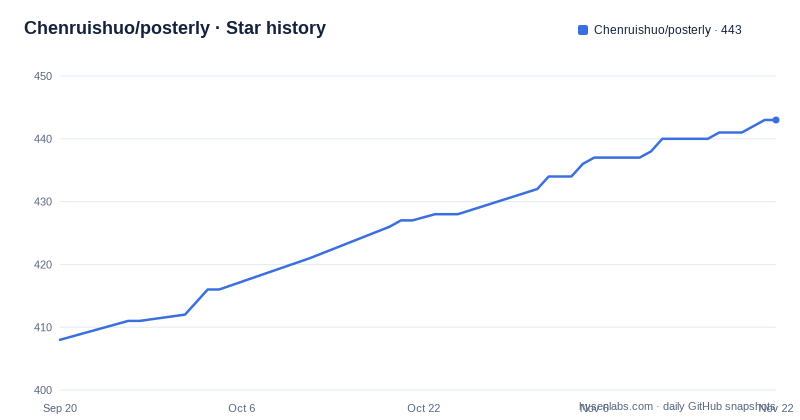
- Chenruishuo/posterly443 ★ · +35
| Repository | 2026-09-20 | 2026-11-22 |
|---|---|---|
| Chenruishuo/posterly | 408 | 443 |
35 Stars in the last 63 days, measured from the daily GitHub snapshot. Compare with other projects
Editorial analysis
The problem posterly targets: a poster that prints the way it looked on screen
Conference posters fail in boring ways. A column runs two lines past its box. A heading drifts off the grid. A colour that looked fine on a monitor lands outside the palette the rest of the poster uses. By the time these show up, the file is usually already at the print shop.
posterly is aimed at that gap. The README describes it as turning a paper into a print-ready conference poster "at the exact canvas size you set", naming ICML, NeurIPS, ICLR and CVPR, with custom sizes allowed. The audience is narrow and specific: researchers who already drive a coding agent such as Claude Code or Codex, and who are willing to have that agent assemble the poster. The README is explicit that the open-source route "runs on your machine; needs no posterly account".
That framing matters. This is not a poster editor with a canvas and drag handles. It is a skill file plus a set of command-line checks, and the primary interface is the agent that reads it. If you do not run an agent, the README points you at the hosted service instead, and says so plainly: "If you don't run a coding agent, or wouldn't trust yours with this, and you want posterly at its best without the setup, use the hosted service."
Why posterly renders HTML and CSS instead of LaTeX
The README devotes a short section to this choice, and the reasoning is worth reading because it explains most of the design. Four points are given: fast preview, because you edit CSS and refresh with no recompile step; modern layout, because flexbox, grid, gradients, `text-wrap: balance` and web fonts are available directly rather than through stacked LaTeX poster packages; checkability, because "Is this column overflowing?" becomes a Playwright geometry query instead of a visual guess; and exact print size, because `@page { size: 60in 36in }` combined with Chromium's `page.pdf()` produces a PDF whose dimensions match the canvas.
The third point is the one that separates posterly from a template pack. A geometry query returns a number. A number can be compared against a threshold and made to fail a build. That is what makes the pre-print checks possible at all, and it is the reason the project can claim checks that "catch overflow, misalignment, and off-palette styling before you print".
Math is the trade-off in this design. The browser does not typeset it natively, so posterly uses MathJax. According to the README, templates use the CDN when opened directly, while the gate and preview renders serve a bundled copy so that measurement works offline. That is a sensible split, but it does mean math rendering depends on MathJax behaving the same way in both paths. The README does not describe what happens when the two disagree.
Installing posterly as an agent skill and producing a first poster
The fastest path is to let an agent do it. The README gives a single line to paste into your coding agent, which clones the repository, installs the Python dependencies and runs the smoke test:
Install this skill for me: https://github.com/Chenruishuo/posterlyThe manual route is short but has one trap. The README uses `/absolute/path/to/dedicated-env/bin/python` as a placeholder and instructs you to replace it with the verified absolute interpreter path of a dedicated, non-base environment. It also states that you should always use that interpreter for tools, `-m pip` and `-m playwright`, and never use base or rely on shell activation. Clone into the directory your agent scans for skills; the README's example is `~/.claude/skills/` for Claude Code, and it notes that other agents have their own skills directory.
git clone https://github.com/Chenruishuo/posterly ~/.claude/skills/posterly
cd ~/.claude/skills/posterly
/absolute/path/to/dedicated-env/bin/python -m pip install "playwright>=1.40"
/absolute/path/to/dedicated-env/bin/python -m playwright install chromium
Chromium is the renderer, so that second install is not optional. The README adds that on a fresh Linux box you may also need the system libraries Chromium links against. If the smoke test fails after these steps, that is the first thing to check.
For a first real use, the repository ships `examples/hello_world/`, which is the smallest working input to start from. The README does not document a single canonical command for producing a poster from a paper; it points to `SKILL.md` for the details of the workflow, and describes the blog as walking through how a paper becomes a checked, print-ready poster. Read `SKILL.md` before running anything against a real paper, because the order of the gates is part of the method.
There is one constraint the README states in a callout, and it is easy to miss. Do not run posterly above `high` effort. The README says this applies to GPT-5.6 Sol and other GPT models and to Claude Opus as well, because at higher effort levels those models "tend to overthink, second-guess, or drift away from posterly's required workflow", which can lead to substantially worse results. `high` is the maximum recommended level.
What posterly does not solve
The repository is not a pip-installable Python package, and the `pyproject.toml` says so in a comment: posterly is distributed as a coding-agent skill, cloned under `~/.claude/skills/posterly/`, and the file "exists ONLY to" declare dependencies rather than to make the project installable with pip. Anyone expecting `pip install posterly` to give them a library is going to be disappointed, and the packaging metadata will not correct that expectation on its own.
The figure pipeline is optional and separately gated. Real-figure provenance lives behind an extra, `figures`, which pulls in `PyMuPDF>=1.23` and `Pillow>=10` and vendors three tools named in the `pyproject.toml` comment: `extract_pdf_figures.py`, `preprocess_figures.py` and `asset_check.py`. The same comment states that the core HTML, measure, style and preflight gates do not require these. So a poster built without real figures from the paper skips that gate entirely, and the checks you get depend on which path you took.
Finally, there is the effort-level ceiling. A tool that tells you not to let your model think too hard is telling you something about how tightly its workflow is specified. That is a real constraint on how you run it, not a footnote, and it applies across model families according to the README.
The repository has no published GitHub releases, so there is no version history to pin against. If you need a stable artefact to reproduce a poster months later, that is a gap to plan around.
posterly compared with a LaTeX beamerposter workflow
The obvious alternative is the LaTeX route: build the poster with `beamerposter` or `tikzposter` and compile to PDF. The difference is not cosmetic.
With LaTeX, the layout engine is the compiler, and the failure mode is a compile error or an overfull box warning. The output is deterministic and the toolchain is mature, but the README's own list of trade-offs applies in reverse: you pay a recompile step for every preview, and the modern CSS layout primitives are not available without stacking poster packages. Checking whether a column overflows is a visual judgement rather than a numeric query.
posterly inverts that. Layout is CSS, so preview is a refresh, and the checks are Playwright geometry queries that return numbers. The cost is that the renderer is Chromium, which you must install and keep working, and the workflow is mediated by a coding agent whose behaviour at high effort levels the README warns about. LaTeX does not care which model you are running.
Neither approach is strictly better. If your institution already has a LaTeX poster template and your figures are TikZ, posterly adds a renderer and an agent to the loop for a gain you may not need. If your poster is mostly text, images and a colour scheme, and you want the overflow question answered by a number rather than by eye, the HTML and CSS path is the shorter one.
Licence, maintenance and the cost of upgrading
posterly is licensed AGPL-3.0-only, per both the repository's LICENSE file and the `license` field in `pyproject.toml`. The README badge reads AGPL v3. The AGPL's network clause is the part that tends to matter for anyone considering a derivative: if you modify posterly and let users interact with it over a network, the licence's terms travel with that. This is a description of the licence text, not legal advice, and the repository also carries a `LICENSES/` directory and a `NOTICE.md` that are worth reading before you build on it.
The last push to the repository was on 2026-09-16, four days before the date of writing. The repository has no published GitHub releases, so there is no tagged version to track and nothing to upgrade between. Upgrading means pulling the branch and re-reading `SKILL.md`, because the skill file is the interface and it can change without a version number to warn you. The Python side is thin (a single runtime dependency, `playwright>=1.40`, plus a `dev` extra of `pytest>=7` and the `figures` extra), so dependency churn is unlikely to be the thing that breaks a working setup. Workflow changes are the likelier source of breakage.
Editorial conclusion
Adopt posterly if you already run a coding agent and want a poster whose canvas size, overflow and palette are checked in code before printing. Do not adopt it if you have no agent and will not use the hosted service, or if you need a pip-installable library, since the repository states it is not one. Before committing, verify that your agent's skill directory is the one posterly is cloned into, confirm the Chromium install works on your machine, and read the effort-level warning in the README, which caps the recommended setting at high.
Frequently asked questions
Is posterly a pip-installable Python package?
No. The `pyproject.toml` comment states that posterly is distributed as a coding-agent skill and should be cloned under `~/.claude/skills/posterly/`, and that the file exists only to declare runtime and dev dependencies.
What does posterly need installed to render a PDF?
Playwright and a Chromium browser. The README's manual steps install `playwright>=1.40` with pip and then run `python -m playwright install chromium`, noting that a fresh Linux box may also need the system libraries Chromium links against.
Which canvas sizes does posterly support?
The README says the poster is produced at the exact canvas size you set, naming ICML, NeurIPS, ICLR and CVPR, with custom sizes allowed. The showcased examples include landscape 60x36 and portrait 24x36.
Should posterly be run at maximum model effort?
No. The README warns against running posterly above `high` effort for GPT-5.6 Sol and other GPT models as well as Claude Opus, saying those models tend to overthink or drift from the required workflow, and recommends `high` as the maximum.
Official sources
Add this badge to your README
If you maintain this project, the badge below links readers to this analysis and shows its maintenance status from the daily GitHub snapshot. Paste the markdown into your README; add ?metric=license or ?metric=stars to the image URL for a different field.

[](https://hysenlabs.com/projects/chenruishuo-posterly)Star history chart for your README
[](https://hysenlabs.com/projects/chenruishuo-posterly)Was this useful?