mcmc-demo: a browser gallery where MCMC algorithms are visible while they run
Interactive Markov-chain Monte Carlo Javascript demos
At a glance
- What is it?
- mcmc-demo is a dependency-free JavaScript gallery of Markov-chain Monte Carlo samplers that draws its target distribution live, so you can watch a proposal get accepted or rejected while you change parameters. It is a teaching and intuition tool, not a library you would ship in a sampler pipeline.
- Who is it for?
- Adopt mcmc-demo if you teach sampling, if you need to convince a colleague of what a step size or an adaptation schedule does, or if you want a zero-install reference implementation of ten samplers to read as source. Do not adopt it as a production sampler: it runs in a browser without a build step, it exposes no API, and it has no releases and no package to pin a version against.
- Can I use it commercially?
- Yes. MIT is a permissive licence: you can use, modify and sell software built on it, as long as you keep its copyright and licence notices.
- Is it still maintained?
- Yes. The repository last received commits 71 days ago.
- What is it written in?
- Mainly JavaScript, according to GitHub's language statistics.
Answers come from the project's GitHub data, last synced on November 7, 2026, and from our analysis. They are not legal advice.
Star history
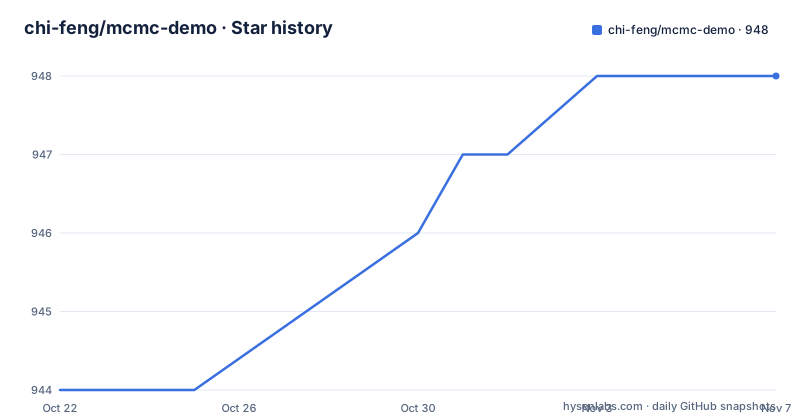
- chi-feng/mcmc-demo948 ★ · +4
| Repository | 2026-10-22 | 2026-11-07 |
|---|---|---|
| chi-feng/mcmc-demo | 944 | 948 |
4 Stars in the last 16 days, measured from the daily GitHub snapshot. Compare with other projects
Editorial analysis
Eleven samplers share one page and one target distribution
The core of mcmc-demo is a single page that draws a known probability density and runs one Markov-chain Monte Carlo sampler against it, live, in the browser. The homepage links to ten implementations, each opening the same app with a different algorithm and target selected through URL parameters.
The standard group covers the familiar ground: Random Walk Metropolis Hastings, Adaptive Metropolis Hastings, Hamiltonian Monte Carlo, the No-U-Turn Sampler under the label NaiveNUTS, the Metropolis-adjusted Langevin Algorithm, Hessian-Hamiltonian Monte Carlo, Gibbs Sampling, DE-MCMC-Z and Microcanonical Hamiltonian Monte Carlo. A separate group holds the non-Markovian methods, currently just Stein Variational Gradient Descent, listed with a delay parameter in its link.
The target defaults to a banana-shaped density, the classic two-dimensional test case where a plain random walk fails because the geometry is curved. Because every algorithm is offered against the same target, the comparison is the point. A reader can move from RandomWalkMH to HamiltonianMC and watch the shape of the trajectory change, which is a lesson that a static diagram of a paper rarely conveys.
This is aimed at people who want intuition rather than throughput. There is no dataset loading, no model definition layer, no checkpointing. The repository is a JavaScript project with a lib/ directory holding the bundled dependencies, an algorithms/ directory holding the samplers, and a main/ directory holding the shared machinery.
The URL carries the algorithm and the target, not the parameters
The application is driven from the query string. The example link the project publishes is:
https://chi-feng.github.io/mcmc-demo/app.html?algorithm=HamiltonianMC&target=bananaEach entry in the README list is a variation on that shape, with a different algorithm key and, for the Stein variational method, an extra delay argument set to zero. That means every link in the README is a permalink to a specific configuration, which is the sort of thing that makes a demo shareable in a lecture slide or a review comment.
What the URL does not carry is the parameter set. The README's own description of the interface says you can change algorithm parameters on the fly, so the sliders and numeric inputs for things like step size or iteration count live in the page and are not encoded in the link. If you want to reproduce a particular configuration, you have to note the values yourself or read them off the screen.
That distinction matters when you compare two runs. Two links that differ only in algorithm give you a clean comparison of methods. Two links that differ in algorithm and in a parameter you typed by hand are harder to keep track of, and there is no share button mentioned anywhere in the documentation. The one visible link mechanism, the GitHub Pages URL, is also a static host path, so the project is designed around being hosted rather than served by a backend.
Running locally means opening index.html, with no build step
The installation story is unusually short, and that is a feature rather than an omission. The README says to clone or download the repository and open index.html in a web browser, and adds that all dependencies are included in lib/. There is no package.json, no bundler, no dependency installation step, and no server requirement.
That means the project can be opened directly from a file system. The trade-off is that the app is plain HTML and JavaScript loaded by the browser, so the code you read in the repository is the code the browser runs. There is no transpilation, no module resolution and no test harness described in the quick start, and a top-level scripts/ directory exists alongside a .prettierrc, which suggests formatting automation rather than a build pipeline.
For a reader who wants to study the code rather than use it, this is the ideal shape. Every algorithm is a single file in algorithms/, and the README names algorithms/HamiltonianMC.js as a good starting point for a copy-and-modify workflow. The repository also carries a ROADMAP.md, so the author's own sense of direction is readable, and a docs/ directory holds the animated example image referenced by the README.
Note that the project is hosted on GitHub Pages under the chi-feng.github.io path, and the README links to the master branch for the example animation. The default branch is master rather than main, which matters if you write automation against the raw file URLs.
Visuals are queued as events and composited across three canvases
The rendering model is the part of the codebase a developer will want to understand, and the README describes it in unusual detail.
The simulation does not draw directly to the screen. Instead it pushes visualization events onto an animation queue, and the README names the function that drains that queue: Visualizer.prototype.dequeue in main/Visualizer.js. Events such as accepting or rejecting a proposal are already implemented, which means a new algorithm only needs to emit events, not to draw anything itself.
The renderer then composites three offscreen canvases, named densityCanvas, samplesCanvas and overlayCanvas. The separation is sensible: the target density, the accumulated samples and the moving overlay of the current chain can each be updated at their own rate. A rejected proposal and an accepted one produce different overlays, so the visual difference between a working sampler and a stuck one is immediate.
This is also the extension contract. To add an algorithm, the documented steps are: copy an existing file from the algorithms directory, include your JavaScript file at the bottom of app.html so the file registers itself in the dropdown menu, add any new visualizations to Visualizer.prototype.dequeue, and add a link in README.md and index.html. The registration is a manual include rather than a discovery mechanism, so the dropdown reflects exactly what app.html references and nothing more.
The trade-off of that design is that the visual vocabulary is fixed by the shared renderer. An algorithm with a genuinely different behaviour, such as the non-Markovian Stein variational method, still has to express itself through the same event and canvas vocabulary.
No releases, no package, and a last push on 2026-08-28
Maintenance facts here are thin and should be treated that way. The repository is not archived, and the last push was on 2026-08-28. There are no GitHub releases, which means there is no tagged version history to consult and no changelog of sampler changes.
The licence is MIT, which is the permissive end of the spectrum and means the code can be copied into another project, modified and redistributed with attribution and without a requirement that derived work be published. From a licensing angle this is about as permissive as it gets. It is worth noting that the licence covers the project code, and the papers cited in the README cover the algorithms it implements.
The absence of releases matters more than the licence. There is no version to pin. If you vendor a sampler file from algorithms/ into your own codebase, you are copying whatever state master happened to be in, and the only record of that state is a commit hash. A reader who cares about reproducibility should copy a specific commit and record it, because the project offers nothing else.
The absence of an issue tracker discussion and a release series also means the README reference list is the only scholarly anchor. Each sampler links to a paper: the 2001 adaptive Metropolis paper, the 2011 No-U-Turn Sampler preprint, the 1996 Roberts and Tweedie Langevin result, the 2015 H2MC ACM Transactions on Graphics article, the 2016 Stein variational gradient descent NeurIPS paper, the 2008 DE-MCMC-Z Statistics and Computing article, and the 2022 microcanonical Hamiltonian Monte Carlo preprint.
Where the gallery is the wrong tool for real sampling work
State this plainly: mcmc-demo is not a sampler you can use in production, and nothing in the repository suggests it intends to be.
There is no programmatic interface. The whole surface is a web page, which means the algorithms cannot be called from a script, a notebook or a data pipeline. There is no convergence diagnostic, no multiple-chain orchestration, no burn-in handling, no checkpointing and no resume. The parameters that matter for a real inference run are exactly the ones the demo leaves in the page and out of the URL.
The visual approach also carries its own conceptual risk. Watching points fill a density is persuasive and immediate, and that is exactly why it can mislead. A chain that looks like it is tracking the banana target can still be autocorrelated far beyond what any downstream summary would tolerate, and a density plot at a few thousand iterations gives no indication of effective sample size. The demos teach you what a proposal does; they cannot tell you when to stop.
The dependency choice is the third constraint. Bundling the libraries in lib/ keeps the project openable with no tooling, which is wonderful for a workshop and painful for a team that already has a build system, a lockfile and a dependency review process. There is no package metadata to consume.
So the honest use cases are teaching, writing, and reading source code for a clean reference implementation of ten sampling methods in one language.
The sibling demo covers regression instead of sampling
The README points to a related project by the same author, an interactive Gaussian process regression demo at chi-feng/gp-demo, under a See also heading. The difference in approach is worth spelling out, because the two are often confused.
mcmc-demo deals with sampling: the algorithm is a Markov chain, the observable behaviour is a trajectory of proposals, and the question a demo answers is how a chain moves through a density and where it gets stuck. gp-demo deals with regression: the method is Gaussian process regression, the observable behaviour is a predictive surface, and the question it answers is what a fitted model predicts between and beyond observed points.
The two therefore have different failure signatures and different audiences. A sampler demo invites the question of mixing and acceptance rate. A regression demo invites the question of how the predictive mean and variance behave away from data, which is governed by the kernel and its length scale. Reading the two side by side is a reasonable way to see that a similar visual treatment and the same browser-only distribution can carry quite different statistical content.
mcmc-demo itself offers no package, a release series or an API. Treat them as a pair of well-made explanations, and pick the one whose question matches the one you are trying to answer.
Editorial conclusion
Adopt mcmc-demo if you teach sampling, if you need to convince a colleague of what a step size or an adaptation schedule does, or if you want a zero-install reference implementation of ten samplers to read as source. Do not adopt it as a production sampler: it runs in a browser without a build step, it exposes no API, and it has no releases and no package to pin a version against. Before building on it, open main/Visualizer.js and algorithms/HamiltonianMC.js to see how much of the sampling logic is kept in plain JavaScript, and check ROADMAP.md, since the project tracks its own plans there.
Frequently asked questions
How do I run mcmc-demo locally?
Clone or download the repository and open index.html in a web browser, as the README states. All dependencies are included in the lib/ directory, so there is no install or build step and no server to start.
Which MCMC algorithms does mcmc-demo include?
Ten: Random Walk Metropolis Hastings, Adaptive Metropolis Hastings, Hamiltonian Monte Carlo, the No-U-Turn Sampler listed as NaiveNUTS, the Metropolis-adjusted Langevin Algorithm, Hessian-Hamiltonian Monte Carlo, Gibbs Sampling, DE-MCMC-Z, Microcanonical Hamiltonian Monte Carlo, and Stein Variational Gradient Descent as the non-Markovian entry. The README links each one to the corresponding paper.
How do I add a new algorithm to mcmc-demo?
Copy an existing file such as algorithms/HamiltonianMC.js, include your JavaScript file at the bottom of app.html so it appears in the dropdown, add any new visualizations to Visualizer.prototype.dequeue in main/Visualizer.js, and add a link in README.md and index.html.
Does mcmc-demo have a released version I can install?
No. The repository has no GitHub releases and no package metadata, so there is no tagged version to pin. The licence is MIT, so the code can be reused with attribution, and copying a specific commit is the only way to record exactly which state you took.
Official sources
Add this badge to your README
If you maintain this project, the badge below links readers to this analysis and shows its maintenance status from the daily GitHub snapshot. Paste the markdown into your README; add ?metric=license or ?metric=stars to the image URL for a different field.

[](https://hysenlabs.com/projects/chi-feng-mcmc-demo)Star history chart for your README
[](https://hysenlabs.com/projects/chi-feng-mcmc-demo)Was this useful?