DDTV offers desktop and server builds; Linux users install ffmpeg themselves
可对阿B进行直播多窗口观看、开播提醒、自动录制、合并、转码的跨平台工具
At a glance
- What is it?
- DDTV is a cross-platform tool for Bilibili live streams that watches the streamers you follow, records automatically when they go live, and captures danmaku, SC, fleet and gift events on a correct timeline. The solution contains five projects targeting .NET 10, from a headless server with a web UI to a Windows desktop app.
- Who is it for?
- Adopt DDTV if you want unattended recording of the streams you follow and need the danmaku timeline kept alongside the video, since that is the feature this project is actually built around. Skip it if you only want to watch, since that needs no recorder, and read the disclaimer first: the project states it is unofficial and not for commercial use.
- Can I use it commercially?
- Yes, with conditions. GPL-2.0 is a copyleft licence: if you distribute software that includes it, you must release that software's source code under the same licence. Running it internally without distributing it does not trigger that obligation.
- Is it still maintained?
- Yes. The repository last received commits 14 days ago.
- What is it written in?
- Mainly C#, according to GitHub's language statistics.
Answers come from the project's GitHub data, last synced on October 23, 2026, and from our analysis. They are not legal advice.
Star history
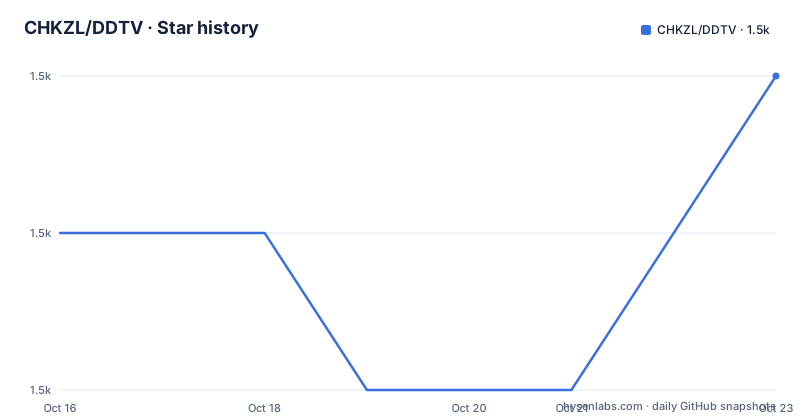
- CHKZL/DDTV1,496 ★ · +1
| Repository | 2026-10-16 | 2026-10-23 |
|---|---|---|
| CHKZL/DDTV | 1.5k | 1.5k |
1 Stars in the last 7 days, measured from the daily GitHub snapshot. Compare with other projects
Editorial analysis
The timeline guarantee is the actual product
DDTV describes itself as a Bilibili live companion tool that monitors the streamers you follow, records the live stream automatically when they start, and synchronously records danmaku, SC, gifts and fleet information while guaranteeing the timeline is correct.
Almost every recorder can save a video file. The timeline is the hard part. A live stream arrives as segments that drift, and the chat overlay renders on its own clock. If you download the video and the danmaku separately and merge them afterwards, the comments slide out of sync, and the community tool that fixes that drift is a repair job you wait on for as long as the stream lasted.
So the feature list leads with that: a correct timeline, recorded as you go, so there is no repair wait at the end.
The other entries follow from it. Danmaku recording covers comments, SC super chats, fleet or guard purchases and gifts, so no moment is missing. Start-of-stream bubbles give a visual indication of which streamers in your list are live. Automatic recording means you do not have to be present when it starts.
Then a feature that is closer to a bonus: the tool supports native live room functions including sending danmaku, switching backup lines and switching quality, with gifts excluded from that list.
Automatic post-processing handles file merging and transcoding, based on ffmpeg.
Five projects, four ways to run them
The repository table maps five projects to frameworks, and that table is the architecture.
Core is on.NET 10 and holds all the business logic. Server is.NET 10 with ASP.NET 10 and wraps Core further, integrating the API interface and the WEBUI service. Desktop is.NET 10 Desktop and is Windows exclusive, carrying a GUI plus advanced features such as online viewing, and it includes everything Core and Server do. Client is.NET 10 and is a desktop wrapper around Server providing a WPF shell with an embedded web UI. Doc is a Vue and VitePress documentation site with installation, configuration and API documentation.
Read as a dependency chain, Core sits underneath, Server is the headless host, and Desktop and Client provide Windows desktop interfaces.
The release guidance tells you which to download. Windows users are pointed at Desktop as the recommended option with the full GUI, live notifications and online viewing, or Client as a lightweight shell with the embedded web UI. Linux, macOS, servers and NAS users are pointed at Server in headless mode, managed through a browser.
The archives are self-contained. The README states the runtime is bundled and.NET does not need to be installed.
There is also a `DDTV.Tests` directory and an `Update/` directory at the repository root.
ffmpeg is the one thing you install yourself
Every other dependency ships in the archive, with one exception that the README calls out twice.
Under the ordinary user section it notes that Linux and macOS platforms need ffmpeg installed and added to PATH, otherwise the automatic repair and transcode features for recorded files are unavailable. The developer section repeats it: non-Windows platforms need ffmpeg on PATH because repair and transcoding depend on it.
Repeating a requirement twice suggests it is the most common setup failure, and the reason is worth understanding. The README does not give equivalent ffmpeg installation instructions for the Windows archives.
The developer environment requirements are otherwise minimal: the.NET 10 SDK. The Docker route is delegated rather than built in, with the README recommending a community project, moomiji/docker-ddtv.
Building from source uses the standard solution command:
dotnet build DDTV.slnThe three run targets are `dotnet run --project Server` for the headless API and web UI mode, `dotnet run --project Desktop` for the Windows GUI, and `dotnet run --project Client` for the WPF shell.
The API and web UI are built for second development
One feature entry describes an authenticated REST API plus WebSocket push, presented as convenient for people who want to build on top.
The pairing provides both a REST interface and WebSocket push for clients that build on the server.
The REST API and WebSocket service are documented as having authentication.
The acknowledgements table credits DDTV_GUI_React by moehuhu for providing a web UI, while the repository description says Server integrates the WEBUI service.
So the boundary between the recorder and its interface is a line between repositories, which matters if you contribute: a change to the API contract affects a separate front-end project.
The stack is.NET 10 throughout, with ASP.NET 10 for the server,.NET 10 Desktop for the WPF shell, and Vue with VitePress for the documentation, and the repository topics list wpf alongside the C# sources.
Version names and the disclaimer
Two things about the project's state are worth knowing before you install it.
The releases are named dev5.7.11, dev5.7.9 and dev5.7.10, published in September and October 2026. The listed release names use a `dev` prefix. The last push was on 2026-10-09, so it ships often.
Second, there is a disclaimer and it is specific. The project states it is an unofficial personal open source project with no affiliation, authorisation or cooperation with bilibili or its associated companies. The interfaces, data and content used come from the public internet and are for personal study and technical research only. Commercial use and infringement of others' rights are prohibited, and users bear the consequences of their own use.
Read that as a boundary rather than boilerplate. A recorder built on a platform's public endpoints depends on those endpoints remaining public, and a tool whose author disclaims affiliation carries the risk of the platform changing its terms without notice.
The repository is GPL-2.0 licensed, which covers the code and not anyone's ability to record a broadcast they do not hold the rights to.
Where this goes wrong
Three cases, and the last one is specific to the platform.
If you want to watch a stream rather than keep it, this is far more machinery than you need. A browser and the live room do the job.
If you need something that survives a platform change, the unofficial status applies. Nothing in the repository addresses what happens if the endpoints it uses are restricted, and the disclaimer explicitly places that risk on the user.
If you are on Linux or macOS and have not installed ffmpeg, half the feature set quietly does nothing while everything else appears to work.
What it does well is narrow and real: recording the streams of people you already follow, on a timeline that matches the chat, without you being present when it starts. That last point is the one no browser tab gives you, and it is why the danmaku timeline rather than the recording itself is what the README leads with.
There is also a question of what you do with the result. The tool records streams that other people broadcast, and the disclaimer draws that line explicitly, so the sensible use is your own archive of streams you follow, kept for personal viewing, rather than anything you redistribute.
Editorial conclusion
Adopt DDTV if you want unattended recording of the streams you follow and need the danmaku timeline kept alongside the video, since that is the feature this project is actually built around. Skip it if you only want to watch, since that needs no recorder, and read the disclaimer first: the project states it is unofficial and not for commercial use. Verify that `ffmpeg` is on your PATH if you use the Linux or macOS build and need automatic repair or transcoding.
Frequently asked questions
Which DDTV build should I download?
Windows users should take Desktop for the full GUI with notifications and online viewing, or Client as a lighter shell with an embedded web UI. Linux, macOS, server and NAS users take Server in headless mode and manage it from a browser. Docker users are pointed to the community project moomiji/docker-ddtv.
Do I need to install ffmpeg?
On Linux and macOS, yes, and it must be on your PATH. The README states that without it, automatic repair and transcoding of recorded files are unavailable. The Windows archives bundle the runtime and need no separate.NET install.
How do I build DDTV from source?
Install the .NET 10 SDK, then run `dotnet build DDTV.sln`. Run it with `dotnet run --project Server` for the headless API and web UI mode, `dotnet run --project Desktop` for the Windows GUI, or `dotnet run --project Client` for the WPF shell with the embedded web UI.
Official sources
Add this badge to your README
If you maintain this project, the badge below links readers to this analysis and shows its maintenance status from the daily GitHub snapshot. Paste the markdown into your README; add ?metric=license or ?metric=stars to the image URL for a different field.

[](https://hysenlabs.com/projects/chkzl-ddtv)Star history chart for your README
[](https://hysenlabs.com/projects/chkzl-ddtv)Was this useful?