netscanner puts ping, packet capture and WiFi signal strength in one Rust TUI
Terminal Network scanner & diagnostic tool with modern TUI
At a glance
- What is it?
- netscanner is a terminal network scanner and diagnostic tool written in Rust that combines interface selection, WiFi scanning, CIDR pinging, packet capture and TCP port scanning behind a Ratatui interface. It suits someone diagnosing a home or lab network from one terminal, and it does not suit anyone who cannot grant root, or who needs IPv6 scanning, which the project lists as unfinished.
- Who is it for?
- Adopt netscanner when you want interface listing, WiFi signal strength, ping sweeps, packet capture and TCP port scanning in a single terminal UI on a machine you already administer, and you are content with a tool without IPv6 scanning. Do not adopt it if you need IPv6 discovery, since the README lists IPv6 scanning and dumping as an open TODO, or if root on a shared machine is not acceptable, since the README's own instructions involve making the binary setuid.
- Can I use it commercially?
- Yes. MIT is a permissive licence: you can use, modify and sell software built on it, as long as you keep its copyright and licence notices.
- Is it still maintained?
- Yes. The repository last received commits 124 days ago.
- What is it written in?
- Mainly Rust, according to GitHub's language statistics.
Answers come from the project's GitHub data, last synced on November 7, 2026, and from our analysis. They are not legal advice.
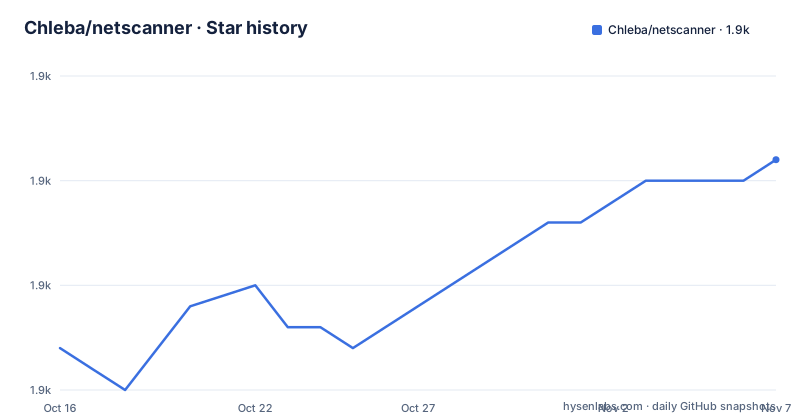
Star history
- Chleba/netscanner1,896 ★ · +9
| Repository | 2026-10-16 | 2026-11-07 |
|---|---|---|
| Chleba/netscanner | 1.9k | 1.9k |
9 Stars in the last 22 days, measured from the daily GitHub snapshot. Compare with other projects
Editorial analysis
What it does: one TUI covering the first hour of a network problem
netscanner is described as a terminal network scanner and diagnostic tool with a modern TUI, written in Rust by Lukas Chleba. The feature list is a checklist of what a person reaches for when a home or lab network misbehaves.
It starts by listing hardware interfaces and letting you switch which one is active for scanning and packet-dumping. From there: scanning WiFi networks, WiFi signal strength with charts, IPv4 pinging across a CIDR with hostname, OUI and MAC address resolution, IPv4 packetdump covering TCP, UDP, ICMP and ARP, IPv6 packetdump limited to ICMP6, start and pause of the packetdump, scanning of open TCP ports, filtering of the packet log, export of scanned IPs, ports and packets to CSV, and traffic counting with DNS records.
Two design decisions stand out. First, the OUI lookup: the topics include `ouilookup`, and the dependency list includes the `mac_oui` crate with a `with-db` feature, which is why a ping sweep can print a hardware vendor name next to an IP address rather than a bare address. Second, the port descriptions come from a crate called `port-desc`, so a scan result can label a port rather than leaving you to remember it.
This is diagnostic tooling, not a scanning framework. Nothing in the feature list is about exploitation, credential capture or attack automation. It is built for the person who already knows their network and wants to see it.
Installing from a package manager or cargo
netscanner is packaged for several distributions through repology, with badges for Arch, nixpkgs unstable, Manjaro Stable and Kali Linux Rolling. On Arch the install is:
pacman -S netscannerOn Alpine, from the edge testing repository:
apk add netscanner --repository=http://dl-cdn.alpinelinux.org/alpine/edge/testing/And from cargo, which is also the route for any other platform:
cargo install netscannerWindows needs a prerequisite. The README states that using netscanner on Windows requires installing Npcap, otherwise you may encounter a packet.dll error, and links to npcap-1.80.exe. Npcap is the packet capture library required for network scanning and packet analysis.
The release profile in `Cargo.toml` is tuned small rather than fast: `opt-level = "z"`, `lto = true` and `strip = true`. For a binary distributed as a single terminal tool, that is a reasonable trade, and it explains why the project is willing to ship through distro packaging rather than a JVM-style fat runtime.
Root privileges, and why the README suggests a setuid binary
The README states plainly that netscanner must be run with root privileges. That is not a stylistic choice. The README requires netscanner to run with root privileges.
That creates an operational problem for distribution installs, because you cannot just tell every user to type `sudo` for an interactive TUI. The README's answer is to change the ownership and mode of the installed binary:
sudo chown root:user /home/user/.cargo/bin/netscanner
sudo chmod u+s /home/user/.cargo/bin/netscanner
`u+s` is the setuid bit, meaning the binary runs with the privileges of its owner, `root`. It is a real trade: it removes the need to authenticate repeatedly, and it also means any process that can execute that file inherits the privilege. That is the same class of mechanism as `sudo`, but with far less of the accounting.
The Debian packaging takes the same approach and makes it explicit. In `Cargo.toml` under `[package.metadata.deb]`, the asset table installs `target/release/netscanner` into `usr/bin/` with mode `4755`, which is setuid root in octal. The same block declares `depends = "iw"` for wireless configuration, ships `README.md` to `/usr/share/doc/netscanner/README`, and installs `debian/netscanner.manpage` as `/usr/share/man/man1/netscanner.1`.
The export default path is the user's `$HOME` directory on Linux and macOS, so CSV output lands somewhere the calling user can read, even though capture itself happened as root.
How the crate is put together
The dependency list in `Cargo.toml` describes the architecture more precisely than a README diagram would, and the edition is 2024 with the crate version at 0.6.43.
The interface layer is Ratatui with Crossterm underneath, and Crossterm is pulled in with the `serde` and `event-stream` features, which means input events are a stream rather than polled calls. The author credits Ratatui and libpnet as the two libraries that helped most. Packet handling itself goes through `pnet` at 0.35.0.
Networking is decomposed into small purpose-built crates: `fastping-rs` for ICMP reachability, `dns-lookup` for names and DNS records, `cidr` and `ipnetwork` for range arithmetic, `mac_oui` with `with-db` for vendor lookup, `port-desc` for service names, and `libc` for the privileged calls. `rand` is there too, which is what makes a port scan sample ports rather than walk them in order.
The argument and configuration surface is conventional Rust: `clap` 4.4.5 with derive, wrap_help and unicode features, `config` 0.14.0 paired with `json5`, which suggests the tool reads a JSON5 settings file rather than forcing flags for everything. Error handling uses `color-eyre` for reporting and `better-panic` for panics, with `human-panic` also in the list.
Output goes through the `csv` crate, and `itertools` handles the scanning combinators. There is also a `build.rs`, a `rust-toolchain.toml` pinning the compiler, and a `demo.tape` used to record the demo GIF.
The examples directory is the documentation for how it works
netscanner ships five standalone examples, and their names describe the internal model of the tool more clearly than any user documentation.
`examples/cidr.rs` covers range arithmetic, the part that turns a CIDR into a list of addresses to probe. `examples/port.rs` covers the port layer, which given the `port-desc` dependency is likely also where a service name is attached to a number. `examples/chunks.rs` is the interesting one: chunking is how a large address space gets processed in bounded pieces rather than materialised all at once, and it is the difference between a ping sweep that allocates sensibly and one that does not.
`examples/ip_lookup.rs` isolates host and vendor resolution, so the DNS answer and the OUI vendor for an address are separable. `examples/env_csv.rs` covers export, meaning the CSV schema is a discrete unit that can be tested without running a scan.
Separating these as examples rather than only as internal modules suggests the author intends the pieces to be readable in isolation. For anyone who wants to extend the tool, they are also the best starting points, since each one is small enough to understand in a sitting and corresponds to a feature in the README list.
There is also an `assets/` directory, a `traffic.png`, and a `debian/` directory carrying the changelog and manpage referenced in the packaging metadata.
What is missing, and when to pick something else
The README carries an explicit TODO: IPv6 scanning and dumping. The current state is that IPv4 is covered for ping, TCP, UDP, ICMP and ARP capture and TCP port scanning, while IPv6 support is limited to ICMP6 packetdump. On a network that is dual-stack, or IPv6-only, that is a real gap rather than a detail.
The version numbering also deserves attention. The crate is at 0.6.43, which is below 1.0 and signals an API that can still change. The release history is irregular: v0.6.3 on 2025-03-09, v0.6.41 on 2026-01-20, and v0.6.43 on 2026-07-06, which is also the date of the last push. That gap between releases is worth factoring into a decision.
Then there is the tool choice itself. For a scheduled TCP port scan that runs on a schedule and writes machine-readable output to a file, a TUI is the wrong interface, and the README does not document a non-interactive mode beyond the CSV export path. For packet analysis with protocol dissectors, filtering and offline capture files, a full protocol analyser is the better tool and this one is deliberately not that. For anything requiring IPv6 host discovery, it is the wrong tool today.
What it is good at is the interactive case: a human at a terminal, wanting to see signal strength, then sweep a range, then watch packets, then export what they found.
Editorial conclusion
Adopt netscanner when you want interface listing, WiFi signal strength, ping sweeps, packet capture and TCP port scanning in a single terminal UI on a machine you already administer, and you are content with a tool without IPv6 scanning. Do not adopt it if you need IPv6 discovery, since the README lists IPv6 scanning and dumping as an open TODO, or if root on a shared machine is not acceptable, since the README's own instructions involve making the binary setuid. Before installing, read the `Cargo.toml` asset block, where the Debian package ships the binary with mode 4755, and confirm that matches your security policy.
Frequently asked questions
How do I install netscanner on Linux?
On Arch it is `pacman -S netscanner`, on Alpine edge `apk add netscanner --repository=http://dl-cdn.alpinelinux.org/alpine/edge/testing/`, and from source with cargo it is `cargo install netscanner`. Repology also tracks packages for nixpkgs unstable, Manjaro Stable and Kali Linux Rolling.
Does netscanner need root privileges?
Yes. The README states it must be run with root privileges, and suggests changing ownership and adding the setuid bit with `sudo chown root:user /home/user/.cargo/bin/netscanner` and `sudo chmod u+s /home/user/.cargo/bin/netscanner`.
What extra setup does netscanner need on Windows?
Npcap must be installed, otherwise you may encounter a packet.dll error. Npcap is the packet capture library required for network scanning and packet analysis.
Can netscanner scan IPv6 networks?
Not for host discovery. The README lists IPv6 scanning and dumping as an unfinished item in its TODO section, and the current IPv6 support is packetdump for ICMP6 only.
Where does netscanner export its scan results?
The default export path is the user's `$HOME` directory on Linux and macOS. The tool can export scanned IPs, ports and packets into CSV.
What licence is netscanner released under?
MIT, declared in `Cargo.toml` as `license = "MIT"` with the `LICENSE` file at the repository root. The author is Lukas Chleba.
Official sources
Add this badge to your README
If you maintain this project, the badge below links readers to this analysis and shows its maintenance status from the daily GitHub snapshot. Paste the markdown into your README; add ?metric=license or ?metric=stars to the image URL for a different field.

[](https://hysenlabs.com/projects/chleba-netscanner)Star history chart for your README
[](https://hysenlabs.com/projects/chleba-netscanner)Was this useful?