HISE sample instrument framework: build setup and adoption limits
The open source framework for sample based instruments
At a glance
- What is it?
- HISE is a C++ framework for building sample-based and hybrid virtual instruments, then exporting them as VST, AU, or AAX plugins or standalone applications. Its sampling focus and multiple export paths are substantial, but the GUI-driven build process, external SDK setup, and custom commercial licensing terms require careful evaluation.
- Who is it for?
- HISE suits C++ developers who need to build a sample-focused virtual instrument and retain control over its plugin packaging. It is a poor fit for developers seeking a package-manager installation, a documented command-line instrument-creation workflow, or an unambiguous permissive license for closed-source products.
- Can I use it commercially?
- Check first. The repository uses a licence we do not classify automatically, so read its LICENSE file before any commercial use.
- Is it still maintained?
- Yes. The repository last received commits 12 days ago.
- What is it written in?
- Mainly C++, according to GitHub's language statistics.
Answers come from the project's GitHub data, last synced on October 23, 2026, and from our analysis. They are not legal advice.
Star history
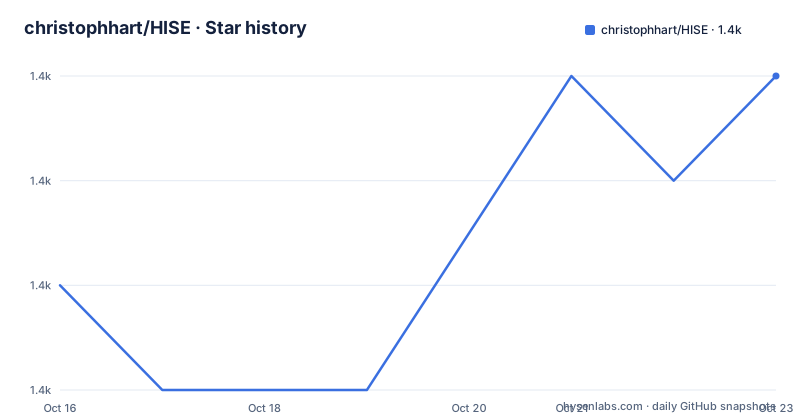
- christophhart/HISE1,437 ★ · +2
| Repository | 2026-10-16 | 2026-10-23 |
|---|---|---|
| christophhart/HISE | 1.4k | 1.4k |
2 Stars in the last 7 days, measured from the daily GitHub snapshot. Compare with other projects
Editorial analysis
HISE's sample-instrument scope and intended developers
HISE addresses a specific part of audio software development: creating virtual instruments whose primary content is recorded audio. The README describes sampling as its central concern while also allowing basic synthesis, hybrid instruments, and audio effects. This places HISE between a general-purpose audio framework and a conventional preset instrument. The repository is predominantly C++ and is organized into modules for DSP, scripting, streaming, synthesis, user-interface code, and supporting libraries.
The intended user is a developer who is willing to work at framework level rather than assemble an instrument from a hosted service or a lightweight package. HISE provides paths for exporting an instrument as VST, AU, or AAX plugins, or as a standalone application for Windows, macOS, or iOS. That format selection is useful for teams serving several plugin ecosystems, although HISE does not present these as interchangeable packaging operations with identical constraints.
The listed host support includes Cubase, Ableton Live, Logic, Reaper, Protools, REASON 10, FL Studio, and Presonus Studio One. The documented operating systems are Windows 7 or later, macOS 10.7 or later, iOS 8.0 or later, and Linux, with the Linux path described as tested on Ubuntu 16.04 LTS. These are important compatibility claims, but they are not evidence that every HISE-generated instrument will behave identically across all listed hosts and platforms.
How HISE's module structure reaches exported plugins
The repository layout exposes the implementation as a collection of C++ components rather than a single command-line sampler. Relevant directories include `hi_dsp_library`, `hi_core`, `hi_scripting`, `hi_streaming`, `hi_snex`, `hi_faust`, `hi_frontend`, and `hi_lac`. Audio production, sample handling, scripting, synthesis, user-interface logic, and several domain-specific components therefore have separate source locations.
Export begins from HISE itself, not from a separate wrapper around an ordinary plugin. The README says that instruments can be exported as VST, AU, or AAX plugins and as standalone applications. It also identifies plugin-specific projects such as `project/plugin/HISE.jucer` and a standalone project at `projects/standalone/HISE Standalone.jucer`. The `.jucer` files are loaded and regenerated through the bundled Projucer, after which the target IDE performs compilation.
Sample access receives special attention. The Windows instructions recommend 64-bit builds because the project uses memory mapping for sample access and needs a slower fallback under the 32-bit address-space limit. HISE recommends Intel IPP for FFT routines and vector operations, while Kiss FFT is included as a fallback when IPP is unavailable. This dependency choice affects more than installation time: it changes which DSP implementation participates in the build.
The repository also includes several supporting frameworks. The README identifies ICSTDP DSP, Kiss FFT, FFTConvolver, MDA plugin code, and public-domain material among its third-party components. Because HISE includes modified JUCE source, cloning the repository may take a while, according to the build instructions.
Building HISE on Linux from the documented Makefile path
The Linux instructions provide the clearest terminal-based build route. Install the listed system dependencies first. This command installs build tools and libraries for audio, graphics, networking, JACK, GTK, and WebKit development:
sudo apt-get -y install build-essential make llvm clang libfreetype6-dev libx11-dev libxinerama-dev libxrandr-dev libxcursor-dev mesa-common-dev libasound2-dev freeglut3-dev libxcomposite-dev libcurl4-gnutls-dev libgtk-3-dev libjack-jackd2-dev libwebkit2gtk-4.0-devThe README notes that `libwebkit2gtk-4.1-dev` can replace `libwebkit2gtk-4.0-dev` when the latter is absent from the distribution repository. It also warns of buggy user-interface behavior with GCC/G++ versions greater than 11 and advises using GCC/G++ 11 or lower. Following this is especially relevant because HISE is a graphical audio application framework rather than a minimal command-line DSP library.
After cloning the repository and extracting `tools/SDK/sdk.zip` into `tools/SDK`, open the precompiled Linux Projucer at `tools/projucer`. Load `projects/standalone/HISE Standalone.jucer` and resave it so the generated Makefile contains the correct Linux paths. Then enter `projects/standalone/Builds/LinuxMakefile` and compile the release configuration:
make CONFIG=ReleaseA debug build is also documented:
make CONFIG=DebugThe debug version is slower but permits source-level debugging, according to the README. The first documented build therefore still depends on a graphical Projucer operation before the generated Linux Makefile can be used.
Windows and macOS Projucer prerequisites before compilation
Windows and macOS use Projucer to open either `projects/standalone/HISE Standalone.jucer` or `project/plugin/HISE.jucer`. Before that step, the contents of `tools/SDK/sdk.zip` must be extracted into `tools/SDK`, producing directories named `ASIOSDK2.3` and `VST3 SDK`. The bundled Projucer executables are under `tools/projucer`.
On Windows, the default configuration assumes Intel IPP is installed. Developers without IPP are instructed to open the Projucer exporter settings and set `Exporters -> VS2022 -> Use IPP (One API)` to `No`. Selecting `Save Project and open in IDE` opens the generated project in Visual Studio 2022, where compilation begins. The 64-bit target is the recommended choice for its sample memory-mapping path.
On macOS, selecting the same Projucer action opens the project in XCode. The README says that a macOS permission error may require granting Projucer access in `Security & Privacy`. This is an operating-system trust decision, not an HISE build flag, so the tutorial cannot reduce it to a portable terminal command.
The documented first build is a framework build, not a complete worked tutorial for loading samples, defining mappings, and exporting an instrument. The README points to `http://hise.audio` for more information, but the supplied repository documentation does not provide those later steps.
HISE's REST, MCP, and scripting boundaries
HISE includes optional tooling aimed at AI-assisted development, but these integrations sit outside the core repository. The documentation links an MCP server that can expose HISE documentation and, when `Tools > Enable REST Server` is active, interact with a running project through actions such as compiling scripts, capturing screenshots, and manipulating user-interface components. Setup is assigned to the separate `hise_mcp_server` repository, so the main HISE repository does not fully document its installation here.
A separate diagnostic-only Language Server checks HISEScript in `.js` files. The README says it can identify API hallucinations, incorrect argument counts, and type mismatches before compilation. It must be configured per project so that it does not replace the standard JavaScript language service in unrelated repositories. Setup likewise belongs to `hise_lsp_server`.
The `justfile` also defines a `dump-openapi` target. With a HISE backend running on port `1900`, it requests the live REST API specification and formats it as JSON:
curl -s http://127.0.0.1:1900/ | python -m json.tool > guidelines/api/openapi.jsonThis repository entry demonstrates that a REST endpoint exists for development use, but it does not document authentication, deployment controls, or the behavior of that endpoint when HISE is not running.
Custom license implications for distributed HISE instruments
The repository metadata labels the license as custom because GitHub cannot classify it. The README describes HISE as licensed under GPL v3 while also stating that closed-source usage requires a commercial license. It further says that instruments built with HISE inherit the relevant license obligations, and that a closed-source release may require both a HISE commercial license and a JUCE commercial license.
That wording creates a clear adoption boundary. An open-source instrument aligned with GPL v3 terms is the scenario most directly connected to the stated licensing model. Shipping a proprietary instrument is not merely a matter of hiding source code, because the README explicitly directs closed-source users toward commercial licensing. This article does not interpret the legal effect of the license or advise on individual distribution arrangements.
The build also carries operational licensing considerations outside HISE itself. The bundled SDK archive contains `ASIOSDK2.3` and `VST3 SDK`, while export formats include AAX. The README does not explain the redistribution terms for each SDK or format, so teams should not assume that the HISE license statement covers every external component. The `license.txt` file and the applicable SDK terms need direct review before an instrument is distributed.
Platform, build, and workflow limits for HISE adoption
HISE is a framework-level choice with real constraints. The documented system requirements include operating systems old enough to cover Windows 7, macOS 10.7, and iOS 8.0, but those entries should be treated as stated support boundaries, not proof that current operating systems remain equally suitable. The Linux build documentation is tied to an Ubuntu release and gives a compiler warning about newer GCC/G++ versions. It also accepts either WebKit development package version, which means the package name must be checked before copying the installation command.
The most visible wrong-tool case is a developer who needs a sampler through a package manager and a short programmatic API. The README requires cloning a large repository, extracting SDKs, using Projucer, saving generated projects, and compiling through Visual Studio, XCode, or a generated Makefile. A team that does not need VST, AU, AAX, or standalone packaging and does not want a GUI-driven build has little reason to absorb that setup cost.
A real alternative is JUCE alone. The README states that HISE includes modified JUCE source, and its builds require exporting through Projucer into an IDE or generated Makefile. The README identifies JUCE as an underlying C++ library. HISE adds sample-instrument development, HISEScript tooling, sampling mechanisms, and export preparation, but it also adds the framework, licensing, SDK, and build complexity associated with that layer.
HISE is not archived. Its last push was on 2026-10-11. The listed releases are 4.1.0 from 2024-10-29, 4.0.0 from 2024-06-12, and 3.6.2 from 2023-09-23. Recent repository activity does not itself define upgrade compatibility, and the README does not document a rollback procedure for instrument projects or framework versions.
Editorial conclusion
HISE suits C++ developers who need to build a sample-focused virtual instrument and retain control over its plugin packaging. It is a poor fit for developers seeking a package-manager installation, a documented command-line instrument-creation workflow, or an unambiguous permissive license for closed-source products. Before adoption, verify the custom GPL and commercial licensing terms for the intended instrument, test the target operating system and DAW, and confirm that the required SDKs and build dependencies can be supplied.
Frequently asked questions
What is HISE used for?
HISE is a cross-platform C++ framework for building virtual instruments based primarily on samples. It also supports basic synthesis, hybrid instruments, and audio effects.
Which plugin and application formats can HISE export?
The README lists VST, AU, and AAX plugins, plus standalone applications for Windows, macOS, and iOS. The exact export path depends on the target and build configuration.
Can a closed-source instrument be built with HISE?
The README says closed-source usage requires a commercial HISE license and may also require a commercial JUCE license. It states that every instrument inherits the applicable license terms.
Does HISE support a command-line Linux build?
The generated Linux Makefile is built with `make CONFIG=Release` or `make CONFIG=Debug`. Before that, Projucer must load and resave `projects/standalone/HISE Standalone.jucer` so the Makefile has the correct Linux paths.
Is Intel IPP required to compile HISE?
IPP is not required on every platform. The Windows build assumes IPP by default, but the Projucer setting `Exporters -> VS2022 -> Use IPP (One API)` can be set to `No`; the repository also includes Kiss FFT as a fallback.
Official sources
Add this badge to your README
If you maintain this project, the badge below links readers to this analysis and shows its maintenance status from the daily GitHub snapshot. Paste the markdown into your README; add ?metric=license or ?metric=stars to the image URL for a different field.

[](https://hysenlabs.com/projects/christophhart-hise)Star history chart for your README
[](https://hysenlabs.com/projects/christophhart-hise)Was this useful?