Chromium: The Browser Source Tree That Demands a Different Workflow
The official GitHub mirror of the Chromium source
At a glance
- What is it?
- The official GitHub mirror of Chromium is not a typical repository. It is a read-only snapshot of a massive source tree with its own checkout tooling, directory conventions, and bug tracking process.
- Who is it for?
- Use this mirror if you need to read Chromium source; to build or contribute, follow the project's own checkout process in docs/get_the_code.md instead. Do not use it as a starting point for a small browser experiment or a fork you plan to maintain casually; the source tree is enormous and the tooling expects a specific setup.
- Can I use it commercially?
- Yes. BSD-3-Clause is a permissive licence: you can use, modify and sell software built on it, as long as you keep its copyright and licence notices.
- Is it still maintained?
- Yes. The repository last received commits 1 day ago.
- What is it written in?
- GitHub does not report a main language for this repository.
Answers come from the project's GitHub data, last synced on November 21, 2026, and from our analysis. They are not legal advice.
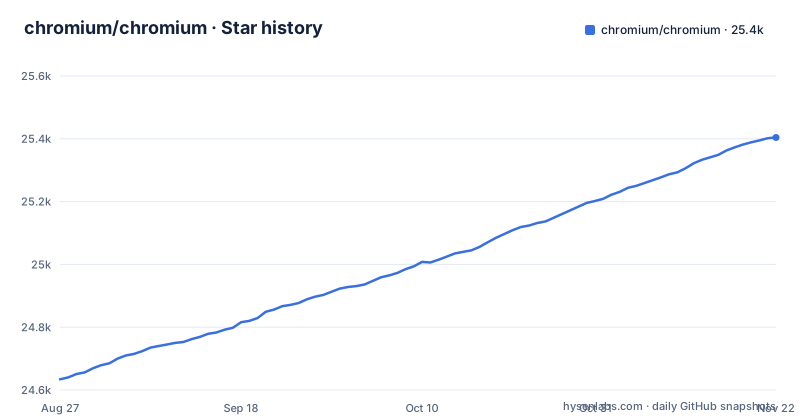
Star history
- chromium/chromium25,402 ★ · +768
| Repository | 2026-08-27 | 2026-11-21 |
|---|---|---|
| chromium/chromium | 24.6k | 25.4k |
768 Stars in the last 86 days, measured from the daily GitHub snapshot. Compare with other projects
Editorial analysis
What This Mirror Actually Is
The chromium/chromium repository on GitHub is the official mirror of the Chromium source. It exists so that people who live on GitHub can browse the code, but it is not where development happens. The README is blunt about this: it tells you not to use git clone, and it points you to separate documentation for getting the code. That distinction matters. If you treat this like a normal open source project, you will hit a wall immediately. The mirror is a snapshot of a much larger system, and the project's real home is the Chromium infrastructure, not GitHub.
The Problem It Solves: Source Access Without the Full Toolchain
For an engineer who wants to understand how a browser is built, this mirror solves a simple problem: it gives you a browsable copy of the source without forcing you to set up the entire Chromium development environment. You can search the tree, read comments, and trace code paths from your browser. The intended audience is someone who needs to inspect or reference the code, not someone who wants to clone and build in five minutes. The README makes that clear by directing you to the official instructions for getting the code, which involve a tool called depot_tools and a different fetch process. If your goal is just to read, the mirror works. If your goal is to build, you need to leave GitHub.
How the Code Is Organized: Product Directories First
The README describes a specific layout rule: new top-level directories are for products like Chrome, Android WebView, and Ash. Even if a product has multiple executables, the code lives in subdirectories of that product. This is a departure from older Chromium structure, where top-level directories accumulated for historical reasons. The guidance is that new code should follow the product-first convention. That tells you something about how the project thinks about its own tree: it is organized around shipping products, not around generic libraries. If you are looking for a component, you will need to know which product owns it. The README points to a separate page for getting around the directory structure, which suggests the layout is not self-explanatory to newcomers.
Getting the Code: Why git clone Is Wrong
The README's most direct instruction is this: do not use git clone. Instead, you should follow the instructions in docs/get_the_code.md. The warning is unambiguous. Chromium's source is too large and has too many dependencies to be fetched as a single git repository. The official process uses a combination of git, a bootstrap script, and a separate dependency checkout. If you ignore this and run git clone, you will likely end up with an incomplete tree or a checkout that takes hours and fails partway. The correct path is to read the documentation first. That is a rare demand from a project, and it is a sign of how complex the build system is.
A Real Limitation: This Is a Mirror, Not a Contribution Point
The repository has no recent releases listed, and the README tells you to file bugs at crbug.com, not on GitHub. That is a genuine limitation if you are used to GitHub-centric workflows. You cannot submit a pull request here and expect it to be reviewed. The mirror is read-only for practical purposes. If you find a bug, you must leave GitHub and use the project's own issue tracker. This also means the GitHub issue tracker, if any, is not the place to ask questions. For an engineer evaluating this project, the limitation is not technical but procedural: you have to adopt Chromium's tools and conventions even to report a problem. That adds friction, but it is consistent with how the project operates.
The Alternative: The Official Source Repository and depot_tools
The real alternative to using this GitHub mirror is to go directly to the project's official source at chromium.googlesource.com and follow the checkout instructions. That path uses depot_tools, a set of scripts that manage the source tree and its dependencies. The difference in approach is fundamental: the mirror gives you a static view, while the official repository is the live source with a workflow designed for building and contributing. The official method also handles the vast number of third-party dependencies that Chromium bundles, which a plain git clone cannot do. If you need to build Chromium, the mirror is the wrong tool. The README's pointer to docs/get_the_code.md is the first step on that alternative path.
Licence and Maintenance Costs
The repository is licensed under BSD-3-Clause, which is permissive for reuse, but that says nothing about the size of the codebase or the cost of maintaining a fork. Chromium is a massive source tree with frequent changes. The README does not give version numbers or release cadence, and the mirror has no recent releases listed, so you cannot infer stability from this page alone. Maintenance cost for anyone who forks this is high: you must track upstream changes, manage dependencies, and keep up with build system updates. The BSD licence allows you to do that, but it does not make it easy. For a project that just wants to embed a browser component, this is not a lightweight dependency. You are adopting a moving target.
Editorial conclusion
Use this mirror if you need to read Chromium source; to build or contribute, follow the project's own checkout process in docs/get_the_code.md instead. Do not use it as a starting point for a small browser experiment or a fork you plan to maintain casually; the source tree is enormous and the tooling expects a specific setup. Before you begin, verify that you have the disk space, a compatible build environment, and the patience to follow docs/get_the_code.md rather than a plain git clone. The repository is a mirror, not a community hub, so file bugs at crbug.com, not as GitHub issues.
Frequently asked questions
How do I install Chromium?
The README tells you not to use `git clone` and to follow docs/get_the_code.md for how to get the code. No package manager command or install script appears in the README.
How do I install Chromium on Ubuntu?
The README gives no steps for Ubuntu or any other distribution. Its only instruction is to obtain the code through docs/get_the_code.md rather than a plain clone, and the DEPS file at the root is the dependency declaration for that checkout.
How do I run Chromium from the terminal?
No launch command is documented in the README. For anything that behaves wrongly in a running browser, the project routes bug reports to https://crbug.com/new rather than to this repository.
Official sources
Add this badge to your README
If you maintain this project, the badge below links readers to this analysis and shows its maintenance status from the daily GitHub snapshot. Paste the markdown into your README; add ?metric=license or ?metric=stars to the image URL for a different field.

[](https://hysenlabs.com/projects/chromium-chromium)Star history chart for your README
[](https://hysenlabs.com/projects/chromium-chromium)Was this useful?