Security Onion bundles the Elastic Stack, Suricata, Zeek and osquery in one Linux image
Security Onion is a free and open platform for threat hunting, enterprise security monitoring, and log management. It includes our own interfaces for alerting, dashboards, hunting, PCAP, detections, and case management. It also includes other tools such as osquery, CyberChef, Elasticsearch, Logstash, Kibana, Suricata, and Zeek.
At a glance
- What is it?
- Security Onion ships as a Linux distribution rather than a package, so search, intrusion detection, metadata and packet capture get installed and sized as one unit. The README is short, which leaves sizing and build details to the external documentation.
- Who is it for?
- Security Onion fits teams that want alerting, hunting, PCAP and case management inside one appliance and can accept an appliance sized by somebody else's hardware guide. Before committing, open that hardware guide and the LICENSE file and confirm what the paid Pro tier adds, because none of those three answers live in this repository.
- Can I use it commercially?
- Check first. The repository uses a licence we do not classify automatically, so read its LICENSE file before any commercial use.
- Is it still maintained?
- Yes. The repository last received commits 2 days ago.
- What is it written in?
- Mainly Shell, according to GitHub's language statistics.
Answers come from the project's GitHub data, last synced on November 15, 2026, and from our analysis. They are not legal advice.
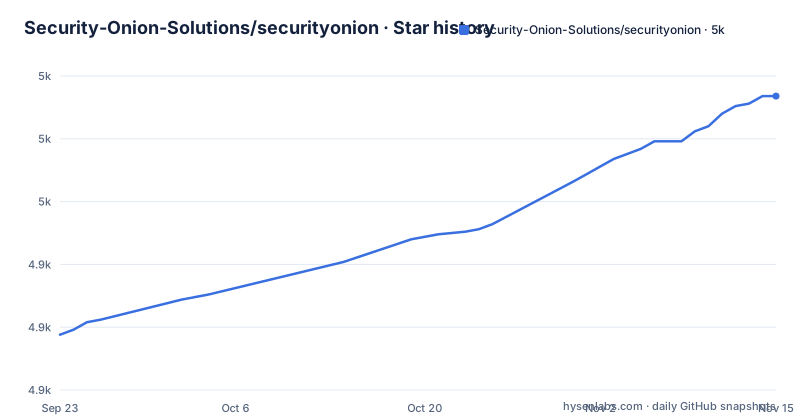
Star history
- Security-Onion-Solutions/securityonion4,992 ★ · +95
| Repository | 2026-09-23 | 2026-11-15 |
|---|---|---|
| Security-Onion-Solutions/securityonion | 4.9k | 5k |
95 Stars in the last 53 days, measured from the daily GitHub snapshot. Compare with other projects
Editorial analysis
Elasticsearch, Logstash, Kibana, Suricata, Zeek and osquery arrive as one image
Security Onion is a Linux distribution, not a package you drop onto an existing server. Its feature list assigns search to the Elastic Stack, intrusion detection to Suricata on the network side and Elastic Fleet on the host side, network metadata to Zeek or Suricata, and full packet capture to Suricata PCAP. The project description adds osquery and CyberChef to that set, so host telemetry and file analysis ride along in the same image. Nothing in the README offers a subset install. There is no per component command, no package manager line, and no sizing hint for a partial deployment. If your plan is to keep the Elastic stack you already run and add Suricata alone, this distribution is the wrong shape: you take the whole set or you build that stack yourself from the upstream projects.
The console, the Elastic search, the IDS, the metadata and the PCAP split the work five ways
The capability list divides the platform into five buckets. Security Onion Console is a unified web interface for analyzing security events and managing the grid. The Elastic Stack supplies search backed by Elasticsearch. Intrusion detection runs network based through Suricata and host based through Elastic Fleet. Network metadata is generated by Zeek or by Suricata, so the same sensor job can run on either engine. Full packet capture retains and analyzes raw traffic through Suricata PCAP. The project description adds the layer that sits on top of those five: interfaces for alerting, dashboards, hunting, PCAP, detections and case management. That split matters during evaluation, because console behaviour, detection content and case workflow are Security Onion's own code, while search, the IDS and the metadata engine belong to the bundled upstream tools you could also assemble by hand.
Tags carry a build date, and the default branch is 3/main
The default branch is 3/main, and recent tags follow a dated pattern: 3.4.0-20261102 released on 2026-11-02, 3.3.0-20260911 released on 2026-09-11, and 3.3.0-20260908 released on 2026-09-08. Two tags for 3.3.0 three days apart tell you the project rebuilds images inside a release line, so a bare 3.3.0 in a ticket or a support thread does not identify a build. The last push landed on 2026-11-02, the same day as the 3.4.0-20261102 tag. The top level also carries a VERSION file and a HOTFIX entry. Neither one is explained anywhere in the README, so there is no documented way to confirm from this repository which build a running node reports. Read those two files yourself before you compare two appliances.
The tree is Salt shaped, but pyci.sh and pytest.ini are never explained
Here is the whole top level of the repository:
.github/
.gitignore
CONTRIBUTING.md
DOWNLOAD_AND_VERIFY_ISO.md
HOTFIX
KEYS
LICENSE
README.md
SECURITY.md
VERSION
assets/
files/
pillar/
pyci.sh
pytest.ini
salt/
setup/
sigs/
so-desktop-install
so-setup-network
tests/
The primary language is Shell. A pillar directory sitting beside salt, plus a pytest.ini, a pyci.sh entry point and a tests/ directory, describes a Salt driven build with a Python test suite behind it. The README walks through none of it: no build command, no test invocation, no statement of what pyci.sh triggers or what the tests cover. If you want to build an image yourself or patch a state file, you are reading source and the external documentation, because the repository text stops at the download, hardware and installation links.
so-desktop-install and so-setup-network are named without a documented use
Two top level entries carry install names: so-desktop-install and so-setup-network. Nothing in the README explains what either one installs, whether they run on a node or on a client machine, or which state they touch. A third entry, DOWNLOAD_AND_VERIFY_ISO.md, sits next to KEYS and sigs/, and the getting started table still routes you to a download page rather than to that file. So three things stay open for anyone sizing a first install: how the ISO is meant to be verified, what the two installer entries do, and what the desktop name refers to. Treat those as questions for the external documentation at docs.securityonion.net before you script anything against those names, because a plausible file name is not a documented procedure.
The base image is free and open, while Onion AI sits behind Pro
The distribution is described as free and open, and that covers all five capabilities in the feature list. Security Onion Pro is a separate offering for organizations that need more: the README names exactly two additions, Onion AI and enhanced enterprise tools and integrations, then sends readers to securityonionsolutions.com/pro for the details. Nothing in this repository prices Pro, states which limits differ between the tiers, or explains what the AI driven analysis actually does inside the console. Licensing is equally thin. Security Onion is licensed under the terms of the license found in the LICENSE file, and no license name appears anywhere in the README. Budget planning and a compliance review both need that LICENSE file opened before sign off, not a promise that the project is open source.
The getting started table is four links, and sizing lives on one of them
The getting started table has four rows, and the entries are the whole procedure:
https://securityonion.net/docs/download
https://securityonion.net/docs/hardware
https://securityonion.net/docs/installation
https://securityonion.net/docs/release-notes
https://docs.securityonion.net
Requirements is the row that decides everything, and it is the one that resolves off site. No CPU count, no memory figure, no disk estimate and no NIC throughput number appears in this repository. That gap has teeth for the deployments people actually attempt. An evaluation install cannot be sized from anything written here, and neither can a full packet capture node on real hardware. Open the hardware guide before you allocate storage, and treat every sizing number you find quoted elsewhere as unverified until it matches that page.
AWS, Azure and GCP marketplace images open three doors besides the ISO
Alongside the ISO, the README lists ready to deploy images in the AWS, Azure and GCP marketplaces. An evaluation therefore has four ways in: an ISO on hardware you control, or a marketplace deployment in one of three clouds. What the README does not carry over to those images is the operational detail. There are no configuration steps, no credential handling notes, no retention defaults, and no statement about what happens to captured traffic after it leaves the appliance you own. If your data cannot leave the building, the marketplace path is out and you are sizing the local install instead. If egress is allowed, ask what the marketplace image collects before assuming it matches the ISO, because the repository never says that the two are configured the same way.
Editorial conclusion
Security Onion fits teams that want alerting, hunting, PCAP and case management inside one appliance and can accept an appliance sized by somebody else's hardware guide. Before committing, open that hardware guide and the LICENSE file and confirm what the paid Pro tier adds, because none of those three answers live in this repository. Anyone holding an existing Elastic deployment is better off assembling the upstream tools directly.
Frequently asked questions
Is Security Onion a siem tool?
It is presented as a free and open Linux distribution for threat hunting, enterprise security monitoring and log management, with a unified web console for security events and search on Elasticsearch. The word SIEM never appears in the README, so the classification is yours to make.
Is Security Onion a free software?
The base distribution is described as free and open. A separate Pro offering adds Onion AI along with enhanced enterprise tools and integrations, and its terms are not part of this repository.
What is Security Onion used for?
Threat hunting, enterprise security monitoring and log management, using the unified console, the Elastic Stack for search, Suricata and Elastic Fleet for intrusion detection, Zeek or Suricata for network metadata, and Suricata PCAP to retain raw traffic.
How much does a Security Onion cost?
The distribution itself is free and open. Security Onion Pro, which covers Onion AI and enhanced enterprise integrations, is described on a separate page that the README links at securityonionsolutions.com/pro.
how to install securityonion
No command appears in the README. The path it gives is the ISO download at securityonion.net/docs/download, sizing at securityonion.net/docs/hardware, the procedure at securityonion.net/docs/installation, plus ready to deploy marketplace images for AWS, Azure and GCP.
how to use security onion desktop
The README does not document a desktop client. Two top level files are named so-desktop-install and so-setup-network, and neither is explained, so check the external documentation at docs.securityonion.net before assuming what they install.
Official sources
Add this badge to your README
If you maintain this project, the badge below links readers to this analysis and shows its maintenance status from the daily GitHub snapshot. Paste the markdown into your README; add ?metric=license or ?metric=stars to the image URL for a different field.

[](https://hysenlabs.com/projects/security-onion-solutions-securityonion)Star history chart for your README
[](https://hysenlabs.com/projects/security-onion-solutions-securityonion)Was this useful?