FlowNetPytorch is a training and inference harness for FlowNet in PyTorch
Pytorch implementation of FlowNet by Dosovitskiy et al.
At a glance
- What is it?
- FlowNetPytorch is a PyTorch implementation of the FlowNet architecture by Dosovitskiy and colleagues, packaged as a research harness with a training script, a data augmentation module that keeps the flow map coherent, pretrained weights and an inference script for image pairs. It is MIT licensed, it ships no releases, and the last push was on 2026-04-15.
- Who is it for?
- Adopt FlowNetPytorch if you need a readable PyTorch reference implementation of FlowNet to train on Flying Chairs, to study how the flow map has to be transformed alongside the images, or to run inference on your own image pairs with the supplied weights.
- Can I use it commercially?
- Yes. MIT is a permissive licence: you can use, modify and sell software built on it, as long as you keep its copyright and licence notices.
- Is it still maintained?
- Activity is slowing. The repository last received commits 6 months ago.
- What is it written in?
- Mainly Python, according to GitHub's language statistics.
Answers come from the project's GitHub data, last synced on November 7, 2026, and from our analysis. They are not legal advice.
Star history
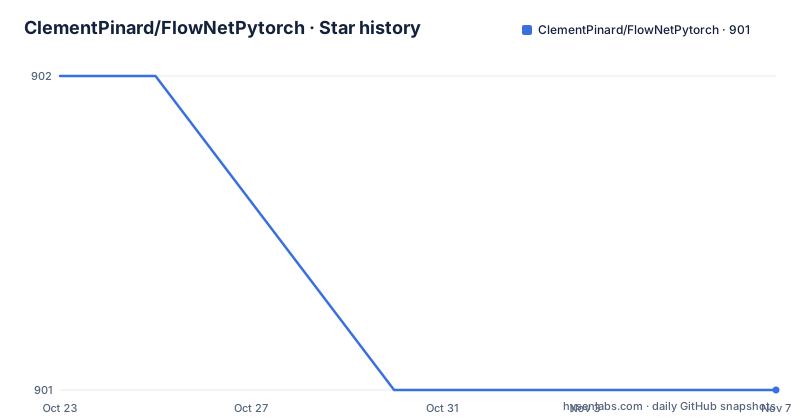
- ClementPinard/FlowNetPytorch901 ★ · -1
| Repository | 2026-10-23 | 2026-11-07 |
|---|---|---|
| ClementPinard/FlowNetPytorch | 902 | 901 |
-1 Stars in the last 15 days, measured from the daily GitHub snapshot. Compare with other projects
Editorial analysis
A research implementation, not a packaged library
FlowNetPytorch is described in one line as a PyTorch implementation of FlowNet by Dosovitskiy and colleagues, referring to the original paper. The README also links a Torch implementation by the same author, so the repository sits alongside a Torch version rather than replacing it.
What the repository actually contains is a working harness. At the top level there is main.py for training, run_inference.py for running a trained network over your own images, flow_transforms.py for the data augmentation, multiscaleloss.py for the loss, util.py for helpers, and directories for models, datasets, images and weights. There is a requirements.txt and a LICENSE file, and a README that documents the commands, the pretrained models and the maths behind the augmentation.
The code is mainly inspired by the official PyTorch imagenet example, which is worth knowing because it explains the shape of the training loop and the option style. The script argument style in the usage examples, with short flags such as -b, -j and -a, comes from that lineage.
The audience is someone who wants to understand or reproduce optical flow work in PyTorch: a researcher, a student, or an engineer who needs a known-good reference implementation to compare against. It is not a pip-installable library with a public API, and the README gives no versioning scheme for the code itself, which is typical of this kind of research repository.
Four model names, and an explicit warning about one of them
The README lists two neural network models along with their batch norm variation, marked as experimental. The four entries are FlowNetS, FlowNetSBN, FlowNetC and FlowNetCBN, so the simple and the convolutional variants each come in a plain and a batch normalised form.
The training results table then says something more useful than a model list. It records the learning rate, the batch size, the epoch size and the validation EPE for each trained model, with filenames such as flownets_EPE1.951.pth.tar, flownets_bn_EPE2.459.pth.tar and flownetc_EPE1.766.pth.tar. Those are the checkpoints in the weights folder, and they were trained with the default options unless specified, with colour warping not used.
The note under the table is the part to read carefully. FlowNetSBN took longer to train and got worse results, and the README strongly advises against using it for the Flying Chairs dataset. That is a specific, actionable warning about one of the four variants, and it saves you from a training run that has a known poor outcome in this configuration.
The other point worth noting is that the learning rate differs between the plain and the batch norm models, 1e-4 against 1e-3, and the batch size differs too, 8 against 32. If you change hyperparameters from the defaults, you are leaving the configuration in which these numbers were produced.
Training on Flying Chairs needs 64GB of disk and the right flags
The training example is a single command. The flying chairs dataset has to be downloaded first, and the README notes it is around 64GB and recommends putting it on an SSD drive. The default hyperparameters in main.py are stated to be the same as in the original caffe training scripts, which is the anchor for anyone comparing results.
The example invocation for FlowNetS is:
python main.py /path/to/flying_chairs/ -b8 -j8 -a flownetsThe -a flag selects the architecture, and the README recommends setting j, the number of data threads, to a high value when you use data augmentation, so that data loading does not slow the training down. That advice is a direct hint about the compute balance: with augmentation the loader does real work per sample, and a single worker becomes the bottleneck.
A help menu is available for the remaining options:
python main.py -hInstallation is through pip, either by installing the listed modules or by using the requirements file:
pip install -r requirements.txtThe requirements list pins the interesting one, the correlation sampler that FlowNet depends on:
torch>=1.2
torchvision
numpy
spatial-correlation-sampler>=0.2.1
tensorboard
imageio
argparse
path
tqdm
scipy
That spatial-correlation-sampler dependency is worth pausing on, because it is a compiled extension rather than a pure Python package, so a source install is not always frictionless.
The augmentation has to move the flow map with the images
The most technically careful part of the repository is flow_transforms.py, and the README explains it at length because the augmentation is easy to get wrong.
The problem it solves is stated up front. To have coherent transformations between inputs and target, new transformations must be defined that take both the input and the target, because a new random variable is defined each time a random transformation is called. Applying the same random augmentation independently to each image would break the correspondence between the two frames, and the flow map would no longer describe the actual motion.
The rules that follow are concrete. If you apply a transformation to the first image, you have to apply the very same one to the flow map. A translation of (tx,ty) applied to the second image is added to the flow components:
flow[:,:,0] += tx
flow[:,:,1] += ty
A scale with a zoom parameter alpha applied to both images multiplies the flow by the same amount:
flow *= alphaRotation is the subtle case, because rotating both images by an angle theta also rotates the flow vectors by the same angle, and rotating only the second image requires recomputing each vector based on the coordinates where it lands. The README gives that per-pixel expression in full:
flow[i, j, 0] += (cos(theta) - 1) * (j  - w/2 + flow[i, j, 0]) +    sin(theta)    * (i - h/2 + flow[i, j, 1])
flow[i, j, 1] +=   -sin(theta)    * (j  - w/2 + flow[i, j, 0]) + (cos(theta) - 1) * (i - h/2 + flow[i, j, 1])
For anyone writing their own augmentation for optical flow, this file is the reference, and the README links to the exact code for the optical flow to colour map in main.py.
Pretrained weights come from two sources, and one of them expects BGR
The weights folder holds two kinds of checkpoint, and the distinction matters for the first inference you run.
One set is trained networks from scratch, in the PyTorch implementation, which is what the training results table describes. The other set is a pretrained version of FlowNetS that came from caffe, provided by the contributor the README thanks. The loading note matters as well: you feed the downloaded network directly to the script, and you do not need to uncompress it even if your desktop environment tells you to.
The colour order is the trap. The networks from caffe expect a BGR input, compared to RGB in PyTorch, and the README adds that the BGR order is not very important. That is a generous statement, and it is the sort of generosity that will cost you accuracy in a quantitative evaluation if you take it literally, since the channel swap changes the input distribution the network was trained on.
For inference on your own images, the README points to a separate download location for a pretrained network, and the model weights are also linked from the weights folder of the repository. Two different sources for pretrained weights in one project is a small sign of the assembled nature of the repository, and it is worth checking which one a given checkpoint is before you compare numbers.
Inference expects a strict pairing convention for image names
Running the network over your own images goes through run_inference.py, and the input convention is narrow enough to cause silent failures if you get it wrong.
All the image pairs must sit in the same location, and the naming pattern is fixed, with a 1 and a 2 suffix on the base name:
{image_name}1.{ext}
{image_name}2.{ext}
The command takes the folder of pairs and the folder holding the pretrained model:
python3 run_inference.py /path/to/images/folder /path/to/pretrainedAs with the training script, a help menu is available for additional options, so the naming rule is the constraint to design your folder around rather than a flag you can set.
For training progress, the README says tensorboard-pytorch is used for logging, and the visualisation step is a single command pointed at the checkpoints directory:
tensorboard --logdir=/path/to/checkpointsThe validation section of the README shows the intended output format, with the input, the prediction and the ground truth side by side, and states that the predictions shown are made by FlowNetS.
The limits are stated plainly: no releases, one dataset, untested multi GPU
The repository is honest about its boundaries, which makes it easier to judge.
The first is time. The last push was on 2026-04-15, and the repository publishes no GitHub releases, so there is no version to pin and no changelog to read. Nothing in the README suggests a schedule. If you depend on this code, you are depending on a snapshot of master that you should copy into your own tree rather than track upstream.
The second is data. The code provides a training example using the flying chairs dataset with data augmentation, and an implementation for the Scene Flow Datasets may be added in the future. That is a plan, not a feature, so a project that needs Scene Flow has work in front of it.
The third is hardware. The README states that the code has not been tested for multiple GPUs, and that it should work just as in the original code. For a research harness that is a reasonable caveat, and for a training run on a multi GPU cluster it is a risk you accept deliberately.
The fourth is the batch norm path, discussed earlier, where the README explicitly advises against the variant for this dataset.
The licence is MIT, which is permissive and asks little of anyone who uses the code. Taken together, these constraints describe a good reference implementation and a poor foundation for anything that needs to be maintained by someone else.
Editorial conclusion
Adopt FlowNetPytorch if you need a readable PyTorch reference implementation of FlowNet to train on Flying Chairs, to study how the flow map has to be transformed alongside the images, or to run inference on your own image pairs with the supplied weights. Do not adopt it as a maintained research codebase, since the last push was on 2026-04-15 and the repository publishes no releases, and do not adopt it if you need Scene Flow datasets or multi GPU training, because the README states the Scene Flow implementation may be added in the future and that the code has not been tested for multiple GPUs. Before you start, read flow_transforms.py, decide whether you need the caffe weights that expect BGR input, and check the reported validation EPE for the variant you intend to train, since the README advises against the batch norm FlowNetS on this dataset.
Frequently asked questions
How do I train FlowNetPytorch on the Flying Chairs dataset?
Download the flying chairs dataset, which the README says is about 64GB and should go on an SSD, then run the training script with the architecture flag, for example python main.py /path/to/flying_chairs/ -b8 -j8 -a flownets. The defaults in main.py match the original caffe training scripts.
What are the dependencies for FlowNetPytorch?
The requirements list covers torch 1.2 or newer, torchvision, numpy, spatial-correlation-sampler 0.2.1 or newer, tensorboard, imageio, argparse, path, tqdm and scipy. You can install them with pip install -r requirements.txt.
Why do the pretrained FlowNet weights expect BGR input?
The networks in the weights folder that came from caffe expect BGR input, compared to RGB in PyTorch, and the README says the order is not very important. Feed a PyTorch checkpoint to the script directly without uncompressing it.
Which FlowNet variant should I use on Flying Chairs?
The README advises against the batch norm FlowNetS, since it took longer to train and got worse results, with a validation EPE of 2.459 against 1.951 for the plain FlowNetS. The reported validation EPE for FlowNetC is 1.766.
How do I run FlowNet inference on my own images?
Place the image pairs in one folder with the naming pattern {image_name}1 and {image_name}2 plus the same extension, then run python3 run_inference.py /path/to/images/folder /path/to/pretrained with a pretrained network.
Official sources
Add this badge to your README
If you maintain this project, the badge below links readers to this analysis and shows its maintenance status from the daily GitHub snapshot. Paste the markdown into your README; add ?metric=license or ?metric=stars to the image URL for a different field.

[](https://hysenlabs.com/projects/clementpinard-flownetpytorch)Star history chart for your README
[](https://hysenlabs.com/projects/clementpinard-flownetpytorch)Was this useful?