autoMate: shell.exec sits behind a bearer token on /mcp/
Like Manus, Computer Use Agent(CUA) and Omniparser, we are computer-using agents.AI-driven local automation assistant that uses natural language to make computers work by themselves
At a glance
- What is it?
- A local hub that stores notes, files, reminders and cross-session memory for any AI client over MCP, HTTP or a bridge, shipping a container image that widens the default 127.0.0.1 bind, a requirements.txt missing three of its seven core dependencies, and a README that stops mid-word three times.
- Who is it for?
- Adopt it as a data layer for whichever client you prefer, and read the security section of its README before you wire anything up, because the same endpoint that serves your notes also exposes shell.exec, desktop control through pyautogui and a Playwright browser.
- Can I use it commercially?
- Yes. MIT is a permissive licence: you can use, modify and sell software built on it, as long as you keep its copyright and licence notices.
- Is it still maintained?
- Yes. The repository last received commits 59 days ago.
- What is it written in?
- Mainly Python, according to GitHub's language statistics.
Answers come from the project's GitHub data, last synced on November 15, 2026, and from our analysis. They are not legal advice.
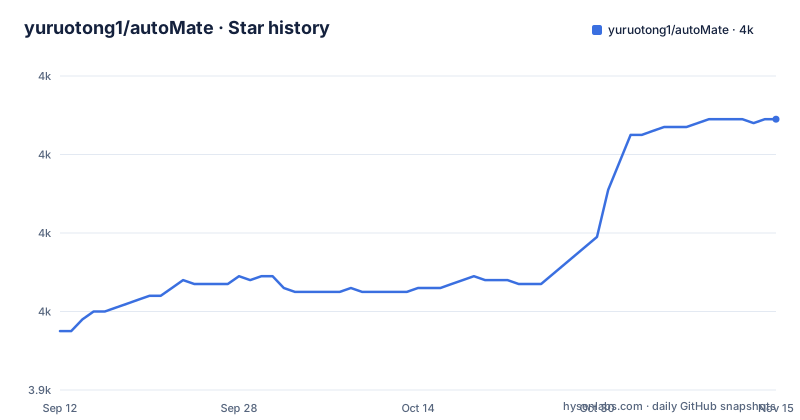
Star history
- yuruotong1/autoMate4,009 ★ · +54
| Repository | 2026-09-12 | 2026-11-15 |
|---|---|---|
| yuruotong1/autoMate | 4k | 4k |
54 Stars in the last 64 days, measured from the daily GitHub snapshot. Compare with other projects
Editorial analysis
Three different self-descriptions, two different tool counts
The repository description positions the project against computer use: like Manus, a Computer Use Agent and Omniparser, we are computer-using agents, an AI-driven local automation assistant that uses natural language to make computers work by themselves. The README's own headline says something else entirely, a smart NAS for AI, with notes, files, reminders, memory and 40+ tools, usable as a tool source inside another client or standalone through its own web chat. The packaging metadata repeats the NAS framing and counts differently again, at 30+ tools.
So the pitch has moved from acting on your computer to storing things for it, and the two documents that a reader meets first disagree about the size of the tool surface. The gap matters practically rather than cosmetically, because the executors are the expensive part: `shell.*`, `script.*` for Python, Bash and Node, `desktop.*` through pyautogui, `browser.*` through Playwright, and `bx.*` which drives the real Chrome you already have through the bundled extension.
The argument the README makes for the storage half is a competitive one: every vendor wants to be your chat tool and most can call tools, but none of them remember anything across vendors, store your files, or ping your phone when something matters. The `memory.*` namespace is the cross-vendor part, long-term key-value facts any client can read and write.
The container image is the one place the bind is widened
The privacy section is specific, and one of its rules is implemented in the Dockerfile. The server binds to 127.0.0.1, network access is opt-in through `--host 0.0.0.0`, the MCP endpoint at `/mcp/` requires a bearer token that the README says to treat like a password because anyone holding it can call autoMate's tools including `shell.exec`, and secrets are encrypted with Fernet under `~/.automate/secret.key` at mode 600. LLM calls go straight from autoMate to whichever provider you chose.
The container sets the environment variable that undoes the first rule:
ENV PYTHONDONTWRITEBYTECODE=1 \
    PYTHONUNBUFFERED=1 \
    AUTOMATE_HOME=/data \
    AUTOMATE_HOST=0.0.0.0 \
    AUTOMATE_OPEN_BROWSER=0 \
    PIP_DISABLE_PIP_VERSION_CHECK=1
AUTOMATE_HOST=0.0.0.0 is the opt-in you would otherwise have to pass yourself, applied by the image. Combined with the bearer token on `/mcp/` and the `shell.*` and `desktop.*` executors behind it, the practical rule is that publishing port 8765 is a decision about who may invoke tools, including commands in the server environment. In a container, host impact depends on privileges, mounts and isolation; protect the token and restrict network access. The README's own remedy for a leaked token is regeneration from Settings, then Channels, and the extension pairs over a websocket at `/api/extension/ws`, which the Dockerfile says is the default.
requirements.txt is missing three of the seven core dependencies
The core dependency list in pyproject.toml is seven entries long, under a comment that says minimal dependencies for server, storage and crypto, with everything else opt-in. The sixth entry carries a note of its own: as of v4.5.7, MCP is the primary integration path for OpenClaw, Claude Desktop, Cursor and Cline, so mcp was promoted from an optional extra to a requirement to make the `/mcp` endpoint work without an extras install.
The file next to it says to use pyproject.toml as the source of truth, then lists four:
fastapi>=0.110
uvicorn[standard]>=0.27
pydantic>=2.0
cryptography>=41.0
python-multipart, pywebpush and mcp are absent. The same comment block in that file advertises `pip install -e '.[full]'` and `pip install 'automate-hub[full]'`, so the file is not a deliberate minimal set, it is an older copy. The two omissions with consequences are python-multipart, which the file-upload parts of the API need, and mcp, which is the endpoint the whole client integration story runs through. Anyone installing from requirements.txt gets a server without the feature the last minor release promoted to mandatory.
The browser extra installs the library, not the browser
Three executors have three different availability stories, and the optional dependencies say so in comments. The browser extra is a single entry, playwright at 1.40 or newer, with the instruction to run `python -m playwright install chromium` afterwards. Installing the extra is therefore not sufficient, and the second step is not something pip will do for you. The desktop extra is pyautogui, annotated with a warning to skip it on headless servers, which is the same constraint the Dockerfile records in its own notes: desktop tools are skipped because there is no display in the container, while the browser tools work because Chromium is preinstalled at image build time.
That is why the image build runs the extra step itself, installing the project with the mcp and browser extras and then `python -m playwright install --with-deps chromium` together with its system libraries. The consequence for a pip user is that the three surfaces arrive at different times. `browser.*` gets a fresh Chromium tab of its own, `bx.*` drives the Chrome you are already logged into through the extension, and `desktop.*` reaches the whole screen through pyautogui with no isolation at all. The `bx.*` tools operate your existing Chrome profile, so they can interact with its logged-in sessions; treat extension pairing and tool access accordingly.
The image name in the run command is not the tag the build produces
The Dockerfile's own header comment shows the local flow: build with `docker build -t automate-hub .`, then run with `docker run --rm -p 8765:8765 -v automate-data:/data automate-hub` and open localhost:8765. The install table in the README points somewhere else, at an image on a registry:
docker run -p 8765:8765 ghcr.io/yuruotong1/automate:latestThe local tag is automate-hub and the published name is automate under the yuruotong1 organisation, so the command in the README cannot be run against a local build. The volume is named in the Dockerfile's example and missing from the README's, which means the data directory is not obviously persistent in the command most people will copy. The image also installs the mcp and browser extras rather than the full extra that requirements.txt advertises, and the base image is python:3.12-slim while the project itself declares requires-python of 3.10 or newer, so 3.10 and 3.11 are supported by the package and untested by the container.
25 providers in the catalog, 100+ through a gateway
The provider catalog names 25: OpenAI, Anthropic, Gemini, xAI Grok, Mistral, Cohere, OpenRouter, Groq, Together, Fireworks, DeepInfra, DeepSeek, Moonshot Kimi, 通义, 豆包, GLM, 百川, Yi, MiniMax, 阶跃, 混元, 硅基流动, Ollama, LM Studio and any OpenAI-compatible endpoint. The first-run wizard walks you through picking one and pasting a key, and the secrets land in the Fernet-encrypted store.
There is a second path to the same place. An optional dependency group called litellm carries the comment LiteLLM AI gateway, 100+ providers via unified interface, with a version range of 1.65 to under 1.85. So the catalog you configure by hand covers 25 providers, and the gateway covers four times that, at the cost of one more moving part. Alongside it, 31 SaaS connectors are listed, from GitHub, GitLab and Gitee through Notion, Slack, Linear, Jira and Trello to Stripe, Shopify, Telegram, Discord, Sentry, 飞书, 钉钉, 企业微信, 微信公众号, 微博, 语雀 and 高德地图.
One tool is not fully in the open repository. `audio.transcribe` runs voice to text through Tencent ASR or OpenAI Whisper, and the custom vocabulary mined from your notes is marked as a Pro tier feature, so part of the advertised tool surface depends on a paid plan.
The README stops in three places
Three passages in the README end mid-sentence, and they are the passages a reader is most likely to need. The project layout listing cuts off inside a comment on the frontend directory, at static SPA with PWA instal and no closing bracket. The tools line in the same block breaks off after the list of namespaces, ending at search and audio. The privacy section, the one that matters most, has a final bullet that starts with autoMate C and stops there.
What is complete is still enough to work from. The package layout has server with the FastAPI app, REST, websocket and MCP over HTTP, with mcp_bridge.py mounted at `/mcp/`; an agent directory holding the natural language to tool call loop; providers; tools; integrations; and the frontend. The top level of the repository adds cloud/, packaging/, imgs/, extension/, docs/ and tests/, plus a Chinese README beside the English one, and none of those six directories is described anywhere in the English README.
One description is also thinner than it sounds. The architecture diagram labels `search.find` as BM25 over notes and files, while the tool list calls it Coze-style hybrid retrieval through SQLite FTS5 BM25 across both in one call. Hybrid implies a second ranking signal that neither passage names.
Editorial conclusion
Adopt it as a data layer for whichever client you prefer, and read the security section of its README before you wire anything up, because the same endpoint that serves your notes also exposes shell.exec, desktop control through pyautogui and a Playwright browser. The default bind is loopback and network access is opt-in, but the container image is the exception, since it sets AUTOMATE_HOST=0.0.0.0 for you, so anyone who can reach the endpoint and has the token can invoke exposed tools, including shell commands in the server environment; container privileges and mounts determine host access. Two smaller things to check first: install from pyproject rather than requirements.txt, which is missing python-multipart, pywebpush and the mcp package, and remember that the Playwright extra needs a second command before the browser tools work.
Frequently asked questions
What does autoMate do and how does it connect to an AI client?
It is a local hub that stores notes, files, reminders and long-term memory and exposes them as tools. Clients connect over MCP, HTTP or a bridge, and after install you open Settings, then Connect to AI clients, and click Copy install text to get a markdown blob with the URL and token already filled in, with per-client sections for OpenClaw, Claude Desktop, Cursor, Cline, generic MCP and non-MCP gateways. The same backend also runs standalone through its own web chat.
How do I install autoMate without Python?
Three routes are documented: a standalone binary for Windows, macOS and Linux from the Releases page, a container with docker run -p 8765:8765 ghcr.io/yuruotong1/automate:latest, and the browser extension in the extension/ directory for driving your real Chrome. With Python, the package is automate-hub, installed with pip install automate-hub, and running automate opens a browser at http://127.0.0.1:8765 and starts a wizard for picking a model and pasting a key.
Is the autoMate MCP endpoint protected?
The server binds to 127.0.0.1 by default and network access is opt-in through --host 0.0.0.0. The endpoint at /mcp/ requires a bearer token, which the README says to treat like a password because anyone with it can call the tools including shell.exec, and it can be regenerated from Settings then Channels. API keys, OAuth tokens and push subscriptions are encrypted with Fernet, with the key at ~/.automate/secret.key at mode 600. The container image, however, sets AUTOMATE_HOST=0.0.0.0 itself.
Why do the autoMate browser tools not work after installing the extra?
The browser optional dependency is only the Playwright package, and the comment in pyproject.toml says to run python -m playwright install chromium afterwards, so a second step is required. The container image does both at build time, which is why its notes say the browser tools work there and the desktop tools do not, since pyautogui needs a display. The bx.* tools are separate again and drive your own Chrome through the extension.
Should I install autoMate from requirements.txt?
Install from pyproject.toml, which that file itself names as the source of truth. requirements.txt lists only fastapi, uvicorn, pydantic and cryptography, and omits python-multipart, pywebpush and mcp. The mcp omission matters most, since as of v4.5.7 the package was moved from an optional extra into the required dependencies so the /mcp endpoint works without an extras install. The pyproject name is automate-hub at version 4.6.0.
Official sources
Add this badge to your README
If you maintain this project, the badge below links readers to this analysis and shows its maintenance status from the daily GitHub snapshot. Paste the markdown into your README; add ?metric=license or ?metric=stars to the image URL for a different field.

[](https://hysenlabs.com/projects/yuruotong1-automate)Star history chart for your README
[](https://hysenlabs.com/projects/yuruotong1-automate)Was this useful?