OpenCalc for Android: features, installation, and limits
A simple and beautiful calculator for Android downloaded more than 300k times
At a glance
- What is it?
- OpenCalc is a lightweight Android calculator with scientific functions, calculation history, multiple themes, and a project-built algebra system. It suits users who want a small F-Droid or APK-based calculator, but its documentation does not define expression syntax or calculation precision.
- Who is it for?
- OpenCalc is a reasonable choice for Android users who prioritize a small package, store or APK distribution, themes, and scientific mode without unnecessary permissions. It is less suitable for work that requires documented expression syntax, independently validated numerical precision, or a documented rollback procedure.
- Can I use it commercially?
- Yes, with conditions. GPL-3.0 is a copyleft licence: if you distribute software that includes it, you must release that software's source code under the same licence. Running it internally without distributing it does not trigger that obligation.
- Is it still maintained?
- Yes. The repository last received commits 121 days ago.
- What is it written in?
- Mainly Kotlin, according to GitHub's language statistics.
Answers come from the project's GitHub data, last synced on November 7, 2026, and from our analysis. They are not legal advice.
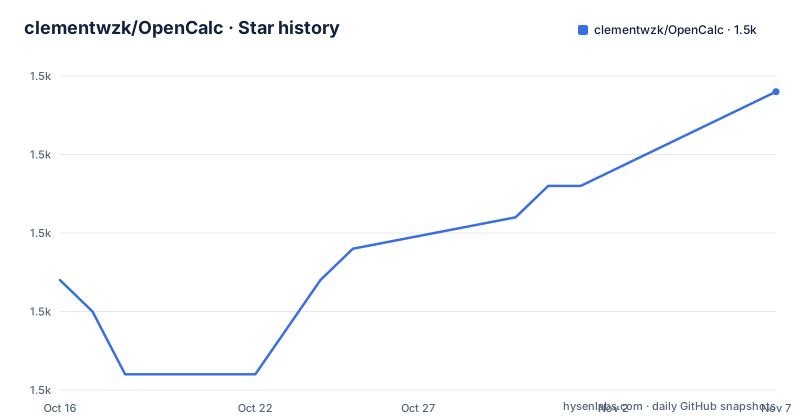
Star history
- clementwzk/OpenCalc1,547 ★ · +6
| Repository | 2026-10-16 | 2026-11-07 |
|---|---|---|
| clementwzk/OpenCalc | 1.5k | 1.5k |
6 Stars in the last 22 days, measured from the daily GitHub snapshot. Compare with other projects
Editorial analysis
OpenCalc's Android calculator scope
OpenCalc addresses a narrow but common need: providing arithmetic and scientific calculations on an Android device without the permissions and package size associated with many larger applications. The README describes it as a simple Android calculator, and the primary implementation language listed for the repository is Kotlin. Its intended audience includes people who install applications from Google Play, F-Droid, IzzyOnDroid, or GitHub releases, as well as users who prefer an application without a conventional dependency on Google's store.
The feature set goes beyond a basic four-function calculator. OpenCalc includes scientific mode, calculation history, portrait and landscape layouts, a quick settings tile, and lock-screen availability. Themes cover dark, light, AMOLED, and Material You variants. These are user-facing capabilities rather than developer APIs. OpenCalc is intended to calculate expressions on a phone, not to serve as a programmable computing environment, spreadsheet, graphing tool, or general mathematics package.
Package size is another explicit design target. The README describes the APK as approximately 2 MB and says it requests no unnecessary permissions. That makes OpenCalc relevant when storage use, permission scope, or quick installation matter. The statement about permissions is useful, but the README does not enumerate every permission used for optional features such as the quick settings tile or lock-screen availability. A security-conscious adopter would need to inspect the release or application manifest before drawing a conclusion about its complete permission set.
The project also distributes beyond a single storefront. The README links to Google Play, F-Droid, IzzyOnDroid, and GitHub releases. This gives users several acquisition paths, although the README does not explain whether every channel receives every release or whether store signatures and build provenance are identical.
OpenCalc's custom algebra system
OpenCalc does not depend on an existing algebra parser. Its FAQ states that the application stopped using mXparser in version 2.0.0 and replaced it with its own implementation. According to the README, this decision was made to control accuracy-related behavior and feature availability more directly, while also reducing package size. The project estimates that mXparser would be roughly three times the size of OpenCalc.
That choice creates an important implementation boundary. A calculator must interpret user expressions and return numerical results. Owning the algebra system gives the project control over operators, parsing behavior, supported functions, and error handling, but it also places responsibility for expression compatibility and numerical correctness on OpenCalc. The README does not publish a grammar, operator precedence table, precision model, rounding policy, or list of supported scientific functions.
The repository layout is consistent with a standard Android application. The top level contains `app/`, `build.gradle.kts`, `settings.gradle.kts`, Gradle properties, the Gradle wrapper, and a `fastlane/` directory. The primary language is Kotlin, while the Gradle Kotlin DSL files indicate that the Android build is described through Kotlin-based configuration. These visible entry points support the broader Android application description, but the README and repository entry list do not expose enough source detail to document the complete evaluator architecture or the exact path from keypad input to displayed result.
For users, that missing detail matters more when entering complex scientific expressions than when entering ordinary arithmetic. OpenCalc's scientific mode is confirmed, but the available operations and their edge-case behavior are not. This is a reason to test representative calculations before switching away from an existing calculator.
Installing OpenCalc and choosing a release source
OpenCalc requires Android 5.0 or later. The README does not provide source-build instructions, Gradle commands, Android Studio setup steps, or a list of required SDK versions. It directs users to four distribution channels instead: Google Play, F-Droid, IzzyOnDroid, and GitHub Releases. Those links are the documented installation path, so no undocumented build flag should be inferred from the presence of `gradlew`.
For the shortest first use, choose one of those channels and install the published package. A Google Play user normally searches for the linked application there. An F-Droid user can use the F-Droid package listing. IzzyOnDroid provides its own repository listing, while the GitHub Releases link points to downloadable release artifacts. The README does not say whether GitHub release files are signed in the same way as store builds, nor does it provide checksums.
After installation, launch OpenCalc and use the default calculator screen for ordinary arithmetic. The presence of scientific mode indicates that additional functions are available through the interface, but the README does not document how to enter them, how to open a secondary keypad, or which functions are supported. It also does not document data import, export, synchronization, backup, or calculator history transfer.
The repository includes release versions 3.2.1, 3.2.0, and 3.1.4, with 3.2.1 dated 2025-09-21. The README's latest-release badge points to the upstream `Darkempire78/OpenCalc` release URL rather than the `clementwzk/OpenCalc` repository path. That discrepancy should be checked before using a GitHub artifact: confirm that the release page, package name, version, and source repository are the ones intended for your distribution.
OpenCalc themes, history, and Android access
OpenCalc's more distinctive user features are tied to Android platform conventions. It supports portrait and landscape orientation, which can matter on phones and tablets, although the README does not state whether large-screen layouts are optimized for tablets. A quick settings tile provides a path from the system interface, and the application is available on the lock screen. The documentation does not explain how lock-screen access is configured, whether a device PIN is required, or what visibility protection it applies.
History records previous calculations, but no retention limit, search facility, synchronization behavior, deletion control, or privacy explanation is documented. It would be incorrect to infer that history remains only on the device. OpenCalc could store it locally, back it up through Android, or transmit it elsewhere. The README simply does not answer that question. Anyone who needs to inspect the release for network, backup, or storage behavior must review the application code and Android data rules directly.
Theme selection is documented at a high level. Light, dark, AMOLED, and Material You options address visual preference and display technology. Material You availability may depend on the Android version and device implementation, because Android 5.0 is the stated minimum while Material You was introduced later. The README does not document fallbacks, so users on older supported devices may not get identical theming behavior.
Orientation support and quick settings integration improve convenience, but they also expand the surface that needs device testing. This is an Android application rather than a platform-neutral expression library, so performance, lock-screen behavior, and system integration should be checked on the Android versions and manufacturers that the deployment actually supports.
OpenCalc's correctness and distribution limits
The largest limitation is not a missing feature named in the README, but the absence of a public contract for the custom algebra system. OpenCalc says it controls its own implementation because it wants freedom over accuracy and feature behavior. That rationale explains the design choice, yet it does not establish how accurate the results are. The documentation gives no test vectors, comparison results, edge-case examples, rounding rules, or known unsupported expressions.
Scientific calculations expose this gap. A calculator can support trigonometric, logarithmic, exponential, or other functions without documenting exactly how it handles units, constants, domains, invalid input, repeated operations, or floating-point precision. The README confirms scientific mode but does not enumerate those semantics. Users should not treat the feature label as evidence that a particular notebook calculation will be reproduced exactly.
Distribution also lacks documented integrity details. The README provides several download links, but it does not state whether GitHub artifacts include checksums, whether F-Droid reproduces builds, or whether the store packages use matching source commits. The repository is not archived, and its last push was on 2026-07-10, so there is no archival status preventing further development. Recent code movement does not itself establish release-channel parity or calculation correctness.
A sensible first-use check is to enter a small set of operations that matter to the intended user. Ordinary arithmetic can confirm that the keypad and display work. Scientific users should also check parentheses, operator precedence, supported functions, division by zero, and boundary inputs. The result should be compared with a trusted calculator or another independent implementation. This is especially important before relying on OpenCalc for coursework, engineering estimates, or financial figures.
GPL-3.0 implications for users and integrators
OpenCalc is licensed under GPL-3.0. For an end user installing a compiled Android application, the label primarily identifies the terms under which the software is distributed. For someone modifying the source or incorporating OpenCalc code into another program, the license obligations become more relevant. This article does not provide legal advice, and the exact obligations should be reviewed against the repository's `LICENSE` file.
The GPL designation also affects how distribution choices should be assessed. OpenCalc is available through third-party Android channels and GitHub releases in addition to Google Play. The documentation does not explain build provenance for each channel, so integrators and technically cautious users may need to compare package identifiers and versions. The application identifier shown by the store links is `com.darkempire78.opencalculator`, while the repository under review is `clementwzk/OpenCalc`.
There is no stated upgrade policy, migration guide, schema history, or rollback procedure for user data. Release tags exist, but the README does not say whether downgrading an installed APK is safe or how Android's package-installer restrictions affect an upgrade or rollback. Maintainers requesting contributions are asked to update tests as appropriate, which is a useful contribution rule, though the README does not describe the existing test suite.
For adoption, GPL-3.0 does not compensate for missing documentation around expression semantics or upgrade behavior. Those project-specific questions must be answered separately. The safest first artifact check is the exact version and application identifier, followed by targeted calculation tests.
Editorial conclusion
OpenCalc is a reasonable choice for Android users who prioritize a small package, store or APK distribution, themes, and scientific mode without unnecessary permissions. It is less suitable for work that requires documented expression syntax, independently validated numerical precision, or a documented rollback procedure. Before adoption, verify the exact release artifact, test the operations needed by the intended workflow, and compare calculated results against trusted references.
Frequently asked questions
What Android version does OpenCalc require?
OpenCalc requires Android 5.0 or later. The README does not document a specific Android SDK requirement for building the application from source.
Where can I install OpenCalc?
The README links to Google Play, F-Droid, IzzyOnDroid, and GitHub Releases. It does not state whether all four channels always contain the same build.
Does OpenCalc support scientific calculations and history?
Yes. The README lists scientific mode and history as features, but it does not enumerate every scientific function or document history retention, backup, or synchronization behavior.
Official sources
Add this badge to your README
If you maintain this project, the badge below links readers to this analysis and shows its maintenance status from the daily GitHub snapshot. Paste the markdown into your README; add ?metric=license or ?metric=stars to the image URL for a different field.

[](https://hysenlabs.com/projects/clementwzk-opencalc)Star history chart for your README
[](https://hysenlabs.com/projects/clementwzk-opencalc)Was this useful?