WhoDB: a self-hosted database workspace that ships as a container, a desktop app, and a CLI
Where data access meets operational intelligence
At a glance
- What is it?
- WhoDB is an Apache-2.0 Go and TypeScript tool that puts browsing, editing, schema graphing, a query scratchpad and optional text-to-SQL behind one self-hosted interface. The interesting question is not what it does but where its boundaries are, and the README is honest about some of them and silent about others.
- Who is it for?
- Adopt WhoDB if you want a self-hosted, browser-reachable database workspace that a teammate can open without installing a client, and if you are willing to manage the WHODB_ENCRYPTION_KEY as a durable secret. Skip it if you need one client that speaks to every engine you own, or if you need schema-change tooling rather than data browsing and query work.
- Can I use it commercially?
- Yes. Apache-2.0 is a permissive licence: you can use, modify and sell software built on it, as long as you keep its copyright and licence notices.
- Is it still maintained?
- Yes. The repository received new commits within the last day.
- What is it written in?
- Mainly Go, according to GitHub's language statistics.
Answers come from the project's GitHub data, last synced on November 15, 2026, and from our analysis. They are not legal advice.
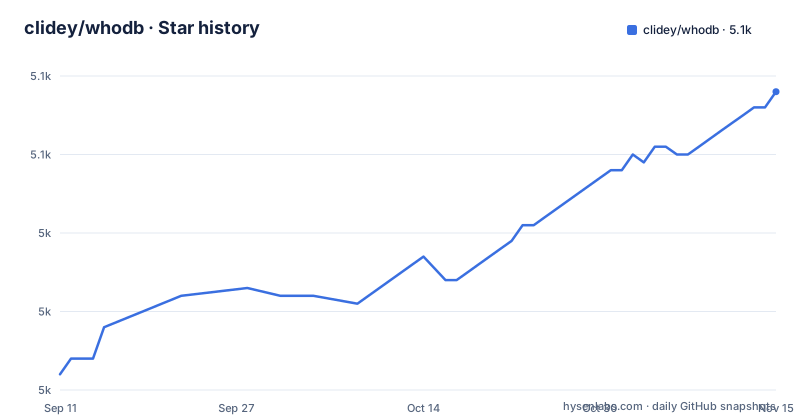
Star history
- clidey/whodb5,058 ★ · +36
| Repository | 2026-09-11 | 2026-11-15 |
|---|---|---|
| clidey/whodb | 5k | 5.1k |
36 Stars in the last 65 days, measured from the daily GitHub snapshot. Compare with other projects
Editorial analysis
The gap WhoDB fills: a database client you do not have to install
Most database GUIs assume a single operator on a workstation with install rights. That assumption breaks in two common situations. One is the shared environment where a teammate needs to look at a staging table and you do not want to walk them through a client install, a driver download and a connection string. The other is the machine you do not control, where the only thing available is a browser and a shell. WhoDB targets both by being reachable over HTTP and also shipping as a desktop app for macOS, Windows and Snap, plus a CLI with a terminal UI. The stated use cases in the README are narrow and practical: inspect a local database, help a teammate explore unfamiliar data, or work without installing a heavyweight client. That is a different ambition from a full data-platform suite, and it should be read that way.
Architecture as visible from the repository: a Go server, a TypeScript frontend, and a CLI that reuses the same core
The language split is Go for the backend and TypeScript for the interface. The Docker image is the primary distribution, and the same codebase is packaged three more ways: a desktop build for macOS and Windows, a Snap, and a CLI distributed through an install script and an npm package named @clidey/whodb. The CLI provides its own terminal UI and, separately, an MCP server, which means the database access layer is reachable without the web frontend at all. That is the most consequential architectural fact, because it means the tool can be embedded into an AI client's tool list rather than only driven by a human at a browser. Database support is enumerated by engine family: PostgreSQL with CockroachDB, YugabyteDB and QuestDB; MySQL with MariaDB and TiDB; SQLite and DuckDB; MongoDB and FerretDB; Redis, Valkey and Dragonfly; Elasticsearch and OpenSearch; ClickHouse and Memcached. The README is explicit that support varies by database because not every system has the same concepts or capabilities, and that the connection screen reflects what is available per source. That is a meaningful admission: a key-value store and a relational engine do not expose the same operations, so the feature surface is per-engine, not uniform.
Running it: one Docker command, one key, and two environment variables that matter
The trial path is a single command. The README gives docker run --rm -it -p 8080:8080 clidey/whodb, after which you open http://localhost:8080 and enter connection details. That container is disposable, so any login session is lost when it is removed. To keep encrypted sessions across container replacement, the README instructs you to generate a key with openssl rand -hex 32, mount /data as a volume, and pass the value as WHODB_ENCRYPTION_KEY. The documented example is a named volume whodb-data plus -e WHODB_ENCRYPTION_KEY=your_saved_64_character_hex_key. Two constraints follow directly. Changing the key invalidates existing sessions, and the key is 64 hex characters, so it is a secret you have to store outside the container. The second variable is WHODB_SECURE, which the README says to set to true when WhoDB is served through an HTTPS reverse proxy so browsers only send the session cookie over HTTPS. The README points to the documentation site for Compose, connection profiles, SSL and AI provider configuration. For the CLI, installation is either a curl-piped shell script from the repository's cli/install path or npm install -g @clidey/whodb, and the two entry points are whodb for the terminal UI and whodb mcp serve for the MCP server.
The encryption key is the operational cost, and the README does not hide it
Self-hosted tools often bury the stateful part. WhoDB puts it in the setup instructions: the /data volume holds encrypted sessions, and the key that decrypts them lives outside the container. That split is correct design and it is also the thing most likely to be mishandled. A container recreation without the key is not a crash, it is a silent loss of sessions, which in practice means everyone reconnects. A volume restore without the key produces the same result. The practical rule is that the key belongs in whatever secret store your team already uses, and the volume backup and the key backup have to travel together. The second constraint is the release cadence. Three releases are listed in about a week: 0.136.0 on 2026-10-21, then 0.137.0 and 0.138.0 on 2026-10-28. The version numbers are pre-1.0, and the spacing suggests active iteration rather than a frozen interface. If you pin a tag in a Compose file, expect to move it deliberately rather than automatically, and check the release notes for anything that touches stored session format, since that is the surface where a key or volume change would bite.
Where WhoDB is the wrong tool: breadth over depth, and no schema migration story
The supported-database list is wide, and the README's own caveat about per-engine variation is the first limitation. A tool that connects to Memcached, ClickHouse and PostgreSQL cannot present the same editing model for all three, and the README does not enumerate which operations are missing where. If your workflow depends on a specific engine feature, the connection screen is the only place the README says to look. The second limitation is scope. What the README lists is browsing and editing data in a grid, a schema graph, a query scratchpad, import and export, mock-data generation, and optional natural-language querying. That feature list does not mention schema migration, DDL diffing, or versioned change management. Teams that live in migration tooling will still need it. The third is the AI layer. The README says AI features are optional and that you connect Ollama, OpenAI, Anthropic, LM Studio, or another OpenAI-compatible provider, and that a hosted provider can be added from the Chat panel with an API key and no backend configuration or restart. That convenience has a cost that the README does not discuss: schema context and query text leave your network when a hosted provider is selected. For a self-hosted tool, that is the trade-off worth naming, and the local option (Ollama, LM Studio) is the mitigation the project already offers.
How it differs from DBeaver and Adminer, and why the MCP server is the real differentiator
DBeaver is a desktop client with a JDBC driver layer, which means breadth of engine support and a mature SQL editor, but it is installed per workstation and has no HTTP surface for a teammate to open. Adminer is the opposite trade: a single PHP file you drop next to a web server, trivial to deploy. WhoDB sits between them. It is a container you run once and reach over HTTP, and it packages a desktop build for people who prefer that. The part this comparison turns on is the MCP server. Running whodb mcp serve exposes database access to an MCP-capable AI tool, which turns WhoDB from a place a human looks at data into a tool an agent can call. That is the feature worth evaluating on its own. The README gives the command and points to the CLI guide for the full command reference, but its CLI section does not say what the MCP server exposes, what permissions it runs with, or how to constrain it. If agent access to production data is your reason for looking at WhoDB, that gap is the first thing to close against the documentation site before you connect it to anything that matters.
Licence, distribution and what to verify before adopting
WhoDB is Apache-2.0, which permits commercial use, modification and redistribution provided the licence and notices are preserved. The README says this repository is WhoDB Community, and that WhoDB Platform is a separate commercial, self-hosted edition with shared projects, more data sources, SSO, fine-grained access controls, audit logs, pipelines, reporting and internal apps. Distribution is broad: Docker Hub under clidey/whodb, the Microsoft Store, the Apple App Store, Snapcraft, and npm for the CLI. The maintenance cost is not the licence, it is the two operational items already named: the encryption key and the /data volume, plus the cadence of pre-1.0 releases. Verify the connection screen for your engines first, since that is where the README says capability differences surface. Then verify that a restored volume plus the original key actually re-establishes sessions in your environment, because that is the failure the README warns about without describing a recovery path.
Editorial conclusion
Adopt WhoDB if you want a self-hosted, browser-reachable database workspace that a teammate can open without installing a client, and if you are willing to manage the WHODB_ENCRYPTION_KEY as a durable secret. Skip it if you need one client that speaks to every engine you own, or if you need schema-change tooling rather than data browsing and query work. Before rolling it out, verify three things: that your specific database appears in the connection screen with the options you expect, that the AI provider you intend to use is reachable from wherever the container runs, and that your backup process covers the /data volume alongside the key, because a restored volume without the matching key leaves existing sessions unusable.
Frequently asked questions
How do I keep WhoDB logins alive when the container restarts?
Generate a key with openssl rand -hex 32, mount a named volume at /data, and pass it as WHODB_ENCRYPTION_KEY on every start, as the README's persistent sessions command shows. Changing that key invalidates existing sessions, so keep the 64 character hex string in your secret store rather than regenerating it.
Which databases does WhoDB Community support?
Eighteen engines in seven families: PostgreSQL, CockroachDB, YugabyteDB, QuestDB, MySQL, MariaDB, TiDB, SQLite, DuckDB, MongoDB, FerretDB, Redis, Valkey, Dragonfly, Elasticsearch, OpenSearch, ClickHouse, and Memcached. Support varies by source, and the connection screen shows the options available for each one.
Do I have to restart WhoDB to add an AI provider?
Not for providers added in the browser. Open Chat, choose Add Provider, pick OpenAI, Anthropic, or Gemini, and enter the key, and WhoDB fetches the model list with no backend configuration and no restart. Deployment-wide providers come from WHODB_OPENAI_*, WHODB_ANTHROPIC_*, and WHODB_AI_GENERIC_<ID>_* environment variables instead.
Can WhoDB use an Ollama instance running on my own machine?
Yes, Ollama and LM Studio are local options in Community. The backend looks for Ollama at localhost:11434 and LM Studio at localhost:1234/v1 and adjusts those addresses automatically for Docker and WSL, and WHODB_OLLAMA_HOST, WHODB_OLLAMA_PORT, or WHODB_LMSTUDIO_BASE_URL override them when the defaults do not fit.
What does WhoDB Community leave out compared with the paid Platform?
The README puts shared projects, more data sources, SSO, fine-grained access controls, audit logs, pipelines, reporting, and internal apps in WhoDB Platform, the commercial self-hosted edition. Community is the Apache-2.0 version, free to self-host, and is described as the place to start.
Is there a terminal or MCP way to use WhoDB?
Yes. The CLI has an interactive terminal UI opened with whodb and an MCP server started with whodb mcp serve. On macOS and Linux it installs through the repository install script, or through npm install -g @clidey/whodb, and the CLI README holds the connection examples and command reference.
Official sources
Add this badge to your README
If you maintain this project, the badge below links readers to this analysis and shows its maintenance status from the daily GitHub snapshot. Paste the markdown into your README; add ?metric=license or ?metric=stars to the image URL for a different field.

[](https://hysenlabs.com/projects/clidey-whodb)Star history chart for your README
[](https://hysenlabs.com/projects/clidey-whodb)Was this useful?