Awesome Security Feeds: A YAML-First Pipeline for Curated Security RSS
Awesome Security Feeds a curated, structured and automation-friendly collection of security RSS/Atom sources. Based on https://securityfeeds.org/
At a glance
- What is it?
- A structured, automation-friendly collection of security RSS/Atom sources with YAML as the source of truth and generated JSON, OPML, and status artifacts. The project is a solid foundation for tooling, though its maintenance and coverage depend on community contributions.
- Who is it for?
- Adopt Awesome Security Feeds if you need a machine-readable, YAML-driven catalog of security feeds for your own aggregator or monitoring tool, and you are comfortable relying on community curation. Skip it if you need a guaranteed up-to-date list with active maintainers, or if you prefer a single-file solution without a build pipeline.
- Can I use it commercially?
- Yes. MIT is a permissive licence: you can use, modify and sell software built on it, as long as you keep its copyright and licence notices.
- Is it still maintained?
- Yes. The repository last received commits 1 day ago.
- What is it written in?
- Mainly Python, according to GitHub's language statistics.
Answers come from the project's GitHub data, last synced on October 22, 2026, and from our analysis. They are not legal advice.
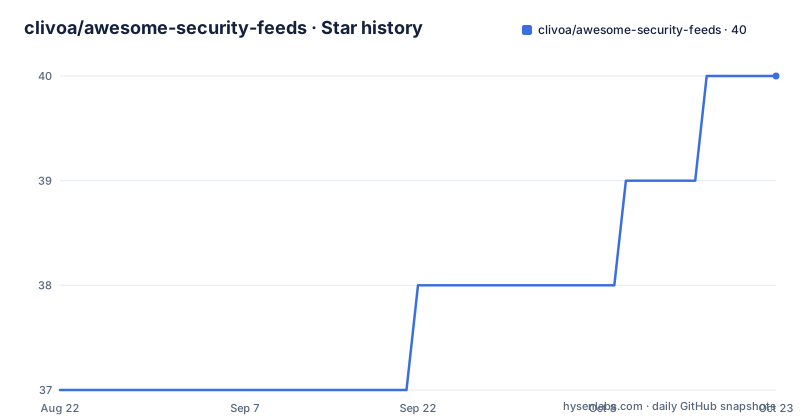
Star history
- clivoa/awesome-security-feeds40 ★ · +3
| Repository | 2026-08-22 | 2026-10-22 |
|---|---|---|
| clivoa/awesome-security-feeds | 37 | 40 |
3 Stars in the last 61 days, measured from the daily GitHub snapshot. Compare with other projects
Editorial analysis
What This Repository Actually Solves
Security professionals and tool builders often need a reliable list of RSS and Atom feeds from blogs, threat intel sites, and vulnerability databases. Manually maintaining such a list is tedious, and most existing lists are static markdown files that are hard to parse. Awesome Security Feeds addresses this by providing a curated collection of security feeds in a structured, automation-friendly format. The source of truth is YAML files under feeds/, which are easy to review in pull requests, and the repository generates JSON, OPML, and status artifacts that other tools can consume directly. The README explicitly states that the repository is independent and based on securityfeeds.org, and that generated artifacts are used downstream by projects like S33R, a security news aggregation and briefing tool. This makes it a practical starting point for anyone building a security news aggregator, a dashboard, or an alerting system that needs a feed list without scraping the web or maintaining their own.
The YAML-to-Artifact Pipeline
The core design is a pipeline that starts with human-editable YAML and ends with machine-readable artifacts. The repository layout shows feeds/*.yaml as the source of truth. Scripts in scripts/ perform validation, health checks, and exports. The build script scripts/build_feeds_json.py produces data/feeds.json and data/feeds.min.json, along with a manifest.json. The health check script scripts/check_feeds.py outputs data/feed_status.json, which presumably records whether each feed is reachable and parseable, though the README does not detail the exact status fields. The export script scripts/export_opml.py generates OPML/XML files, one for all feeds and one for active feeds only. This separation of source and generated output is a clean approach: contributors edit YAML, and the artifacts are regenerated via scripts or CI workflows, as indicated by the GitHub Actions badges for build_feeds_json.yml, feed_check.yml, and export_opml.yml. The pipeline is reproducible locally, which is a strength for a project that aims to be automation-friendly.
Getting It Running: Commands and Config
The README gives a straightforward local setup. You create a virtual environment, install dependencies from requirements.txt, and then run the scripts in order. Validation is the first step: python scripts/validate_feeds.py checks for duplicates and schema issues in the YAML files. Then you build the JSON artifacts with python scripts/build_feeds_json.py, which outputs feeds.json, feeds.min.json, and manifest.json. To serve the static UI, you run python -m http.server 8000 and open localhost:8000. Health checks are separate: python scripts/check_feeds.py writes feed_status.json. For OPML export, you must pass arguments: python scripts/export_opml.py --out data/sec_feeds_full.xml --title "Security Feeds (Full)" --status all, and similarly for active feeds. There is also an optional script to generate the markdown table page: python scripts/build_awesome_page.py --out docs/awesome-feeds.md. All these commands are concrete and copy-pasteable. The lack of a single 'make all' command means you have to run several scripts, but that is acceptable for a pipeline with distinct stages.
Consuming the Artifacts Without Cloning
A key feature is that you do not need to clone the repository to use the data. The README lists raw GitHub URLs for the generated artifacts: data/feeds.json, data/feeds.min.json, data/sec_feeds_full.xml, data/sec_feeds_active.xml, and data/feed_status.json. If the repository is hosted on GitHub, these URLs are stable and can be fetched directly by applications. This is a practical distribution method for a catalog that changes infrequently. However, there is a caveat: the URLs point to the main branch, so the artifacts are only as current as the last successful CI run. If the repository is archived or the maintainer stops pushing, those URLs will serve stale data. For production use, you would want to mirror the artifacts or vendor them into your own repository to avoid a dependency on a third-party GitHub repo's availability. The README does not mention any versioning or release tags, and the repository has no recent releases, so there is no way to pin a specific version of the feed list.
Limitations: Stale Feeds and Manual Curation
The project's main weakness is that it depends on community contributions to stay accurate. The README says the list is curated, but it does not describe a review process or how often feeds are updated. The health check script can detect dead feeds, but it only reports status; it does not automatically remove or update broken entries. Someone must see the status and open a pull request. This means the list can drift out of date, especially for smaller blogs that disappear without notice. Another limitation is that the repository does not provide any meta-information about the feeds beyond what is in the YAML. There is no mention of categories beyond the docs/categories.md file, but the README does not list the categories. If you need a feed list with tags like 'malware' or 'CVE', you have to inspect the YAML yourself. Finally, the project is not a feed reader itself; it is a source list. If you want to aggregate and read articles, you need to pair it with something like S33R or your own code. This is a boundary that is easy to miss from the name.
Alternatives and How They Differ
The most direct alternative is the original securityfeeds.org, which this project is based on. That site likely provides a similar list, but it is a website, not a GitHub repository with scripts and data files. The advantage of Awesome Security Feeds is that the data is versioned and can be forked, and the YAML source allows for structured contributions. Another alternative is a manually maintained OPML file that you subscribe to in a feed reader. Many security professionals maintain their own OPML lists, but those are usually not machine-readable in a structured way and lack health checks. A third alternative is to build your own list from scratch using a tool like RSS-Bridge or a custom scraper, but that requires significant maintenance effort. The key difference is that this project gives you a pipeline, not just a list. You get validation, export, and status checks out of the box, which is more than a static OPML file offers. However, if you only need a simple list to import into a reader, the OPML export from this project is sufficient, and you do not need the scripts.
Maintenance, Licensing, and What to Verify
The repository is licensed under MIT, which is permissive and allows commercial use with attribution. That is a low-friction license for a data catalog. The maintenance cost is split between the maintainers and the community. The CI workflows (build_feeds_json, feed_check, export_opml) automate the generation of artifacts, but they do not automate the curation of new feeds. Someone has to add new YAML entries and update existing ones. The repository has no recent releases, and the last push is unknown from the material, which is a warning sign. You should check the commit history and the data/feed_status.json file to see how many feeds are currently active and how recent the last health check is. If the status file shows many dead feeds or is months old, the list may be stale. The README also mentions a CONTRIBUTING.md, but its contents are not provided, so the contribution guidelines are unknown. Before adopting this project, you should run the scripts locally against the current YAML to see if they still work with your Python version, since the requirements.txt is not shown. The scripts are simple enough to debug, but you should verify them in your environment.
Editorial conclusion
Adopt Awesome Security Feeds if you need a machine-readable, YAML-driven catalog of security feeds for your own aggregator or monitoring tool, and you are comfortable relying on community curation. Skip it if you need a guaranteed up-to-date list with active maintainers, or if you prefer a single-file solution without a build pipeline. Before using it, verify the freshness of the data by running scripts/check_feeds.py and reviewing data/feed_status.json, and check the last commit date to assess whether the feed list is still being maintained.
Frequently asked questions
What are the top threat intelligence feeds in awesome-security-feeds?
The repository does not rank feeds. It publishes the full list at docs/awesome-feeds.md, the criteria for what belongs in a category in docs/categories.md, and a per-feed health result in data/feed_status.json. Choosing from it is left to the reader.
What does awesome-security-feeds say about the number one cybersecurity threat today?
Nothing. It is a curated collection of RSS and Atom sources with no analysis of current threats. The contents are listed in docs/awesome-feeds.md and exported in full to data/sec_feeds_full.xml.
How do I run the awesome-security-feeds checks locally?
Create a virtual environment and run pip install -r requirements.txt, then python scripts/validate_feeds.py for duplicates and schema, python scripts/build_feeds_json.py for the JSON artifacts, and python scripts/check_feeds.py for feed health.
Which files does awesome-security-feeds publish for other tools?
Five artifacts sit under data/ on the main branch and are reachable by raw URL: feeds.json, feeds.min.json, sec_feeds_full.xml, sec_feeds_active.xml and feed_status.json. A local JSON build additionally writes data/manifest.json.
Official sources
Add this badge to your README
If you maintain this project, the badge below links readers to this analysis and shows its maintenance status from the daily GitHub snapshot. Paste the markdown into your README; add ?metric=license or ?metric=stars to the image URL for a different field.

[](https://hysenlabs.com/projects/clivoa-awesome-security-feeds)Star history chart for your README
[](https://hysenlabs.com/projects/clivoa-awesome-security-feeds)