Cloud in a Bottle puts a rootless Podman app platform on your server
Deploy, use, and share web apps on a server you control. Your apps, data, and infrastructure stay yours.
At a glance
- What is it?
- Cloud in a Bottle is a Python control plane that installs web apps from Git repositories, builds them with rootless Podman, and routes them by subdomain with owner authentication by default. The project is early at version 0.2.0 and is licensed under AGPL-3.0 with a stated intention to move to a fair source licence.
- Who is it for?
- Cloud in a Bottle suits a self hosting enthusiast who wants to run several open source web apps on hardware they control, with subdomain routing, per app storage tiers and a manifest that declares what each app may access. It is the wrong choice if you need a stable platform API, because the project is at version 0.2.0 with a licence that the maintainers explicitly say may change, and a poor match if you cannot accept AGPL-3.0 obligations today.
- Can I use it commercially?
- Yes, with strict conditions. AGPL-3.0 is a network copyleft licence: if people use a modified version over a network, for example as a hosted service, you must offer them its source code under the same licence.
- Is it still maintained?
- Yes. The repository received new commits within the last day.
- What is it written in?
- Mainly Python, according to GitHub's language statistics.
Answers come from the project's GitHub data, last synced on November 7, 2026, and from our analysis. They are not legal advice.
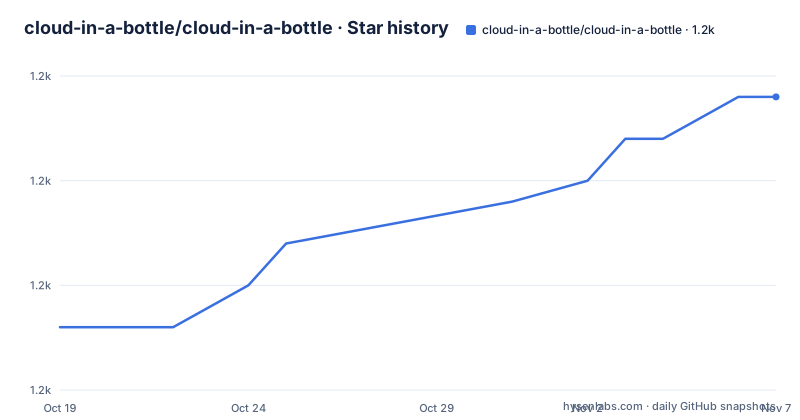
Star history
- cloud-in-a-bottle/cloud-in-a-bottle1,244 ★ · +11
| Repository | 2026-10-19 | 2026-11-07 |
|---|---|---|
| cloud-in-a-bottle/cloud-in-a-bottle | 1.2k | 1.2k |
11 Stars in the last 19 days, measured from the daily GitHub snapshot. Compare with other projects
Editorial analysis
The gap between open source software and a place to run it
The project states its motivation plainly: most people have no access to the cloud that is not mediated by a company with different incentives than theirs. Open source web software exists in abundance, but running it somewhere means fighting infrastructure that most people do not want to touch.
Cloud in a Bottle is described as the project the team needed and could not find, a corner of the cloud that is genuinely yours, where apps install as easily as on a phone and the data lives on hardware you control. The deployment target is deliberately broad: your own hardware, a local virtual machine, or a cloud server. There is also a managed option, where Imbue provisions an instance with your SSH key and hands it over, which is a useful middle path for someone who wants the software but not the operating work.
What people are said to deploy is a useful indicator of the intended scope. Personal tools, including AI generated apps, scripts and utilities with nowhere useful to host them. Open source software such as Matrix, Minecraft servers, notes apps and project management tools. Development and creative tools, including coding agents and image making software, anything you built and want to share with a real URL. And containerized web apps of your own, which is the case the project documents most directly: add a cloudinabottle.toml manifest to a repository that already has a Dockerfile and it is deployable.
The audience is therefore individual operators and small teams, not platform engineers. The design goal is an app store experience on a box you own, with the constraint that the data never leaves it.
A Python router that installs from Git and builds with rootless Podman
The architecture has one control plane and a container runtime underneath it. The Python router is the control plane for the instance: its dashboard and its APIs install apps from Git repositories, read their cloudinabottle.toml manifests, build their Dockerfiles with rootless Podman, and manage updates, logs and the container lifecycle.
Every element of that sentence is a design decision. Installing from Git rather than from an image registry means the source of an app is a repository you can fork, and the build happens on your machine with your own supply chain. Rootless Podman means the containers do not need a daemon running as root and the build does not require privileged access, which matters on a home server or a small VPS where you do not want to hand a platform root. And managing updates, logs and the lifecycle from the same place is what turns a pile of containers into a platform with an interface.
The Python project is named openhost in its packaging metadata, requires Python 3.12 or newer, and builds with hatchling. Its dependency list shows the shape of the work: Litestar for the web framework, with the version pinned to the 2.x line, hypercorn and websockets for serving, PyJWT with the crypto extra and argon2-cffi and bcrypt for tokens and password hashing, acme and josepy for certificate automation, boto3 for S3 compatible storage, GitPython for repository access, httpx for outbound calls, cappa for command line interfaces, jinja2 and markdown-it-py for rendering, and diskimage-builder for image preparation.
The packaging also exposes three console entry points, which is a good map of the roles: openhost for the self host CLI, bottle for the compute space CLI, and a separate openhost_system_agent command, backed by its own package in the tree. The repository carries compute_space, compute_space_cli, routerd_cli, openhost_system_agent and an openhost_app_test_harness, so the control plane, the compute layer, the CLI surfaces and the test harness are separate components rather than one application.
Loopback ports, subdomain routing and owner authentication by default
The network model is conservative in a way that is worth understanding before you expose an instance. By default, each app's main HTTP port is bound to the host's loopback interface. The container is not reachable from outside the machine on its own port; the router is the only thing that talks to it, and the router proxies HTTP and WebSocket requests to the right container based on the app subdomain.
That gives two properties. A misbehaving app cannot open a listening socket on a public interface, because the platform never gives it one, and the public surface of the instance is a single proxy that the platform controls. It also means the routing key is the subdomain, so the deployment has to have wildcard DNS for app subdomains and a TLS terminator in front. In the standard public deployment, Caddy handles HTTPS and CoreDNS provides wildcard DNS for app subdomains.
Authentication is on by default as well. App routes require owner authentication by default, while the manifest can declare paths that should be public. This is a sensible default for the apps the project expects people to run, where a notes app or a Minecraft server has no login of its own, and it is the mechanism that lets an app expose a health check or a webhook without the owner turning authentication off wholesale. The cost is that the manifest becomes a security relevant file, since it is where a developer declares which paths are open.
The loopback binding also constrains the deployment. An instance that only binds loopback and relies on Caddy for TLS is one deployment shape, and it is not the same as a bare metal box with no reverse proxy, where nothing would be reachable at all until you add one.
Storage is tiered, and the manifest decides what a container sees
App storage is organized into three tiers: permanent data, temporary files, and archive storage. The manifest controls which tiers the container can access, which is the key security control on the storage side. A container that cannot reach the permanent tier cannot delete your data, and a container that cannot reach the archive tier cannot exfiltrate backups.
Where the data lives follows from the tier. Platform state and permanent app data are stored on your instance. Archive data can stay local or use S3 compatible storage that you configure, which is the escape hatch for someone who wants their archives on object storage while the live data stays on the box.
The boto3 dependency in the packaging metadata is the concrete trace of that S3 option, and the acme and josepy dependencies point at the certificate side of the standard deployment. Taken together, the storage and network models describe a platform that is deliberately conservative: a container sees only what the manifest asks for, the platform keeps its own state, and the operator decides where the cold data goes.
For an app author, this means the manifest is the contract, and the project keeps a full specification page for it. The documentation also has a section on creating an app, so the path from a Git repository with a Dockerfile to a running, routed, authenticated app is documented rather than implied.
Running the platform locally with pixi and just
The development workflow is organised around pixi for the environment and just for the tasks, and the justfile states the convention directly: just ships in the dev environment, so a recipe is run as pixi run -e dev just <recipe>, or just <recipe> if you install just yourself.
The default recipe lists what is available:
just --listAnd a local compute space, which runs on a random port, is started with:
pixi run -e dev python scripts/run_local_stack.pyThe extra arguments pass through, for example a port or a set of default apps, and the justfile also provides a variant that wipes the persisted data directory first so that setup starts over. That pairing is the useful detail for anyone evaluating the platform: the local stack is a single command, and the fresh variant means you can repeat a first-run experience without hunting for leftover state.
The Python packaging backs this with a test setup. The optional test-harness extra pulls in pytest, requests and playwright with the pytest-playwright plugin, and the pytest configuration points at test suites under compute_space, compute_space_cli, the self host CLI, an oauth app and the system agent. The presence of a browser driver in the test dependencies matches what the platform does: it renders pages and routes requests, so the tests exercise a browser rather than only function calls.
The project also ships an ansible/ directory with an ansible.cfg, which is the configuration management route for a repeatable deployment, and a pre-commit configuration for the repository itself.
AGPL-3.0 now, and a stated intention to change the licence
The project is provided under the AGPL-3.0 licence, with the terms in the LICENSE file at the repository root. That is a strong copyleft licence, and for a platform that lets other people install their own apps on your instance, the network clause is the part that deserves attention: code you reach over a network is within scope of the licence obligations.
The project also states its licensing intent, and this is unusual enough to quote rather than paraphrase. The maintainers say they may move to a different licence in the future, something like a fair source licence, with the intent that personal use will always be unrestricted, while commercial use may be scoped to support a sustainable project.
For a reader evaluating this, the practical reading is that AGPL-3.0 is the licence you must comply with today, and that the terms may change in a direction that limits commercial use. A personal instance for your own apps is the case the intent explicitly protects, and a hosted or commercial deployment is the case where the future licence could change what you are allowed to do. If you intend to build a business on top of this, read the LICENSE file and treat the stated intent as a signal about the maintainers' direction rather than as a promise.
The project is an open source project from Imbue, and the managed hosting offering comes from the same organisation, which is a relevant fact for anyone assessing long term continuity: the company behind the platform is the company that sells the hosted version.
An early project on an active main branch
The version numbers tell the story of the maturity level. The most recent releases are v0.1.3 and v0.1.4 on 2026-09-03, and v0.2.0 on 2026-09-05, and the project metadata in the packaging file carries the same version, 0.2.0. A zero major version in a platform that installs other people's code and routes traffic to it is the correct signal to read carefully, and it is the main reason the deployment advice in the documentation is worth following exactly rather than approximately.
The repository is not archived, and the last push was on 2026-10-19, so development is active. The release cadence in the visible history is fast, with two releases on the same day in September, which fits a project finding its footing rather than one with a long support policy. There is no compatibility promise to lean on, so treat upgrades as breaking until the project says otherwise.
Two configuration details also affect day to day operation. The uv configuration in the packaging file sets a dependency cooldown, ignoring package versions uploaded in the last week so that brand new releases are not picked up, on a rolling window resolved relative to the lock time. That is a deliberate supply chain caution and it means the lock file lags the newest releases on purpose. The Litestar dependency is pinned to the 2.x line with an upper bound below 3, which tells you the framework upgrade path is a future piece of work rather than something the project has already absorbed.
The repository also carries a skills/ directory, a claude.md file, a style guide and a docs/ directory, which describes a project that is building its own agent facing workflow and its own documentation set alongside the code.
Editorial conclusion
Cloud in a Bottle suits a self hosting enthusiast who wants to run several open source web apps on hardware they control, with subdomain routing, per app storage tiers and a manifest that declares what each app may access. It is the wrong choice if you need a stable platform API, because the project is at version 0.2.0 with a licence that the maintainers explicitly say may change, and a poor match if you cannot accept AGPL-3.0 obligations today. Before adopting, read the AGPL-3.0 terms in the LICENSE file, read the manifest specification to see which storage tiers and public paths your app can request, and confirm your host can run rootless Podman with wildcard DNS and a Caddy front end.
Frequently asked questions
What is Cloud in a Bottle and what does it manage?
It is a Python control plane for a personal app platform. Its dashboard and APIs install apps from Git repositories, read their cloudinabottle.toml manifests, build their Dockerfiles with rootless Podman, and manage updates, logs and the container lifecycle.
How are apps exposed and protected in Cloud in a Bottle?
Each app's main HTTP port is bound to the host's loopback interface, and the router proxies HTTP and WebSocket requests to the right container based on the app subdomain. App routes require owner authentication by default, and the manifest can declare paths that should be public.
Can I deploy a containerized web app from my own Git repository?
Yes. Add a cloudinabottle.toml manifest to a repository that already has a Dockerfile and it is deployable, with the manifest controlling which storage tiers the container can access and which paths are public.
What licence does Cloud in a Bottle use?
It is provided under the AGPL-3.0 licence, with the terms in the LICENSE file. The project also states that it may move to a fair source licence later, with personal use always unrestricted and commercial use possibly scoped.
Official sources
Add this badge to your README
If you maintain this project, the badge below links readers to this analysis and shows its maintenance status from the daily GitHub snapshot. Paste the markdown into your README; add ?metric=license or ?metric=stars to the image URL for a different field.

[](https://hysenlabs.com/projects/cloud-in-a-bottle-cloud-in-a-bottle)Star history chart for your README
[](https://hysenlabs.com/projects/cloud-in-a-bottle-cloud-in-a-bottle)Was this useful?