CodeStitch Intermediate Website Kit: 11ty, Decap CMS and SASS in one template
The official CodeStitch Intermediate kit, featuring 11ty, Decap CMS and SASS - all set up for you! Perfect for websites of all sizes.
At a glance
- What is it?
- The Intermediate Website Kit is a pre-configured static site starter from CodeStitch that combines Eleventy, Nunjucks, Decap CMS and SASS, so a developer can hand a client a site with a blog they can edit themselves. Its value is the assembly and the cleanup scripts, and its rough edges are a licence that disagrees with itself and a file structure you are expected to learn in full.
- Who is it for?
- Adopt this kit if you build marketing sites for clients who want to edit their own blog and you would rather start from a working Eleventy setup than assemble one, and if you are prepared to read the whole file structure before you change anything. Do not adopt it if you want a general purpose static site framework, or if a licence file that says CC0 in one place and ISC in another is a problem for your organisation.
- Can I use it commercially?
- Yes. CC0-1.0 is a permissive licence: you can use, modify and sell software built on it, as long as you keep its copyright and licence notices.
- Is it still maintained?
- Yes. The repository received new commits within the last day.
- What is it written in?
- Mainly HTML, according to GitHub's language statistics.
Answers come from the project's GitHub data, last synced on November 7, 2026, and from our analysis. They are not legal advice.
Star history
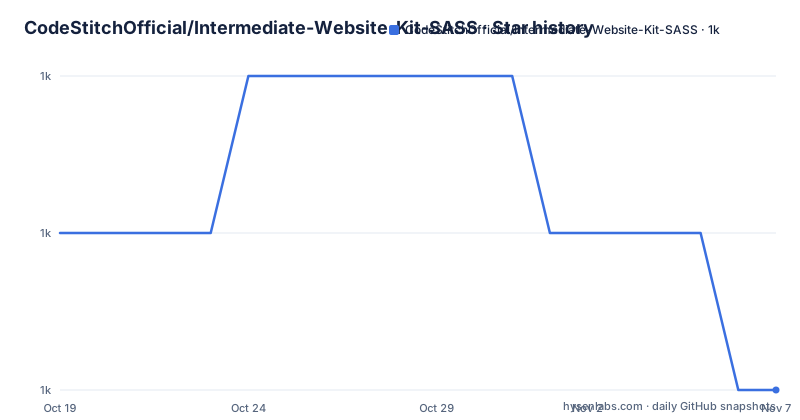
- CodeStitchOfficial/Intermediate-Website-Kit-SASS1,033 ★ · -1
| Repository | 2026-10-19 | 2026-11-07 |
|---|---|---|
| CodeStitchOfficial/Intermediate-Website-Kit-SASS | 1k | 1k |
-1 Stars in the last 19 days, measured from the daily GitHub snapshot. Compare with other projects
Editorial analysis
A starter aimed at client work, not at a framework
CodeStitch sells website design kits, and this repository is the intermediate tier of that catalogue. The README describes it as including a pre-configured Eleventy environment with Nunjucks templating, along with integration of Decap CMS, so a developer can start a project quickly and hand the client a blog to manage themselves.
The audience is narrow and identifiable. This is for a freelancer or a small studio building a marketing site for a client, where the client should be able to write posts without a developer in the loop, and where the developer would rather not spend the first week of a project on build tooling. The kit description names the stack as 11ty, Decap CMS and SASS, all set up for you, and says it suits websites of all sizes.
What the intermediate tier adds over the beginner kits is stated in the overview section. It includes reusable components, centralized data, and greater scalability as clients grow, plus a blog provided through Decap CMS, and plugins for HTML and CSS minification, JavaScript bundling and minification, and automatic sitemap generation. An example website is included, with sections meant to be swapped out using CodeStitch's vanilla component library hosted at codestitch.app.
That last point is the commercial shape of the project. The kit is the free part, the component library is the hosted part, and the deployment target is Netlify, with a live result published at codestitch-intermediate.netlify.app.
How the four pieces fit together
The mechanism is a conventional Eleventy project with a CMS bolted on, and the package manifest shows each piece.
Eleventy itself is the site generator, at @11ty/eleventy ^3.1.6, with Nunjucks as the template language. The configuration lives in.eleventy.js at the root, and the content lives under src/, with src/_data/ for data files and src/_includes/ for templates and partials, including a Navigations include. The output directory is public/, which is also where the built site ends up.
Decap CMS is the content side, with decap-server ^3.10.0 in the dependency list and an admin/ directory under src/ for the CMS itself. SASS is the styling layer, with sass ^1.101.7 plus postcss and autoprefixer for the vendor prefixing step, and cssnano for the minification. JavaScript is bundled and minified with esbuild.
The image side is the part that shows how opinionated the kit is. Two dependencies handle images: @codestitchofficial/eleventy-plugin-sharp-images, which is the Eleventy plugin, and codestitch-sharp-image-automation, which appears to be the automation it is built on. The file structure listing has an Image Optimization section under src/ alongside a config/ directory, so the image pipeline is configured in the repository rather than left to defaults.
Sitemap generation is handled by @quasibit/eleventy-plugin-sitemap, and HTML and CSS minification by @codestitchofficial/eleventy-plugin-minify.
The two command loop that gets you running
The quick start is nine numbered steps, and the practical part is short. You create the repository with the Use This Template button, clone it, open it in VS Code, install the dependencies, start the development server, then fill in the client details and the style variables.
npm install
npm start
The start script is run-p watch:*, which runs the two watch scripts in parallel. One of them is the CMS, npx decap-server, and the other is the site itself, cross-env ELEVENTY_ENV=DEV eleventy --serve. The ELEVENTY_ENV value is the switch between development and production behaviour, and the same mechanism appears in the build script, where it is set to PROD for a plain eleventy run with no server.
"watch:cms": "npx decap-server",
"watch:eleventy": "cross-env ELEVENTY_ENV=DEV eleventy --serve",
"build:eleventy": "cross-env ELEVENTY_ENV=PROD eleventy",
"start": "run-p watch:*",
"build": "run-s build:*",
"preview": "cross-env ELEVENTY_ENV=PROD eleventy --serve"
There is a separate preview script that serves a production build locally, which is worth using before deploying since the dev server is the one with the CMS attached.
Two path rules in the quick start save real time. You fill in ./src/_data/client.js with the client's information, and you adjust the :root variables in ./src/assets/sass/root.scss. Then, and this is the one people get wrong, you modify the files under ./src/ and not ./public/, because public/ is the build output and your edits there are overwritten on the next build. A template file at content/pages/_template.txt is provided to start a new page from.
The cleanup scripts and the scaffold script
The kit carries four scripts in scripts/, and they are the clearest signal of what the authors expect to happen to a project.
Three of them remove things. npm run remove-dark-mode strips all the dark mode code, npm run remove-decap removes Decap CMS and optionally all blog content, and npm run remove-demo strips the template to its bare minimum. These exist because a kit that ships dark mode, a CMS and demo content has a lot of code that a given project does not want, and a client who never asked for a blog should not be shipped one.
The fourth is the useful one. npm run create-page -- "Page Name" scaffolds a new page, and a comma separated list creates several at once:
npm run create-page -- "About, Services, Contact"For each name the script creates src/content/pages/{slug}.html pre-filled with _template.txt, creates src/assets/sass/{slug}.scss with the page specific styles ready to go, sets the page title to Page Name | Client | City, State automatically using data from _data/client.js, and sets the permalink to /{slug}/.
Two details make this script trustworthy rather than merely convenient. The title format is built from the client data file rather than hardcoded, so the site keeps one title convention without you editing each page. And if a page with the same slug already exists, the script skips it with a message rather than overwriting it, which is the difference between a scaffold and a destructive tool.
The file structure you are expected to learn
The README devotes a large section to explaining every file and directory from the root inwards, and the promise it makes is that by the end of it you will have a full understanding of all files and directories and be equipped to adapt the kit.
The tree starts with scripts/, which holds a utils/ directory alongside remove-dark-mode.js and remove-decap.js. At the root level, .eleventy.js holds the Eleventy configuration, netlify.toml holds the deployment configuration, and package.json with package-lock.json pin the Node dependencies.
The src/ tree is where the work happens. It holds _data/ for data files, _includes/ for templates with a Navigations include, admin/ for the Decap CMS interface, assets/ with the SASS sources, an Image Optimization area and a config/ directory, and content/ for the actual pages and blog entries. At the bottom of src/ are four files that sit directly in the source root: _redirects, index.html, robots.html and sitemap.html.
That last group is the part to watch. A _redirects file is a Netlify convention, and it sits in src/ so that it gets copied into the build output, which the passthrough mechanism in Eleventy handles. The same applies to robots.html and sitemap.html: they are source files that are copied through to the output rather than generated, and a sitemap is also produced by the sitemap plugin, so the kit has both a hand written sitemap template and a generated one.
A separate node_modules/ directory holds the installed dependencies and is never edited by hand.
Where the kit asks for knowledge before it asks for typing
The prerequisites section splits requirements into must knows and good-to-knows, and the split is worth reading because it tells you how much of the stack you are expected to own.
The must knows are HTML and CSS, beginner level JavaScript, familiarity with working in a NodeJS powered project, which the README describes as handling dependencies with npm and understanding source versus built files, and familiarity with templating languages, since the kit uses Nunjucks. Those are the non negotiable parts. The good-to-knows are the three frameworks in more depth: Nunjucks, with a link to an article on setting up VS Code for it, Eleventy with the data cascade, layouts, permalinks and passthroughs called out as the key topics, and Decap CMS.
The Eleventy list is the most useful part of the whole section, because those four concepts are what you actually use when you edit this kit. The data cascade is why client data lives in src/_data/, layouts are how a page picks up the site chrome, permalinks are why the create-page script sets /{slug}/ for you, and passthroughs are how the _redirects and robots.html files end up in the output.
So the honest summary of the learning curve is that the kit removes the build configuration work and leaves the templating work. A developer who has never used Nunjucks can still run it, but the first real edit will be a template edit, not a CSS edit.
The licence files disagree with each other
Two things are worth checking before this kit goes into a client project.
First, the licence. The licence field in the repository's own metadata says CC0-1.0, a public domain dedication, while the package.json licence field says ISC, and the repository root carries a LICENSE.md file. Those are not the same thing. CC0 is a waiver that pushes the file into the public domain, ISC is a permissive MIT style licence that retains a copyright notice, and a LICENSE.md whose contents you have not read may settle the point differently again. If your organisation checks licences by string, you will get two different answers from two files in the same repository.
Second, the release record. There are no GitHub releases, so the version in package.json, currently 2.0.1, is the only version marker, and the last push to the repository was on 2026-10-18.
The deployment story is the third thing to confirm, and it is the least obvious. The repository includes netlify.toml and a netlify-plugin-cache dependency, and the live example is hosted on Netlify. The kit is not Netlify locked, since the build output is a static site and any host can serve it, but the _redirects file and the cache plugin are Netlify specific conventions, so a deployment to another host means checking that file by hand. The README's own claim is that deployment is achievable in as little as two minutes, including CMS hosting, which is a fair description of the Netlify path and an optimistic one elsewhere.
Editorial conclusion
Adopt this kit if you build marketing sites for clients who want to edit their own blog and you would rather start from a working Eleventy setup than assemble one, and if you are prepared to read the whole file structure before you change anything. Do not adopt it if you want a general purpose static site framework, or if a licence file that says CC0 in one place and ISC in another is a problem for your organisation. Verify first that the scripts in package.json match the features you need, that ./src/_data/client.js is the only place client data lives, and that the deployment path you plan to use matches the netlify.toml and netlify-plugin-cache setup in the repository.
Frequently asked questions
How do I get the CodeStitch Intermediate Website Kit running locally?
Create a repository with the Use This Template button, clone it, open it in VS Code, then run npm install followed by npm start. The start script runs the CMS watch script and the Eleventy dev server in parallel, and the build and preview scripts use ELEVENTY_ENV=PROD.
Where do I edit the site content in the Intermediate Website Kit?
You edit the files under ./src/ and not ./public/, because public/ is the build output. Client details go in ./src/_data/client.js and the style variables live in the :root block of ./src/assets/sass/root.scss, and content/pages/_template.txt is the starting point for a new page.
What do the customisation scripts in the kit do?
npm run remove-dark-mode strips all the dark mode code, npm run remove-decap removes Decap CMS and optionally all blog content, npm run remove-demo strips the template to its bare minimum, and npm run create-page -- "Page Name" scaffolds a page with its template, a matching SASS file, a title built from the client data and the permalink /{slug}/.
What licence is the Intermediate Website Kit released under?
The licence field in the repository's own metadata says CC0-1.0, while the licence field in package.json says ISC, and the repository root holds a LICENSE.md file. The two declarations differ, so the file itself is the one to read before redistributing the kit.
Official sources
Add this badge to your README
If you maintain this project, the badge below links readers to this analysis and shows its maintenance status from the daily GitHub snapshot. Paste the markdown into your README; add ?metric=license or ?metric=stars to the image URL for a different field.

[](https://hysenlabs.com/projects/codestitchofficial-intermediate-website-kit-sass)Star history chart for your README
[](https://hysenlabs.com/projects/codestitchofficial-intermediate-website-kit-sass)Was this useful?