Fresh and its many install paths: one curl, many managers
Terminal based IDE & text editor: easy, powerful and fast
At a glance
- What is it?
- Fresh is a terminal editor written in Rust that ships an IDE feature set, from a command palette to LSP to a worktree orchestrator, and installs either as a self-updating static binary or through a package manager you pick. The catch is that only the universal Linux build can replace itself.
- Who is it for?
- Fresh is worth a try if you want a terminal editor with an IDE feature set and no config file to write, especially if your day is split across git worktrees and long-running processes. It is the wrong choice if you need a stable 1.0 crate to depend on from Rust, if you expect a package-managed install to upgrade itself, or if your terminal is configured in a way the project has not documented.
- Can I use it commercially?
- Yes, with conditions. GPL-3.0 is a copyleft licence: if you distribute software that includes it, you must release that software's source code under the same licence. Running it internally without distributing it does not trigger that obligation.
- Is it still maintained?
- Yes. The repository received new commits within the last day.
- What is it written in?
- Mainly Rust, according to GitHub's language statistics.
Answers come from the project's GitHub data, last synced on November 15, 2026, and from our analysis. They are not legal advice.
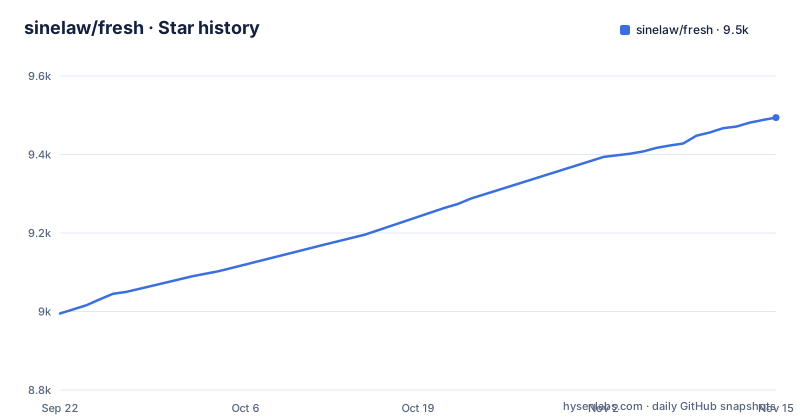
Star history
- sinelaw/fresh9,494 ★ · +499
| Repository | 2026-09-22 | 2026-11-15 |
|---|---|---|
| sinelaw/fresh | 9k | 9.5k |
499 Stars in the last 54 days, measured from the daily GitHub snapshot. Compare with other projects
Editorial analysis
Ten feature categories, no modes to learn
Fresh is a terminal editor written in Rust and released under GPL-3.0, and the argument for it is the interface it borrows rather than the algorithms it adds: familiar keybindings, full mouse support, menus and a command palette, on the claim that there are no modes and no shortcuts to memorize. The feature table behind that claim is broad. File management covers open, save, new, close, a file explorer, tabs, auto-revert and a git file finder. Editing adds undo and redo, multi-cursor, block selection, smart indent, comments and clipboard. Search and replace has incremental search, find in selection, query replace and git grep. Navigation lists go to line and bracket, word movement, position history, bookmarks and error navigation. Views cover split panes, line numbers, line wrap, backgrounds and a markdown preview. Against a bare modal editor, the difference is not features but shape: everything arrives at once, and nothing is opt-in.
One curl pipe unpacks a static musl binary under your home directory
The quick install is a single shell pipe, and on Linux it fetches a universal build: one statically linked musl binary for x86_64 and aarch64 with every feature compiled in, plugins included. The command is:
curl -fsSL https://raw.githubusercontent.com/sinelaw/fresh/refs/heads/master/scripts/install.sh | shIt unpacks to ~/.local/share/fresh-editor and symlinks ~/.local/bin/fresh, so ~/.local/bin has to be on your PATH or nothing works. Two environment variables, FRESH_INSTALL_DIR and FRESH_BIN_DIR, move those locations when your layout differs. The installer also copies a desktop entry and icon theme into XDG_DATA_HOME, which is what puts Fresh in an application menu; pass --no-desktop-integration or set FRESH_NO_DESKTOP=1 to skip that, the usual choice on a server or in a container. Every file written outside the install directory is recorded in ~/.local/share/fresh-editor/installed-files.txt, so re-running the installer cleans up the last run and uninstalling means going through that list plus the install directory and the symlink.
Packages are opt-in because root takes the updates away from Fresh
Every other install route asks for more than the pipe, and the installer can be told which you want:
curl -fsSL .../install.sh | sh -s -- --method=deb # also: rpm, aur, nix, cargo, npm, brew, appimagePackages are supported rather than default because installing one needs root and hands updates to that package manager. Fresh records how it was installed and updates through the same mechanism afterwards, which is the design decision with the sharpest edge here. The universal build is the one Linux install that can replace itself, because nothing else owns those files. install.sh --help lists every option, and --method=auto restores the earlier autodetecting behaviour if you would rather let the script choose again.
fresh --cmd update checks a checksum and an attestation, then swaps the binary
Self-update is the one part of the install story with real verification behind it. The universal build's update path downloads the next release, verifies it against both its published checksum and GitHub's release attestation, and swaps the binary in place:
fresh --cmd updateNothing else in that story carries the same check, because on a package-managed install the job belongs to the package manager. There is a second catch in the same paragraph of the docs. Only the binary is swapped on update, so the desktop entry and the icon theme come back when you re-run the installer rather than when you update. Downloading the archive by hand from the releases page behaves the same way, since it ships the same install receipt, which means a hand-unpacked copy still updates itself. The result is a machine that keeps getting new editor code while its start menu entry stays stale until somebody reruns the script.
Brew on macOS, winget on Windows, and a terminal you configure yourself
On macOS the installer defers to Homebrew, and the same route is offered on Bazzite, Bluefin and Aurora, where the package is named fresh-editor:
brew install fresh-editorWindows users are pointed at winget. Linux distributions are covered by the .deb, the .rpm, the AUR, Terra, OpenSUSE, Flatpak, AppImage, Nix flakes and GURU on Gentoo, FreeBSD users are pointed at ports and pkg, Cargo users get cargo-binstall for the fast path or crates.io, and there is a from-source route for developers. The honest gap is macOS. Beside the brew instructions there is a note pointing at a macOS Terminal Tips page for recommended terminal configuration, which tells you plainly that the editor's behaviour depends on how the terminal itself is set up.
Multi-gigabyte files are promised, not measured here
Performance is the claim Fresh makes without numbers in the repository. It says the editor handles multi-gigabyte files with negligible memory overhead and delivers consistently low-latency input regardless of file size, and it links a separate blog post explaining how it loads huge files fast. The README gives no benchmark figures for it. What can be checked is where the engineering effort sits. The workspace splits the editor into fresh-editor, fresh-editor-core, fresh-ui, fresh-gui, fresh-core, fresh-parser-js, fresh-languages, fresh-plugin-runtime, fresh-plugin-api-macros, fresh-winterm, fresh-input-parser, fresh-update, fresh-i18n, fresh-js, fresh-quickjs-sys and fresh-js-macros, with input parsing and updates each isolated in their own crate. If huge files are the reason you are considering Fresh, the answer you can defend is that you would have to measure it on your own files.
The Orchestrator runs coding agents side by side in worktrees
Multitasking is the least editor-like feature in the list. Each task gets its own git worktree, you hop between them with an arrow key, and the others keep running. Each workspace also gets terminals and long-running commands, which is what makes the split worth having when a server process or a file watcher would otherwise sit in the way. The same workspace list holds coding agents, named as claude, codex, opencode and aider, with resumable sessions, alongside a dock switcher and remote or SSH workspaces. Two consequences follow. Resumable sessions let a context outlive the terminal that started it, so work can stay running while you step away. Plugins are the part that is explicitly confined: TypeScript plugins run inside a sandboxed QuickJS runtime, next to a color highlighter, a TODO highlighter, merge conflict handling, path completion and keymaps.
A pre-1.0 version number and a workspace lint that reaches the tests
The workspace metadata is where the project's habits show. The latest release is v0.5.7, which matters more than it looks: below 1.0 the minor bump is where breaking changes live, so packaging Fresh or depending on it from Rust code carries no semver safety net. Sixteen crates are listed as workspace members and fifteen appear in default-members, with fresh-gui the one left out, so a default workspace build skips it. The lint table is strict for a project this size: a rule against holding a bare tokio::runtime::Handle is denied at the workspace level and inherited by every member, which the comments in the file explain lets the rule reach integration-test crates, something a crate-root deny cannot do. clippy.toml says what to hold instead, deny.toml covers dependency policy and rust-toolchain.toml pins the toolchain. The documentation site is a separate Node project, where package.json is a private fresh-docs workspace running vitepress over the docs directory.
Editorial conclusion
Fresh is worth a try if you want a terminal editor with an IDE feature set and no config file to write, especially if your day is split across git worktrees and long-running processes. It is the wrong choice if you need a stable 1.0 crate to depend on from Rust, if you expect a package-managed install to upgrade itself, or if your terminal is configured in a way the project has not documented. Before adopting it, check three things: that ~/.local/bin is on your PATH for the universal build, whether --no-desktop-integration or FRESH_NO_DESKTOP=1 is what you want on a server or in a container, and which method install.sh actually used, because that choice decides who updates the binary later.
Frequently asked questions
How do I install Fresh on Linux?
With one command: curl -fsSL https://raw.githubusercontent.com/sinelaw/fresh/refs/heads/master/scripts/install.sh | sh. It unpacks a static musl binary for x86_64 and aarch64 into ~/.local/share/fresh-editor, symlinks ~/.local/bin/fresh, and needs ~/.local/bin on your PATH.
Does Fresh need root to install?
Not for the universal build, which unpacks into your home directory and needs no root. Selecting a package method such as deb, rpm, aur, nix, cargo, npm, brew or appimage is opt-in, needs root, and hands updates to that package manager instead.
Can Fresh update itself?
The universal Linux build can. fresh --cmd update downloads the next release, verifies it against the published checksum and GitHub's release attestation, and swaps the binary in place. It refreshes only the binary, so the desktop entry and icons return when you rerun the installer.
What does the Fresh orchestrator do?
It gives each task its own git worktree, moves between them with an arrow key, and keeps terminals, long-running commands and coding agents such as claude, codex, opencode and aider per workspace, with sessions that can be resumed.
What can Fresh plugins do?
Plugins are written in TypeScript and run in a sandboxed QuickJS runtime. The listed examples are a color highlighter, a TODO highlighter, merge conflict handling, path completion and keymaps, plus a translation system for plugins.
Official sources
Where developers are discussing it
Posts on Hacker News, dev.to and Lobsters that link to this repository, found by our scan of those communities. 0 in the last 30 days; newest first.
- Fresh: Terminal based IDE and text editor: easy, powerful and fastHacker News · Sep 12, 2026 · 4 points · 1 comments
Add this badge to your README
If you maintain this project, the badge below links readers to this analysis and shows its maintenance status from the daily GitHub snapshot. Paste the markdown into your README; add ?metric=license or ?metric=stars to the image URL for a different field.

[](https://hysenlabs.com/projects/sinelaw-fresh)Star history chart for your README
[](https://hysenlabs.com/projects/sinelaw-fresh)Was this useful?