ProxmoxVE Helper-Scripts: One-Command Service Installations for Proxmox Hosts
Proxmox VE Helper-Scripts (Community Edition). Paste a command into your Proxmox shell, answer a few prompts, and your container or VM is up and running.
At a glance
- What is it?
- The community-scripts/ProxmoxVE repository offers hundreds of shell scripts that turn a single pasted command into a working LXC container or VM on Proxmox VE. It is fast, but it demands root shell access and an internet connection, and it inherits the maintenance risks of any community-run script collection.
- Who is it for?
- Adopt ProxmoxVE Helper-Scripts if you run Proxmox VE 8.0 to 8.4 or 9.0 to 9.2, have root shell access, and want to stand up common self-hosted services in minutes without manual package hunting. Skip it if you need strict reproducibility, cannot tolerate a script that may change between releases, or run an unsupported Proxmox version.
- Can I use it commercially?
- Yes. MIT is a permissive licence: you can use, modify and sell software built on it, as long as you keep its copyright and licence notices.
- Is it still maintained?
- Yes. The repository received new commits within the last day.
- What is it written in?
- Mainly Shell, according to GitHub's language statistics.
Answers come from the project's GitHub data, last synced on November 13, 2026, and from our analysis. They are not legal advice.
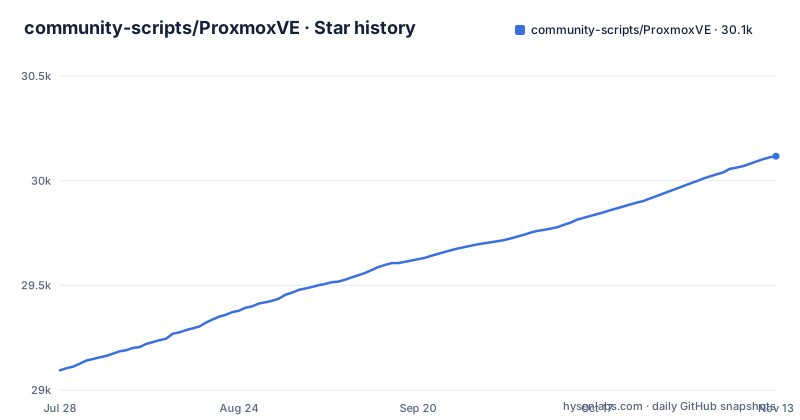
Star history
- community-scripts/ProxmoxVE30,117 ★ · +1,023
| Repository | 2026-07-28 | 2026-11-13 |
|---|---|---|
| community-scripts/ProxmoxVE | 29.1k | 30.1k |
1,023 Stars in the last 108 days, measured from the daily GitHub snapshot. Compare with other projects
Editorial analysis
What Problem This Solves and Who It Is For
The problem is the repetitive, error-prone work of setting up a service inside a Proxmox VE container or VM by hand. You have to create the container, pick an operating system template, configure CPU, RAM, storage, and network, then install and configure the application itself. The helper-scripts collapse all of that into one command. You paste a line into the Proxmox shell, answer a few prompts, and the script creates the container or VM, installs the service, and applies sensible defaults. The intended audience is a Proxmox administrator who runs a homelab or a small production environment and wants popular self-hosted tools like Home Assistant, Nginx Proxy Manager, or Jellyfin without reading long installation guides. It is not aimed at someone who needs fine-grained control over every package version, nor at users who avoid giving root shell access to third-party code.
How the Scripts Work: Default and Advanced Modes
Every script in the repository follows the same pattern, according to the README. There are two execution paths. Default mode picks resource defaults for CPU, RAM, and storage, then asks only the minimum questions. The README says most installs finish in a few minutes. Advanced mode gives full control over container settings, networking, storage backends, and application-level configuration before anything is installed. After the installation, every container gets an update command, typed in the container console. It updates the installed application and reaches settings that would otherwise mean editing config files by hand; VM scripts have no built-in updater. The data flow is straightforward: the script runs on the Proxmox host, and loads the shared engine from the core repository at start-up; that engine creates the container or VM, asks the questions and handles errors, while the script itself only describes what to install.
Getting It Running: Commands and Requirements
The README lists three requirements. You need Proxmox VE 8.0 to 8.4, or 9.0 to 9.2. You need root shell access on the Proxmox host, and an internet connection during installation because the scripts download packages. The process is: go to community-scripts.org, search for the service, copy the one-line install command from the script page, open the Proxmox Shell, paste the command, then choose Default or Advanced and follow the prompts. There are no explicit installation commands in the README because each script has its own one-liner. The script pages document what the container includes, default resource allocation, and post-install notes. There is no package manager or separate installer for the collection itself; you run scripts directly from the repository.
Maintenance and Upgrade Cost
The repository is actively maintained. The last push was on 2026-11-02, and releases appear daily, with dates like 2026-11-02 and 2026-11-01. That activity is a double-edged sword. On one hand, fixes and new scripts arrive frequently. On the other, scripts can change behavior between releases without a stable versioning scheme. The README points to a CHANGELOG.md, but it does not describe how to upgrade an existing container or VM after a script changes. The update command can apply updates to the installed application, but that is not the same as updating the script itself. If you rely on a specific script version, you would need to pin to a commit or release. The license is MIT, which means you can fork and modify the scripts, but the project does not offer a formal upgrade path. For a homelab, daily changes are acceptable. For a production environment, you would want to test a script before running it, and the lack of a stable release channel is a real cost.
Limitations and Failure Modes
The most obvious limitation is the requirement for root shell access on the Proxmox host. You are pasting a command that runs as root, and the README's advice is to read the script before pasting it: every script is readable in this repository, and each script page links to its source. Another limitation is the narrow version support: only Proxmox VE 8.0 to 8.4 and 9.0 to 9.2 are listed. If you run an older version, the scripts may fail or produce broken containers. The internet connection requirement means the scripts will not work in an air-gapped environment. The README also says that new scripts go to a separate repository, DevScripts, for testing first. That implies scripts in the main repo are considered stable, but it does not guarantee they are bug-free. A failure mode is that a script might assume a specific Proxmox configuration, such as a default storage location, and fail if your setup differs. The README does not list any rollback or uninstall procedure, so if a script breaks your host, you are on your own.
Alternatives and How They Differ
The closest alternative is the original tteck scripts, which the README explicitly credits as the foundation. The community-scripts project is a continuation of that work, so the approach is nearly identical: paste a command, answer prompts, get a container. The difference is governance. The tteck repository was a single maintainer's project, while community-scripts is a community effort with a core team and a separate testing repo, DevScripts. Another alternative is using Proxmox's built-in Cloud-Init templates and Ansible or Terraform to provision containers and VMs. That approach is more declarative and reproducible, but it requires writing and maintaining configuration files. The helper-scripts trade that control for convenience. A third alternative is manual installation following official documentation for each service. That gives you full visibility into every step, but it is slow and error-prone. The helper-scripts are the opposite: fast and opaque.
License and Contribution Model
The project is licensed under MIT, which is permissive. You can use, modify, and redistribute the scripts, even in commercial settings, as long as you retain the copyright notice. The contribution model is structured around two repositories. New scripts go to DevScripts first, where they are tested, and the README states that PRs with new scripts opened directly against this repo will be closed. Bug fixes and improvements to existing scripts belong in this repo, and the README asks contributors to keep PRs focused, one fix or feature per PR. There is a security policy linked in the README, and a Discord server for help. The core team is listed in the README. This structure suggests a reasonable level of oversight, but it is still a community project, not a commercial product. You should treat the scripts as community-maintained code, not as a vendor-supported tool.
Editorial conclusion
Adopt ProxmoxVE Helper-Scripts if you run Proxmox VE 8.0 to 8.4 or 9.0 to 9.2, have root shell access, and want to stand up common self-hosted services in minutes without manual package hunting. Skip it if you need strict reproducibility, cannot tolerate a script that may change between releases, or run an unsupported Proxmox version. Before running any script, read its source in the repository and check the script page on community-scripts.org for what it installs and its default resources. The project is MIT licensed and actively maintained with daily releases, but that activity also means scripts can change without notice, so pin to a specific commit or release if you plan to repeat installs.
Frequently asked questions
Is Proxmox VE free?
The scripts in this repository are MIT licensed. The README does not state the licensing or cost of Proxmox VE itself, so that part has to come from Proxmox rather than from these docs.
What is Proxmox VE?
It is the host platform these scripts target: version 8.0 to 8.4 or 9.0 to 9.2, with root shell access and an internet connection required during installation. The scripts put self-hosted services into containers or VMs on top of it.
how to use proxmox ve helper scripts
Open community-scripts.org, search for the service, copy the one-line install command from the script page, and paste it into the Proxmox shell. You then choose Default or Advanced setup and follow the prompts, and each script page documents what the container includes, its default resource allocation, and post-install notes.
how to use proxmox ve scripts
Every script follows the same pattern. Default mode picks resource defaults for CPU, RAM, and storage and asks the minimum required questions, with most installs finishing in a few minutes, while Advanced mode asks about container settings, networking, storage backends, and application-level configuration before anything is installed, and every container gets an update command in its console afterwards.
how to install proxmox ve on debian
These scripts do not install Proxmox VE. The scripts require Proxmox VE 8.0 to 8.4 or 9.0 to 9.2 with root shell access, and the commands run from the Proxmox shell rather than from a plain Debian machine.
Official sources
Add this badge to your README
If you maintain this project, the badge below links readers to this analysis and shows its maintenance status from the daily GitHub snapshot. Paste the markdown into your README; add ?metric=license or ?metric=stars to the image URL for a different field.

[](https://hysenlabs.com/projects/community-scripts-proxmoxve)Star history chart for your README
[](https://hysenlabs.com/projects/community-scripts-proxmoxve)Was this useful?