BentoPDF: A Client-Side PDF Toolkit That Keeps Files in the Browser
The Privacy First PDF Toolkit. BentoPDF BentoPDF** is a powerful, privacy-first, client-side PDF toolkit that is self hostable and allows you to manipulate, edit, merge, and process PDF files directly in your browser.
At a glance
- What is it?
- BentoPDF is a self-hostable, browser-based PDF toolkit that processes files entirely on the client side. It offers 50+ tools, but its reliance on CDN-loaded AGPL components and a commercial license adds complexity.
- Who is it for?
- Adopt BentoPDF if your priority is keeping PDFs off servers and you can accept the AGPL obligations or pay the $79 commercial license. Avoid it if you need a fully offline, zero-config deployment without managing WASM bundles, or if your team lacks the capacity to handle the dual-license complexity.
- Can I use it commercially?
- Yes, with strict conditions. AGPL-3.0 is a network copyleft licence: if people use a modified version over a network, for example as a hosted service, you must offer them its source code under the same licence.
- Is it still maintained?
- Yes. The repository last received commits 1 day ago.
- What is it written in?
- Mainly JavaScript, according to GitHub's language statistics.
Answers come from the project's GitHub data, last synced on November 13, 2026, and from our analysis. They are not legal advice.
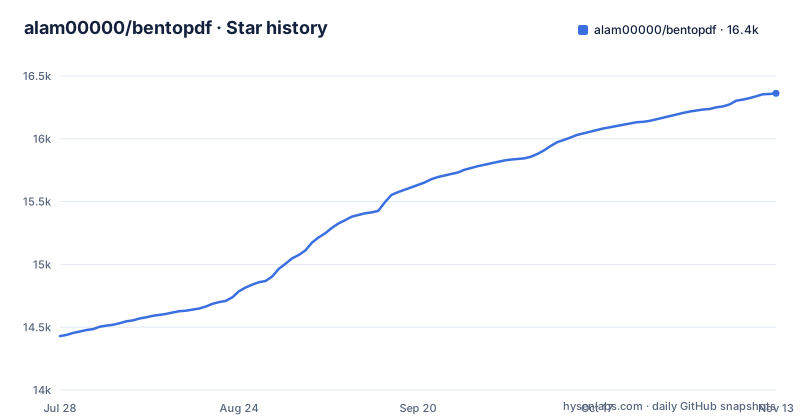
Star history
- alam00000/bentopdf16,362 ★ · +1,933
| Repository | 2026-07-28 | 2026-11-13 |
|---|---|---|
| alam00000/bentopdf | 14.4k | 16.4k |
1,933 Stars in the last 108 days, measured from the daily GitHub snapshot. Compare with other projects
Editorial analysis
The Problem: PDF Tools That Send Your Files Elsewhere
Most online PDF tools upload your document to a server, process it there, and then send it back. That is a privacy problem for legal documents, medical records, or anything confidential. BentoPDF solves this by doing all processing in the browser, using WebAssembly and JavaScript. No server-side processing is required, so your files never leave your machine. The target user is someone who needs a wide range of PDF operations but does not trust cloud-based services. It is also aimed at organizations that want to self-host a toolkit for internal use, giving them control over the deployment.
How It Works: WASM and CDN at the Core
The repository description says BentoPDF is a client-side toolkit. The README goes further: it does not bundle AGPL-licensed processing libraries in its source code. Instead, it pre-configures CDN URLs for three key components. PyMuPDF handles PDF to text, markdown, SVG, DOCX, image and table extraction, EPUB/MOBI/XPS conversion, compression, and deskew. Ghostscript handles PDF/A conversion and font outlining. CoherentPDF (CPDF) handles merge, split by bookmarks, table of contents, PDF to/from JSON, and attachments. These modules are loaded at runtime from jsDelivr CDN. That is a clever way to keep the core repository lighter, but it also means the application depends on external network access at runtime. For an air-gapped deployment, you must reconfigure those URLs, which the README covers under WASM Configuration.
Getting It Running: Docker, Static Hosting, and Local Builds
The README offers several deployment paths. The table of contents lists Docker Compose / Podman Compose as recommended, plus Podman Quadlet for systemd integration, and a simple mode build. For static hosting, it supports Netlify, Vercel, and GitHub Pages. That means you can deploy it as a static site, which fits the client-side architecture. For a local setup, you would clone the repository and use the development setup described in the docs. The README also mentions custom branding, disabling specific tools, and disabling the GitHub star counter. These are configuration options, not code changes, which suggests a config file or environment variables.
The Licensing Trap: AGPL Components via CDN
BentoPDF is dual-licensed: AGPL-3.0 for open-source projects with public source code, and a commercial license for $79 lifetime for proprietary use. The AGPL-3.0 license is known for its copyleft obligations, especially for network services. The README explicitly lists the AGPL components and their licenses. This is a critical point for adoption. If you self-host BentoPDF and modify it, you must release your modifications under AGPL. If you use it as a service, the AGPL may require you to offer source code to users. The commercial license removes those obligations, but at a one-time cost. The README says the commercial license includes unlimited devices and users and lifetime updates. For a company that wants to integrate BentoPDF into a closed-source product, the $79 is a bargain compared to legal risk. For a hobbyist, the AGPL might be fine if they do not distribute the software.
Limitations: CDN Dependency and Air-Gapped Complexity
The biggest limitation is the runtime dependency on CDN-hosted WASM modules. If the CDN goes down or is blocked, the tools that rely on PyMuPDF, Ghostscript, or CPDF will fail. The README addresses this with a WASM Configuration section for air-gapped or offline deployments, but that is extra work. You must download the WASM files and host them yourself, then configure the URLs. That is not a zero-config scenario despite the README's claim of zero-config by default. Another limitation is browser compatibility. Not all browsers support the required WebAssembly features, though modern browsers generally do. Also, processing very large PDFs in the browser can be memory-intensive, and the README claims to handle large files with ease. So, if your use case involves huge documents, you should test it yourself.
Alternatives: What Else Is Out There
A direct alternative is pdf-lib, a JavaScript library that runs in the browser and Node.js, and is MIT-licensed. It can create and modify PDFs, but it does not have the breadth of tools like OCR or PDF/A conversion. Another alternative is PDFsam, an open-source desktop application (AGPL) that focuses on split, merge, and rotate, but it does not run in the browser. The key difference: pdf-lib gives you a library to build your own tools, while BentoPDF is a ready-made toolkit with a UI. PDFsam is a native app, so it does not have the CDN dependency, but it requires installation. For a privacy-focused user who wants a web interface, BentoPDF is more convenient than pdf-lib. For a developer who wants to embed PDF manipulation into an application, pdf-lib is lighter and has no AGPL obligations.
Maintenance and Upgrade Cost
The repository shows recent activity: version 2.8.11 released on 2026-10-31, preceded by v2.8.10 and v2.8.9 in October 2026. That indicates active maintenance. However, the dual-license model means you must track which components are AGPL and ensure their versions are compatible with your deployment. Upgrading BentoPDF may require updating the CDN URLs or the WASM configurations. The README mentions Version Management, but the details are in the docs. For a self-hosted deployment, you will need to monitor the repository for security updates and apply them. The commercial license includes lifetime updates, so that reduces the cost of upgrades. Overall, the maintenance burden is moderate, but the CDN dependency adds a layer of risk that you must manage.
Editorial conclusion
Adopt BentoPDF if your priority is keeping PDFs off servers and you can accept the AGPL obligations or pay the $79 commercial license. Avoid it if you need a fully offline, zero-config deployment without managing WASM bundles, or if your team lacks the capacity to handle the dual-license complexity. Before adopting, verify that the CDN-hosted AGPL components (PyMuPDF, Ghostscript, CPDF) are acceptable for your distribution model, and check whether the air-gapped configuration meets your offline requirements. If you need a simpler, truly offline tool, consider a desktop-based PDF editor like PDFsam or a JavaScript library such as pdf-lib, which avoid the CDN dependency.
Frequently asked questions
What does BentoPDF do?
It is a self-hostable PDF toolkit that runs in the browser. Tools include merging, splitting by bookmarks, conversion to and from PDF, compression and other organize, edit, secure and optimize tools, all with processing happening client-side so no file is uploaded to a server.
How do I install bentopdf?
The quickest route is the compose file, which pulls the prebuilt image ghcr.io/alam00000/bentopdf-simple:latest and maps port 8080. You can also build from source with npm, where npm run serve:simple builds in SIMPLE_MODE and previews on port 3000, and static hosting is covered separately.
How do I use bentopdf?
You open the app in a browser and use the individual tools, of which the documentation site counts more than 50. The README groups them into organize and manage, edit and modify, convert to PDF, convert from PDF, and secure and optimize, and your files are handled in the browser rather than sent anywhere.
How do I use bentopdf offline?
Repoint the WASM variables away from jsDelivr at your own server, for example to a path such as /wasm/pymupdf/, using VITE_WASM_PYMUPDF_URL, VITE_WASM_GS_URL and VITE_WASM_CPDF_URL. For OCR, set the Tesseract worker, core and language URLs, and the repository carries a bentopdf-airgap-bundle directory for offline packaging.
Is BentoPDF free?
Yes for open source. The project is dual-licensed: AGPL-3.0 at no cost for projects with public source code, and a commercial licence at $79, one time and lifetime, for proprietary or closed-source applications, with unlimited devices and users, lifetime updates and no AGPL obligations.
Official sources
Add this badge to your README
If you maintain this project, the badge below links readers to this analysis and shows its maintenance status from the daily GitHub snapshot. Paste the markdown into your README; add ?metric=license or ?metric=stars to the image URL for a different field.

[](https://hysenlabs.com/projects/alam00000-bentopdf)Star history chart for your README
[](https://hysenlabs.com/projects/alam00000-bentopdf)Was this useful?