compat-table: the ECMAScript compatibility tables behind kangax's test pages
ECMAScript compatibility tables
At a glance
- What is it?
- compat-table is the source repository for the ECMAScript compatibility tables: JavaScript data files, a build script, and browser test pages. It answers one narrow question well, and it is not a runtime feature-detection library.
- Who is it for?
- Adopt compat-table if you need to edit or regenerate the ECMAScript compatibility tables themselves, or to run the Node.js test harness against a specific engine build. Do not adopt it if you want runtime feature detection in shipped code; that is what shims and transpilers in the dependency list are for.
- Can I use it commercially?
- Check first. The repository uses a licence we do not classify automatically, so read its LICENSE file before any commercial use.
- Is it still maintained?
- Yes. The repository last received commits 12 days ago.
- What is it written in?
- Mainly JavaScript, according to GitHub's language statistics.
Answers come from the project's GitHub data, last synced on November 15, 2026, and from our analysis. They are not legal advice.
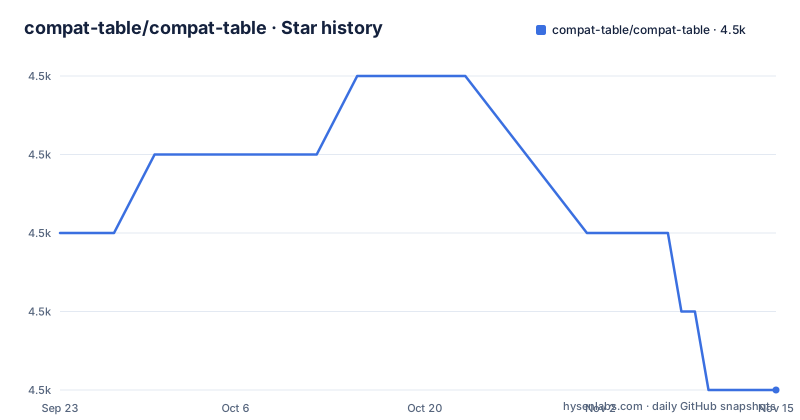
Star history
- compat-table/compat-table4,505 ★ · -2
| Repository | 2026-09-23 | 2026-11-15 |
|---|---|---|
| compat-table/compat-table | 4.5k | 4.5k |
-2 Stars in the last 53 days, measured from the daily GitHub snapshot. Compare with other projects
Editorial analysis
What the ECMAScript compatibility tables actually are
compat-table is the source repository for the ECMAScript compatibility tables. It is not a library you import. The repository holds the test definitions and the recorded results, and build.js turns those JavaScript data files into the HTML pages that make up the published tables.
The audience is narrow. People who edit the tables: contributors who add a test for a new language feature or record a browser result. People who run the tables: engine and compiler authors who want a scorecard for a specific build. The README is written for exactly those two groups, and it assumes you are comfortable reading and writing JavaScript test cases.
If you arrived looking for a runtime check such as "does this browser support Symbol", this repository does not give you that. The dependency list does include es5-shim, es6-shim and es7-shim, but those are installed so the compiler test pages can run, not because compat-table ships them to your users.
How the data files, build.js and the HTML pages fit together
The data flow is short and worth understanding before you touch anything. Test definitions and recorded results live in data-es5.js, data-es6.js, data-esnext.js, data-es2016plus.js, data-esintl.js and data-non-standard.js. Running node build.js reads those sources and writes the HTML output into directories such as es5/, es6/, esnext/, es2016plus/ and esintl/.
The test code itself sits inside multi-line comments. That is deliberate: Node.js has to be able to parse the data scripts without throwing syntax errors on features it does not support. build.js wraps the commented code in an eval call inside a try, so individual tests do not need to catch errors that a non-supporting platform throws.
Test authoring has a version rule. ES6 tests should be written in pure ES3 except for the single ES6 feature under test, plus any ES5 features strictly required to use it. ES Next tests may use any ES5 features and only the ES6 features strictly required. That constraint keeps a failing test attributable to one feature rather than to a missing prerequisite.
The percentages are weighted, not a simple pass count. Each test carries a significance rating: "large" is worth 1, "medium" 0.5, "small" 0.25, and "tiny" 0.125. The README describes "large" as a landmark, transformative feature and reserves "tiny" for meager changes such as altered parameters or side effects. This is an editorial judgement encoded as a number, and it means two platforms with the same raw pass count can show different totals.
Installing compat-table and building the tables locally
The repository is private in package.json ("private": true) and version 0.0.0, so you clone it rather than install it from a registry. The engine field asks for Node.js >= 0.11.12 and npm >= 3.0, which is a low floor, but the dependency list pulls in current packages such as typescript, espree and esprima, so a modern Node.js is the safer choice.
Start with dependencies, then build the HTML:
npm install
node build.js
After the build, the generated pages appear in the version directories listed in the repository root, and build.js prints lines containing "Write to file" as it writes them. The package.json script build is the same command, so npm run build works identically.
There is a CI-oriented check for uncommitted generated output. It stashes uncommitted changes while keeping the index, rebuilds, and fails if the build produced changes:
npm run test:no_changeThe script definition runs npm run git:clean first, then greps the build output for "Write to file" and exits 1 with the message "Please run `npm run build` and commit the changes." If you edit a data file, this is the command that tells you whether you also need to commit regenerated HTML.
Compiler test pages are a separate target and only exist for ES6:
npm run build:compilersThat creates pages under es6/compilers. The README says to open them in a browser with close to zero native ES6 support, naming Internet Explorer 9, Opera 12 and Safari 5.1, and warns that IE9's missing strict mode will cause some tests to fail. It also states plainly that some tests cannot be compiled correctly because they rely on runtime eval() results, for example to confirm that a construct is a syntax error. Those fail on compiler pages and the README says support for them should be divined manually. That is a real gap in the automation, not a footnote.
For a Node.js build, the entry point is the main field, node.js:
node .Run it with the node executable you want to test, plus any flags such as --es-staging. Results print in colour: green for correct support, cyan for support that incorrectly requires strict mode, red for no support. The README notes this script is currently hard-coded to display ES6 results only.
Significance ratings and the manual work the tooling cannot remove
The weighting scheme is the most opinionated part of the project and also the part most likely to mislead a casual reader. A platform's total is a weighted sum, so the number is only as meaningful as the ratings behind it. If you disagree that a feature deserves "large", the table's headline figure disagrees with you.
The second limitation is the eval-dependent tests. Tests that must observe a runtime eval() result to prove, for instance, that a construct is a syntax error cannot be compiled correctly. On compiler test pages they fail, and the README instructs you to determine support manually. Any workflow that treats a compiler page as a complete pass or fail signal will be wrong about those cases.
The third is scope. The Node.js runner is hard-coded to display ES6 results, so it is not a general-purpose audit of every table in the repository. And the compiler pages exist only for ES6, not for ES5, ES Next or the Intl tables.
Finally, this is the wrong tool for runtime decisions. Nothing here runs in a user's browser to decide whether to load a polyfill. It is a measurement instrument, and it is maintained as one.
compat-table compared with MDN browser-compat-data
The closest alternative in practice is MDN's browser-compat-data. The difference is in the unit of measurement.
compat-table measures features by executing test code and recording whether the engine produced the correct result. Its rows are language features with runnable tests, and its output is a pass or fail per platform, weighted by significance.
MDN browser-compat-data is a structured catalogue of support statements, maintained as data and consumed by documentation and tooling. It describes support; compat-table demonstrates it. A support claim in a catalogue can go stale or be entered from release notes, while a test here either runs correctly on the engine or it does not.
The trade-off runs the other way too. Because compat-table depends on executable tests, features that cannot be observed that way, such as the eval-dependent syntax cases, fall outside what it can score automatically. A catalogue does not have that problem. If you need broad API coverage and machine-readable output for tooling, the catalogue form fits better. If you need to know whether a specific engine build actually behaves correctly for a language feature, the test-based approach is the stronger signal.
Maintenance, licensing and what to check before relying on it
The repository is not archived, and the last push was on 2026-05-05. That is a recent commit history, but the project has no published releases, so there is no versioned artifact to pin. You consume it as a git checkout, and the data files change as tests are added or results are recorded.
That shape has an upgrade cost. Because generated HTML is committed alongside the sources, a change to a data file normally means regenerating and committing build output. npm run test:no_change exists precisely to catch the case where you forgot. If you fork the repository and edit tests, expect that loop: edit data, run npm run build, commit both.
The dependency list is a second cost. It includes many "latest" version specifiers, among them @babel/standalone, es5-shim, es6-shim, es6-transpiler, es7-shim, esdown, espree, esprima, jshint, jstransform, traceur and typescript. Unpinned dependencies mean a fresh npm install months apart can resolve to different compiler versions, which matters when the whole point of the compiler pages is to measure those compilers. The README acknowledges this indirectly by telling you to run npm update frequently.
On licensing, the repository contains a LICENSE file, but the metadata reports the licence as NOASSERTION, meaning no standard licence identifier was detected. Read the LICENSE file itself before you reuse the data or the generated pages. That is not legal advice, just the step the metadata leaves open.
Editorial conclusion
Adopt compat-table if you need to edit or regenerate the ECMAScript compatibility tables themselves, or to run the Node.js test harness against a specific engine build. Do not adopt it if you want runtime feature detection in shipped code; that is what shims and transpilers in the dependency list are for. Before editing anything, run npm install and node build.js once and confirm the working tree stays clean under npm run test:no_change. The significance ratings are editorial, so read the individual test rather than the percentage.
Frequently asked questions
What is the compat-table ECMAScript project?
It is the source repository for the ECMAScript compatibility tables. It holds the JavaScript data files that define the tests and recorded results, plus build.js, which generates the HTML pages in directories such as es5/, es6/ and esnext/.
Which browsers are compatible with JavaScript?
The tables record results per browser and engine, but the repository does not publish a single verdict. Support is expressed as weighted totals built from per-test significance ratings of large (1), medium (0.5), small (0.25) and tiny (0.125).
How do I build the compat-table pages locally?
Run npm install, then node build.js. The package.json build script runs the same command, and the build prints lines containing "Write to file" as it writes each generated page.
How do I test a Node.js build against the compat-table ES6 tests?
After npm install, compile a fresh ES6 HTML file with node build.js, then run node . using the executable you want to test along with any flags such as --es-staging. The README states the output is colour-coded and that this script currently displays ES6 results only.
Why do some compat-table tests fail on the compiler test pages?
The README explains that some tests rely on runtime eval() results, for example to confirm that a construct is a syntax error. Those cannot be compiled correctly, so they fail on compiler pages and support for them has to be determined manually.
Official sources
Add this badge to your README
If you maintain this project, the badge below links readers to this analysis and shows its maintenance status from the daily GitHub snapshot. Paste the markdown into your README; add ?metric=license or ?metric=stars to the image URL for a different field.

[](https://hysenlabs.com/projects/compat-table-compat-table)Star history chart for your README
[](https://hysenlabs.com/projects/compat-table-compat-table)Was this useful?