Constella: a local-first desktop index over your files, with an MCP bridge for Claude Code
Index all your local files + cloud apps privately, on-device with VectorDB & KnowledgeGraph in one
At a glance
- What is it?
- Constella is an Electron and React desktop app that indexes local folders into LanceDB and SQLite, synthesises a knowledge graph from that index, and exposes the result to agents over MCP. It is an acknowledged prototype that still requires a Firebase project, and its licence metadata disagrees with itself.
- Who is it for?
- Use Constella if you want a private, searchable index of your own folders that an agent can read and write over MCP, and you are willing to run a prototype on macOS with Node.js 18. Do not adopt it for a team, for Windows or Linux, or where telemetry tokens and a Firebase project are not acceptable, since the environment file expects Firebase for authentication and offers PostHog, Mixpanel and Sentry keys.
- Can I use it commercially?
- Yes, with strict conditions. AGPL-3.0 is a network copyleft licence: if people use a modified version over a network, for example as a hosted service, you must offer them its source code under the same licence.
- Is it still maintained?
- Yes. The repository last received commits 140 days ago.
- What is it written in?
- Mainly TypeScript, according to GitHub's language statistics.
Answers come from the project's GitHub data, last synced on November 7, 2026, and from our analysis. They are not legal advice.
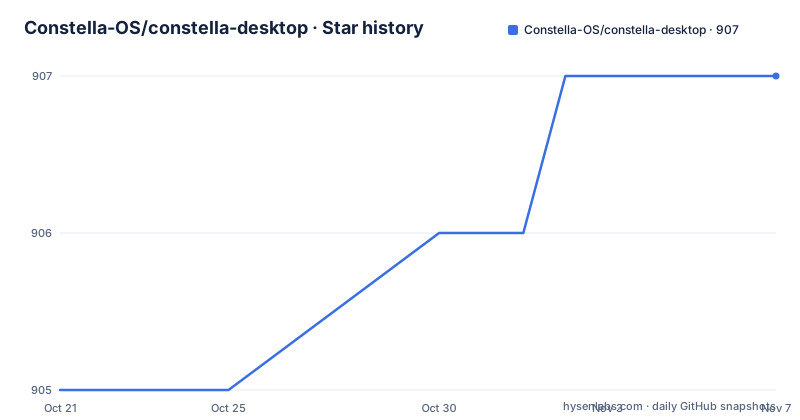
Star history
- Constella-OS/constella-desktop907 ★ · +2
| Repository | 2026-10-21 | 2026-11-07 |
|---|---|---|
| Constella-OS/constella-desktop | 905 | 907 |
2 Stars in the last 17 days, measured from the daily GitHub snapshot. Compare with other projects
Editorial analysis
The problem: an agent that cannot see the files you already have
The pitch is a command center for your files, memories, agents and workflows, with one shared brain for personal knowledge and agentic workflows.
That problem shows up in a specific way. You have notes in an Obsidian vault, documents in a Downloads folder, a Documents directory, workspaces belonging to the agents you already run, and more files in cloud apps. An assistant can only work with what it can see, and giving it access usually means uploading or pasting. Constella takes the other route: it indexes the folders you choose on your own machine, builds a searchable structure out of them, and then hands that structure to an agent over a standard protocol.
The privacy claim is specific rather than decorative. The renderer calls into the main process over IPC, and the documentation states that private files never leave your machine. The embeddings are produced locally with EmbeddingGemma at 512 dimensions, which runs fully offline, and the scheduled analysis pass can use a local or a cloud model, your choice.
The audience is a developer or writer with a large personal file collection who wants agent assistance over their own files without uploading it. The project also advertises a curated download with cloud integrations for Notion, Google Calendar, Slack, Gmail and Drive, a Chrome extension companion and a mobile assistant, but those are part of the distributed product rather than the repository.
The project is explicit about its maturity. It calls itself an active desktop prototype and says to use it as a work-in-progress foundation for local-first personal AI tooling, not a polished production app yet, and it names the surfaces still evolving: the full constellation graph view, reminders and automatic recommendation workflows.
The three layers: sync, a search substrate, and graph synthesis
The architecture is described as three layers composing into a local AI backend, and the data flow is short enough to read in one go:
Local folders
  → file indexer (chunk + embed)
  → LanceDB vectors + SQLite metadata
  → scheduled graph pass
  → concept pages, themes, edges
  → UI: insights, alerts, agents, workflows
  → MCP: Claude Code reads/writes directly
The first layer is source sync. The main process owns a JSON-backed source registry, and each source maps to a folder. The app periodically checks enabled sources, extracts text from PDF, DOCX, Markdown and image files, chunks the content and embeds it into LanceDB.
The second is the search and memory substrate. Indexed content lands in LanceDB as vectors and in SQLite as metadata and full text, and searches run across all sources or a subset of them.
The third is knowledge graph synthesis. A scheduler runs clustering and synthesis passes so that raw chunks become concept pages, themes and edges, with the graph stored in a local SQLite database. A scheduled LLM pass connects related content across sources.
That third layer is the one with a cost, and it is worth being clear about it. The embeddings and the search are local and deterministic. The synthesis step is a model pass over your files, and if you point it at a cloud provider, then material you believed never left your machine does leave your machine. The choice of local or cloud is yours, but the default is not stated.
The code layout: main process modules and a swappable renderer
The repository is an Electron application, and the top-level entries show an unusual build setup: a src/ directory, a package.json, a tsconfig.json, a .env.example, a .erb/ directory and a LICENSE. The .erb directory holds the webpack configuration and build scripts, which is how the main and renderer bundles are produced.
The documentation sets out where each layer lives, and this table is the most useful thing in the project description:
- File indexer at src/main/file-index/, watching folders, extracting text, chunking and embedding into LanceDB. - Knowledge graph at src/main/file-graph/, the scheduled LLM pass that produces concepts, themes and edges in SQLite. - Local database at src/main/main-db/, a SQLite supervisor running in a worker_thread with generic CRUD. - AI pipeline at src/utils/ai-pipeline/, a step and recipe orchestration engine built from pure composable functions. - MCP bridge at src/main/mcp/, exposing local knowledge as MCP tools for Claude Code. - Embeddings and LLM at src/main/ai/, EmbeddingGemma at 512 dimensions offline, plus local or cloud provider dispatch.
The renderer is deliberately replaceable. The entry point is src/components/open-source/OpenSourceApp.tsx, and the documentation says you can replace it with anything, because the six core layers run in the main process regardless of what the renderer shows. For a project that is partly a reference architecture, that separation is the point: the interesting code is the backend, and the UI is a demonstration of it.
The AI pipeline being composed of pure functions is the other design decision worth noting. It is what makes a pipeline step testable in isolation, and it is why the orchestrator does not need to own state.
Installing it: clone, install, copy the environment file, run
The requirements are short. You need Node.js 18 or newer, and macOS. Windows and Linux are noted as community pull requests welcome, which in practice means the desktop app targets macOS today.
The install sequence is three commands:
git clone https://github.com/Tej-Sharma/constella
cd constella
npm install
The clone URL is worth pausing on. The repository holding this code is Constella-OS/constella-desktop, and the documented clone points at a different path, Tej-Sharma/constella. That is a discrepancy in the install instructions rather than something you should assume is intentional, so check which URL actually gives you the tree described here before you start.
Configuration is a copy of the environment example:
cp .env.example .env.localThe .env.local file is gitignored and loaded by webpack at build time. The example explains that all variables are optional and that features degrade gracefully when they are unset, and then lists the Firebase keys as the ones required for authentication, with PostHog, Mixpanel, Sentry and ConvertAPI listed as optional and to be left empty to disable.
The Firebase setup is described as three steps: create a project in the Firebase console on the free Spark plan, add a web app and copy the config values into .env.local, then enable email and password plus Google in the authentication sign-in methods.
Finally:
npm startThe postinstall script is where the native build happens. It runs a check for native dependencies, then electron-builder install-app-deps, then a webpack DLL build for the renderer, so a first install compiles more than you might expect.
The IPC surface: how the interface talks to the indexer
The renderer never touches the databases directly. It sends requests over a single IPC channel and the main process dispatches them by operation name. A search looks like this:
window.electron.ipcRenderer.invoke('mcp:request', {
  op: 'search_local_notes',
  params: { query: 'your query', limit: 10 }
})
Note that the search goes through the same channel as the MCP bridge, named mcp:request, rather than through a separate file-index channel. That is a design decision with a consequence: the code path your UI uses for search is the same path an external agent uses, so anything the interface can reach, an agent can reach too.
Source management has its own channel names:
window.electron.ipcRenderer.invoke('file-index:sources:add', {
  path: '/Users/you/Documents/notes', label: 'My notes'
})
and a separate call triggers a sync across the registry. The names follow a colon separated pattern of subsystem and action, which makes the whole surface greppable from the renderer side.
For anyone writing a custom interface, the practical points are that the renderer is replaceable, that the operations are string dispatched, and that the parameters are plain objects. The documentation does not publish a complete list of operations, so the set has to be read out of the main process source in src/main/mcp/ and src/main/file-index/.
MCP: the part that makes it an agent backend
The feature that distinguishes Constella from a desktop search tool is the MCP bridge at src/main/mcp/. Everything the app indexes is exposed as MCP tools, so Claude Code can search, read and write to the knowledge base directly.
The difference in approach from a conventional agent setup is the direction of the data. Instead of an agent that receives the files it needs, the agent queries a local index that already holds vectors, metadata, full text, concepts, themes and edges. The retrieval happens inside the app, and the agent receives results.
That design also explains the knowledge graph layer. Raw chunks are not much use to an agent; concepts and themes are, because they are the durable labels that let a query land on the right content even when the wording differs. The synthesis pass is what turns a document pile into something navigable.
The agents the project describes are Claude and Codex powered, and the AI pipeline is a step and recipe orchestration engine, so a workflow is assembled from composable steps rather than hard coded. The pipeline, the knowledge graph and the MCP bridge are the three pieces that a developer would most likely reuse in a different product, and all three live in the main process, independent of the shipped interface.
The licence conflict, the telemetry keys, and the prototype status
Two things in this repository need reconciling before you build on it.
The first is the licence. The repository is recorded under AGPL-3.0, while the package.json in the same tree declares license MIT. Those are very different obligations, and the MIT claim in the package metadata is what a consumer of a published package would read. Which one governs depends on what you are doing with which artefact, and this is not legal advice, but it is a discrepancy to resolve with the project rather than to guess at.
The second is what leaves your machine. The product is described as local-first and private, and the code paths for indexing, embeddings and search are local. The environment file asks for Firebase credentials for authentication, and offers PostHog, Mixpanel and Sentry tokens, plus a ConvertAPI token for PDF to DOCX export. The optional entries are described as leaving the features disabled when empty, so the honest configuration for a privacy sensitive user is to leave them empty. The scheduled graph pass is the other opening, since it can run against a cloud model.
On maintenance, the repository is not archived and the last push was on 2026-06-20. There are no GitHub releases or Git tags visible in the current listing; compare commits to inspect source changes, and the package version in package.json is 2.3.1. The project also splits between the repository and a curated download at constella.sh that ships the cloud integrations, the browser extension and the mobile assistant, so what you run depends on which artefact you obtained.
The project is honest that it is a prototype, with the graph view, reminders and recommendation workflows still in flux. Treating it as a foundation to build on, rather than a finished application to deploy, is the reading the documentation asks for.
Editorial conclusion
Use Constella if you want a private, searchable index of your own folders that an agent can read and write over MCP, and you are willing to run a prototype on macOS with Node.js 18. Do not adopt it for a team, for Windows or Linux, or where telemetry tokens and a Firebase project are not acceptable, since the environment file expects Firebase for authentication and offers PostHog, Mixpanel and Sentry keys. Before you install, confirm which repository the clone command points at, because the documented URL and the repository hosting the code are not the same, and check the AGPL-3.0 and MIT discrepancy in the licence fields before you redistribute anything.
Frequently asked questions
How do I install and run Constella?
You need Node.js 18 or newer and macOS. Clone the repository, run npm install, copy .env.example to .env.local and fill in the Firebase keys, then run npm start. The documented clone URL points at Tej-Sharma/constella while the code here lives in Constella-OS/constella-desktop, so check that before you start.
Does Constella send my files to the cloud?
Indexing, embedding and search are local: the renderer talks to the main process over IPC, embeddings use EmbeddingGemma at 512 dimensions offline, and the documentation states that private files never leave your machine. The scheduled graph synthesis pass can use a local or a cloud model, so the choice of provider determines whether that step leaves the machine.
What is the MCP bridge in Constella for?
It exposes the indexed knowledge as MCP tools, so Claude Code can search, read and write to the knowledge base directly. The MCP bridge lives at src/main/mcp/ and runs in the main process independently of the renderer.
Which platforms does Constella support?
The requirements list Node.js 18 or newer and macOS, and note that Windows and Linux are open to community pull requests. The desktop application is therefore a macOS target today.
Can I replace the Constella user interface?
Yes. The renderer entry is src/components/open-source/OpenSourceApp.tsx, and the documentation states the six core layers run in the main process regardless of what the renderer shows. Calls go through a single IPC channel with an operation name and plain object parameters.
Official sources
Add this badge to your README
If you maintain this project, the badge below links readers to this analysis and shows its maintenance status from the daily GitHub snapshot. Paste the markdown into your README; add ?metric=license or ?metric=stars to the image URL for a different field.

[](https://hysenlabs.com/projects/constella-os-constella-desktop)Star history chart for your README
[](https://hysenlabs.com/projects/constella-os-constella-desktop)Was this useful?