Spotifast: a Rust and egui Spotify client that asks you to register your own Spotify app
Spotify, native and fast. One lightweight Rust app for your whole library, local playback, and Spotify Connect on Linux, macOS, and Windows.
At a glance
- What is it?
- Spotifast is an MIT-licensed desktop Spotify client for Linux, macOS and Windows, built on egui with no browser engine. It is fast-moving and feature-rich, but playback requires Spotify Premium, setup requires your own Spotify developer registration, and what the audio features do depends on which player and platform you pick.
- Who is it for?
- Spotifast is a good fit for a Spotify Premium listener on Linux, macOS or Windows who wants a native client without a browser engine, local file playback, a Winamp-style mini player and MilkDrop visuals, and who does not mind creating a Spotify developer app to get a Client ID. It is not for Free account holders, who can browse but not play, and Windows users who choose Soloist should not expect audible EQ.
- Can I use it commercially?
- Yes. MIT is a permissive licence: you can use, modify and sell software built on it, as long as you keep its copyright and licence notices.
- Is it still maintained?
- Yes. The repository received new commits within the last day.
- What is it written in?
- Mainly Rust, according to GitHub's language statistics.
Answers come from the project's GitHub data, last synced on November 14, 2026, and from our analysis. They are not legal advice.
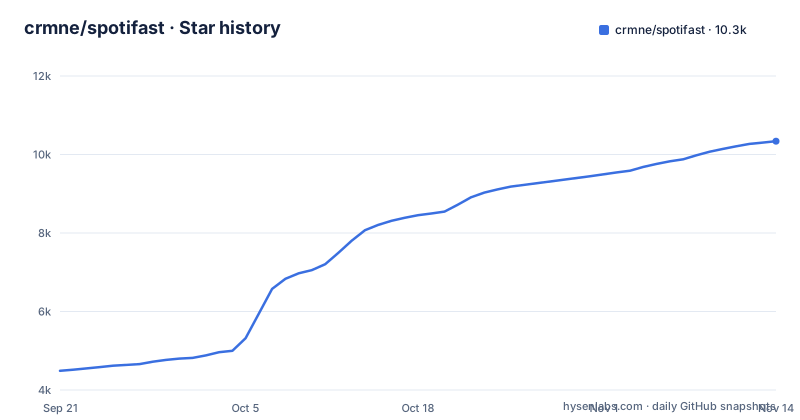
Star history
- crmne/spotifast10,339 ★ · +5,850
| Repository | 2026-09-21 | 2026-11-14 |
|---|---|---|
| crmne/spotifast | 4.5k | 10.3k |
5,850 Stars in the last 54 days, measured from the daily GitHub snapshot. Compare with other projects
Editorial analysis
Spotify Premium gates both playback and the registration step
Spotifast states the restriction up front: playback needs Spotify Premium. A Free account can browse and search the catalogue in Spotifast, but cannot play music through it. The restriction appears a second time during setup. To sign in, you register Spotifast with Spotify in the Spotify developer dashboard, and Spotify requires Premium on the account that does that registration. So a Free user cannot even complete the first setup step alone; someone with Premium has to create the registration. For a household where only one person pays for Premium, that means the paying account does the developer setup. The consequence for anyone evaluating Spotifast as a way around the official app's limits is simple: it is not one. It is a different front end for a paid Spotify account, and it uses Spotify's own sign-in and Connect machinery rather than replacing them.
You bring your own Client ID from the Spotify developer dashboard
First playback takes four steps. In the Spotify developer dashboard you click Create app, which is Spotify's name for this registration, set the redirect URI and tick Web API. The redirect URI must be exactly http://127.0.0.1:8989/login. The registration takes about two minutes and yields a Client ID. You paste that Client ID into Spotifast and choose Sign in with Spotify, then approve access in your browser and return to the app to see your library. To listen on the computer itself, you open the device menu in the bottom player bar and choose Set up playback here, which is also in Settings, and complete a second, separate playback approval in the browser. After that the computer appears as a Spotify Connect device named Spotifast. Library access and local playback are separate approvals, and Spotifast stores both in the operating system's protected storage. The Cargo.toml comment on the keyring-core dependency makes the rule explicit: durable Spotify grants must not be copied into ordinary state JSON.
Soloist or the built-in librespot player, chosen once and remembered
Spotifast plays audio through one of two engines. Since 0.15, setup leads with Spotify Soloist, with guided key setup, one-time pairing and automatic renewal of expiring builds. New listeners and people updating see the choice once after sign-in on supported platforms, and the choice is remembered. The other option, Use the built-in player, keeps librespot along with Spotifast's EQ, visualizers, local files and full queue editing. When Soloist is enabled it appears as This computer, and settings show the controls that apply to it; turning Soloist off restores the built-in player's preferences. While Soloist starts and its account is verified, the loading screen shows Verifying Soloist and holds playback commands until it is ready. If Soloist stops later, a banner says so while Spotifast restarts it, with a Try again button if the restart fails. Settings, then Spotify Soloist, then Spotify access connects a separate Spotify session for Made for you, listening activity and Spotify lyrics without changing players.
EQ and visualizers under Soloist depend on your operating system
The audio extras do not behave the same everywhere once Soloist is the player. On Linux with PipeWire, Soloist supports Spotifast's EQ and visualizers through a private audio route. Native audio support adds EQ and visualizers on macOS 14.2 or newer, and visualizers, including MilkDrop, on Windows 11. Windows Soloist playback does not support audible EQ, so a Windows user who cares about EQ has to stay on the built-in librespot player. Older macOS versions below 14.2 do not get the native route. Volume also works differently. On a Mac, Spotifast keeps Soloist at full volume after redirecting its output and applies its own volume after the visualizers, including mute. Volume changes from your phone adjust that output level, while Spotify's own indicator returns to 100%, so the number shown in the Spotify app no longer reflects what you hear. On Windows, visuals keep their level as Soloist's volume falls and stop only when it is muted.
egui with the glow backend and no browser engine
Spotifast is written in Rust and draws its interface with egui through eframe, and it has no browser engine. The Cargo.toml explains the backend choice: glow keeps the binary and the dependency tree small, and wgpu is not needed for a 2D music client. The eframe features include accesskit, which connects egui's control names, states and actions to native screen readers, plus wayland and x11 for Linux desktops. The app is also built on fastframe, a shared foundation for a family of native apps by the same author: Spotifast, ZapFast, RekordFlash and TonePush. Every fastframe crate is pinned to the same git tag, v0.15.4, with a comment saying they must move together. For anyone building from source, the manifest sets edition 2024 and rust-version 1.98, and a rust-toolchain.toml file sits at the root, so an older Rust toolchain will not do. The crate exposes a library at src/lib.rs and the spotifast binary at src/spotifast.rs, and the examples directory holds probes such as cast_probe, connect_probe and discovery_probe.
Package routes differ by platform
On macOS, Spotifast installs from the author's Homebrew tap, or as a downloaded Mac app from spotifast.rocks:
brew install --cask crmne/tap/spotifastArch Linux users get a binary package from the AUR:
yay -S spotifast-binWindows users choose a build on the download page at spotifast.rocks, and other Linux distributions find Flatpak, AppImage, Nix and other options on the same page. Building from source follows the Build from source section of the Getting started guide, which lists the dependencies and commands. The repository root carries flake.nix and flake.lock, a packaging/ directory, PACKAGING.md and native-packages.yaml, which reflects how many formats the project ships. The practical point is that the macOS cask comes from the crmne/tap tap rather than a default Homebrew source, so the tap has to be trusted alongside the app.
Local files, lyrics, Cast and a Winamp mini player
Beyond streaming, Spotifast plays the local files your playlists list from a folder you choose in Settings, at any sample rate, and shows names with spaces and accents correctly, including in cached playlists. Local files are a built-in player feature, so choosing Soloist gives that up. Lyrics come from Spotify when the playback session is signed in, with LRCLIB as fallback; temporary LRCLIB overloads retry and fall back to search, and older cached lyrics stay available during outages. Spotify Connect lets you play on the computer or control other devices, including Google Cast speakers and groups, with frequently and recently chosen outputs rising to the top. Play next, which puts a song or selection first in the queue, works only when playing on this computer. The Winamp mini player uses classic skins with an equalizer, playlist and animated displays, and MilkDrop shows music-reactive visuals in a window or full screen, subject to the platform rules above. Themes cover light, dark, system and custom colours, and on Omarchy Spotifast follows the desktop theme.
Three minor releases in four days
Spotifast is under active development. The last push to main was on 2026-11-02, and the release list shows v0.15.0 on 2026-10-31, v0.16.0 on 2026-11-01 and v0.17.0 on 2026-11-03. The Cargo.toml on main already reads 0.17.1. That pace has a cost for users: the setup flow itself changed in 0.15, when Soloist became the leading option, and people updating were shown the player choice again. On a 0.x project moving this quickly, expect screens and defaults to shift between updates, and read the release notes before updating if you depend on a specific behaviour such as EQ under one player. The license is MIT, so forks and redistribution are permitted with the license notice kept.
Editorial conclusion
Spotifast is a good fit for a Spotify Premium listener on Linux, macOS or Windows who wants a native client without a browser engine, local file playback, a Winamp-style mini player and MilkDrop visuals, and who does not mind creating a Spotify developer app to get a Client ID. It is not for Free account holders, who can browse but not play, and Windows users who choose Soloist should not expect audible EQ. Before installing, confirm the account that will register the app has Premium, decide between Soloist and the built-in librespot player, and expect behaviour to change between the frequent 0.x releases.
Frequently asked questions
What is Spotifast?
Spotifast is a native Spotify client for Linux, macOS and Windows, written in Rust with egui and fastframe and released under the MIT license. It has no browser engine.
What does Spotifast do?
Spotifast browses your Spotify library, plays through Spotify Soloist or the built-in librespot player, controls Spotify Connect and Google Cast devices, and plays local files listed in your playlists. It also has lyrics, a Winamp mini player and MilkDrop visuals.
Spotifast vs Spotify: do I still need a Spotify account?
Yes. Spotifast is a client for your Spotify account, and playback needs Spotify Premium. Free accounts can browse and search but cannot play music through Spotifast.
Official sources
Add this badge to your README
If you maintain this project, the badge below links readers to this analysis and shows its maintenance status from the daily GitHub snapshot. Paste the markdown into your README; add ?metric=license or ?metric=stars to the image URL for a different field.

[](https://hysenlabs.com/projects/crmne-spotifast)Star history chart for your README
[](https://hysenlabs.com/projects/crmne-spotifast)Was this useful?