rqbit: a Rust BitTorrent server with Web UI and streaming
A bittorrent client in Rust
At a glance
- What is it?
- rqbit is a Rust BitTorrent client available as a CLI server, library, Web UI, and Tauri desktop application. It fits sequential downloading, HTTP-based control, LAN discovery, and piece-aware streaming, while its custom licence and sequential-only design require review before adoption.
- Who is it for?
- Adopt rqbit when sequential downloading, API access, and HTTP streaming fit your workflow. Do not assume it is suitable for arbitrary multi-file piece scheduling or redistribution until you inspect its custom LICENSE and confirm that its piece prioritization meets the media source's needs.
- Can I use it commercially?
- Check first. The repository uses a licence we do not classify automatically, so read its LICENSE file before any commercial use.
- Is it still maintained?
- Yes. The repository last received commits 14 days ago.
- What is it written in?
- Mainly Rust, according to GitHub's language statistics.
Answers come from the project's GitHub data, last synced on October 23, 2026, and from our analysis. They are not legal advice.
Star history
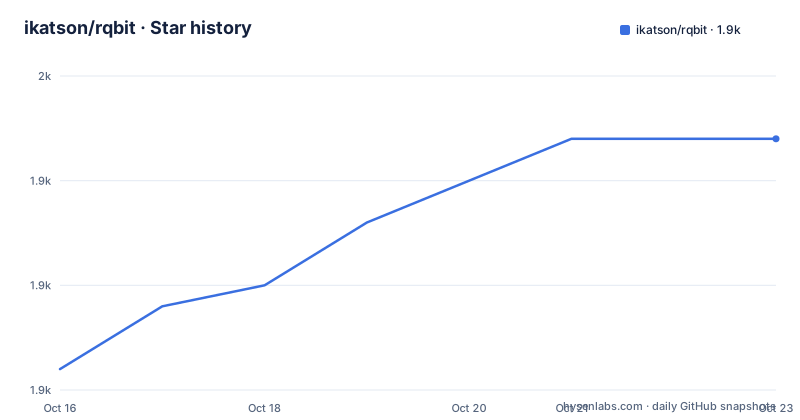
- ikatson/rqbit1,947 ★ · +11
| Repository | 2026-10-16 | 2026-10-23 |
|---|---|---|
| ikatson/rqbit | 1.9k | 1.9k |
11 Stars in the last 7 days, measured from the daily GitHub snapshot. Compare with other projects
Editorial analysis
Why rqbit targets server-style BitTorrent workflows
rqbit solves the problem of running BitTorrent transfers as a persistent service while retaining conventional ways to add content and monitor it. The README presents three delivery forms: a command-line client and server, a Web UI served over HTTP, and a desktop application built with Tauri. The `librqbit` crate also exposes the implementation as a library. This makes the project relevant to people who want a self-hosted download service, Rust developers who need to embed torrent handling, or LAN users who prefer a browser interface.
The default model is sequential downloading. The README explicitly describes sequential downloading as both the default and the only option, so rqbit is not a client for configurable multi-file piece scheduling. Its documented selection mechanism is filename matching through `-r / --filename-re`, which can select files whose names match a regular expression. That is useful for torrents containing unwanted extras, but it is not the same as assigning custom piece priorities to several files.
The server can maintain state across runs, resume files already on disk, and expose pause, unpause, deletion, rate-control, and torrent-management operations through an HTTP API. Those capabilities suit administration from scripts or another application. They also broaden the deployment surface. The README documents binding the server to a LAN address and advertising it through mDNS, but it does not document authentication requirements, authorization roles, or a reverse-proxy guide. Treat the Web UI as an operational interface whose exposure must be accounted for when choosing a listen address.
How rqbit handles peers, trackers, and torrent data
Based on the Rust workspace layout, rqbit is not merely a front end around a separate BitTorrent engine. The command-line application is under `crates/rqbit`, the reusable implementation is under `crates/librqbit`, and supporting functionality is divided among crates such as `crates/bencode`, `crates/dht`, `crates/tracker_comms`, `crates/peer_binary_protocol`, `crates/upnp`, and `crates/upnp-serve`. Shared types are under `crates/librqbit_core`, while local service discovery is represented by `crates/librqbit_lsd`.
The documented BEP coverage includes the base BitTorrent protocol, DHT, peer exchange, private torrents, metadata exchange, local service discovery, UDP trackers, compact peer lists, IPv6 extensions, padding, and magnet URI file selection. DHT allows magnet links to discover peers, while peer exchange can make additional swarm members available. Sequential downloading still controls how torrent pieces are fetched, so torrent support and piece scheduling are separate concerns.
The project supports HTTP, UDP, and WebTorrent-style tracker behaviors through the listed BEPs, but the README does not provide a compatibility matrix mapping every BEP to a CLI switch. Protocol support is therefore better assessed at the level of the documented BEPs than inferred from feature names. The workspace separation does suggest that tracker communication, DHT, peer protocol handling, local discovery, and UPnP are implemented as distinct Rust components rather than bundled into a single opaque binary module.
Installing rqbit and adding the first torrent
The simplest documented installation paths are Homebrew and Cargo. Homebrew is appropriate for users who already manage system packages on macOS or another supported Homebrew environment. Cargo requires an installed Rust toolchain and compiles the package locally.
The README gives these installation commands:
brew install rqbitUse this when Homebrew is already part of the machine's package workflow. No setup output beyond a successful package installation is specified in the README.
For a Rust installation, use:
cargo install rqbitAfter either installation, open a persistent server with the intended download directory. The example assumes `~/Downloads`:
rqbit server start ~/DownloadsThis command should leave the server running. The README directs users to the Web UI at `http://localhost:3030/web/` for local management.
A torrent can also be added through the CLI without first describing how to start the server. Replace the example source below with a real magnet URI, HTTP torrent URL, or local `.torrent` path:
rqbit download [-o ~/Downloads] 'magnet:?....' [https?://url/to/.torrent] [/path/to/local/file.torrent]The brackets describe accepted torrent sources, while the literal `magnet:?....` shows the expected shape rather than a usable download. The `-o ~/Downloads` option selects the output directory. According to the README, downloads go to the current directory by default, so omitting `-o` can place content somewhere other than the user expects.
For shell completion in Bash, add the documented command to `~/.bashrc`:
eval "$(rqbit completions bash)"Reload Bash after editing `~/.bashrc`. The command asks rqbit to generate Bash completions and evaluates them in the current shell environment.
Web UI, Tauri desktop app, and local service exposure
A running server exposes the Web UI at `http://localhost:3030/web/`. This is the main graphical interface for managing torrents without a native client. The desktop application is described as a thin Tauri wrapper over the Web UI frontend. That design limits duplicated interface logic, but it also means the desktop app is closely tied to the frontend rather than offering a separate native control model.
Prebuilt desktop binaries are available from Releases for macOS and Windows. Linux desktop builds are made manually with the following command:
cargo tauri buildThis is a source build rather than a package-manager installation. The README states that the `webui` feature requires npm, so a source builder also needs the JavaScript package tooling required by the workspace. The repository `package.json` identifies separate desktop and Web UI workspaces and defines Prettier tasks, but it does not provide a complete Linux packaging guide.
For LAN discovery, rqbit can advertise its HTTP API through mDNS/DNS-SD. The documented command enables mDNS and binds the API to all IPv4 interfaces:
rqbit --enable-mdns --http-api-listen-addr 0.0.0.0:3030 server start ...After the required non-loopback listener is configured, the README gives `http://rqbit.local:3030/web/` as the browser address. That improves hostname discovery but does not replace access controls. The README does not specify whether the HTTP API includes authentication, so the absence of documentation should not be interpreted as either authenticated or unauthenticated access.
Streaming behavior and UPnP Media Server constraints
rqbit can serve torrent files before the complete torrent has downloaded. According to the documentation, it blocks the stream until the required pieces are available and prioritizes pieces being streamed. HTTP range requests allow seeking, including playback through VLC or another compatible player. The documented stream path is:
http://IP:3030/torrents/<torrent_id>/stream/<file_id>This behavior is more specialized than ordinary sequential downloading. Instead of waiting for an entire file, rqbit uses knowledge of torrent pieces to decide when a requested media segment can be served. The limitation is that this is not a transcoding system. Source and player must therefore be compatible in codec, container, and other media requirements.
The optional UPnP Media Server advertises managed torrents to devices such as televisions. It supports seeking to arbitrary points in videos, but it also sends files without transcoding. That makes rqbit suitable for direct playback when the LAN device can handle the original media. It is the wrong tool for converting a format that the target television or media application cannot decode.
The CLI enables the server with:
rqbit --enable-upnp-server server start ...The feature is opt-in through this command. The repository also has UPnP-related workspace crates, including `crates/upnp` and `crates/upnp-serve`, but the README does not document firewall behavior, media metadata control, or device compatibility testing.
Watched folders, SOCKS proxies, and systemd operation
rqbit can watch a directory for `.torrent` files, which suits systems that create torrent metadata outside the client. The documented invocation places the watch option before the download path:
rqbit server start --watch-folder [path] /download/pathReplace `[path]` with the directory to monitor and `/download/path` with the intended destination. This avoids manually submitting every newly created `.torrent` file, although the README does not document filename collision handling or what happens when the watched file changes.
SOCKS support provides two DNS-resolution modes:
rqbit --socks-url socks5h://[username:password]@host:port ...The README states that `socks5h://` sends DNS resolution through the proxy, while `socks://` resolves DNS locally. That distinction matters when the local resolver cannot reach tracker or peer hostnames. The example includes optional credentials, but it does not document credential storage or whether the URL can be supplied through configuration.
Systemd socket activation provides on-demand startup. The README says to install the service and socket units into `$XDG_CONFIG_HOME/systemd/user/`, shown as `~/.config/systemd/user/`. If `rqbit.conf` is installed at `$XDG_CONFIG_HOME/rqbit/rqbit.conf`, shown as `~/.config/rqbit/rqbit.conf`, rqbit reads it during socket-activated startup. The repository contains the corresponding `systemd` directory and `rqbit.conf`, but customization and activation commands are not included in the quoted README.
Sequential-only behavior, upgrades, and the custom licence
The main functional limitation is that sequential downloading is the only documented order. For a single large file or media intended for sequential playback, this simplifies operation. For a multi-file torrent containing several independent assets, there is no documented interface for arbitrary piece priorities. Filename regular expressions can select content, but they do not create a per-file scheduling system. A workflow that needs to jump between distant parts of multiple incomplete files should verify the sequential behavior against its actual access pattern.
The repository is not archived, and the last push was on 2026-10-09. Recent releases include `v9.0.1` on 2026-08-20 and `v9.0.0` on 2026-08-15. The workspace package version is also `9.0.1`. This confirms recent repository and release activity, but the README does not publish upgrade procedures for persisted sessions, configuration changes, API compatibility, or library consumers. Operators using systemd, watched folders, or the HTTP API should distinguish an ordinary binary update from changes in integration behavior.
The repository declares a custom licence that GitHub cannot classify, with its governing text in `LICENSE`. The actual terms are not present in the available documentation, so this review cannot determine whether modification, redistribution, commercial use, or embedding `librqbit` carries particular conditions. That is a concrete adoption constraint. Review `LICENSE` before distributing binaries, publishing changes, or integrating the library into another product.
Editorial conclusion
Adopt rqbit when sequential downloading, API access, and HTTP streaming fit your workflow. Do not assume it is suitable for arbitrary multi-file piece scheduling or redistribution until you inspect its custom LICENSE and confirm that its piece prioritization meets the media source's needs. Check the licence permissions first, then verify download-path and overwrite behavior, followed by range-request playback in your target player.
Frequently asked questions
How do I install rqbit?
The README documents Homebrew with `brew install rqbit` and Cargo with `cargo install rqbit`. It also links to prebuilt binaries on the repository's Releases page.
Does rqbit have a Web UI and HTTP API?
Yes. A running server provides the Web UI at `http://localhost:3030/web/` and exposes torrent-management operations through an HTTP API.
Can rqbit stream a torrent before the download finishes?
The documentation states that streamed pieces are prioritized and that rqbit blocks the stream until required pieces are available. It supports seeking and range headers, but it does not transcode the media.
Official sources
Add this badge to your README
If you maintain this project, the badge below links readers to this analysis and shows its maintenance status from the daily GitHub snapshot. Paste the markdown into your README; add ?metric=license or ?metric=stars to the image URL for a different field.

[](https://hysenlabs.com/projects/ikatson-rqbit)Star history chart for your README
[](https://hysenlabs.com/projects/ikatson-rqbit)Was this useful?