Nowen Video: A Go and SQLite Media Server That Puts Transcoding and Scraping in One Container
A lightweight home media server built with Go + React + SQLite. Automatic TMDb/Douban scraping, HLS transcoding with hardware acceleration, episode recognition, one-click Docker deployment, an Emby/Jellyfin-like alternative.
At a glance
- What is it?
- Nowen Video is a lightweight, self-hosted media server for NAS users who want Emby or Jellyfin functionality without the heavyweight stack. It combines Go, React, SQLite, and FFmpeg, with automatic metadata scraping, HLS transcoding, and hardware acceleration, all wrapped in a single Docker image.
- Who is it for?
- Adopt Nowen Video if you run a NAS or home server, want a single-container media platform with automatic scraping and on-demand HLS transcoding, and prefer SQLite over a separate database service. Avoid it if you need multi-user isolation beyond basic admin rights, require mature AI features, or depend on a large community ecosystem for plugins.
- Can I use it commercially?
- Yes, with conditions. GPL-3.0 is a copyleft licence: if you distribute software that includes it, you must release that software's source code under the same licence. Running it internally without distributing it does not trigger that obligation.
- Is it still maintained?
- Yes. The repository last received commits 37 days ago.
- What is it written in?
- Mainly Go, according to GitHub's language statistics.
Answers come from the project's GitHub data, last synced on October 22, 2026, and from our analysis. They are not legal advice.
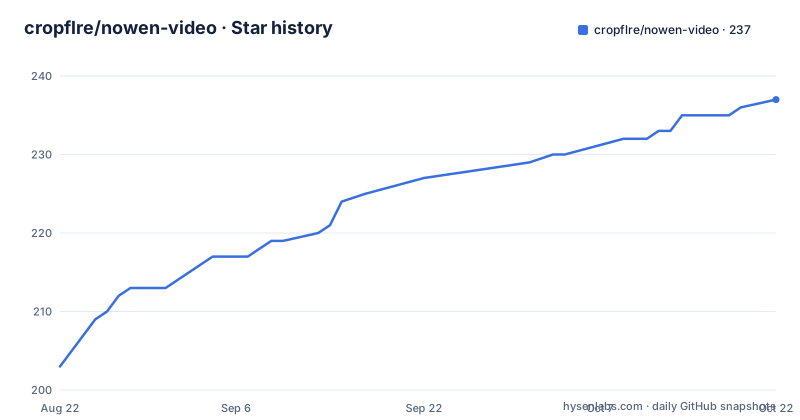
Star history
- cropflre/nowen-video237 ★ · +34
| Repository | 2026-08-22 | 2026-10-22 |
|---|---|---|
| cropflre/nowen-video | 203 | 237 |
34 Stars in the last 61 days, measured from the daily GitHub snapshot. Compare with other projects
Editorial analysis
What Nowen Video Solves for NAS Owners
Nowen Video targets a specific pain: running a home media server on a NAS or small server without the overhead of a full application stack. The README describes it as a lightweight family media platform built with Go, React, SQLite, and FFmpeg. The core problem is that existing solutions like Jellyfin or Emby often require significant resources, separate database services, or complex configuration. Nowen Video condenses the entire pipeline into a single Docker container with two persistent volumes: /data for the SQLite database and /cache for transcoding artifacts. The intended user is someone who already has a NAS, understands Docker, and wants a clean web interface for browsing and playing a personal movie and TV collection. It is not aimed at large multi-user deployments or public streaming; the language around family and personal space makes that clear. The project explicitly mentions NAS and self-hosting in the first line, so the scope is narrow and honest.
The Playback Pipeline: Direct Play, Remux, or On-Demand HLS
The most interesting mechanism is the server-side playback planner. According to the README, the server evaluates the client's capabilities and the media file's codecs, then chooses one of three paths: direct play, remux, or on-demand HLS transcoding. Direct play sends the original file when the client can handle it. Remux likely repackages the stream without re-encoding, which is useful for containers that the client does not support. HLS transcoding is used as a fallback, breaking the video into segments for adaptive streaming. The README also mentions automatic degradation: if playback fails, the system falls back to a lower-capability path without manual intervention. This is a practical design because it avoids transcoding everything upfront. The Docker image ships with FFmpeg 8.1.2, and hardware acceleration is supported through /dev/dri for Intel and AMD GPUs, with software transcoding as a backup. The transcoding tasks have persistent execution state, caching, verification, and cleanup mechanisms, which suggests the developers have thought about long-running NAS workloads where a crash mid-transcode should not leave stale files.
Metadata Scraping and Episode Recognition
Metadata comes from multiple sources: TMDb, Douban, TheTVDB, Bangumi, and Fanart.tv. The README lists these as configurable sources, and the config directory includes a secrets.yaml file where API keys go. The system uses FFprobe to extract technical details like codecs and duration, then matches filenames against common movie and TV episode naming patterns. The README claims automatic recognition of common movie, series, and season structures. This is a critical feature because misnamed files are the number one reason media servers fail. The scraping pipeline also supports NFO files, external subtitles, and file watching via fsnotify, so changes in the media folder are picked up without manual rescanning. The project also includes a two-phase highlight analysis for movie clips, which is described as sparse and on-demand, meaning it does not process every file by default. This is a sensible trade-off for a lightweight server: you get highlights without paying the cost of full analysis on every title.
Deployment: Docker, Compose, and Source Build
The README gives a straightforward Docker command. You map port 8080, set PUID and PGID for file permissions, mount /data and /cache, and mount your media folder read-only. The example includes TZ=Asia/Shanghai, though that is just a default. For hardware acceleration, you add --device /dev/dri:/dev/dri. The first registered user becomes an administrator, which is a simple bootstrap model. JWT secret handling is worth noting: if you do not set NOWEN_SECRETS_JWT_SECRET, the server generates a random key on first boot and persists it in the data directory. That means your tokens survive restarts as long as /data is persistent, but if you recreate the container and lose /data, all sessions invalidate. The compose file mirrors the Docker run command, and the source build requires Go 1.25, Node.js 20+, and FFmpeg. The build uses make dev for development and make build for production, producing a binary at ./bin/nowen-video. The configuration loads in a specific order: built-in defaults, config.yaml, config/*.yaml, then NOWEN_* environment variables. This layered approach is familiar to anyone who has used Viper in Go, which the tech stack confirms.
Clients: Web, Desktop, and Android
The web frontend is the primary interface, built with React 18 and TypeScript. The desktop client uses Tauri 2.0 with libmpv, which is a significant advantage over pure web players. The README lists MKV, HEVC, AV1, HDR, Dolby Vision, DTS, TrueHD, and Atmos as formats that the desktop client can handle locally, whereas a browser would struggle. The desktop app supports both a Web video element and native mpv as playback engines, giving users a choice. The Android client is written in Kotlin with Jetpack Compose and Media3, targeting API 26 and up. It uses WorkManager for background tasks and Android Keystore for security. The project has moved away from older V1 and V2 Android versions, and the README warns that signature changes may require uninstalling old versions before installing the new one. There is also a fnOS package (.fpk) for FeiNiu NAS, which shows the project is actively targeting specific NAS hardware. This multi-client approach is a real strength, but it also means more code to maintain, and the desktop client depends on mpv being available on the host.
Limitations and Failure Modes
The most obvious limitation is the single-admin bootstrap model. The first user to register becomes an administrator, and there is no mention of a setup wizard or initial credential configuration. That works for a single-family NAS, but it is a security concern if the server is exposed to the internet before the first user registers. The README also states that AI capabilities are optional and not enabled by default, so if you rely on AI features, you must configure providers in the ai.yaml file. Another limitation is the dependency on external metadata sources. TMDb, Douban, and others require API keys, and if those services are unreachable or rate-limit you, scraping will fail. The README does not describe a fallback for metadata failures beyond NFO files, which means a user with a large library and no NFO files could end up with missing posters and descriptions. The highlight analysis is explicitly described as evolving, so it may not work consistently across all media types. Finally, the GPL-3.0 license is a constraint: if you embed or modify the server, you must share your changes under the same license. That is fine for personal use but a blocker for commercial products.
Alternatives and How They Differ
Jellyfin is the most direct alternative. Jellyfin is also open source, self-hosted, and supports hardware transcoding, but it is built on .NET and uses a separate database (SQLite, but with a heavier ORM layer). Jellyfin has a much larger plugin ecosystem and client support, but it is also heavier on resources. Nowen Video differentiates itself by being Go-based, which gives a smaller memory footprint and a single static binary. The SQLite WAL mode in Nowen Video is a deliberate choice for simplicity, whereas Jellyfin also uses SQLite but with more complex migrations. Another difference is the metadata source: Jellyfin primarily uses TMDb and TheTVDB, while Nowen Video adds Douban and Bangumi, which is a real advantage for Chinese and anime libraries. The desktop client with libmpv is another differentiator; Jellyfin's desktop client is a web wrapper, not a native player. The trade-off is that Nowen Video has a smaller community and fewer third-party integrations. If you need plugins for live TV, music, or book management, Jellyfin is the safer bet. If you want a lean, single-purpose video server with strong Chinese metadata support, Nowen Video is worth a trial.
Maintenance, Upgrade, and License Implications
The project is actively maintained, with releases every few days in August 2026 (v1.3.2, v1.3.3, v1.3.4). The README describes a release pipeline that validates server CI, client builds, Docker manifests, and release assets, which suggests a disciplined process. Upgrades are handled through Docker image tags; you pull a new version and restart the container. The /data and /cache volumes are designed to persist across upgrades, but you should check the release notes for any database migrations. The README mentions that the Lite/Full product distinction has been retired, and only the current server is supported. That reduces confusion but means older configuration files may not work. The license is GPL-3.0, which means any derivative work must be open source under the same license. For a home user, this has no practical impact, but for a company considering embedding this in a proprietary product, it is a deal-breaker. The project also uses third-party services like TMDb and Douban, so you must comply with their API terms, which is a legal consideration beyond the code license. The README explicitly warns not to commit API keys or JWT secrets to Git, so you should use environment variables or the secrets.yaml file with proper file permissions.
Editorial conclusion
Adopt Nowen Video if you run a NAS or home server, want a single-container media platform with automatic scraping and on-demand HLS transcoding, and prefer SQLite over a separate database service. Avoid it if you need multi-user isolation beyond basic admin rights, require mature AI features, or depend on a large community ecosystem for plugins. Before adopting, verify that your media naming conventions match the automatic recognition patterns, confirm your hardware acceleration path (/dev/dri) works with your CPU, and test the JWT secret persistence on first boot. The project is actively maintained with regular releases, but its GPL-3.0 license and evolving feature set mean you should review the source for your specific deployment.
Frequently asked questions
What is Nowen Video and what is it built from?
It is a home media platform for NAS, home server and self-hosted use, described as built on Go, React, SQLite and FFmpeg. The readme lists the server side as Go 1.25 with Gin, GORM, SQLite in write ahead logging mode, Zap, Viper, a websocket library and a file watcher, with FFmpeg 8.1.2 in the official image.
How does Nowen Video decide how to play a file?
A server side playback planner looks at the client and the media, then chooses direct playback, remuxing, or on demand HLS transcoding. When a request fails it offers an automatic degradation path, and hardware acceleration is used where a device node is passed through, with software transcoding as the fallback.
Which metadata sources does Nowen Video scrape?
Five are named: TMDb, Douban, TheTVDB, Bangumi and Fanart.tv. The server also reads NFO files, scans external subtitles, watches the filesystem for changes, and recognises common movie, series and season naming structures on its own.
Do I need to run the administrator account setup on Nowen Video?
There is no setup step. The first user to register automatically becomes the administrator, passwords are stored with bcrypt, and sessions use JSON web tokens. If the token signing secret is not set, the server generates one on first start and persists it in the data directory.
How is Nowen Video configured?
In four layers, with later layers overriding earlier ones: built in defaults, a top level config file, any files in a config directory, and environment variables prefixed with the project name. Named variables cover the port, data directory, SQLite path, cache directory, log level and the optional token secret.
Why does the Nowen Video compose file run as root with privileged mode?
The comments in the file explain it: several NAS platforms mount directories with identifiers other than 1000, so running as root avoids permission denied errors. The compose file also adds capabilities for remote filesystem mounting, disables the application armour and seccomp profiles, and passes the FUSE device, while the readme's quick start command does none of that.
Official sources
Add this badge to your README
If you maintain this project, the badge below links readers to this analysis and shows its maintenance status from the daily GitHub snapshot. Paste the markdown into your README; add ?metric=license or ?metric=stars to the image URL for a different field.

[](https://hysenlabs.com/projects/cropflre-nowen-video)Star history chart for your README
[](https://hysenlabs.com/projects/cropflre-nowen-video)