cucumber-ruby-core: the engine under the Ruby flavour, and what it costs to use directly
Core library for the Ruby flavour of Cucumber
At a glance
- What is it?
- cucumber-ruby-core is the inner hexagon of the Ruby Cucumber implementation: a Ruby API for executing Gherkin features without any UI. It is a library for tool builders, not for test authors, and its direct use comes with real trade-offs.
- Who is it for?
- Adopt cucumber-ruby-core if you are building a custom tool that must parse and execute Gherkin documents with fine-grained control over each test case and step, and you are comfortable working with a Ruby API instead of a CLI. Do not adopt it if you just want to run features: the full cucumber gem gives you step definitions, hooks, reports, and a command line, all of which this core deliberately omits.
- Can I use it commercially?
- Yes. MIT is a permissive licence: you can use, modify and sell software built on it, as long as you keep its copyright and licence notices.
- Is it still maintained?
- Yes. The repository last received commits 1 day ago.
- What is it written in?
- Mainly Ruby, according to GitHub's language statistics.
Answers come from the project's GitHub data, last synced on November 13, 2026, and from our analysis. They are not legal advice.
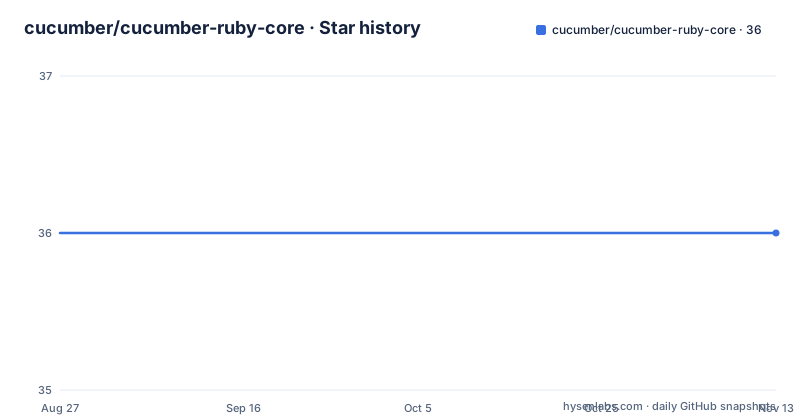
Star history
- cucumber/cucumber-ruby-core36 ★ · +0
| Repository | 2026-08-27 | 2026-11-13 |
|---|---|---|
| cucumber/cucumber-ruby-core | 36 | 36 |
0 Stars in the last 78 days, measured from the daily GitHub snapshot. Compare with other projects
Editorial analysis
What the core is for, and who should touch it
Cucumber is a tool for running automated tests written in plain language, so that non-programmers can read and trust them. The Ruby flavour of Cucumber is split into pieces, and cucumber-ruby-core is the inner hexagon: the domain logic that actually executes features. It has no user interface, only a Ruby API. The README is explicit about the audience: people who want to understand how Cucumber works, or who want to build other tools that work with Gherkin documents. That is a narrow audience. Test authors who write .feature files and step definitions never need to require this gem directly; they use the cucumber gem, which wraps this core. The core is for library developers, plugin authors, and anyone curious enough to trace how a scenario becomes a sequence of executed steps.
The filter pipeline: how execution is shaped
The architecture is built around a filter mechanism. In the README example, you define a class that inherits from Cucumber::Core::Filter.new. That class implements a test_case method, which receives a test case object. Inside that method you can transform the test case: the example maps over the test steps, attaches an action to each one via with_action, and then describes the modified test case to a receiver. The receiver is what actually runs the steps and collects results. This is a pipeline: a test case flows through filters, each of which can change steps or add actions, and finally reaches the receiver. The design means you can insert custom behaviour at a precise point, like printing a prefix before each step runs. It is a clean, functional style, but it is also an abstraction you must learn before you can do anything useful.
Getting it running: install and the minimal example
Installation is standard for a Ruby gem. Add gem 'cucumber-core' to your Gemfile and run bundle, or install directly with gem install cucumber-core. The README gives a complete script. You require 'cucumber/core' and 'cucumber/core/filter'. You define a filter class, create a Gherkin document by passing the current file and a Gherkin string to Cucumber::Core::Gherkin::Document.new. Then you define a class that includes Cucumber::Core, instantiate it, and call execute with an array containing the feature document. The expected output is three lines, each with the step text and a check mark, prefixed by the action you attached. The example is self-contained: it does not need a step definition file or a CLI. That is the point. You are driving execution from Ruby code alone.
What the core does not give you
The core has no user interface, and the README says so directly. That means no command-line runner, no step definition matching, no hooks, no reporting formats. In the example, the filter attaches an action that only prints text; the actual step definitions, the glue that maps Given some requirements to a Ruby method, live in the outer cucumber gem. If you try to use cucumber-ruby-core alone to run a real project, you will have to build the step-matching logic yourself. That is a significant limitation. The core is an execution engine for test cases that already have actions attached. For a normal test suite, you want the full cucumber gem, which wires the core to Gherkin parsing, step definitions, and output. The core is the wrong tool for anyone who just wants to run tests.
The alternative: the full cucumber gem, and what changes
The obvious alternative is cucumber, the complete Ruby implementation that depends on this core. The difference is not just more features; it is a different level of abstraction. With the full gem you write step definitions in Ruby files, use a CLI with options for tags, formats, and profiles, and get reports in JSON, JUnit, or HTML. With the core you write Ruby code that constructs a filter pipeline and manually attaches actions to steps. The full gem hides the pipeline inside its own runner. The core exposes the pipeline so you can modify it. If your goal is to build a custom tool that consumes Gherkin and executes scenarios in a non-standard way, the core gives you the hooks. If your goal is to test an application, the full gem is the intended path. The README points to the cucumber-ruby repository for supported platforms, which is a reminder that the core alone is not a complete product.
Maintenance and upgrade cost
The repository shows a fast release cadence: v17.0.0 in June 2026, v18.0.0 in July 2026, and v19.0.0 in August 2026. Three major versions in three months. That is a signal that the API is not stable, and major version bumps may introduce breaking changes. The README does not document a migration path between versions. If you depend on cucumber-ruby-core directly, you should pin the version and read the CHANGELOG before upgrading. The project is under the MIT license, which is permissive for commercial use, but the copyright is held by Cucumber Ltd. and Contributors. The maintenance cost is real: you are tracking a moving API, and the project itself delegates platform support details to the larger cucumber-ruby repository, so you must check that repository for your Ruby version. None of this is a reason to avoid the core, but it is a reason to treat it as a dependency that requires attention.
A judgement on the core's place
The core is a well-scoped piece of software. It does exactly what it says: executes features with no UI. The filter pipeline is a genuine mechanism that gives you control, and the example shows a working path in under thirty lines. But the README is thin on details beyond that example. There is no documentation of the full API, no list of filter methods, no explanation of the receiver contract. You are expected to read docs/ARCHITECTURE.md. That is a gap. For a tool builder, the core is a reasonable foundation, but you will need to dig into the source or the architecture doc to go beyond the trivial case. For a test author, it is an unnecessary layer. The rapid major version releases mean you should not assume stability. This is a library for people who want to build on Cucumber, not for people who want to use Cucumber.
Editorial conclusion
Adopt cucumber-ruby-core if you are building a custom tool that must parse and execute Gherkin documents with fine-grained control over each test case and step, and you are comfortable working with a Ruby API instead of a CLI. Do not adopt it if you just want to run features: the full cucumber gem gives you step definitions, hooks, reports, and a command line, all of which this core deliberately omits. Before committing, verify that your Ruby platform is supported by checking the cucumber-ruby supported platforms list, and inspect the CHANGELOG for the v19.0.0 release, because the project moves through major versions quickly and the API may shift between releases.
Frequently asked questions
What is Cucumber in Ruby, and where does cucumber-core fit?
Cucumber is a tool for running automated tests written in plain language so that anyone on the team can read them. The Ruby side is split in layers, and cucumber-core is the inner hexagon: the core domain logic that executes features, with no user interface and only a Ruby API.
What is Cucumber Gherkin, and how does cucumber-core read it?
Gherkin is the plain language document format Cucumber executes, and the kind of document other tools are built to work with. In this library it is loaded through Cucumber::Core::Gherkin::Document, which takes the file the text came from plus the Gherkin body, as the usage example shows with a Feature containing a Scenario and Given, When, Then steps.
What is the purpose of a dry run in Cucumber, and is it in cucumber-core?
Not here. cucumber-core holds the core domain logic that executes features and has no user interface, so runner options are not its concern. The only command this repository shows is ruby cucumber_core_example.rb, which executes the feature it is handed.
What is the current version of Cucumber for the cucumber-core gem?
The most recent tagged release for this repository is v19.0.0, published on 19 August 2026. It came after v18.0.0 on 13 July 2026 and v17.0.0 on 1 June 2026.
Official sources
Add this badge to your README
If you maintain this project, the badge below links readers to this analysis and shows its maintenance status from the daily GitHub snapshot. Paste the markdown into your README; add ?metric=license or ?metric=stars to the image URL for a different field.

[](https://hysenlabs.com/projects/cucumber-cucumber-ruby-core)Star history chart for your README
[](https://hysenlabs.com/projects/cucumber-cucumber-ruby-core)Was this useful?