Toggl Track extension: the button in your toolbar is only the front of a per-service integration layer
Toggl Track browser extension for Chrome and Firefox
At a glance
- What is it?
- The Toggl Track browser extension puts a timer button into the web tools you already use, and the repository that hosts it is really the integration layer behind that button, one small piece of JavaScript per supported service. This looks at how the extension is packaged, how integrations are structured, and what the repository does and does not contain.
- Who is it for?
- This repository is worth a look for a team that wants a time-tracking button inside the services its staff already live in, because the extension ships integrations for a list of tools and the per-service code is small and readable. It is the wrong place to look for the timing data itself, since the entries live in the Toggl Track account, and it is the wrong place to look for a build system, since the package is private and the dev dependencies are formatting tools only.
- Can I use it commercially?
- Yes. Apache-2.0 is a permissive licence: you can use, modify and sell software built on it, as long as you keep its copyright and licence notices.
- Is it still maintained?
- Yes. The repository last received commits 9 days ago.
- What is it written in?
- Mainly JavaScript, according to GitHub's language statistics.
Answers come from the project's GitHub data, last synced on November 7, 2026, and from our analysis. They are not legal advice.
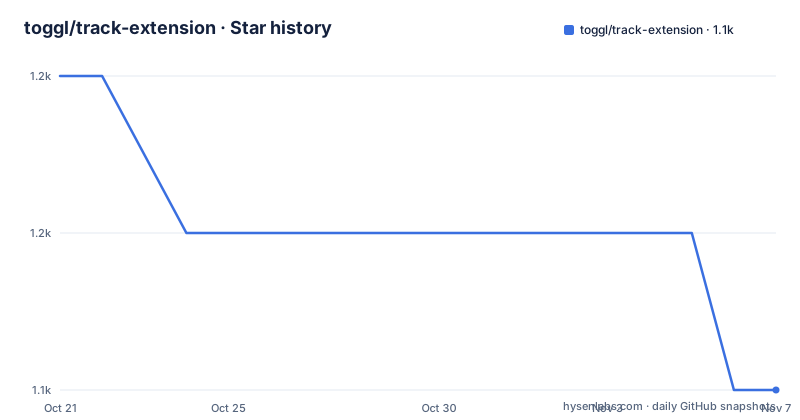
Star history
- toggl/track-extension1,149 ★ · -2
| Repository | 2026-10-21 | 2026-11-07 |
|---|---|---|
| toggl/track-extension | 1.2k | 1.1k |
-2 Stars in the last 17 days, measured from the daily GitHub snapshot. Compare with other projects
Editorial analysis
A repository named after integrations, with a renamed product behind it
The first thing the README says is that Toggl Button is now the Toggl Track browser extension, and that the project not only renamed the extension but made several changes to the codebase to build a better foundation for the future and make it easier to contribute new integrations. A blog post is given for the reasoning, but the mechanism of the change is visible in the repository itself: the package is named `@toggl/track-extension` and the homepage is a project page at toggl.github.io rather than a marketing site.
Then there is the scope statement, which is unusually clear about what this repository is. This is the repo for the browser extension's integrations. Not the extension as a whole, not the timer, but the layer that connects the extension to the individual web services. The one-line description in the package manifest says the same thing: Add Toggl Track one-click time tracking to popular web tools.
So the repository has two jobs in practice. It is the published extension that Chrome and Firefox users install, and it is the place where an integration for a new service gets written. The README's own table of contents reflects that, with sections for how to use the extension, for adding custom domains, for supported services, and then a section aimed at people who want to create new integrations and share them.
The project is JavaScript, licensed under Apache License 2.0, and the last push was on 2026-10-14. The releases show v2.0.82 on 2026-10-14, v2.0.81 on 2026-09-10 and v2.0.80 on 2026-08-28, so the extension ships on a frequent, patch-numbered cadence rather than in large feature releases.
What the user actually does: log in, enable integrations, start the timer
The usage section is short, and that is a useful signal about where the complexity is not.
The first step is to log in to the Toggl Track account from the extension popup. The second is to enable the services you want the extension to work with, under Settings > Integrations. The third is to navigate to your service and start the Toggl timer there, or to start an entry from the extension icon menu.
Editing a running entry is possible in two places, and the distinction is worth knowing. You can edit entry details from the post start popup that is shown right after you click the "Start timer" button, or from the extension icon menu by clicking the running time entry name. Stopping works the same way, by pressing the button again, by stopping the entry from the extension icon menu, or by starting another time entry inside your account.
That last option is the one with a consequence beyond the current screen. Starting another entry inside the account rather than stopping the current one implies the extension can hold a running timer while a different one begins, and the README does not explain how the extension resolves that, whether the previous entry is closed automatically, or whether the user is asked. It is the kind of behaviour a team adopting the extension for billing will want to pin down before it becomes a question on an invoice.
Nothing in the usage flow mentions capturing a description, tagging a project, or choosing a workspace at the moment of starting, even though the entry details popup is described as editable. The scope of what can be set before you start, and what has to be fixed afterwards, is not documented in the README.
The extension is distributed through the two stores, not from the repository
The installation instructions are two URLs, one per browser.
https://chrome.google.com/webstore/detail/toggl-button/oejgccbfbmkkpaidnkphaiaecficdnfn
https://addons.mozilla.org/en-US/firefox/addon/toggl-button-time-tracker/
The Chrome Web Store listing still carries the old name in its path, and the Firefox add-on listing does too, which is a small but useful detail for anyone who searched for the old name and found nothing, or who is looking at a store entry that looks older than the repository.
There is no install-from-source path in the README, and no build instruction for producing a loadable extension. That is consistent with the package manifest, which marks the package as private and lists only three dev dependencies, `@toggl/prettier`, `prettier` and `prettier-plugin-jsdoc`. There is no bundler, no test runner, no transpiler and no linter among them, which means the repository as published is not set up for a third party to build a custom build of the extension and load it into a browser. The extension goes to users through the stores, and a contribution goes through the project, not through a fork that people install themselves.
The `main` field points at `src/origins.js` and the `types` field at `src/index.d.ts`, and the repository root carries a `prettier.config.js` and a `yarn.lock`, with an `.editorconfig` alongside. The formatting tooling is shared through the `@toggl/prettier` package so that style stays consistent across the organisation's repositories, which is a small sign of a codebase maintained by more than one team.
The service list lives in docs, and the integration pattern is documented in two files
Two documents carry the substance for anyone working with this repository.
The first is docs/INTEGRATIONS.md, referenced from the Supported services section as the place to find the list of supported services. The README deliberately keeps the list out of itself, which means the set of services is versioned in a separate file and can change without the README changing.
The second is docs/CREATING_INTEGRATIONS.md, which the Contributing section points at as the guide for creating integrations. The README says it explains in detail how to create, debug, and test a new integration for the Toggl Track browser extension. Debug and test are the two verbs worth noting, because they imply the guide covers a development loop rather than just a data format, and that loop has to work for an extension that runs inside somebody else's web page.
The custom domains feature is the other half of how this layer works. The README explains that if a supported service you use is hosted on a custom domain, for example a company-hosted instance, you can define the custom domains in Settings > Integrations. That is a design decision with a consequence: the extension cannot rely on matching a fixed list of hostnames, so each integration has to carry a rule for where it applies, and the custom domain list is the user-facing escape hatch for the cases that rule does not cover.
The directory listing shows `src/`, `docs/`, `.github/`, and the two configuration files, and the source entry point is `src/origins.js`. The name matters. Origins are the thing a content script matches against, and the extension manifest point of an origins-based integration layer is that the permission set and the match patterns are the security boundary, not just a detail. The README does not document what permissions the extension requests, which is the first thing to check before installing it in a corporate browser profile.
The changelog and the manifest version have drifted apart
Two version numbers in this repository disagree, and the gap between them is small but instructive.
The published releases are v2.0.82 on 2026-10-14, v2.0.81 on 2026-09-10 and v2.0.80 on 2026-08-28, and the last push was on 2026-10-14, the same day as v2.0.82. The package manifest, however, says `"version": "2.0.73"`, which is older than the last three releases.
The likely explanation is the private flag. The manifest marks the package as `"private": true`, so it is never published to a registry, and the version field is not consumed by an installer. It is plausible that the version is bumped by the release process and not by the commit that adds an integration, or that the two live in separate places by convention. The README does not say, and there is no CONTRIBUTING file at the root to explain it, since the contributing guide lives at docs/CREATING_INTEGRATIONS.md instead.
This matters less for a user and more for a contributor. If you write an integration and the release process reads the manifest version, your change may not ship under the number you expect, and if the release process stamps the version elsewhere, the manifest drifts further. Either way, the answer is in the release pipeline rather than in the repository, and a contributor who wants to know should ask before merging anything that touches version numbers.
The changelog, by contrast, is handled openly. The README says a list of all the changes and added features can be found at the project page, http://toggl.github.io/track-extension, which is a published history rather than a CHANGELOG file in the repository. The root listing confirms there is no CHANGELOG.md here.
Where the Toggl Track extension is the wrong tool
The limits here are mostly the limits of a browser extension, and the README is honest about not covering them.
The first is the browser boundary. A button injected into a third-party web page depends on that page staying the same. When the service changes its markup, the integration stops matching, and the failure is silent, because the user simply sees no button rather than an error. The README's reference to a guide that covers debugging a new integration is telling: a contributor is expected to know how to work out why their script is not running, which means the failure mode is a normal part of maintaining this code rather than an exception.
The second is the extension's dependency on the browser and on the user's session. It asks for a Toggl Track account login in the popup, and it needs the page to be one the extension has been given access to. In a locked-down corporate browser, extension policies and the store allowlist decide whether this tool is available at all, and no repository change affects that.
The third is that this is not a time-tracking system. The entries are in the Toggl Track account, and the extension is a way of starting and stopping them. A team that wants its own data, its own storage and its own reports will not find that here, and pairing it with a script that reads the Toggl API is a separate project with its own authentication handling.
The fourth is the narrowness of the service list for a specific team. The supported services are whatever docs/INTEGRATIONS.md lists, and a company that runs its own tool on its own domain needs a custom domain entry, or needs someone to write the integration. The custom domain setting covers the first case, and the second case is a contribution. For a team whose people spend their day in one internal tool that is not on the list, that is the work this repository actually asks for.
Editorial conclusion
This repository is worth a look for a team that wants a time-tracking button inside the services its staff already live in, because the extension ships integrations for a list of tools and the per-service code is small and readable. It is the wrong place to look for the timing data itself, since the entries live in the Toggl Track account, and it is the wrong place to look for a build system, since the package is private and the dev dependencies are formatting tools only. Before contributing an integration, read docs/CREATING_INTEGRATIONS.md, follow the pattern already in src/origins.js, and note that the version in package.json has already fallen behind the published releases, so the release process is worth understanding before you start.
Frequently asked questions
Where do I install the Toggl Track browser extension?
From the Chrome Web Store or from the Firefox add-ons directory, with the two links given in the README. Both store listings still carry the old Toggl Button name in their URLs, and there is no install-from-source path described.
How do I start a Toggl timer from a web tool?
Log in to your Toggl Track account from the extension popup, enable the services you want under Settings > Integrations, then start the timer on the service page or from the extension icon menu. A running entry can be edited from the post start popup or by clicking the entry name in the icon menu.
Can I use the Toggl Track extension with a service hosted on my own domain?
Yes, the README says custom domains for supported services can be defined in Settings > Integrations, with the example given as a company-hosted instance such as https://yourcompany.github.com.
How do I add a new integration to the Toggl Track extension?
The contributing section points to docs/CREATING_INTEGRATIONS.md, which explains in detail how to create, debug and test a new integration. The list of services the extension already supports is kept separately in docs/INTEGRATIONS.md.
Is the Toggl Track extension open source?
Yes, it is released under the Apache License 2.0, and the repository is public. The npm package is marked private, so it is not distributed through a registry.
Official sources
Add this badge to your README
If you maintain this project, the badge below links readers to this analysis and shows its maintenance status from the daily GitHub snapshot. Paste the markdown into your README; add ?metric=license or ?metric=stars to the image URL for a different field.

[](https://hysenlabs.com/projects/toggl-track-extension)Star history chart for your README
[](https://hysenlabs.com/projects/toggl-track-extension)Was this useful?