Stepperize v8 makes next() awaitable and can refuse it
The type-safe way to build multi-step experiences in React.
At a glance
- What is it?
- Stepperize is a TypeScript toolkit for multi-step React flows, MIT licensed and published as @stepperize/react over @stepperize/core. In the v8 branch the navigation methods return a result telling you whether the step was accepted, and the UI is entirely yours.
- Who is it for?
- Stepperize suits a team building a wizard, onboarding flow or multi-part form in React or React Native that wants typed step definitions and no imposed markup, and that is on React 18 or 19. It is the wrong choice if you need the library itself to be the versioned thing, because the README documents installing 8.0.0 while the latest published React release shown is 7.0.0 from 2026-06-05, so v8 is still a branch.
- Can I use it commercially?
- Not without permission. GitHub finds no licence file in the repository, and without a licence all rights are reserved by default: you may read the code but not reuse it. Check the README, or ask the authors, before using it.
- Is it still maintained?
- Yes. The repository last received commits 23 days ago.
- What is it written in?
- Mainly TypeScript, according to GitHub's language statistics.
Answers come from the project's GitHub data, last synced on November 7, 2026, and from our analysis. They are not legal advice.
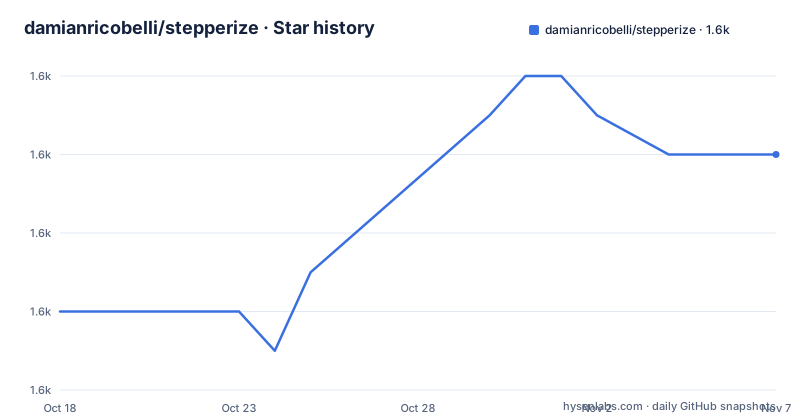
Star history
- damianricobelli/stepperize1,610 ★ · +4
| Repository | 2026-10-18 | 2026-11-07 |
|---|---|---|
| damianricobelli/stepperize | 1.6k | 1.6k |
4 Stars in the last 20 days, measured from the daily GitHub snapshot. Compare with other projects
Editorial analysis
Steps are data, rendering is a match
Stepperize's core idea is that a step is a plain object and the flow is a flat list of them. You declare the steps once with defineStepper and consume the resulting stepper wherever you need it.
import { defineStepper } from "@stepperize/react";

const checkout = defineStepper([
  { id: "shipping", title: "Shipping", description: "Enter your address" },
  { id: "payment", title: "Payment", description: "Payment details" },
  { id: "review", title: "Review", description: "Confirm your order" },
]);
The types are the reason the library exists. The id values in that array become the keys accepted by the rendering match, so a typo or a missing case is a type error rather than a blank screen at runtime. Custom fields added to a step definition stay typed, which is what lets you put form-specific metadata in the same object as the id and title.
Rendering goes through stepper.match with one function per step:
{stepper.match({
  shipping: () => <ShippingForm />,
  payment: () => <PaymentForm />,
  review: () => <ReviewOrder />,
})}
Navigation state is flat and enumerated in the README as id, current, index, next, prev, goTo and reset, with canNext and canPrev for button state. There is a sibling is function for typed rendering alongside match, and the library explicitly leaves the UI to you: the Stepper primitives are described as accessible and unstyled.
next() returns a result in v8, and that changes the calling code
The v8 navigation model is the substantive change, and it is worth reading before you write the call sites.
Navigation methods are awaitable and report acceptance:
const result = await stepper.next({ data: values, complete: true });
if (!result.accepted) console.log(result.reason);
await stepper.goTo("review", { bypassPolicy: true }); // intentional branch; guard still runs
await stepper.reset(); // restore mount-time step, data and completion
await stepper.reset({ keepData: true, keepCompleted: true });
Three things follow from that snippet. A step can refuse a navigation and tell you why, which means per-step validation is part of the transition rather than something you bolt on. complete: true marks the source step only after acceptance, so a rejected advance does not leave a half-completed wizard behind. And goTo accepts bypassPolicy for an intentional branch while the guard still runs, which is the distinction you need when a wizard has a skip path.
reset has two shapes: the plain form restores the step, data and completion captured at mount, and the options form keeps data and completion. Defaults are captured at mount rather than recomputed.
The README states one more rule that affects how you reason about renders: navigation methods use the latest committed state, while hook reads are render snapshots. Treat definitions and snapshot data as immutable.
Local state, shared state, and validation
The API distinguishes two ways of holding a stepper, and choosing wrong is the most likely integration mistake.
useStepper() gives independent local state, which is the Quick Start case where one component owns its own flow. useStepperContext with an optional selector and an optional isEqual reads a shared instance, and Provider is what makes an instance available to multiple descendants.
That separation matters for checkout-style flows where a summary panel and the form need to agree on the current step. Without it, two components calling useStepper() hold two unrelated flows, which is a confusing bug rather than an obvious one.
Per-step drafts live in data, and each step can declare a schema for validation, with the README naming Standard Schema as the interface. That keeps validation next to the step definition instead of in a form library's config elsewhere in the app.
Completion is explicit: setComplete and isComplete, rather than inferring it from reaching the last step. An explicit flag is what lets a flow support returning to a finished wizard later.
On packaging, the repository is a pnpm workspace managed with Turbo with packages/core for framework-agnostic utilities and types, packages/react for React and React Native bindings, and apps/docs for the documentation site, block gallery, changelog and a shadcn-compatible registry.
Bundle size is a choice you make at the import statement
The README documents a two-way decision at import time that is easy to miss.
The default import path includes everything: hooks, Provider, selectors, validation, and the generated Stepper components that give you accessible unstyled primitives. If you build your own components, importing defineStepper from @stepperize/react/headless keeps the hooks, Provider, selectors and validation without the generated components.
Since the project's positioning is that the UI is fully yours, the headless path is the coherent choice for anyone taking that claim seriously, and it is where the bundle-size badge in the README stops being relevant. The README links a bundle comparison and example in the performance documentation, which is the place to see the actual difference rather than assume it.
The repository also publishes a bundlephobia badge for the minified size of @stepperize/react, so the number is being tracked rather than ignored.
The docs site itself is built with TanStack Start, TanStack Router, Fumadocs, MDX, Tailwind CSS and a generated shadcn registry for the example blocks, which tells you the examples are real components you can copy rather than screenshots.
Testing and compatibility work, which is the real engineering
The parts of the README that describe how the library is verified say more about its quality than the feature list.
Compatibility is checked by running the same runtime, SSR and hydration, and TypeScript tests in isolated React 18 and React 19 installs, using a script that takes the React major version as an argument, on Node 24. The repository pins Node 24.18.0 in.nvmrc and pnpm 10.28.0, while the published package supports React 18 and 19.
Tests run in two environments. Core, server rendering and pure documentation utilities run in Node, while React hooks, hydration, primitives and interactive examples run in Chromium through Vitest Browser Mode with vitest-browser-react. CI installs Chromium with playwright install --with-deps --only-shell chromium, and STEPPERIZE_CHROMIUM_PATH overrides it when you already have a browser, which the README prefers you avoid in favour of Playwright's matching build for reproducible results.
The assertions follow from that: DOM assertions and user interactions use await render, locators such as page.getByRole("button").click(), and the retrying expect.element. React's act is only for direct state updates and is unnecessary around native browser actions.
There is also a benchmark command that compares the pinned v7.0.0 source with the current v8 working tree in production React in Chromium, printing signed changes with win and loss indicators, and it refreshes the performance documentation tables and raw samples.
Licence is MIT, the repository is not archived, and the last push was on 2026-09-15.
Editorial conclusion
Stepperize suits a team building a wizard, onboarding flow or multi-part form in React or React Native that wants typed step definitions and no imposed markup, and that is on React 18 or 19. It is the wrong choice if you need the library itself to be the versioned thing, because the README documents installing 8.0.0 while the latest published React release shown is 7.0.0 from 2026-06-05, so v8 is still a branch. Verify that before starting, and decide between the default import path and @stepperize/react/headless early, since the primitives are what carry the bundle size.
Frequently asked questions
How do I install Stepperize?
Run npm install @stepperize/react@^8.0.0, which requires React 18 or 19. The README notes this branch prepares v8 and points to the v8 migration guide, since the latest published React release shown is 7.0.0.
How do I handle a step that must not be left until it is valid?
Await the navigation call and check the result. next accepts data and an optional complete flag, and returns an object whose accepted field tells you whether the transition happened, with a reason when it did not; complete marks the source step only after acceptance.
Can I use Stepperize without its built-in UI components?
Yes. Import defineStepper from @stepperize/react/headless to keep the hooks, Provider, selectors and validation without the generated Stepper components; the default import path still includes all accessible primitives.
Official sources
Add this badge to your README
If you maintain this project, the badge below links readers to this analysis and shows its maintenance status from the daily GitHub snapshot. Paste the markdown into your README; add ?metric=license or ?metric=stars to the image URL for a different field.

[](https://hysenlabs.com/projects/damianricobelli-stepperize)Star history chart for your README
[](https://hysenlabs.com/projects/damianricobelli-stepperize)Was this useful?