B4 rewrites packets in the kernel netfilter path so DPI equipment cannot classify the connection
Network packet processor with a friendly UI for circumventing Deep Packet Inspection (DPI) systems.
At a glance
- What is it?
- B4 is a Linux service that fragments and obfuscates traffic to defeat deep packet inspection, configured through sets edited in a web UI on port 7000. Discovery tests strategies against your own connection so you do not have to guess which one your provider needs.
- Who is it for?
- Adopt B4 on a router or always-on Linux box when you need every device on the network to reach a blocked destination and you want the choice of strategy made empirically rather than by copying a config from someone else's provider. Do not adopt it where NFQUEUE is unavailable without accepting TUN mode's extra layer, or on a host without the NET_ADMIN and NET_RAW capabilities the packet path requires.
- Can I use it commercially?
- Yes, with conditions. GPL-3.0 is a copyleft licence: if you distribute software that includes it, you must release that software's source code under the same licence. Running it internally without distributing it does not trigger that obligation.
- Is it still maintained?
- Yes. The repository received new commits within the last day.
- What is it written in?
- Mainly Go, according to GitHub's language statistics.
Answers come from the project's GitHub data, last synced on October 23, 2026, and from our analysis. They are not legal advice.
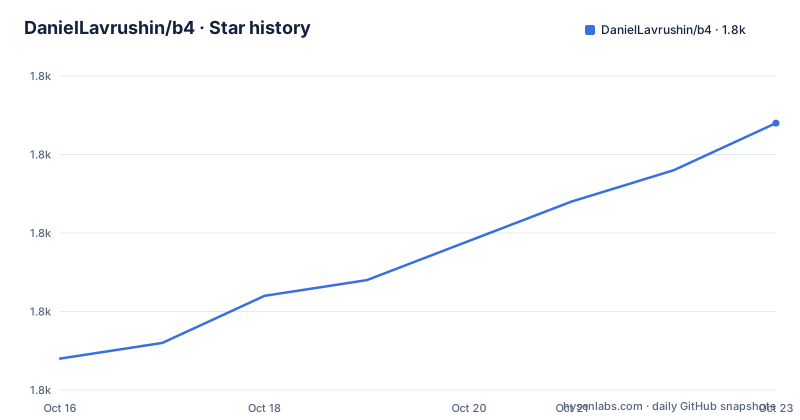
Star history
- DanielLavrushin/b41,807 ★ · +15
| Repository | 2026-10-16 | 2026-10-23 |
|---|---|---|
| DanielLavrushin/b4 | 1.8k | 1.8k |
15 Stars in the last 7 days, measured from the daily GitHub snapshot. Compare with other projects
Editorial analysis
Packet rewriting in the netfilter path, not a local proxy
B4 runs on Linux as a service and rewrites packets so that DPI equipment cannot classify the connection, while the destination server still receives valid data. The distinction from a proxy is the whole point: there is no tunnel to configure on the client.
Installed on a router, it covers every device on the network with nothing configured on the clients. Installed on a server or desktop, it covers that host. The mechanism depends on netfilter, with NFQUEUE support in the kernel, or TUN mode where NFQUEUE is missing.
The requirements are stated tightly: Linux with kernel 3.13 or newer and root access, iptables or nft plus ip, and ipset on iptables-only systems when the routing features are used. The resource budget is about 64 MB of free RAM and about 30 MB of disk, which is why it fits alongside a router's own firmware on ARM and MIPS hardware.
Both netfilter backends are supported and the backend is chosen automatically, and both IP families are handled, IPv4 and IPv6.
Sets are the configuration unit, and there are ten strategies to put in one
Configuration is built from sets. A set is a list of targets, which can be domains, IPs or CIDRs, geosite and geoip categories, ports and LAN devices, plus the bypass techniques, DNS handling and routing applied to them.
The techniques are listed by name: combo, hybrid, tcp, ip, tls, oob, disorder, extsplit, firstbyte and none, plus a random strategy pool. Ten fragmentation strategies is the headline feature, and the fake packet injection layer on top of it covers decoy ClientHellos, TCP desync bursts, window manipulation, fake SYN, SACK stripping and ClientHello mutation.
RST protection is separate and defensive: it detects forged resets by TTL, flag and option fingerprint and drops them, which is the failure mode where an injector on the path tears down the connection.
Sets are edited in the built-in web UI on port 7000 and applied to the running service without a restart. Escalation chains sit on top of the set model: when a set stops working for a host, that host moves to a heavier backup set rather than requiring a manual edit.
Discovery and Watchdog remove the guesswork from strategy choice
Discovery tests strategies against your own connection and saves the working one as a set. The Watchdog re-runs it when a site breaks, and the DPI Detector reports what the provider is doing.
Open the web UI, go to Discovery, type a blocked site and press Start, which takes 1 to 10 minutes. On a successful result, click Use this configuration, then Create a new set. Open the site, and on the Traffic page connections to that domain now show the set name.
That last detail matters more than it looks. The Traffic page is how you confirm a set is actually matching, which is the question you need answered when a strategy appears to do nothing.
This is the main difference from a static configuration file copied from a forum post. The technique that works is determined by measurement against your line, not by assumption.
Installing with the pipe-to-shell installer, and the options it takes
Installation runs as root, either after sudo -i or by piping into sudo sh:
curl -fsSL https://raw.githubusercontent.com/DanielLavrushin/b4/main/install.sh | sudo shor with wget. Then open http://<device-ip>:7000.
The installer options cover the cases where auto-detection guesses wrong:
./install.sh                         # interactive wizard
./install.sh v1.77.0                 # specific version
./install.sh --quiet                 # non-interactive, all defaults
./install.sh --arch=mipsle_softfloat # force architecture
./install.sh --platform=openwrt      # force platform
./install.sh --sysinfo               # system diagnostics
./install.sh --help                  # full usage
Pinning a version is the option that matters for a router, where an unreviewed change to a service every device depends on is not a pleasant surprise. The architecture and platform overrides exist because router firmware lies about both.
The removal warning deserves attention: --remove --quiet deletes the config directory and geodata without asking, and a run with no terminal on standard input behaves as --quiet, except that --remove refuses unless --quiet is given explicitly. So an unattended install is silent and a mis-typed removal is not, which is the safer of the two behaviours.
Runtime paths are fixed. Config lives at /etc/b4/b4.json, or /opt/etc/b4/b4.json on Entware and OpenWrt with extroot. Logs go to /var/log/b4/errors.log, and install.sh --sysinfo produces diagnostics.
The flow offloading trap, which is the first thing to check
On OpenWrt and most router firmware, netfilter flow offloading puts established connections on a fast path that skips the hooks B4 uses. If bypass appears to do nothing, run install.sh --sysinfo.
The mechanism explains why this bites specifically on routers. Hardware offload is an optimisation: once a flow is established, the packets stop traversing the netfilter hooks where B4 sits, so a connection that survived the handshake will not be rewritten afterwards. On a desktop where the flows are short and the routing path is simple, you may never see it.
The failure is confusing because it is partial. Discovery, which creates new connections, works, and a site you have already visited once does not. That pattern reads like a strategy problem and is not one.
The Docker path has the same shape. The image requires NET_ADMIN, NET_RAW and SYS_MODULE capabilities:
docker run -d --name b4 --network host \
  --cap-add NET_ADMIN --cap-add NET_RAW --cap-add SYS_MODULE \
  -v /etc/b4:/etc/b4 \
  lavrushin/b4:latest
Docker is documented as Linux hosts only, and the compose file in the repository root matches that command with network_mode host, the same three capabilities, a./config volume mounted at /etc/b4 and restart unless-stopped.
Beyond bypass: DNS, routing, blocking and Telegram
The feature list is wider than circumvention, and the wider parts are where a household deployment earns its keep.
DNS handling is per-set. You can redirect a set's resolution to a plain resolver or DoH, apply hosts-style pins, fragment queries, intercept DNS-over-TCP, and heal answers that point at addresses which no longer respond. That last one matters for censorship setups where a resolved address is deliberately wrong rather than absent.
Routing decides where a set's traffic leaves. It can go out a chosen interface such as a VPN, WireGuard or a second WAN, through an upstream SOCKS5 proxy, or be blocked outright. Block mode is described as network-wide ad and tracker blocking, which means the same packet path handles both directions of policy.
Telegram support includes a built-in MTProto proxy and a transparent bridge from Telegram over WebSocket for stock clients, which removes the need to replace the official app.
Per-device rules by MAC let you exclude a device from a set, so a console or a smart TV can be left alone while everything else is filtered.
Platform coverage, project shape and licence
Service control differs by platform, which is worth checking against your firmware before you install. Generic Linux with systemd uses systemctl start|stop|restart b4. OpenRC or SysV uses rc-service b4 start or /etc/init.d/b4. OpenWrt 19.07 and later uses /etc/init.d/b4 start|stop|restart|enable. Asus Merlin and Keenetic need Entware and use /opt/etc/init.d/S99b4. MikroTik RouterOS 7.21.1 and later is supported through the Docker container rather than a native binary.
Builds exist for amd64, 386, arm64, armv5, armv6, armv7, mips, mipsle, mips_softfloat, mipsle_softfloat, mips64, mips64le, loong64, ppc64, ppc64le, riscv64 and s390x.
Go 1.25.14 with CGO_ENABLED=0 and version, commit and date injected through ldflags, a Node 22 and pnpm 10.18.2 stage that builds the web UI, and a first stage that runs tools/gendefaults.go to generate UI defaults from the Go config so the interface cannot drift from the binary. The runtime image is alpine 3.23.3 with iptables, ip6tables, ipset, nftables, kmod, iproute2 and tzdata, exposing 7000 and declaring /etc/b4 as a volume. The web UI ships in English and Russian, and the documentation has both language versions.
Licence is GPL-3.0. The repository is not archived, the last push was on 2026-10-16, and releases land frequently, with v1.86.0 on 2026-10-10 and v1.87.0rc1 on 2026-10-13, so a release candidate is part of the normal cadence rather than a sign of trouble.
Editorial conclusion
Adopt B4 on a router or always-on Linux box when you need every device on the network to reach a blocked destination and you want the choice of strategy made empirically rather than by copying a config from someone else's provider. Do not adopt it where NFQUEUE is unavailable without accepting TUN mode's extra layer, or on a host without the NET_ADMIN and NET_RAW capabilities the packet path requires. Before enabling anything, run install.sh --sysinfo, because netfilter flow offloading on OpenWrt and most router firmware puts established connections on a fast path that skips the hooks B4 depends on, and the symptom is a configuration that appears to do nothing.
Frequently asked questions
How do I install B4 on a Linux device?
Run as root, either from a root shell or by piping the installer into sudo sh: curl -fsSL https://raw.githubusercontent.com/DanielLavrushin/b4/main/install.sh | sudo sh. Then open http://<device-ip>:7000 to reach the web UI.
Why does B4 appear to do nothing on my OpenWrt router?
Netfilter flow offloading puts established connections on a fast path that skips the hooks B4 uses, so already established flows bypass the rewriting. Run install.sh --sysinfo to diagnose this.
What system requirements does B4 have?
Linux with kernel 3.13 or newer, root access, NFQUEUE support or TUN mode as a fallback, plus iptables or nft and ip, with ipset required on iptables-only systems for routing features. Budget around 64 MB of free RAM and around 30 MB of disk.
Can I run B4 in Docker?
Yes, on Linux hosts only. The container needs network_mode host and the NET_ADMIN, NET_RAW and SYS_MODULE capabilities, with a volume mounted at /etc/b4.
Where does B4 store its configuration and logs?
Configuration is at /etc/b4/b4.json, or /opt/etc/b4/b4.json on Entware and OpenWrt with extroot. Logs go to /var/log/b4/errors.log, and install.sh --sysinfo produces system diagnostics.
Official sources
Add this badge to your README
If you maintain this project, the badge below links readers to this analysis and shows its maintenance status from the daily GitHub snapshot. Paste the markdown into your README; add ?metric=license or ?metric=stars to the image URL for a different field.

[](https://hysenlabs.com/projects/daniellavrushin-b4)Star history chart for your README
[](https://hysenlabs.com/projects/daniellavrushin-b4)Was this useful?