gonic's container declares four volumes and points a fifth path at nothing
music streaming server / free-software subsonic server API implementation
At a glance
- What is it?
- sentriz/gonic is a Subsonic API server written in Go, shipping a folder browser, a tag browser, ffmpeg transcoding, jukebox mode, podcast support and scrobbling to two services. The feature work is conventional. The packaging has three specific seams: a module path that is not the repository URL, two SQLite drivers in one dependency list while the image builds with cgo disabled, and volume declarations that do not cover the playlists directory the server is told to write to.
- Who is it for?
- gonic is the right server if your clients speak Subsonic and you want folder browsing that preserves your existing tree rather than a tag only view, and if you would rather run a single Go binary than a stack. Four things to check before you expose it.
- Can I use it commercially?
- Yes, with conditions. GPL-3.0 is a copyleft licence: if you distribute software that includes it, you must release that software's source code under the same licence. Running it internally without distributing it does not trigger that obligation.
- Is it still maintained?
- Yes. The repository last received commits 5 days ago.
- What is it written in?
- Mainly Go, according to GitHub's language statistics.
Answers come from the project's GitHub data, last synced on November 21, 2026, and from our analysis. They are not legal advice.
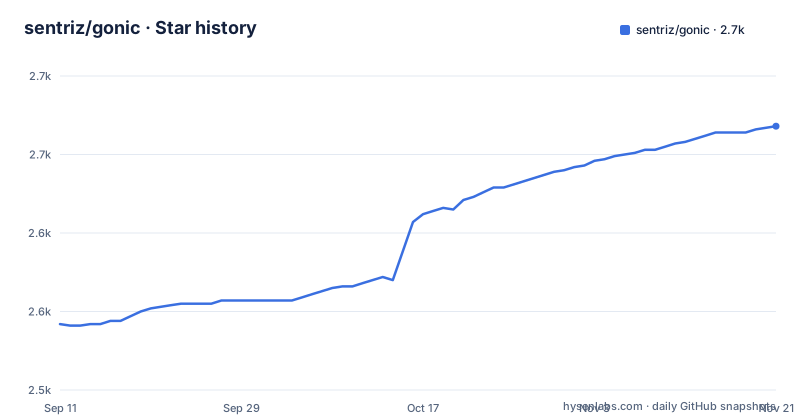
Star history
- sentriz/gonic2,668 ★ · +126
| Repository | 2026-09-11 | 2026-11-21 |
|---|---|---|
| sentriz/gonic | 2.5k | 2.7k |
126 Stars in the last 71 days, measured from the daily GitHub snapshot. Compare with other projects
Editorial analysis
Two SQLite drivers in one module, and the image builds without cgo
The dependency list contains both of the usual Go SQLite drivers at once:
github.com/mattn/go-sqlite3 v1.14.48
github.com/ncruces/go-sqlite3 v0.35.2
They are not interchangeable. The first is the cgo binding and needs a C toolchain and cgo enabled; the second is a transpiled C library that needs neither. A project requiring both is usually keeping one for a build path and one for the other, or carrying a dependency it no longer calls.
The container build resolves the question by choosing for you:
CGO_ENABLED=0 GOOS=$TARGETOS GOARCH=$TARGETARCH go build -o /out/ ./cmd/...With cgo disabled the mattn driver cannot be linked, so the binary in the image is using the pure Go one. Anyone building from source with the default settings may end up on the other driver, and the two have different behaviours around concurrency and file locking, which is exactly the area a music server database depends on.
The ORM choice is older still. The module requires `github.com/jinzhu/gorm` at a pseudo-version of v1.9.17, which is the original GORM rather than the maintained fork under the go-gorm path, and it pulls in `gopkg.in/gormigrate.v1` for schema migrations. A database layer pinned to the pre-fork GORM is a maintenance fact a reader should see before planning an upgrade path.
The module path is a personal domain, not the repository
The first line of go.mod is:
module go.senan.xyz/gonicThe repository is `github.com/sentriz/gonic`. So the import path a Go program writes is not the URL you clone, and that difference has consequences for anyone building from source, vendoring, or writing a replace directive: the import path is the personal domain, and the canonical host appears only in the container label and in the links the README uses.
The same repository owns two of its own dependencies by a different route. `github.com/sentriz/gormstore` appears in the require block alongside the personal-domain modules, and the personal domain supplies four more: `flagconf` for flag handling, `sqlitenotify` for database change notification, `taglib` for tag reading, and `wrtag` for tag writing. Five of the project's building blocks come from a domain rather than from a versioned public registry, so a reviewer has to follow them to judge whether the project is self contained.
Version information is handled separately again. The top level carries both `version.go` and `version.txt`, so the build reads a value from a file rather than deriving it from a tag at link time.
Four volumes are declared and a fifth configured path is not
The container declares its writable locations in one instruction:
VOLUME ["/cache", "/data", "/music", "/podcasts"]The environment block below it configures six paths:
ENV GONIC_DB_PATH=/data/gonic.db
ENV GONIC_LISTEN_ADDR=:80
ENV GONIC_MUSIC_PATH=/music
ENV GONIC_PODCAST_PATH=/podcasts
ENV GONIC_CACHE_PATH=/cache
ENV GONIC_PLAYLISTS_PATH=/playlists
Five of those six are inside the declared volumes, including the database file, which lands in `/data` rather than in a directory of its own. The sixth, `/playlists`, is not. That directory is the one the configuration table describes as holding m3u files laid out as `<userid>/<name>.m3u`, which the server creates and edits over the Subsonic API, so it is a directory the container writes to by design and does not declare as a volume. Under the default Docker behaviour its contents are lost when the container is replaced.
Two smaller details sit in the same block. The timezone is set to an empty value with `ENV TZ=` in the same layer that installs tzdata, so the data is present and the variable says nothing. And the application is run through tini as the entrypoint with `gonic` as the command, which is the right shape for signal handling and for a process that forks ffmpeg.
The default listen address is every interface and the image moves it to port 80
The configuration table gives each setting an environment variable and a command line flag in two columns, and the listen address is the one with a default written out:
`GONIC_LISTEN_ADDR` and `-listen-addr`, described as an optional host and port to listen on, with examples `0.0.0.0:4747` and `127.0.0.1:4747` and a default of `0.0.0.0:4747`.
So out of the box the server binds every interface on port 4747, and the loopback example in the same cell is the form you would use to restrict it. Two optional settings change the transport rather than the address: `GONIC_TLS_CERT` and `GONIC_TLS_KEY`, each described as a path that enables HTTPS listening. Neither is set by default, so the default posture is plaintext HTTP on all interfaces.
That pairs with the installation section, which states the default login is admin over admin and that the password can then be changed from the web interface. Both facts are in the documentation and neither is enforced by the configuration, so the order of operations matters: bind to loopback, or change the password, before the port is reachable from anywhere but the machine.
One inconsistency in the same table is worth noting for anyone scripting against it. Five rows are marked optional and four are not, and the four unmarked ones are exactly the paths a fresh installation cannot proceed without.
The README documents no commands, only where to find them
The installation section offers four routes and every one of them is a link to somewhere else: a wiki page for building from source, a wiki page for Docker, a wiki page for systemd, and Repology's versions page for distribution packages. There is no command in the section, and no command anywhere else in the README.
That is an unusual choice for a project whose main selling point is that it is a single Go binary, and it has a practical cost. The configuration table is the one machine readable surface in the file, and it names nine environment variables with their flag equivalents, which tells you the interface exists without telling you how to invoke it. Someone arriving at the repository to find out how to start the server ends up on the wiki or on Repology.
The feature list, by contrast, is unusually complete, and it is where the actual behaviour of the server is documented. Folder browsing is said to keep your full tree intact, as opposed to a tag view, which is what `taglib` is for across mp3, opus, flac, ape, m4a and wav. Transcoding and caching happen on the fly and require ffmpeg. Jukebox mode does gapless server side playback instead of streaming. Podcasts are supported. Users are separate, each with their own transcoding preferences, playlists and top tracks. Scrobbling goes to last.fm and to ListenBrainz, artist similarities and biographies come from the last.fm API, multi valued tags such as albumartists and genres are supported, and there is a web interface for setting up last.fm, managing users and starting scans.
Three metadata packages in the tree, two in the feature list
The top level of the repository is a directory per subsystem: `jukebox/`, `lastfm/`, `listenbrainz/`, `musicbrainz/`, `playlist/`, `podcast/`, `scanner/`, `scrobble/`, `server/`, `tags/`, `transcode/`, `db/`, `cache/`, `infocache/`, `fileutil/`, `handlerutil/`, `texttree/` and `mockfs/`, plus `cmd/`, `contrib/`, `deps/` and the build files.
Three of those are external metadata sources, and only two appear in the feature list. `lastfm/` and `listenbrainz/` correspond to the two scrobbling integrations the README names, and `musicbrainz/` has no feature entry at all, which means the repository carries an integration the front page does not mention. `mockfs/` is a filesystem double, used for tests, and there is no separate test directory at the top level, so the tests live alongside the packages they exercise.
The build is where the tree gets interesting. The container compiles `./cmd/...` and copies everything produced into `/usr/local/bin`, so the command tree holds more than one binary rather than a single entry point, and the compose of packages above it is what a reader has to understand to find the right one. `texttree/` is presumably the implementation of the folder view that the feature list calls out first, and `transcode/` and `jukebox/` are the ffmpeg and mpv paths: the container image installs both ffmpeg and mpv, which is the clearest statement in the repository about what the jukebox mode needs.
Client compatibility is asserted with a list of fifteen, and scanning numbers are one library's worth
One feature bullet is a compatibility list, and it is longer than any other line in the file. The clients named are airsonic-refix, amperfy, symfonium, dsub, jamstash, music-assistant, subsonic.el, sublime music, soundwaves, stmp, termsonic, tempus, strawberry and ultrasonic, spanning desktop, mobile and terminal clients. That is a useful signal, because Subsonic API implementations vary in which endpoints they honour, and naming the clients that were exercised against is a more honest claim than saying the API is supported.
The performance claim beside it is narrower and should be read as exactly what it says. Scanning is described as pretty fast, with the note that a library of roughly fifty thousand tracks takes about ten minutes for an initial scan and about six seconds for an incremental one afterwards. Those are figures from the maintainer's own library on unspecified hardware, presented without a machine spec or a comparison, so they are orientation rather than a specification.
The mechanism behind the incremental number is visible in the dependencies rather than the prose. File system notification is required, and the module pulls in `fsnotify`, which is what turns a six second rescan into a watch rather than a full walk. The same section notes the project is written in Go and therefore light enough for a Raspberry Pi, and the container build supports that claim mechanically by cross compiling from the build platform to the target architecture with cgo disabled, which is how the ARM images are produced.
Editorial conclusion
gonic is the right server if your clients speak Subsonic and you want folder browsing that preserves your existing tree rather than a tag only view, and if you would rather run a single Go binary than a stack. Four things to check before you expose it. The shipped login is admin over admin, and the listen address defaults to every interface, so change the password before the port is reachable. The module path in go.mod is a personal domain rather than the repository URL, which matters if you build from source with a replace directive or vendor it. Decide which SQLite driver you want, since two are required and only one works in a cgo-free build. And if you use the container image, check that your playlists directory is on a volume, because the image points GONIC_PLAYLISTS_PATH outside the four it declares.
Frequently asked questions
What is the default login for the gonic music server?
admin over admin, stated in the installation section, and the password can then be changed from the web interface. The listen address setting defaults to 0.0.0.0:4747, so both facts are worth acting on before the port is reachable.
Which environment variables does gonic read?
Nine are named in the configuration table, each with a command line equivalent: GONIC_MUSIC_PATH, GONIC_PODCAST_PATH, GONIC_PLAYLISTS_PATH, GONIC_CACHE_PATH, GONIC_DB_PATH, GONIC_HTTP_LOG, GONIC_LISTEN_ADDR, GONIC_TLS_CERT and GONIC_TLS_KEY.
How do I install gonic?
The README names four routes and links out for all of them: wiki pages for building from source, for Docker and for systemd, plus Repology for distribution packages. It contains no commands itself, so the invocation has to come from the wiki.
What does the gonic server need for transcoding and jukebox playback?
On-the-fly transcoding and caching require ffmpeg according to the feature list, and the container image installs ffmpeg and mpv. The jukebox mode does gapless server side playback rather than streaming, which is the part that needs mpv present.
What Go module path does sentriz/gonic use?
go.mod declares `module go.senan.xyz/gonic` with `go 1.26.0`, so the import path is a personal domain rather than the github.com/sentriz/gonic repository URL.
Official sources
Add this badge to your README
If you maintain this project, the badge below links readers to this analysis and shows its maintenance status from the daily GitHub snapshot. Paste the markdown into your README; add ?metric=license or ?metric=stars to the image URL for a different field.

[](https://hysenlabs.com/projects/sentriz-gonic)Star history chart for your README
[](https://hysenlabs.com/projects/sentriz-gonic)Was this useful?