qylock, a set of SDDM greeter themes and Quickshell lockscreens
A cozy collection of sddm-themes & quickshell lockscreen setups.
At a glance
- What is it?
- Darkkal44/qylock is a GPL-3.0 collection of QML login and lock screens for SDDM and Quickshell, installed with a shell script or a NixOS flake, tested on Arch, and it needs Qt6 plus a full GStreamer stack for its video backgrounds.
- Who is it for?
- Adopt qylock if you already run SDDM or a Quickshell based compositor and want one artwork set covering both the login screen and the lock screen. Leave it alone if you need a display manager that boots without ffmpeg, four GStreamer plugin sets and separately downloaded fonts.
- Can I use it commercially?
- Yes, with conditions. GPL-3.0 is a copyleft licence: if you distribute software that includes it, you must release that software's source code under the same licence. Running it internally without distributing it does not trigger that obligation.
- Is it still maintained?
- Yes. The repository last received commits 44 days ago.
- What is it written in?
- Mainly QML, according to GitHub's language statistics.
Answers come from the project's GitHub data, last synced on October 25, 2026, and from our analysis. They are not legal advice.
Star history
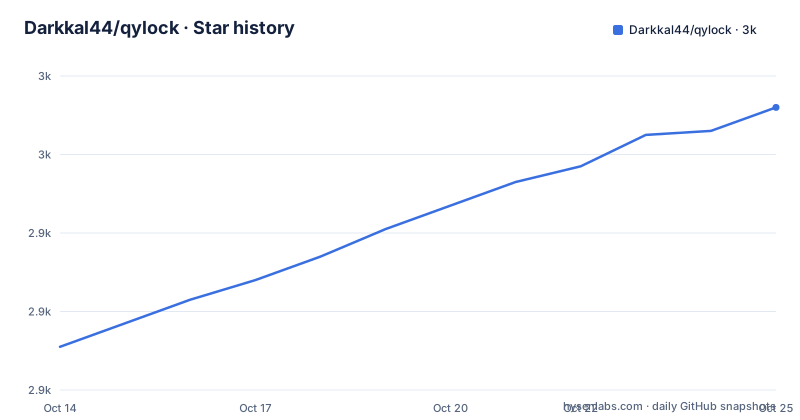
- Darkkal44/qylock2,972 ★ · +61
| Repository | 2026-10-14 | 2026-10-25 |
|---|---|---|
| Darkkal44/qylock | 2.9k | 3k |
61 Stars in the last 11 days, measured from the daily GitHub snapshot. Compare with other projects
Editorial analysis
What qylock ships and who it is for
Start with the repository description, which is unusually honest about what the project is: a cozy collection of SDDM themes and Quickshell lockscreen setups. That is the whole product. There is no daemon to configure, no service to tune, no settings file to edit by hand. You pick artwork, and a script copies it somewhere your display manager or compositor can find it. The repository is Darkkal44/qylock, the primary language is QML, the licence is GPL-3.0, and there is no separate homepage. At the time of writing it has 2793 stars, 116 forks and 26 open issues.
The repository tree tells you more than the star count does. Alongside the README, the LICENSE and an Assets directory used for screenshots, the top level holds sddm.sh, quickshell.sh, qt5.sh, a quickshell-lockscreen directory, a themes directory, and three Nix files: flake.nix, default.nix and flake.lock. Two shell installers and a flake means three different ways to arrive at the same themes, and the presence of both default.nix and flake.nix suggests the Nix side grew a non flake entry point as well.
There are no GitHub releases at all, so there is no version number to track and no changelog to read before upgrading. Changes land as commits on the main branch, which means your update path is to pull and rerun the installer. The last push on record is 2026-09-14, so the artwork and the scripts are still moving.
The audience is narrow and worth stating plainly: a Linux desktop user who already has a display manager or a compositor configured and wants the screen they log in from, and the screen they lock during the session, to stop looking like every other default. If you are on GNOME or KDE and want your whole desktop themed, this repository does nothing for you. If you want a terminal tool, skip it.
Why one theme set runs under two different shells
The architecture is a single decision: the same QML artwork is wrapped twice, once for the moment before a session exists and once for the moment inside it. SDDM themes are QML layouts that SDDM loads to draw the greeter, the login screen that appears at boot. Quickshell is a Qt shell for building status bars and lock screens inside a running session. Both consume QML, so the author draws a theme once and ships a greeter version and a lock screen version. That is why the tree has two installers, and why quickshell-lockscreen sits beside themes instead of inside it.
The two targets do not overlap, and understanding that prevents most disappointed setups. An SDDM theme cannot lock a running session, because nothing is running yet when SDDM draws it. A Quickshell lockscreen can lock a session but does nothing at boot, because your compositor is not running yet. So qylock covers the lock time case with Quickshell and the boot time case with SDDM, and at no point do the two cover the same instant. Choosing qylock means choosing which of those two moments you care about, or accepting both.
The dependency lists explain the rest. Both targets need qt6-declarative and qt6-5compat, so SDDM themes draw through Qt 6 with a bridge for older Qt 5 style imports, and the SDDM side additionally needs qt6-svg. Both lists also carry qt6-multimedia and qt6-multimedia-ffmpeg plus four GStreamer plugin sets, which is the cost of the moving backgrounds.
Two smaller details are worth flagging. The tree contains qt5.sh even though every documented dependency is Qt 6, which reads as a leftover from the project's Qt 5 era rather than a supported path, since no section explains when to run it. And fzf is listed as an optional dependency for both installers, which is unusual enough to be worth knowing about: the NixOS section says the declarative themeOptions replace the interactive prompts, which implies the shell scripts prompt for a theme by name.
Installing the SDDM themes on a normal distribution
The README splits dependencies into four rows, and the Core row is the one that matters first: sddm, qt6-declarative, qt6-5compat and qt6-svg. The Video row adds qt6-multimedia and qt6-multimedia-ffmpeg. The GStreamer row adds gst-plugins-base, gst-plugins-good, gst-plugins-bad and gst-plugins-ugly, and fzf is optional. The README is direct that names vary by distribution, so expect to translate at least the GStreamer rows, and get the installer right rather than assuming the exact string from the table.
With those in place, the install is one command. Run it from a clone of the repository:
chmod +x sddm.sh && ./sddm.shWhat you should see is an interactive session that asks which theme to install, since the NixOS documentation describes those prompts as something the declarative options exist to replace. The script then copies theme files into an SDDM theme directory and sets that theme as the active one.
One step the installer does not cover is telling SDDM where its themes live and which one to use. That configuration belongs in the SDDM configuration file on your system, and the README does not spell it out, so expect to read SDDM's own documentation for that part. This is where the project stops and SDDM begins.
Fonts need a separate errand. Several themes depend on fonts that cannot be bundled because of copyright, and the README handles this honestly by listing what each theme expects: FOT-Rodin Pro DB for NieR: Automata, Andy Bold for Terraria, HYWenHei-85W for Genshin Impact, The Last Shuriken for Sword, Minecraft Regular for Minecraft, DIN Next for Honkai: Star Rail and Torus Regular for osu. Drop each file into the font directory inside that theme and it loads automatically:
themes/<theme_name>/font/A theme that renders with the wrong font, or with a substituted one, almost always means this step was skipped.
Running the Quickshell lockscreen and binding it to a key
The Quickshell path swaps sddm for quickshell and drops qt6-svg, keeping qt6-declarative and qt6-5compat plus the same video, GStreamer and optional fzf rows. The install is the sibling script:
chmod +x quickshell.sh && ./quickshell.shWhat the script writes matters more here than for SDDM, because the lock screen has to be reachable from inside your session. The README says to point your window manager keybind, in Hyprland, Qtile, Sway or i3, straight at this path:
~/.local/share/quickshell-lockscreen/lock.shSo the bind is a command rather than a wrapper you have to write, which keeps the compositor configuration to one line. On NixOS the same role is filled by a wrapper called qylock-lock, and it accepts a theme name as its first argument, which is how you try a different theme without reinstalling anything:
qylock-lock clockwork/tapeThat override matters because these themes are visual and because the NixOS path takes theme names from configuration rather than from a prompt, so being able to try two or three by hand saves a lot of rebuild cycles.
The failure mode worth knowing before you start is a theme that comes up with a black or frozen background. The video backgrounds need qt6-multimedia-ffmpeg and the four GStreamer plugin sets, and the NixOS section says so explicitly: without the GStreamer packages installed system wide, background videos fail to render. That is also the honest cost of this project. A login screen that plays video pulls in ffmpeg bindings and four plugin packages, which on a minimal Arch install is a noticeably heavier install than a static theme.
The NixOS module replaces both scripts and the prompts
For NixOS users the repository ships a flake and a module, which is the third install path and the only one that is declarative. You add the input:
inputs.qylock.url = "github:Darkkal44/qylock";Then import qylock.nixosModules.default and set programs.qylock. The block below is the shape the README documents, including the per theme options:
          programs.qylock = {
            enable = true;
            theme = "nier-automata";          # any directory name under themes/
            # sddm.enable = true;             # installs theme + sets it active (default)
            # quickshell.enable = true;       # adds `qylock-lock` to PATH (default)

            # Optional per-theme tweaks (replaces the interactive prompts):
            themeOptions = {
              terraria.backgroundMode = "time";              # time | random | static
              Genshin.backgroundMode = "time";
              clockwork.orbital = { themeMode = "dark"; enableWindup = true; };
              osu.gameMode = "menu";                         # menu | game
            };
          };
Three things fall out of this. sddm.enable is on by default and both installs the theme and marks it active, while quickshell.enable is on by default and only puts qylock-lock on your PATH, so the module does both jobs without asking. The theme value must be a directory name under themes/, which means a typo has no fallback and no error beyond a lock screen that never changes. And the capital G in Genshin hints that theme directory names are matched case sensitively, so copy the name rather than guessing it.
The themeOptions are the part with no shell equivalent, and they are per theme rather than global: terraria and Genshin take a backgroundMode of time, random or static, clockwork takes an orbital table with a themeMode and an enableWindup toggle, and osu takes a gameMode of menu or game. Note that the options are keyed by theme, so an option only affects a theme that reads it.
The flake also exports the two pieces you need for a home manager setup: packages.<sys>.qylock-sddm-themes places the themes under share/sddm/themes/, and packages.<sys>.qylock-quickshell is the wrapper with the Qt 6 QML dependencies already wired in. There is also a devShell for working on the themes.
One NixOS specific gap is documented and easy to hit. Quickshell wallpapers need the GStreamer stack installed system wide, and the README gives the exact block:
{ config, pkgs, ... }: {
  environment.systemPackages = with pkgs; [
    gst_all_1.gstreamer
    gst_all_1.gst-plugins-base
    gst_all_1.gst-plugins-good
    gst_all_1.gst-plugins-bad
    gst_all_1.gst-plugins-ugly
  ];
}
The README also draws a useful line: qt6.qtmultimedia is not needed, because the qylock-lock wrapper already wires the QML import path. You only need it if you invoke quickshell directly.
What qylock does not do, and where a different tool fits better
The honest limitations are all in the README's own hedging. The themes are made and tested only on Arch Linux, and the script is said to work elsewhere once the dependencies are right, which is a claim about file copying rather than about rendering. Several themes cannot ship their fonts because of copyright, so a first install is never quite complete until you have downloaded them yourself. There are no releases, so there is no supported upgrade path beyond pulling main and rerunning a script. And the 26 open issues are the visible cost of artwork heavy repositories with a volunteer maintainer.
There is also a small inconsistency worth naming: the tree ships qt5.sh while the documentation only ever describes Qt 6 packages, so a reader who finds that file has no guidance on when it applies. Treat the Qt 6 paths as the supported ones.
Against the alternatives, the difference is in approach rather than in polish. SDDM ships its own minimal themes, which start instantly and play nothing. Community theme packs distributed through the AUR cover the greeter only, one theme per install, with no lock screen half at all. Standalone lockscreen apps such as i3lock, swaylock or SilentSDDM take the opposite trade: they lock a running session well, run on a compositor without a theme system, and have nothing to say about the boot time login screen. qylock is the only one of these that keeps a single QML artwork set and reuses it on both surfaces, and that reuse is also its cost, since a greeter theme has to render before any hardware video stack is guaranteed to be ready.
For maintenance, expect to follow the repository rather than a version. Everything arrives as commits on main, the licence is GPL-3.0, and because there is one repository rather than separate theme projects, a change to a shared script or a licence concern reaches every theme at once. If you keep dotfiles in git, the practical upgrade is small: pull, rerun the installer for the target you use, and confirm your font directory still has the files the README asks for.
Editorial conclusion
Adopt qylock if you already run SDDM or a Quickshell based compositor and want one artwork set covering both the login screen and the lock screen. Leave it alone if you need a display manager that boots without ffmpeg, four GStreamer plugin sets and separately downloaded fonts. Verify three things first, because the README cannot check them for you: that your distribution names its Qt6 packages the way the dependency tables do, that the theme name you pass to the module matches a directory under themes/ exactly, and that a background video actually renders once qt6-multimedia-ffmpeg and the gst-plugins sets are installed.
Frequently asked questions
Does qylock work on a distribution other than Arch Linux?
The themes are made and tested only on Arch Linux, and the README says the script should work on most distributions once the dependencies are right. The package names in the Core, Video and GStreamer tables vary between distributions, so getting those four rows correct is the actual work.
How do I install an SDDM theme from qylock on NixOS?
Add the flake input, import qylock.nixosModules.default, and set programs.qylock.enable with a theme name that matches a directory under themes/. sddm.enable is on by default and both installs the theme and sets it active, and the exported qylock-sddm-themes package places themes under share/sddm/themes/.
Why is the qylock background black or not moving?
The video backgrounds need qt6-multimedia, qt6-multimedia-ffmpeg and the four GStreamer plugin sets. On NixOS the README states that background videos fail to render unless those GStreamer packages are installed system wide.
How do I switch qylock themes without reinstalling everything?
On NixOS, pass a theme name to the wrapper as its first argument, for example qylock-lock clockwork/tape. On a normal distribution the themeOptions table in the flake documents the per theme settings, while the shell installers select the theme through their interactive prompt.
Official sources
Add this badge to your README
If you maintain this project, the badge below links readers to this analysis and shows its maintenance status from the daily GitHub snapshot. Paste the markdown into your README; add ?metric=license or ?metric=stars to the image URL for a different field.

[](https://hysenlabs.com/projects/darkkal44-qylock)Star history chart for your README
[](https://hysenlabs.com/projects/darkkal44-qylock)Was this useful?