phpBB Forum Scraper: A Minimal Scrapy Template for Extracting Post Data
Python-based web crawlers for scraping phpBB forum posts.
At a glance
- What is it?
- This Python project offers a starting point for scraping phpBB forums with Scrapy and BeautifulSoup, but it requires manual configuration and offers little beyond the basics.
- Who is it for?
- Adopt this project if you need a quick, minimal template for a one-off crawl of a phpBB forum and are comfortable editing Python code and Scrapy settings yourself. Do not use it if you expect production-grade reliability, active maintenance, or built-in anti-blocking measures.
- Can I use it commercially?
- Not without permission. GitHub finds no licence file in the repository, and without a licence all rights are reserved by default: you may read the code but not reuse it. Check the README, or ask the authors, before using it.
- Is it still maintained?
- Probably not. The repository last received commits 77 months ago, on May 29, 2020.
- What is it written in?
- Mainly Python, according to GitHub's language statistics.
Answers come from the project's GitHub data, last synced on October 21, 2026, and from our analysis. They are not legal advice.
Star history
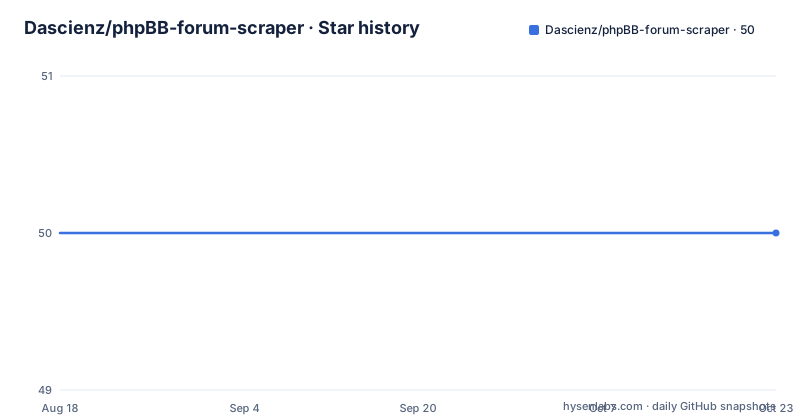
- Dascienz/phpBB-forum-scraper50 ★ · +0
| Repository | 2026-08-18 | 2026-10-21 |
|---|---|---|
| Dascienz/phpBB-forum-scraper | 50 | 50 |
0 Stars in the last 64 days, measured from the daily GitHub snapshot. Compare with other projects
Editorial analysis
What This Project Actually Solves
This repository addresses a narrow problem: extracting specific fields from phpBB forum posts. The README lists exactly five data points: username, user post count, post date and time, post text, and quoted text. If you need anything else, you must edit the spider or write new ones. The intended user is a developer who wants a template, not a plug-and-play scraper. It is for someone who knows Python and Scrapy well enough to adapt code. The project does not claim to handle login flows, pagination, or anti-scraping measures beyond a basic login flag. It is a starting point for a one-off crawl, not a maintained library.
How the Spider Works: Scrapy and BeautifulSoup Together
The project combines two Python libraries: Scrapy for crawling and BeautifulSoup for parsing HTML. Based on the README, the spider is named phpBB.py and is run via Scrapy's command line. It scrapes the five fields from each post page. The mechanism is straightforward: Scrapy fetches pages listed in start_urls, and BeautifulSoup extracts the relevant HTML elements. There is no mention of handling JavaScript-rendered content, so it only works with static HTML. The output can be saved as CSV by adding the -o posts.csv flag to the crawl command. The login feature is toggled with forum_login=True or False, and credentials are set via username and password variables. This is a simple request-response flow, with no middleware or pipelines described beyond what Scrapy provides by default.
Getting It Running: Commands and Configuration
To use the scraper, you first need Scrapy and BeautifulSoup installed. The README points to their official sites but gives no pip commands. You then edit phpBB.py to set allowed_domains and start_urls to your target forum. If the forum requires login, you set username, password, and forum_login=True. After that, you run the scraper from the phpBB_scraper directory with: scrapy crawl phpBB. To save results to a file, use: scrapy crawl phpBB -o posts.csv. The README also tells you to adjust settings.py to throttle requests, but it does not specify which settings to change. That is a gap. You have to know Scrapy's DOWNLOAD_DELAY or AUTOTHROTTLE settings yourself. The project gives you the skeleton but leaves the tuning to you.
A Real Limitation: No Built-In Politeness or Error Handling
The most obvious weakness is the lack of built-in request throttling. The README warns that aggressive crawls can strain servers and tells you to adjust settings.py, but it does not provide default values. If you run the spider without editing settings, Scrapy's default download delay is zero, which can hammer a server. This is a genuine failure mode for anyone who follows the quick start without reading the note. Another limitation is that the scraper only extracts five fields. Any forum with additional metadata, such as post ID, thread title, or user profile links, requires code changes. The project also has no error handling for login failures or changed HTML structures. If the forum updates its markup, the spider breaks silently. This is a template, not a robust tool.
Comparing with an Alternative: Scrapy's Built-In Selectors
A more flexible alternative is to write a Scrapy spider from scratch using Scrapy's own selectors (XPath or CSS) instead of BeautifulSoup. Scrapy's selectors are faster and integrate directly with the response object, avoiding the need for a separate parsing library. The phpBB-forum-scraper adds BeautifulSoup as a dependency, which works but is redundant for simple extraction. Scrapy also has built-in support for login via FormRequest, which the project's forum_login flag presumably implements manually. A custom spider gives you full control over pagination, retries, and output formats. The trade-off is that you lose the template's example code, which can be helpful for beginners. But for anyone comfortable with Scrapy, the built-in tools are more efficient and maintainable.
Maintenance and Upgrade Cost
The repository has no recent releases and no homepage, and the last push date is unknown. The license is also unknown, which is a legal concern if you plan to use or modify the code commercially. Without a license, you have no explicit permission to reuse the code, so you should seek clarification from the author before adopting it. The maintenance cost is low because the project is tiny, but that also means there is no community or support. If Scrapy or BeautifulSoup changes their APIs, you will have to fix the spider yourself. The README is brief and gives no version requirements, so you may encounter compatibility issues with newer Python versions. For a one-off crawl, this is acceptable. For ongoing use, you would likely rewrite the spider anyway.
Editorial conclusion
Adopt this project if you need a quick, minimal template for a one-off crawl of a phpBB forum and are comfortable editing Python code and Scrapy settings yourself. Do not use it if you expect production-grade reliability, active maintenance, or built-in anti-blocking measures. Before relying on it, verify that the target forum permits scraping, check the login mechanism works with your forum's phpBB version, and adjust settings.py to throttle request rates. The project is a skeleton, not a finished tool, so be prepared to modify the spider for any data beyond the five fields it extracts.
Frequently asked questions
Does PhpBB still exist, according to the phpBB-forum-scraper repository?
The repository assumes phpBB forums are worth crawling: it targets phpBB specifically and extracts usernames, post counts, post dates and times, post text and quoted text. Its own last commit is dated 29 May 2020, and the README says nothing about the state of phpBB itself.
What are some good alternatives to PhpBB for the Dascienz scraper?
The README names none. The spider is written against phpBB forum markup specifically, so targeting different forum software would mean writing a new spider rather than changing a setting, since the only configuration offered is allowed domains, start URLs, credentials and a login flag.
How do I run the Dascienz phpBB forum scraper?
Change into the phpBB_scraper directory and run scrapy crawl phpBB, optionally adding an output flag such as -o posts.csv. Before it does anything you must edit four things in phpBB.py: allowed_domains, start_urls, a username and password, and the forum_login flag.
What does the Dascienz phpBB scraper require to install?
Two Python packages, both unpinned: bs4 and scrapy. The README names them as the Python web scraping library and the Python HTML/XML parsing library, and does not give an install command, so the usual dependency install step is left to you.
Official sources
Add this badge to your README
If you maintain this project, the badge below links readers to this analysis and shows its maintenance status from the daily GitHub snapshot. Paste the markdown into your README; add ?metric=license or ?metric=stars to the image URL for a different field.

[](https://hysenlabs.com/projects/dascienz-phpbb-forum-scraper)Star history chart for your README
[](https://hysenlabs.com/projects/dascienz-phpbb-forum-scraper)Was this useful?