videojs-http-streaming: the ES entry point the publish gate skips
HLS, DASH, and future HTTP streaming protocols library for video.js
At a glance
- What is it?
- A JavaScript library that plays HLS and DASH through video.js wherever Media Source Extensions exist, already bundled into video.js 7 and above. Its own manifest ships two entry points and gates the publish with one of them excluded from verification, and the page asks a question about element choice that it never answers.
- Who is it for?
- Use this if you need adaptive HLS or DASH in a video.js player and accept the defaults, since overrideNative already handles the browser split and most of the twenty options only need attention when a specific asset misbehaves.
- Can I use it commercially?
- Check first. The repository uses a licence we do not classify automatically, so read its LICENSE file before any commercial use.
- Is it still maintained?
- Yes. The repository last received commits 13 days ago.
- What is it written in?
- Mainly JavaScript, according to GitHub's language statistics.
Answers come from the project's GitHub data, last synced on November 15, 2026, and from our analysis. They are not legal advice.
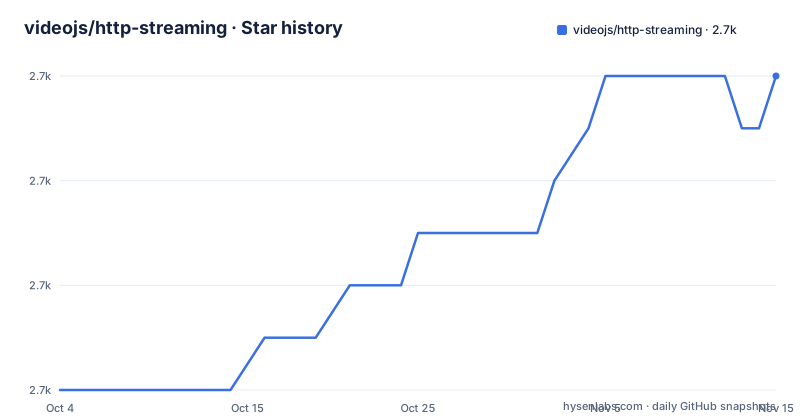
Star history
- videojs/http-streaming2,668 ★ · +6
| Repository | 2026-10-04 | 2026-11-15 |
|---|---|---|
| videojs/http-streaming | 2.7k | 2.7k |
6 Stars in the last 42 days, measured from the daily GitHub snapshot. Compare with other projects
Editorial analysis
Separate install is the exception, and the registry name carries a scope
The install section opens by telling you not to install. It states that in most cases it is not necessary to separately install http-streaming, because it has been included in the default build of Video.js since version 7, and the badge line up top states the same thing. The narrow case it does cover is a specific combination of video.js and http-streaming versions, and the instruction for that case is to use the "core" version of Video.js without the bundled version of http-streaming.
The npm subsection then disagrees with itself about the name. The prose names the package `videojs-http-streaming`, unscoped, while the command beneath it installs a scoped name:
npm install --save @videojs/http-streamingThe manifest sides with the command. Its name field is `@videojs/http-streaming`, and the same scoped string is what appears in the CDN directory listing at `https://unpkg.com/@videojs/http-streaming/dist/`, where the unscoped form is only a path fragment. Someone who trusts the prose and types `videojs-http-streaming` is not installing this package. The repository name itself carries the same mismatch: the project directory is `http-streaming`, with no vendor prefix at all.
Getting Started poses a question about the video-js element and never answers it
The one integration example in the repository is a plain script-tag page:
<video-js id=vid1 width=600 height=300 class="vjs-default-skin" controls>
  <source
     src="https://example.com/index.m3u8"
     type="application/x-mpegURL">
</video-js>
<!-- "core" version of Video.js -->
<script src="video.core.min.js"></script>
<script src="videojs-http-streaming.min.js"></script>
<script>
var player = videojs('vid1');
player.play();
</script>
The filename in that second tag matches neither entry point named in the manifest. `main` is `dist/videojs-http-streaming.cjs.js` and `module` is `dist/videojs-http-streaming.es.js`, and the sample loads the library with an ordinary script tag and no module type, so the mapping between the file the page requests and the field a bundler reads is not spelled out anywhere.
Immediately after the sample the page asks the reader a question and stops: `Is it recommended to use the <video-js> element or load a source with player.src(sourceObject) in order to prevent the video element from playing the source natively where HLS is supported.` Both routes are named and the reason for caring is given, but no answer follows. A neighbouring sentence has its own slip, reading `Only if need a specific combination of versions of Video.js and VHS`, which is missing a word. For anyone whose element will play the source natively before the library takes over, that unanswered question is the one that matters.
overrideNative, not native HLS support, decides the playback path
Native HLS support is not what decides the path taken here. An explicit option does. Three browsers are listed as having Media Source Extensions support: Chrome, Firefox, and Internet Explorer 11 on Windows 10 or 8.1. A separate list then names Chrome Android, Firefox Android and Edge and explains that although these have some level of native HLS support, by default the `overrideNative` option is set to `true` except on Safari, so MSE playback is used. The library takes native playback away from browsers that could have handled it themselves.
The native-only list is Mac Safari and iOS Safari, followed by a sentence saying that Mac and iPad Safari do have MSE support, but native HLS is recommended. Heading and sentence name different platforms: the list says iOS, the sentence says iPad.
The baseline sits above all of it. The Media Source Extensions API is required for http-streaming to play HLS or MPEG-DASH, and the page links to the caniuse entry for it rather than repeating support tables. Where MSE is absent there is no path in this library, which is the single most important thing to know before choosing it, and it is stated once, near the top, without a fallback discussion. Note also that `experimentalUseMMS` carries an experimental prefix while `useDtsForTimestampOffset`, `cacheEncryptionKeys` and `handlePartialData` do not, so the naming gives one protocol option a warning and leaves three behavioural ones unmarked.
Twenty options and nine runtime properties, all named before the prose stops
The option surface is two halves. The write side runs from `withCredentials`, `useCueTags` and `parse708captions` through `overrideNative`, `experimentalUseMMS`, `playlistExclusionDuration`, `maxPlaylistRetries`, `bandwidth`, `useBandwidthFromLocalStorage`, `enableLowInitialPlaylist`, `limitRenditionByPlayerDimensions`, `useDevicePixelRatio`, `usePlayerObjectFit`, `customPixelRatio`, `allowSeeksWithinUnsafeLiveWindow`, `customTagParsers`, `customTagMappers`, `cacheEncryptionKeys`, `handlePartialData`, `liveRangeSafeTimeDelta`, `useNetworkInformationApi`, `useDtsForTimestampOffset`, `useForcedSubtitles` and `captionServices`.
The read side is nine runtime properties: `vhs.playlists.main`, `vhs.playlists.media`, `vhs.systemBandwidth`, `vhs.bandwidth`, `vhs.throughput`, `vhs.selectPlaylist`, `vhs.representations`, `vhs.xhr` and `vhs.stats`. Adaptive decisions can be inspected at runtime through that list rather than inferred, which is what turns the bandwidth options into something measurable instead of a guess.
The repository defines none of them. Every name appears in the table of contents and the navigation tree, while the explanatory text for all of them falls past the end of the page, whose DRM paragraph breaks off partway through a link to the videojs-contrib-eme README. Only two events are named outside the options list, `loadedmetadata` and `xhr-hooks-ready`, alongside two usage-event categories called Presence Stats and Use Stats. DRM itself is delegated rather than implemented: it is supported through videojs-contrib-eme, which has to be included, initialized, and given options on either the plugin or the source.
The publish step runs its own verification with the ES check switched off
The package ships two entry points and gates its own release with one of them excluded. `main` points at a CommonJS bundle and `module` at an ES module bundle, both under `dist/`. Three manifest lines describe how that directory is produced:
"build": "npm-run-all -s clean -p build:*",
"build:js": "rollup -c scripts/rollup.config.js",
"clean": "shx rm -rf ./dist ./test/dist && shx mkdir -p ./dist ./test/dist",
The build runs the clean step serially, then every `build:` task in parallel, and the single JavaScript task is a rollup run against a config under `scripts/`. The asymmetry appears at publish time:
"prepublishOnly": "npm-run-all build-prod && vjsverify --verbose --skip-es-check",`--skip-es-check` is passed to the verification tool that runs immediately before the package is published, and that same package declares an ES module entry for consumers to resolve. The file format modern bundlers prefer is the one the publish gate is configured not to check. Nothing else in the visible manifest re-enables it.
The two bundle variants are selected by environment variable rather than by separate scripts, so one flag always decides what lands in `dist/`:
"build-prod": "cross-env-shell NO_TEST_BUNDLE=1 'npm run build'",
"build-test": "cross-env-shell TEST_BUNDLE_ONLY=1 'npm run build'",
Coverage prints for one CI value only, out of a folder the build deletes
The test chain is lint, then a test-only build, then karma once:
"test": "npm-run-all lint build-test && karma start scripts/karma.conf.js",
"posttest": "[ \"$CI_TEST_TYPE\" != 'coverage' ] || shx cat test/dist/coverage/text.txt",
The `posttest` guard compares `$CI_TEST_TYPE` against the literal string `coverage` and prints the text report only when they match. A contributor running `npm test` locally sees no coverage output, with no error and no hint, because the comparison succeeds and the `cat` is skipped by design. The lint stage in the same chain is a single `vjsstandard` invocation.
The path being read sits under a directory that `clean` removes at the start of every build, as shown above, so the coverage report survives only until the next build touches that tree. Anything rebuilding between the karma run and the `posttest` hook discards the file the hook exists to print. That coupling is invisible in the script names.
For an edit loop the same manifest configures a second mode: `server` starts karma with `--singleRun=false --auto-watch`, and `watch:js` re-runs the rollup build with `-w`. The watch pair therefore rebuilds `dist/` on save while the coverage text that `posttest` reads sits in the other directory, `test/dist/`, which is also wiped.
Three named assets that fail, and a LICENSE the metadata does not describe
The most useful material on the page names assets rather than browsers. Three failures are written down with workarounds attached: Fragmented MP4 Support, Assets with an Audio-Only Rate Get Stuck in Audio-Only, and DASH Assets with `$Time` Interpolation and `SegmentTimeline`s with No `t`. Each is a specific combination of manifest features paired with a described symptom, which is the level at which an integrator can act before shipping rather than after.
Alongside them sits a Hosting Considerations heading, which is an admission of scope. A client-side playback library does not control how an origin serves manifests, segments, byte ranges or cross-origin headers, so that heading marks where the project's answers stop and the server team's begin. The Troubleshooting heading points at a separate guide at `/docs/troubleshooting.md`, and Contributing points at `CONTRIBUTING.md`, so both live outside the main page.
The licensing is the least settled part. The repository metadata carries no recognised license value at all, while a LICENSE file sits at the repository root next to CONTRIBUTING.md and CHANGELOG.md, and the visible portion of the manifest text shows no license field. Both facts can be stated; which license applies cannot be settled from what is here. Anyone shipping this inside a commercial product needs to read the file rather than the metadata, and the page itself is silent on terms.
Editorial conclusion
Use this if you need adaptive HLS or DASH in a video.js player and accept the defaults, since overrideNative already handles the browser split and most of the twenty options only need attention when a specific asset misbehaves. Before shipping, resolve two things the repository leaves open: the license, because the packaged metadata carries no recognised value while a LICENSE file sits at the repository root, and the version floor, because the compatibility line claims video.js 7.x and 8.x only. Read the three known issues first, and confirm your origin serves manifests and segments in a way that satisfies the hosting requirements rather than discovering it during playback.
Frequently asked questions
Do I need to install video.js http-streaming separately?
In most cases no, because it has been included in the default build of Video.js since version 7. Only install it when you need a specific combination of video.js and http-streaming versions, and in that case use the core version of Video.js without the bundled http-streaming.
Which browsers can video.js http-streaming play HLS in?
The Media Source Extensions API is required for it to play HLS or MPEG-DASH. Browsers listed with MSE support are Chrome, Firefox, and Internet Explorer 11 on Windows 10 or 8.1. Mac Safari and iOS Safari are on the native only list.
What does the overrideNative option in video.js http-streaming control?
Chrome Android, Firefox Android and Edge have some level of native HLS support, but by default the overrideNative option is set to true except on Safari, so MSE playback is used on those browsers instead of their native path.
How is DRM handled in video.js http-streaming?
DRM is supported through videojs-contrib-eme rather than built in. To use it you include the videojs-contrib-eme plugin, initialize it, and add options to either the plugin or the source.
Official sources
Add this badge to your README
If you maintain this project, the badge below links readers to this analysis and shows its maintenance status from the daily GitHub snapshot. Paste the markdown into your README; add ?metric=license or ?metric=stars to the image URL for a different field.

[](https://hysenlabs.com/projects/videojs-http-streaming)Star history chart for your README
[](https://hysenlabs.com/projects/videojs-http-streaming)Was this useful?