dbohdan/classless-css: A Curated Index of Classless CSS Themes
A list of classless CSS themes/frameworks with screenshots
At a glance
- What is it?
- The repository is a generated list of classless CSS themes and frameworks, with screenshots and links for each entry. It is a directory, not a style sheet, and its value depends on how well the index is maintained.
- Who is it for?
- Use this repository when you want to compare classless CSS options before picking one for a prototype or a plain-HTML page, and use it as a starting point rather than as documentation. Do not use it if you need a style sheet itself, since the repository contains no CSS to link to.
- Can I use it commercially?
- The repository metadata does not identify a licence. Check the project’s published terms and any component-specific licences before reuse.
- Is it still maintained?
- Yes. The repository last received commits 39 days ago.
- What is it written in?
- Mainly HTML, according to GitHub's language statistics.
Answers come from the project's GitHub data, last synced on November 24, 2026, and from our analysis. They are not legal advice.
Star history
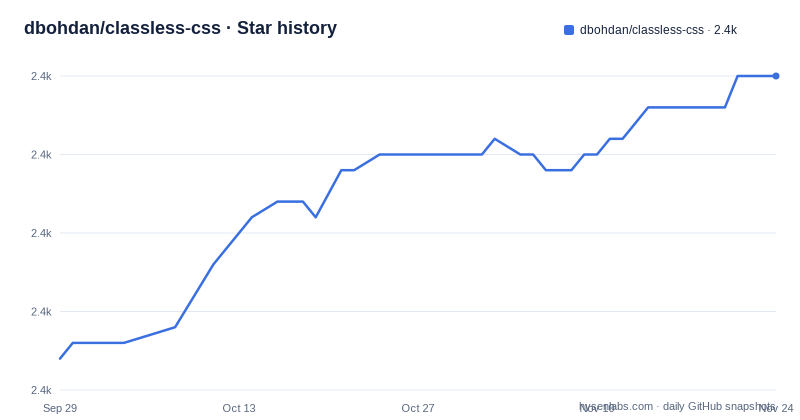
- dbohdan/classless-css2,395 ★ · +18
| Repository | 2026-09-29 | 2026-11-24 |
|---|---|---|
| dbohdan/classless-css | 2.4k | 2.4k |
18 Stars in the last 56 days, measured from the daily GitHub snapshot. Compare with other projects
Editorial analysis
What dbohdan/classless-css Actually Is
The name suggests a style sheet. The repository is a list. Its README opens by describing itself as "a list of classless CSS themes and frameworks," and the topics attached to the repository are classless, classless-css, classless-theme, css and list. The README explains the term it is built around: a classless style sheet does not define special classes you must add to your HTML elements, so you can style any plain-HTML page just by linking to the style sheet. The README gives prototyping as the example use case.
The audience follows from that. If you have hand-written HTML with no classes and no build step, a classless style sheet gives it typography, spacing and form styling with one link tag. Picking between the dozens of options is the problem this repository addresses. It collects them in one place, sorted into a Classless group and a Class-light group, and shows a screenshot of each so you can judge the visual result before clicking through. The README also carries a See also section with a Components subsection, which points at related material outside the two main groups.
What the repository is not: it is not a theme, it does not ship a CSS file, and it is not a comparison with feature tables. It is an index with links and images.
How the Index Is Generated from data/projects.toml
The README is a build artifact. The top level of the repository holds README.md, README.md.njk, a data directory, gen-screenshot.ts, render-template.ts, screenshot-page.html, and the screenshot and thumbnail directories. The Makefile states the relationship directly: the default target builds README.md from README.md.njk, render-template.ts and data/projects.toml.
The data flow is short. Project entries live in data/projects.toml. render-template.ts reads the Nunjucks template README.md.njk together with that TOML file and writes the rendered markdown to standard output, which the Makefile redirects into README.md. Screenshots are a separate step handled by gen-screenshot.ts and screenshot-page.html, which produce the full-size images in screenshot/ and the smaller ones in thumbnail/. The README embeds thumbnails as links to the full screenshots, so each entry shows a small preview that opens larger.
This structure is the repository's real design decision, and it has a consequence worth naming. Because entries are data, adding a theme means editing data/projects.toml and regenerating, not hand-editing markdown. Because the README is generated, any manual edit to README.md is overwritten the next time the Makefile runs. Contributors who do not notice the Makefile will have their changes discarded.
Installing Nothing: Using the List and Building the README
There is no package to install and no style sheet to link. The repository is consumed by reading it. If you want to build the README yourself, the Makefile gives the command. Running make from the repository root invokes the default target, which regenerates README.md:
makeThe Makefile declares all as a phony target and makes it depend on README.md, so this is the same output the maintainer commits. The recipe runs render-template.ts with the template and data file as arguments and redirects the result into README.md. The README does not document the runtime needed to execute render-template.ts or gen-screenshot.ts, so check those files before assuming a plain shell will run them.
A first real use looks like this. Open the README, scan the Classless section, and pick a theme whose screenshot matches the look you want. Each entry links to a repository, a website or a demo. For example, the entry for awsm.css links to a website at igoradamenko.com/awsm.css/v2/ and a demo page, while Pico.css, water.css, Simple.css and MVP.css appear as entries in the list. Follow the demo link to see the theme applied to real HTML elements, then follow the repository link to get the style sheet. The list gives you the comparison; the linked project gives you the file.
Where the Index Falls Short
The most obvious limitation is that the list records links, not liveness. Nothing in the repository layout suggests the build checks whether a demo URL still resolves or whether a linked repository still exists. A theme can be abandoned or moved while its entry stays in the README with a working-looking screenshot. The screenshots themselves are committed images, so they show the theme as it looked when the screenshot was generated, not as it looks now.
The second limitation is coverage depth. Each entry is a name, one or more links, and images. There is no table of file size, browser support, CSS custom property names, or whether the theme handles dark mode. attriCSS, for instance, has five screenshots in the README, each named for a colour variant such as brightlight-green and midnight-green, which tells you variants exist but not how to select one. You have to visit the project to learn that. For a reader who wants to compare themes on measurable criteria, this index only narrows the field.
The third limitation is the boundary between the two groups. The README defines classless as style sheets with no required classes, and it labels a second group Class-light without stating a rule for what qualifies. Chota, Milligram, mini.css, Picnic CSS and matcha.css sit in that group, but the README does not explain what class usage puts them there. If that distinction matters to your decision, the list will not settle it.
Finally, this is the wrong tool if you need a style sheet now. The repository contains no CSS to link to. It is also the wrong tool if you want a framework with components, since a classless style sheet by definition styles plain elements rather than offering a component API.
Classless CSS Versus a Utility or Component Framework
The real alternative is not another list. It is a framework that expects classes in your markup, and the difference is structural rather than cosmetic. With a classless style sheet, the selector side of the contract is fixed by the element: the style sheet decides how h1, table, input and blockquote look, and your HTML stays plain. With a utility framework, you write the styling into the markup through class names, and the framework supplies small single-purpose rules. With a component framework, you adopt named components and their expected markup structure.
The trade-off runs in both directions. A classless style sheet gives you a styled page with one link tag and no markup changes, which is why the README points at prototyping. It also means you have less control: you cannot restyle one heading differently from the others without adding a class, which steps outside the classless premise. A utility or component framework gives you that control at the cost of markup that is tied to the framework and harder to read as plain HTML.
Within the list itself, the Class-light group is the middle ground. Barrel.css, Chota, matcha.css, Milligram, mini.css, mono, Picnic CSS, SASS-ZERO (Breadboard) and Wing are grouped there, meaning they style plain elements but also expose classes for cases the elements alone cannot express. If you expect to need one or two exceptions, that group is where to look first.
Maintenance, Licence and Upgrade Cost
The repository is not archived, and its last push was on 2026-04-03. The project has no releases, so there is no versioned artifact to track and no changelog to read. Upgrades are therefore a matter of pulling the repository and rebuilding the README with make if you want the current list. Since the output is a markdown file and a set of images, there is no runtime dependency to keep patched and no API that can break under you.
The cost that does exist is on the contribution side. Adding or correcting an entry means editing data/projects.toml and regenerating README.md, and screenshots come from gen-screenshot.ts and screenshot-page.html. A contributor who edits README.md directly will see the change erased by the next build. That is the whole upgrade surface, and it is small.
The licence is the open question. The repository metadata does not state a licence, and the README contains a License section in its table of contents, but the contents of that section are not visible in what I could review. The README does show that each listed theme is a separate project with its own repository and its own licence, so the licence that matters for the CSS you actually link is the one in that theme's repository, not this one. Check the License section of the README and the licence of the theme you pick before shipping anything. Nothing here is legal advice.
Editorial conclusion
Use this repository when you want to compare classless CSS options before picking one for a prototype or a plain-HTML page, and use it as a starting point rather than as documentation. Do not use it if you need a style sheet itself, since the repository contains no CSS to link to. Verify first that the theme you pick still has a working demo and repository link, because the index records links and screenshots rather than testing each theme.
Frequently asked questions
What is classless CSS, and how does dbohdan/classless-css define it?
The README defines classless as a style sheet that does not define special classes you must add to your HTML elements to style them. As a result, you can style any plain-HTML page just by linking to the style sheet, which the README gives as useful for prototyping.
Is dbohdan/classless-css a style sheet I can link to?
No. It is a list of classless CSS themes and frameworks. Each entry links to the theme's own repository, website or demo, and the style sheet itself comes from that linked project.
How do I add a theme to the dbohdan/classless-css list?
The README is generated. The Makefile builds README.md from README.md.njk, render-template.ts and data/projects.toml, so entries belong in data/projects.toml and the README is regenerated with make rather than edited by hand.
What is the difference between the Classless and Class-light groups in dbohdan/classless-css?
The README describes the first group as style sheets that do not require classes in your HTML. It labels the second group Class-light but does not state the rule that puts a project there, so the distinction has to be checked against each project.
What licence does dbohdan/classless-css use?
The repository metadata does not state a licence, and the contents of the README's License section are not visible in what I could review. Each listed theme is a separate project with its own licence.
Official sources
Add this badge to your README
If you maintain this project, the badge below links readers to this analysis and shows its maintenance status from the daily GitHub snapshot. Paste the markdown into your README; add ?metric=license or ?metric=stars to the image URL for a different field.

[](https://hysenlabs.com/projects/dbohdan-classless-css)Star history chart for your README
[](https://hysenlabs.com/projects/dbohdan-classless-css)Was this useful?