The Bounded Context Canvas: a structured template for documenting DDD bounded contexts
A structured approach to designing and documenting each of your bounded contexts
At a glance
- What is it?
- The Bounded Context Canvas is a CC-BY-SA-4.0 collaborative template for designing and documenting a single bounded context in Domain-Driven Design. Nine sections guide a team from naming through strategic classification, messages, dependencies, and assumptions, with no software to install.
- Who is it for?
- The Bounded Context Canvas suits teams practicing Domain-Driven Design who want a shared document that captures what a context does, how it classifies strategically, how it communicates, and what assumptions underlie its design. Skip it if your team has not yet established working knowledge of bounded contexts and context mapping; the canvas references those concepts without explaining them.
- Can I use it commercially?
- Yes, with credit. CC-BY-SA-4.0 allows commercial use as long as you credit the authors and indicate what you changed. It is written for creative content, so check how it applies to any code.
- Is it still maintained?
- Yes. The repository last received commits 6 days ago.
- What is it written in?
- Mainly HTML, according to GitHub's language statistics.
Answers come from the project's GitHub data, last synced on October 24, 2026, and from our analysis. They are not legal advice.
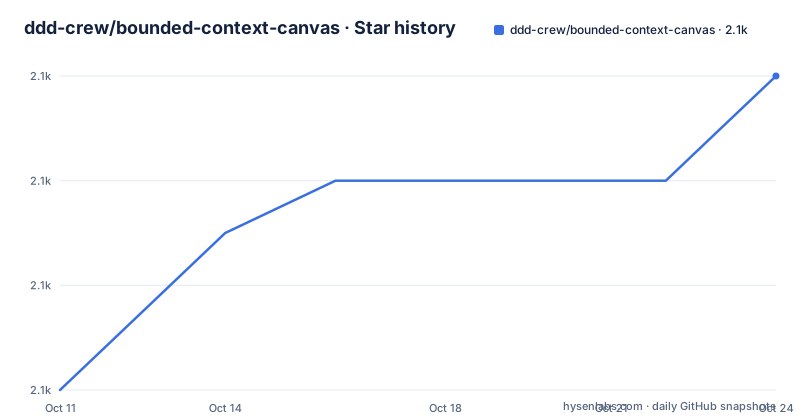
Star history
- ddd-crew/bounded-context-canvas2,072 ★ · +6
| Repository | 2026-10-11 | 2026-10-24 |
|---|---|---|
| ddd-crew/bounded-context-canvas | 2.1k | 2.1k |
6 Stars in the last 13 days, measured from the daily GitHub snapshot. Compare with other projects
Editorial analysis
A template for documenting what a bounded context does, not for discovering where it begins
The Bounded Context Canvas is a structured template for designing and documenting a single bounded context. Produced by the ddd-crew, it ships as a JPG image, a downloadable blank version, and a README that explains each of its 9 sections. Nothing installs. Nothing runs.
A team uses it as a conversation guide, filling sections together to reach shared decisions about a context's name, responsibilities, communication patterns, and relationship to the rest of the system. Sections left blank are a signal of missing knowledge rather than a template failure; the README explicitly says that filling certain sections may require other modelling techniques when the team does not yet have the information needed.
Readers unfamiliar with DDD get a pointer to Eric Evans' DDD Reference and Martin Fowler's article on the topic, but not an explanation inline. That scope decision is consistent throughout: the canvas assumes the team already knows what a bounded context is and needs help structuring what they know about a specific one. The last push to the repository was on August 23, 2026, and the repository is not archived. There are no GitHub releases; the canvas is published directly through the repository files.
Nine sections move from name and purpose through business decisions and assumptions
Filling the canvas starts with Name and Purpose. Writing the name down forces a naming decision that frames every subsequent design choice. Purpose is 2 to 3 sentences in business language describing why the context exists and what value it provides, with no technical details. From there, Strategic Classification identifies the context's importance, business role, and evolutionary stage.
Domain Roles captures how the context behaves. Two communication sections follow: Inbound Communication covers what other systems send to this context, and Outbound Communication covers what this context sends elsewhere. Ubiquitous Language records the key domain terms and their meanings within this specific context. Business Decisions records the rules and policies the context enforces. Assumptions is the 9th section.
The README recommends completing them in that order for a quick start, but says you can fill them in any order after setting name and purpose. Two orderings are explicitly named: outside-in, which starts with inbound communication when the context is defined by what others request of it, and inside-out, which starts with business rules and domain language when the core logic is already known.
Strategic Classification asks three separate questions with a total of 10 predefined answers
Strategic Classification is the section that places the bounded context in the organization's strategy. It has 3 axes, each with a fixed set of options.
The first axis asks how important the context is to organizational success. Three options: core domain (a key strategic initiative), supporting domain (necessary but not a differentiator), and generic (a common capability found in many domains).
Axis 2 asks what role the context plays in the business model. Revenue generator is for services people pay for directly, making it the clearest classification to assign when a payment flow is present in the context. Engagement creator applies when users value the capability but no direct charge occurs. Compliance enforcer covers the case where the context protects the business's reputation and continued legal existence.
Axis 3 asks how evolved the concept is, using the 4 Wardley Maps evolution stages: genesis (new unexplored domain), custom built (companies building their own versions), product (off-the-shelf versions with differentiation), and commodity (highly standardised versions). The README links to the Wardley Maps Evolution definitions on Twitter for the full descriptions of each stage, and to Core Domain Charts, a related ddd-crew repository, for further help filling this section.
Inbound communication: 3 message types, 4 collaborator types, and relationship context
Inbound Communication documents what other systems send to this bounded context and who those systems are. Three message types appear in the canvas. Commands are requests that the context perform a specific action, implying the sender expects state to change. Queries ask for information without triggering side effects. Events arrive as notifications that something significant has already happened elsewhere in the system, and the context decides what, if anything, to do in response.
Message is a technology-neutral term in the canvas. A command might be an HTTP POST from a form or an asynchronous message from a queue; the canvas does not prescribe the implementation. That neutrality means the same canvas applies to a synchronous REST API and an event-driven system.
Collaborators are the senders. They come in several forms: other bounded contexts, web frontends, mobile frontends, and other systems not classified as bounded contexts. When a context owns its own user interface, such as a micro-frontend, the collaborator type becomes direct user interaction.
Each collaborator relationship carries a relationship type that describes how the two teams' models influence each other. The canvas does not define these types itself; it links to the Context Mapping repository in the ddd-crew collection for the definitions. Collaborators can be arranged into horizontal swimlanes that show which messages each one sends, visualizing the sequence of interactions within the inbound section.
Domain Roles and Ubiquitous Language anchor the internal design decisions
Domain Roles asks how the context behaves. An analysis context receives high volumes of data and produces insights; an execution context enforces a workflow. Identifying which archetype fits helps avoid mixing responsibilities that would create coupling between contexts with different scaling and consistency needs.
The README points to Alberto Brandolini's Bounded Context Archetypes and Rebecca Wirfs-Brock's Object Role Stereotypes for deeper reading on this topic. A Model Traits worksheet in the resources directory holds community-generated examples under the older name model traits, now renamed to domain roles.
Ubiquitous Language collects the key domain terms specific to this context and what those terms mean here. Shared language prevents terminology drift, where two teams use the same word to mean different things across context boundaries. Both Ubiquitous Language and Business Decisions are brief prompts in the canvas rather than structured forms, which means the team decides how much depth to record and in what format.
When the canvas cannot tell you where to draw the boundary
The canvas documents a bounded context whose boundary is already decided. A team that has not yet determined where the context boundary lies cannot accurately fill the Name and Strategic Classification sections, because both require a prior decision about what the context includes and excludes.
Event Storming is the commonly recommended technique for that discovery step. Its direction is opposite to the canvas: starting from domain events, it identifies which events belong together and where context boundaries naturally fall. A team would typically run Event Storming first to find the contexts, then use the canvas to document each one's design.
The canvas also points to gaps in the team's knowledge rather than filling them. When a section stays blank, the README says to use other modelling techniques to find the missing information, but does not prescribe which. For a team new to DDD, reading Eric Evans' DDD Reference and working through the Context Mapping repository's material is a prerequisite for using the canvas accurately.
CC-BY-SA-4.0, alternative format options, and what ships with the repository
The canvas is licensed CC-BY-SA-4.0. Attribution is required, and any modified version carries the same licence. That affects teams that adapt the template for internal use and then share it; the share-alike requirement applies to derivatives, not solely to public distribution.
The default v5 canvas is not the only format. One named alternative is Use Case Swimlanes, a style that organizes the communication section to show the sequence of interactions: message in, decision made, message out. The README notes this as one alternative format and points to a blog post by Nick Tune for the full description. The README also invites experimentation with novel formats.
The repository root holds a resources directory with the canvas images, the Model Traits worksheet, and the collaborator type diagrams. A tools directory and a translations directory are also present. Translations indicates that community contributors have adapted the canvas into other languages. No software build steps appear anywhere in the repository, and the HTML listed as the primary language refers to the README format rather than any application.
Editorial conclusion
The Bounded Context Canvas suits teams practicing Domain-Driven Design who want a shared document that captures what a context does, how it classifies strategically, how it communicates, and what assumptions underlie its design. Skip it if your team has not yet established working knowledge of bounded contexts and context mapping; the canvas references those concepts without explaining them. CC-BY-SA-4.0 requires attribution and the same licence on derivatives. Download the blank canvas from resources/bounded-context-canvas-5v-blank.jpg before filling it out.
Frequently asked questions
What is the Bounded Context Canvas?
The Bounded Context Canvas is a CC-BY-SA-4.0 collaborative template from the ddd-crew for designing and documenting a single bounded context. Its 9 sections cover name, purpose, strategic classification, domain roles, inbound and outbound communication, ubiquitous language, business decisions, and assumptions.
How do I get the Bounded Context Canvas template?
Download the blank canvas from resources/bounded-context-canvas-5v-blank.jpg in the repository. A filled example is also in the resources directory. There are no GitHub releases; the template is published directly through the repository files.
What licence does the Bounded Context Canvas use?
CC-BY-SA-4.0, which requires attribution and the same licence on any derivative. The licence file is LICENCE.md at the repository root.
What are the 3 strategic importance options in the Bounded Context Canvas?
Core domain (a key strategic initiative), supporting domain (necessary but not a differentiator), and generic (a common capability found in many domains).
What is the difference between the Bounded Context Canvas and Event Storming?
Event Storming discovers context boundaries by starting from domain events and identifying which events belong together, while the Bounded Context Canvas documents a context whose boundary is already decided. The two techniques are complementary.
Official sources
Add this badge to your README
If you maintain this project, the badge below links readers to this analysis and shows its maintenance status from the daily GitHub snapshot. Paste the markdown into your README; add ?metric=license or ?metric=stars to the image URL for a different field.

[](https://hysenlabs.com/projects/ddd-crew-bounded-context-canvas)Star history chart for your README
[](https://hysenlabs.com/projects/ddd-crew-bounded-context-canvas)Was this useful?