SlideMenuControllerSwift: A Swift Slide-Out Menu Library Frozen in 2016
GitHub describes it as iOS Slide Menu View based on Google+, iQON, Feedly, Ameba iOS app. It is written in pure swift.. The repository metadata lists Swift as its primary language. The metadata lists the MIT license. This article stays within the project description and details documented in the GitHub repository README.
At a glance
- What is it?
- SlideMenuControllerSwift delivers a Google+ style slide-out menu for iOS in pure Swift, but its last release dates to 2016 and targets Swift 4.0. This review covers its mechanism, setup, and why its age matters for new projects.
- Who is it for?
- Adopt SlideMenuControllerSwift if you need a simple, MIT-licensed slide-out menu for a legacy Swift 4.0 or iOS 9.0 project and you can tolerate a library that has not been updated since 2016. Do not use it for new Swift 5.x or iOS 14+ apps, as the code may require manual fixes and lacks modern API support.
- Can I use it commercially?
- Yes. MIT is a permissive licence: you can use, modify and sell software built on it, as long as you keep its copyright and licence notices.
- Is it still maintained?
- Probably not. The repository last received commits 38 months ago, on September 7, 2023.
- What is it written in?
- Mainly Swift, according to GitHub's language statistics.
Answers come from the project's GitHub data, last synced on October 22, 2026, and from our analysis. They are not legal advice.
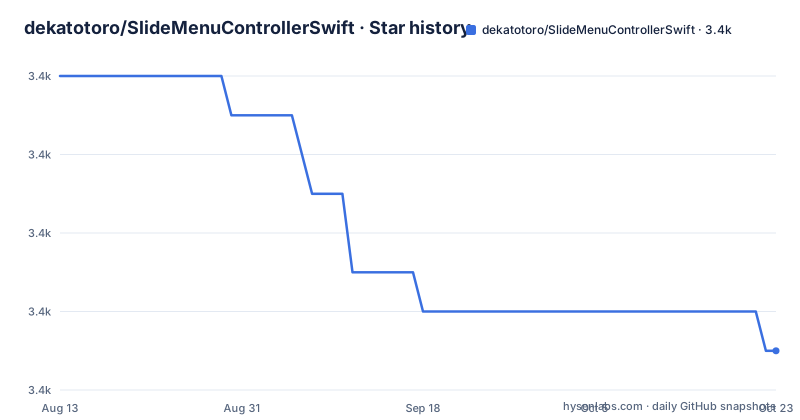
Star history
- dekatotoro/SlideMenuControllerSwift3,367 ★ · -7
| Repository | 2026-08-13 | 2026-10-22 |
|---|---|---|
| dekatotoro/SlideMenuControllerSwift | 3.4k | 3.4k |
-7 Stars in the last 70 days, measured from the daily GitHub snapshot. Compare with other projects
Editorial analysis
What This Library Solves and Who It Serves
SlideMenuControllerSwift addresses a common iOS pattern: a main content view with optional left and right menus that slide in and out, like the Google+ or Feedly apps. The problem it solves is the repetitive work of managing gesture recognizers, view hierarchy, and state transitions for a slide-out menu. It targets iOS developers who want a ready-made component in pure Swift, without Objective-C or third-party dependencies. The README positions it for apps that need a slide menu with minimal setup, and it includes a complete example, which suggests the author intended it as a drop-in solution. The library is not for developers who need a highly animated or custom menu, as its feature list is short and focused on basic open, close, and state callbacks.
The Core Mechanism: View Controller Composition and State Delegation
The library works by wrapping your main, left, and right view controllers in a single SlideMenuController instance. You set this as the root view controller in your app delegate, and the library handles the rest. The mechanism is straightforward: the SlideMenuController manages the layout of the main view and overlays the left or right menu views based on user actions. You trigger actions by calling methods like openLeft() or closeRight() on any view controller that has a reference to the slide menu controller. The library also exposes a delegate protocol with eight methods, such as leftWillOpen() and rightDidClose(), so you can monitor the menu state. The README shows that you can customize options like leftViewWidth and contentViewScale before initialization, which affects how the menu slides and scales. This design is simple but rigid: it assumes a fixed main view with two side menus, and it does not support nested menus or dynamic menu content without manual work.
Getting It Running: CocoaPods, Carthage, and Manual Setup
Installation follows standard iOS dependency managers. With CocoaPods, you add pod 'SlideMenuControllerSwift' to your Podfile and run pod install. For Carthage, the README instructs you to add github "dekatotoro/SlideMenuControllerSwift" to your Cartfile and run carthage update, but only if you target iOS 8 or later. If you prefer manual integration, you add the SlideMenuController.swift file directly to your project. After installation, you import the module and create the controller in your app delegate. The setup code is clear: you instantiate a SlideMenuController with mainViewController, leftMenuViewController, and rightMenuViewController, then assign it as the root. For storyboard users, you subclass SlideMenuController and override awakeFromNib to instantiate child view controllers by identifier. The README also shows how to add bar button images and how to call open and close methods from any view controller. The key config options, like SlideMenuOptions.leftViewWidth, are set before initialization, so you must plan your layout early.
A Real Limitation: Swift Version and iOS Compatibility
The most obvious limitation is the library's age. The last release, 2.2.0, came on 2016-05-31, and the README explicitly states it requires Swift 4.0 and iOS 9.0. If you are using a modern Swift version, such as Swift 5.x, the code may not compile without modifications. The README mentions that for Swift 1.1 through 3.2, you should use a different branch, but those branches are likely unmaintained. This means the library is effectively frozen in time. Another limitation is that the library only supports iOS 9.0 and later, which is fine for many apps, but if you need iOS 8 support, you must import the code directly, as the README notes. For Objective-C projects, you would need a separate port, SlideMenuControllerOC. The library also has no documented support for iPad multitasking or split view, which could be a problem for modern iPad apps. These constraints make it a risky choice for projects that need long-term maintenance.
The Wrong Tool: When SlideMenuControllerSwift Fails
This library is the wrong tool if you need a menu that adapts to dynamic content, such as a list that changes width or a menu that supports nested navigation. The options are limited to a few static properties like leftViewWidth and contentViewScale, and there is no mention of animations beyond the default slide. If your app requires a custom gesture or a menu that can be dragged with a pan gesture, you will have to extend the library yourself. The delegate methods only report state changes, not gesture progress, so you cannot build a parallax or interactive transition. Also, if you are building a SwiftUI app, this library is irrelevant, as it is UIKit-only. The README does not mention SwiftUI or any modern UI framework. In those cases, you are better off writing a custom menu or using a more current library. The lack of updates since 2016 also means it does not handle newer iOS versions' safe area or dark mode changes, which could cause layout issues.
A Real Alternative: A Modern Slide-Out Menu Approach
A direct alternative is to use a container view controller pattern with your own code, or a more recent library like SideMenu (by jonkykong, now maintained by eversiske). SideMenu offers a similar slide-out menu but with continuous updates, support for newer Swift versions, and a more extensive set of customization options, such as animation curves, status bar behavior, and gesture support. The key difference in approach is that SideMenu uses a more modular design where you present a menu view controller as a child, and it relies on modern UIKit APIs. In contrast, SlideMenuControllerSwift is a monolithic class that manages everything, making it harder to extend. If you need a quick solution for a legacy project, SlideMenuControllerSwift works, but for any new project, a maintained alternative is safer. Another option is to use a UISplitViewController for iPad, which provides a built-in sidebar, but that is not equivalent to a slide-out menu on iPhone.
Maintenance and Upgrade Cost: What You Are Signing Up For
The maintenance cost is high because the library is not evolving. The repository has no recent commits after 2016, and the only release notes mention bug fixes in 2.1.1 for open/close menu bugs. There is no indication of future development. If you adopt this library, you must be prepared to fork it and fix issues yourself. The code is a single Swift file, which makes manual patching feasible, but you will need to understand the internal state management. The license is MIT, which allows you to modify and redistribute, so that is a positive. However, you must check the LICENSE file for exact terms, as the README only states the license. The upgrade path is non-existent: there are no newer versions to upgrade to, so you are stuck on 2.2.0. For a production app, this means you need to budget time for compatibility testing with each new iOS release. The storyboard support requires you to subclass and override awakeFromNib, which can be fragile if your storyboard structure changes. In short, the initial setup is easy, but the long-term cost is on you.
Editorial conclusion
Adopt SlideMenuControllerSwift if you need a simple, MIT-licensed slide-out menu for a legacy Swift 4.0 or iOS 9.0 project and you can tolerate a library that has not been updated since 2016. Do not use it for new Swift 5.x or iOS 14+ apps, as the code may require manual fixes and lacks modern API support. Before adopting, verify the code compiles with your Swift version, check the open issues for known bugs, and confirm the storyboard integration matches your setup. The library's last release, 2.2.0, is the only version you should consider, and you must be prepared to fork or maintain it yourself.
Frequently asked questions
How do I install SlideMenuControllerSwift?
Three ways. With CocoaPods, add `pod 'SlideMenuControllerSwift'`. With Carthage, add `github "dekatotoro/SlideMenuControllerSwift"` to your Cartfile and run `carthage update`, which the page says is supported for iOS 8 or later. Or install manually by adding the `SlideMenuController.swift` file to your project, which is the shortest option and implies the whole component is one file.
What are the requirements for SlideMenuControllerSwift?
Swift 4.0, iOS 9.0 and ARC. Developers on Swift 1.1 through 3.2 are told to use the branch for those versions, iOS 8.0 requires importing the code directly rather than through a package manager, and Objective-C with iOS 6.0 is handled by a separate repository, SlideMenuControllerOC.
How do I open and close the menu in SlideMenuControllerSwift?
Get the controller from any view controller with an optional chaining call, then call `openLeft()` or `openRight()` to open and `closeLeft()` or `closeRight()` to close. You can also add bar button items to either side with the helpers that take an image, and register a delegate to receive eight will and did callbacks covering opening and closing of both sides.
How do I use SlideMenuControllerSwift with a storyboard?
Subclass `SlideMenuController` and place a view controller in the storyboard, then override `awakeFromNib()`, instantiate the view controllers from the storyboard by identifier, assign them to `mainViewController` and `leftMenuViewController`, and call `super.awakeFromNib()`. Any custom options have to be set before the initializer runs, since they are global statics.
Is SlideMenuControllerSwift still being worked on?
The dates are on the record rather than a claim. The repository was last pushed on 2023-09-07, and the newest release tag is 2.2.0 from 2016-05-31, preceded by 2.1.1 from 2016-04-10 whose title reads as a fix for left and right menu open and close bugs. There is no version information in the source tree itself and no homepage field on the repository, so the commit is the only identifier to work from.
Official sources
Add this badge to your README
If you maintain this project, the badge below links readers to this analysis and shows its maintenance status from the daily GitHub snapshot. Paste the markdown into your README; add ?metric=license or ?metric=stars to the image URL for a different field.

[](https://hysenlabs.com/projects/dekatotoro-slidemenucontrollerswift)Star history chart for your README
[](https://hysenlabs.com/projects/dekatotoro-slidemenucontrollerswift)